Įvadas
This manual provides essential information for setting up, operating, maintaining, and troubleshooting your NIMO 17.3 Gaming Laptop. Designed for high performance with an AMD Ryzen 9 8945HS processor and Radeon 780M graphics, this laptop offers a powerful computing experience for gaming, creative work, and everyday tasks. Please read this manual thoroughly to ensure optimal use and longevity of your device.
1. Pradinė sąranka
1.1 Išpakavimas ir pirmasis įjungimas
Carefully remove your NIMO laptop and all accessories from the packaging. Place the laptop on a stable, flat surface. Before first use, it is recommended to fully charge the battery.

The NIMO 17.3 Gaming Laptop, ready for initial setup.
1.2 Akumuliatoriaus įkrovimas
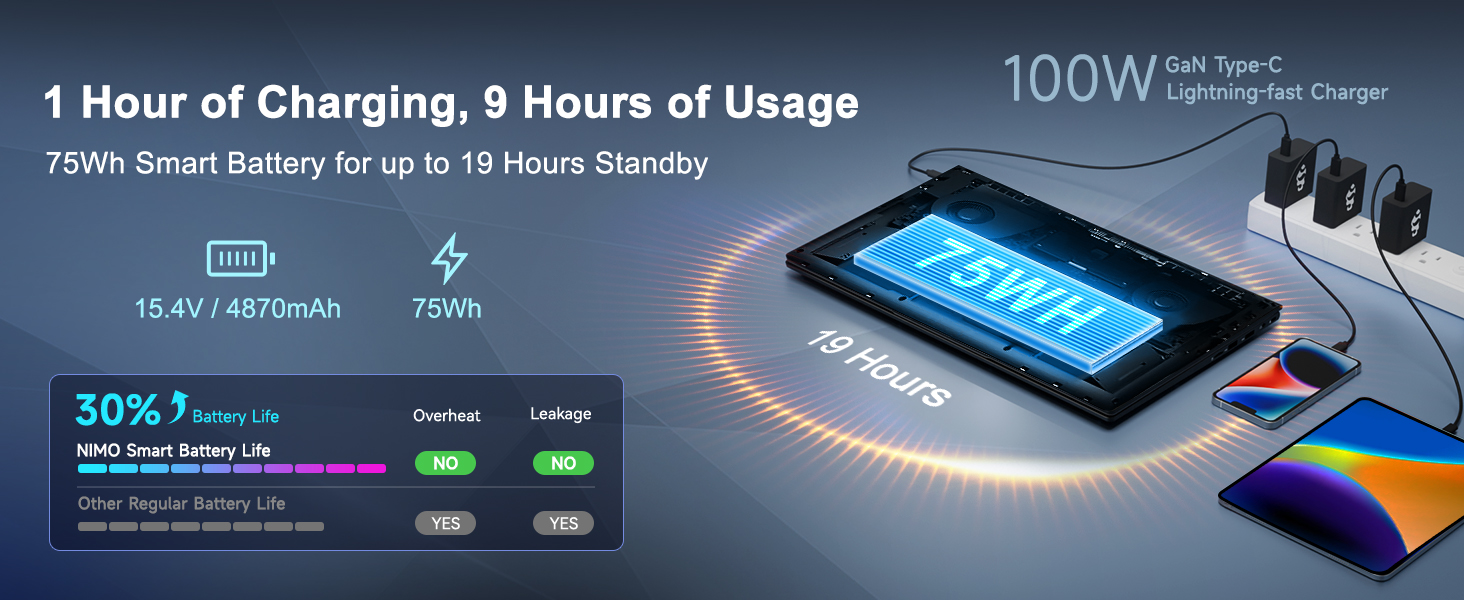
Connect the provided 100W PD Type-C fast charger to the USB-C port on your laptop and then to a power outlet. The charging indicator light will illuminate. Allow the laptop to charge fully before its first use for optimal battery calibration.

The 100W GaN Type-C charger connected to the laptop, illustrating fast charging capability.
1.3 Operacinės sistemos konfigūracija
Upon first power-on, you will be guided through the Windows 11 setup process. Follow the on-screen instructions to configure language, region, network settings, and user accounts.
1.4 Pirštų atspaudų skaitytuvo sąranka
For enhanced security and quick login, set up the integrated fingerprint reader during the Windows 11 setup or later via Windows Settings > Accounts > Sign-in options. Follow the prompts to register your fingerprints.

Close-up of the backlit keyboard and integrated fingerprint reader for secure access.
1.5 Išorinių įrenginių prijungimas
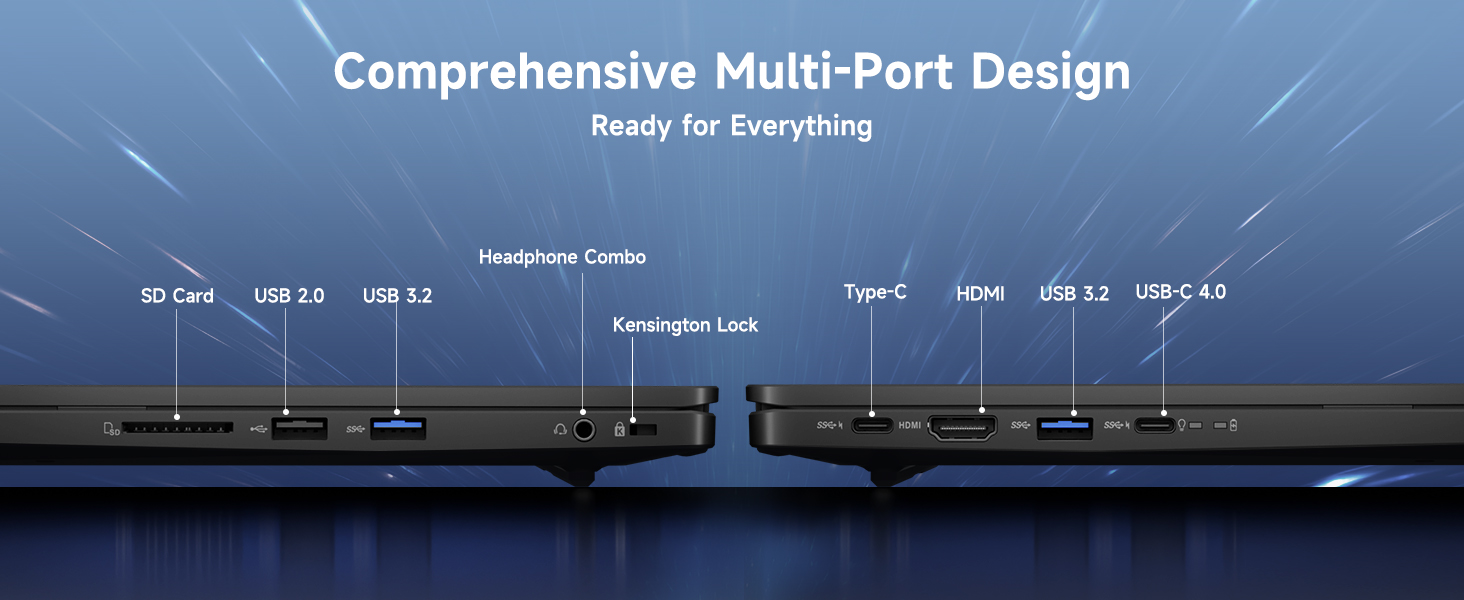
Your NIMO laptop features a comprehensive multi-port design for various peripherals:
- USB-C 4.0: For ultra-fast data transfer, external displays, and eGPU support.
- USB 3.2: High-speed data transfer for compatible devices.
- USB 2.0: Standartiniams USB įrenginiams.
- HDMI: Prijunkite prie išorinių monitorių arba televizorių.
- SD kortelės lizdas: Dėl atminties kortelių.
- Ausinių jungties lizdas: Garso išvesčiai ir mikrofono įvestims.
- Kensingtono užrakto lizdas: Dėl fizinio saugumo.
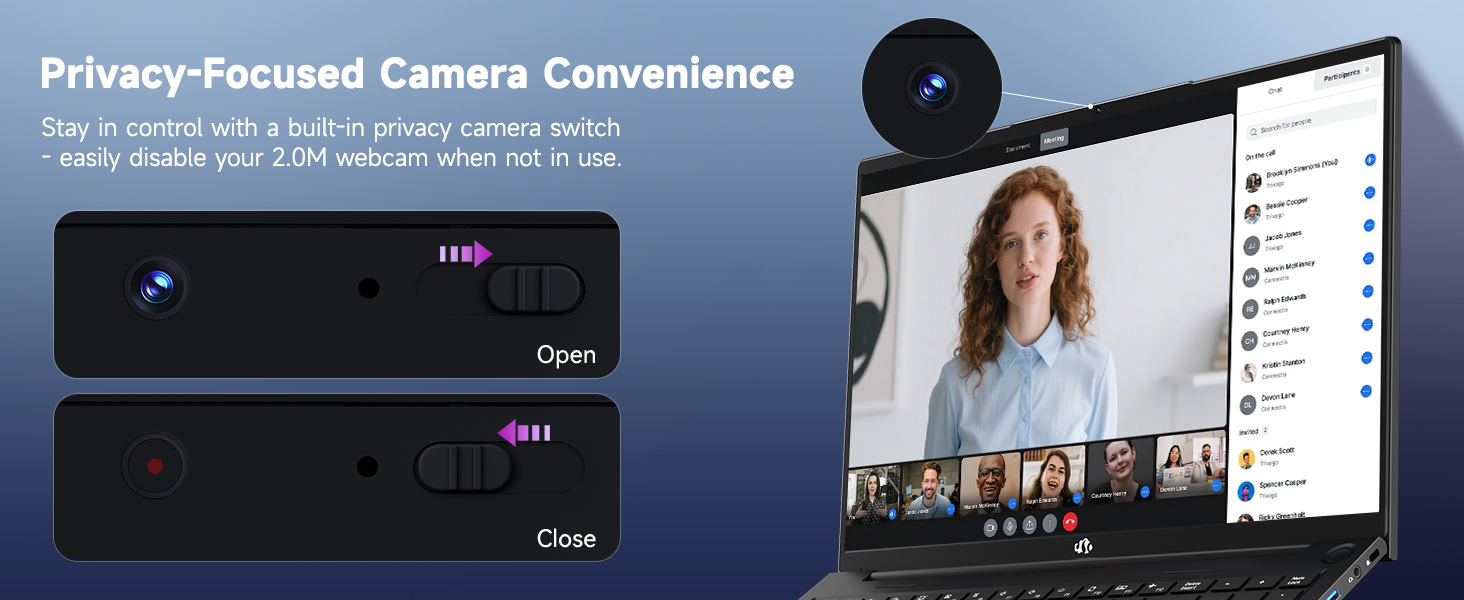
Diagram illustrating the comprehensive multi-port design of the NIMO laptop, including USB-C 4.0, HDMI, USB 3.2, USB 2.0, SD Card slot, Headphone Combo, and Kensington Lock.
2. Naudojimo instrukcijos
2.1 Power On/Off and Sleep Modes
- Maitinimas: Paspauskite klaviatūroje esantį maitinimo mygtuką.
- Išjungti: Spustelėkite mygtuką Pradėti, tada Maitinimas > Išjungti.
- Miegojimo rezimas: Spustelėkite mygtuką „Pradėti“, tada „Maitinimas“ > „Miego režimas“ arba uždarykite nešiojamojo kompiuterio dangtį.
2.2 Klaviatūros ir jutiklinės planšetės naudojimas
The NIMO laptop features a full-size keyboard with a numeric keypad and adjustable backlighting. Press Fn + F10 (or similar function key depending on model) to cycle through backlight brightness levels. The large touchpad supports multi-touch gestures for navigation.
2.3 Ekrano funkcijos
Experience clear visuals on the 17.3-inch Full HD (1920x1080) IPS display. This screen provides vibrant colors and wide viewing angles, suitable for various applications from productivity to entertainment.

The NIMO laptop displaying a vibrant image, highlighting its 17.3-inch Full HD IPS screen.
2.4 Webkameros privatumo jungiklis
For privacy, your laptop includes a physical webcam privacy switch. Slide the switch to the left to cover the camera lens and disable the webcam, or to the right to uncover and enable it.
Iliustracija webcam privacy switch in both open and closed positions, demonstrating how to control camera access.
2.5 Našumas viršview
The NIMO laptop is powered by an AMD Ryzen 9 8945HS processor, offering 8 cores and 16 threads with a max boost clock of 5.2GHz. Integrated AMD Radeon 780M graphics provide capable performance for gaming and demanding creative applications.

Diagrama rodoasing the AMD Ryzen 9 8945HS processor with its 8 cores/16 threads and integrated Ryzen AI NPU.

Visual representation of the AMD Radeon 780M graphics, emphasizing its capabilities for gaming and creative work.
3. Priežiūra ir priežiūra
3.1 Nešiojamojo kompiuterio valymas
- Ekranas: Lengvai naudokite minkštą, nepūkuotą audinį dampnuplaukite vandeniu arba ekrano valikliu. Nepurkškite skysčio tiesiai ant ekrano.
- Klaviatūra ir korpusas: Naudokite minkštą, sausą šluostę. Įsisenėjusius nešvarumus lengvai nuvalykite.amp Galima naudoti audinį. Venkite stiprių cheminių medžiagų.
- Prievadai: Švelniai nuvalykite dulkes nuo prievadų suslėgtu oru.
3.2 Akumuliatoriaus valdymas
The laptop is equipped with a 75Wh battery. To prolong battery life:
- Venkite dažnai visiškai iškrauti akumuliatorių.
- Jei ilgesnį laiką nenaudojate nešiojamojo kompiuterio, laikykite jį vėsioje, sausoje vietoje.
- Utilize power-saving settings in Windows 11.

Graphic illustrating smart battery optimization features, including extended battery life, smart power control, safe fast charging, and battery health protection.
3.3 Šilumos išsklaidymas
The NIMO laptop features an efficient cooling system with dual fans and double copper pipes to manage heat. Ensure that the ventilation openings are not blocked during use to maintain optimal performance and prevent overheating.
Vidinis view of the laptop's efficient heat dissipation system, featuring dual fans and double copper pipes.
3.4 Programinės įrangos naujiniai
Regularly update your Windows 11 operating system and device drivers to ensure system stability, security, and optimal performance. You can check for updates via Windows Settings > Windows Update.
4. Problemų sprendimas
Šiame skyriuje aptariamos dažniausiai pasitaikančios problemos, su kuriomis galite susidurti naudodami NIMO nešiojamąjį kompiuterį.
4.1 Maitinimo problemos
- Nešiojamasis kompiuteris neįsijungia: Ensure the charger is securely connected and the power outlet is functional. Try holding the power button for 15-20 seconds to perform a hard reset.
- Baterija nekraunama: Verify the charger is correctly plugged into both the laptop and the wall. Check for any damage to the charger cable or port.
4.2 Ekrano problemos
- Ekrane nėra vaizdo: Prijunkite išorinį monitorių per HDMI jungtį, kad patikrintumėte, ar problema susijusi su nešiojamojo kompiuterio vidiniu ekranu. Jei išorinis monitorius veikia, gali būti, kad sugedęs vidinis ekranas arba jo jungtis.
- Mirksintis ekranas: Atnaujinkite grafikos tvarkykles. Koreguokite ekrano atnaujinimo dažnį „Windows“ nustatymuose.
4.3 Ryšio problemos
- „Wi-Fi“ neprisijungia: Ensure Wi-Fi is enabled in Windows settings. Restart your router and laptop. Update wireless drivers.
- „Bluetooth“ įrenginys nesusijungia: Įsitikinkite, kad „Bluetooth“ įjungtas abiejuose įrenginiuose. Pašalinkite ir iš naujo pridėkite įrenginį „Windows“ „Bluetooth“ nustatymuose.
4.4 Našumo pablogėjimas
- Lėtas veikimas: Uždarykite nereikalingas programas. Patikrinkite užduočių tvarkytuvę, ar nėra didelio procesoriaus / RAM apkrovimo. Įsitikinkite, kad SSD diske yra pakankamai laisvos vietos. Paleiskite virusų paiešką.
- Perkaitimas: Ensure ventilation vents are clear. Use the laptop on a hard, flat surface. Consider reducing demanding workloads.
5. Techninės specifikacijos
| Funkcija | Specifikacija |
|---|---|
| Prekės ženklas | NIMO |
| Modelio pavadinimas | NIMO N175L |
| Ekrano dydis | 17.3 colių |
| Ekrano raiška | 1920 x 1080 pikselių (Full HD) |
| Procesorius | AMD Ryzen 9 8945HS (Up to 5.2 GHz) |
| RAM | 32 GB DDR5 |
| Kietasis diskas | 1024 GB SSD (kietojo kūno) |
| Grafikos koprocesorius | AMD Radeon 780M (integruota) |
| Operacinė sistema | Windows 11 |
| Belaidis tipas | 802.11a/b/g/n/ac |
| USB prievadai | 1x USB 2.0, 3x USB 3.0, 1x USB-C 4.0 |
| Vidutinis baterijos veikimo laikas | 12.8 valandų |
| Prekės svoris | 3.84 svaro |
| Gaminio matmenys | 15.66 x 9.99 x 0.74 colio |
| Spalva | Juoda |
| Ypatingos savybės | Apšviesta klaviatūra, pirštų atspaudų skaitytuvas, HD garsas, skaitmeninė klaviatūra |
6. Garantija ir klientų aptarnavimas
6.1 Informacija apie garantiją
Your NIMO laptop comes with a 2 metų garantija for support and service. Additionally, NIMO offers a 90 dienų grąžinimo politika nuo įsigijimo datos dėl bet kokios priežasties.
Image depicting a technician working on a laptop, symbolizing the 2-year support provided for NIMO products.
Image of a customer receiving a package, representing the 90-day return policy for NIMO products.
6.2 Susisiekimas su palaikymo tarnyba
For any product-related questions, technical assistance, or warranty claims, please contact NIMO customer support:
- El. paštas: service@nimopc.com
- Professional customer assistance is available to help resolve your issues.
Image of customer service representatives, indicating professional customer assistance is available.


