1. Įvadas
Thank you for choosing the ProtoArc XKM01 Foldable Wireless Keyboard and Mouse Combo. This manual provides detailed instructions for setting up, operating, and maintaining your device. Please read this manual thoroughly before use to ensure optimal performance and longevity of your product.
2. Pakuotės turinys
The ProtoArc XKM01 combo includes the following items:
- ProtoArc XKM01 Foldable Wireless Keyboard
- ProtoArc Wireless Mouse
- Carrying Hard Case
- Foldable Stand (for 4-11” devices)
- USB-C įkrovimo laidas
- USB Receiver (stored in mouse)
- Vartotojo vadovas

Figure 1: ProtoArc XKM01 Package Contents

Figure 2: Quality Portable Hard Case for ProtoArc XKM01
3. Produktas baigtasview
3.1 Klaviatūros funkcijos
- Viso dydžio išdėstymas: 105-key design with dedicated function and number pads for comprehensive input.
- Sulankstomas dizainas: Itin plonas profesionalasfile with a simple fold-and-go mechanism, featuring internal aluminum hinges tested for over 10,000 folds.
- Tylus rašymas: Equipped with whisper-quiet scissor switches and low-profile raktus.
- Multimedijos funkcijų klavišai: Dedicated keys for various multimedia controls.

Figure 3: Keyboard Durable Hinges
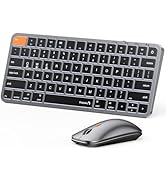
Figure 4: Keyboard Multimedia Function Keys
3.2 Pelės funkcijos
- Itin plonas dizainas: Portable and compact for easy transport.
- Reguliuojamas DPI: 3 modes (1000/1600/2400) for precision control.
- Tylus spragsėjimas: 25dB micro-switches for silent operation.
- Kelių įrenginių ryšys: Supports 2.4G wireless, Bluetooth 1, and Bluetooth 2 connections.

Figure 5: Slim and Portable Mouse

Figure 6: Mouse Component Diagram
4. Sąranka ir ryšys
4.1 Keyboard Setup
- Išskleiskite klaviatūrą: Gently unfold the keyboard until it lies flat.
- Maitinimas: Locate the power switch (usually on the side or back) and slide it to the 'ON' position.
- Pasirinkite ryšio režimą: Klaviatūra palaiko 2.4G belaidį ryšį ir du „Bluetooth“ kanalus (BT1, BT2).
- 2.4G belaidis ryšys: Insert the USB receiver (found in the mouse's battery compartment) into your device's USB port. The keyboard should connect automatically.
- „Bluetooth“ ryšys: Press and hold the 'Fn' key along with 'BT1' or 'BT2' key for 3 seconds until the indicator light flashes, indicating pairing mode. On your device, search for 'ProtoArc XKM01' in Bluetooth settings and connect.
- Perjungimo įrenginiai: To switch between connected devices, simply press 'Fn' + 'BT1', 'Fn' + 'BT2', or 'Fn' + '2.4G' (if applicable).
4.2 Mouse Setup
- Maitinimas: Slide the power switch on the bottom of the mouse to the 'ON' position.
- Pasirinkite ryšio režimą: The mouse supports 2.4G wireless and two Bluetooth channels (BT1, BT2).
- 2.4G belaidis ryšys: Ensure the USB receiver is plugged into your device. The mouse will connect automatically.
- „Bluetooth“ ryšys: Press the mode switch button on the bottom of the mouse to cycle between BT1 and BT2. Hold the desired BT button for 3 seconds until the indicator light flashes. On your device, search for 'ProtoArc Mouse' in Bluetooth settings and connect.
- Perjungimo įrenginiai: Press the mode switch button on the bottom of the mouse to switch between connected devices.

Figure 7: Multi-Device Connectivity Overview
5. Naudojimo instrukcijos
5.1 Klaviatūros naudojimas
- Funkciniai klavišai: The top row of keys (F1-F12) can be used as standard function keys or multimedia keys. Press Fn + Esc to toggle between these modes.
- Operacinės sistemos suderinamumas: The keyboard is compatible with Windows, macOS, Chrome OS, iPadOS, and Android. Specific key functions may vary slightly depending on the operating system.
5.2 Pelės naudojimas
- DPI reguliavimas: Press the DPI switch button (usually near the scroll wheel) to cycle through 1000, 1600, and 2400 DPI settings.
- Tylus veikimas: The mouse is designed for quiet clicking, suitable for various work environments.

Figure 8: Quiet Operation of Keyboard and Mouse
6. Įkrovimas
Both the keyboard and mouse are rechargeable via USB-C.
- Įkrovimo prievadas: Connect the provided USB-C cable to the charging port on the device and to a USB power source.
- Įkrovimo indikatorius: Indikatoriaus lemputė rodys įkrovimo būseną. Paprastai pilnas įkrovimas trunka 2–3 valandas.
- Baterijos veikimo laikas: A full charge provides approximately 150-200 days of standby time.

Figure 9: Type-C Charging for Keyboard and Mouse
7. Priežiūra
- Valymas: Klaviatūros ir pelės paviršiams valyti naudokite minkštą, sausą šluostę. Įsisenėjusius nešvarumus lengvai nuvalykite.amp galima naudoti šluostę, užtikrinant, kad į įrenginį nepatektų drėgmės.
- Saugykla: When not in use, fold the keyboard and store it along with the mouse in the provided hard case to protect it from dust and damage.
- Venkite ekstremalių sąlygų: Nelaikykite prietaisų ekstremaliose temperatūrose, tiesioginiuose saulės spinduliuose ar didelėje drėgmėje.
8. Problemų sprendimas
8.1 Ryšio problemos
- Įrenginys neprisijungia: Ensure both the keyboard and mouse are powered on and in the correct pairing mode (2.4G or Bluetooth). Check your device's Bluetooth settings to confirm it's discoverable and try re-pairing.
- Pertraukiamas ryšys: Ensure there are no obstructions between the devices and your computer. Move closer to your computer. Check battery levels.
8.2 Typing/Clicking Issues
- Klavišai nereaguoja: Check battery level. Ensure the keyboard is properly connected. Try restarting the keyboard and your device.
- Mouse Cursor Erratic: Clean the mouse sensor. Ensure the mouse is on a suitable surface. Adjust DPI settings if the cursor is too fast or slow.
9. Specifikacijos
| Modelio numeris | XKM01 |
| Ryšio technologija | „Bluetooth“, 2.4 G USB |
| Suderinami įrenginiai | Nešiojamasis kompiuteris, asmeninis kompiuteris, išmanusis telefonas, planšetinis kompiuteris |
| Ypatingos savybės | Lightweight, Portable, Rechargeable, Tri-Fold |
| Prekės svoris | 1.96 svaro (apie 0.89 kg) |
| Pakuotės matmenys | 12.99 x 6.42 x 2.13 colio (apytiksliai 33 x 16.3 x 5.4 cm) |

10 pav.: Gaminio matmenys
10. Garantija ir palaikymas
ProtoArc products come with a standard manufacturer's warranty. For detailed warranty information, product support, or technical assistance, please visit the official ProtoArc website or contact customer service using the information provided in the product packaging.
Grąžinimo politika: This product is eligible for a refund/replacement within 30 days of purchase, as per Amazon's return policy.
11. Produktas baigtasview Vaizdo įrašas
Video 1: ProtoArc XKM01 Foldable Keyboard and Mouse Combo Overview. This video demonstrates the product's features, including its foldable design, multi-device connectivity, and portability.


