1. Produktas baigtasview
The AstroAI L10 Mini Portable Tire Inflator is a compact and efficient air compressor designed for various inflation needs, including car tires, motorcycles, bicycles, and sports balls. It features a digital pressure gauge, auto-shutoff function, and an integrated LED light for convenience and safety.

Image: The AstroAI L10 Mini Tire Inflator highlighting its fast inflation capabilities, inflating a car tire from 30PSI to 36PSI in 70 seconds.
Pagrindinės funkcijos:
- Greita infliacija: Inflates standard car tires (195/65 R15) from 30PSI to 36PSI in approximately 70 seconds.
- 360° Rotatable Hose: Flexible hose design for easy connection to tire valves at various angles.
- Delno dydžio dizainas: Compact and lightweight (less than 1 pound) for easy portability and storage.
- 5 iš anksto nustatyti režimai: Dedicated modes for cars, motorcycles, bicycles, basketballs, and a customizable option (3-150 PSI).
- Automatinis išjungimas: Automatiškai sustabdo pripūtimą, kai pasiekiamas iš anksto nustatytas slėgis, taip užkertant kelią per dideliam pripūtimui.
- 3 režimų LED žibintuvėlis: Includes Flashlight, Strobe, and SOS modes for visibility and emergencies.
2. Pakuotės turinys
Before using your AstroAI L10 Mini Tire Inflator, please ensure all items are present:

Image: The AstroAI L10 Mini Tire Inflator with its various accessories, including different nozzles and a charging cable.
- AstroAI L10 Mini Tire Inflator
- Air Hose with 360° Rotatable Connector
- USB-C įkrovimo laidas
- Rutulinio adatos adapteris
- „Presta“ vožtuvų adapteris
- Swim Ring Nozzle Adapter
- Sandėliavimo maišelis
- Vartotojo vadovas
3. Sąranka ir įkrovimas
Įrenginio įkrovimas:
The device comes with a built-in rechargeable Lithium-Ion battery. Before first use, fully charge the inflator using the provided USB-C cable.
- Connect the USB-C charging cable to the charging port on the inflator.
- Connect the other end of the cable to a compatible USB power source (e.g., wall adapter, car charger, power bank).
- The battery indicator on the display will blink during charging.
- Once fully charged, the battery indicator will show a solid light.
Vaizdo įrašas: Viršijimasview of the AstroAI Tire Inflator Portable Air Compressor, demonstrating its features and ease of use, including charging.

Image: The AstroAI L10 Mini display showing the battery indicator during charging, with a blinking light for charging and a solid light for fully charged.
4. Naudojimo instrukcijos
Pagrindinė operacija:

Image: A visual guide demonstrating the 3-step intuitive operation: power on, select preset/pressure, and start inflation.
- Maitinimas: Hold the power button for 1.5 seconds to turn on the device. The digital display will illuminate.
- Prijunkite žarną: Attach the air hose to the tire valve. The 360° rotatable hose connector allows for easy installation at any angle.
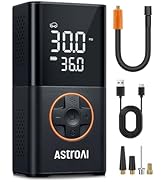
Image: The AstroAI L10 Mini with its 360° rotatable hose, illustrating how it can be adjusted for easy connection to tire valves.
- Select Mode & Set Pressure: Press the mode button to cycle through the 5 preset modes (Car, Motorcycle, Bike, Ball, Custom). Use the '+' and '-' buttons to adjust the target pressure. The device supports pressure settings from 3-150 PSI.
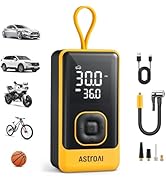
Image: The AstroAI L10 Mini displaying its 5 preset inflation modes for various items like cars, motorcycles, bikes, and balls, along with a custom setting.
- Pradėti infliaciją: Dar kartą paspauskite maitinimo mygtuką, kad pradėtumėte pūsti. Prietaisas automatiškai išsijungs, kai bus pasiektas iš anksto nustatytas slėgis.

Image: A person leaning against a car while the AstroAI L10 Mini inflates a tire, illustrating the auto-shutoff feature that prevents over-inflation.
- Išjungti: Hold the power button for 1.5 seconds to turn off the device. It will also automatically power off after a period of inactivity.
LED žibintuvėlio naudojimas:
The AstroAI L10 Mini includes a versatile LED flashlight with three modes:

Image: The AstroAI L10 Mini showcasing its 3-in-1 emergency LED flashlight, with modes for general illumination, strobe, and SOS signaling.
- Press the flashlight button once for constant illumination (Flashlight mode).
- Press again for a flashing light (Strobe mode).
- Press a third time for an SOS signal (SOS mode).
- Paspauskite ketvirtą kartą, kad išjungtumėte žibintuvėlį.
5. Priežiūra ir sandėliavimas
- Įrenginį laikykite švarų, be dulkių ir šiukšlių. Valymui naudokite minkštą, sausą šluostę.
- Store the inflator and its accessories in the provided storage pouch to prevent damage.
- Venkite įrenginio laikymo ekstremaliose temperatūrose, tiesioginiuose saulės spinduliuose ar drėgmėje.
- Charge the device periodically (e.g., every 3-6 months) even if not in use, to maintain battery health.
6. Problemų sprendimas
| Problema | Galima priežastis | Sprendimas |
|---|---|---|
| Įrenginys neįsijungia. | Išsikrovęs akumuliatorius arba įrenginys išjungtas. | Charge the device fully. Ensure the power button is held for 1.5 seconds. |
| Pripūtiklis nepripučia. | Hose not properly connected, target pressure not set, or device not started. | Ensure the hose is securely attached. Set the desired pressure. Press the power button to start inflation. |
| Įrenginys sustoja per anksti. | Target pressure reached or low battery. | Check the set pressure. If the tire is not fully inflated, check battery level and recharge if necessary. |
| Netikslus slėgio rodmuo. | Atsilaisvinęs prijungimas arba jutiklio problema. | Ensure the hose is tightly connected to the valve. If issues persist, contact customer support. |
7. Specifikacijos
| Funkcija | Detalė |
|---|---|
| Prekės ženklas | „AstroAI“ |
| Modelio pavadinimas | L10 Mini |
| ttage | 7.4 volto (DC) |
| Maitinimo šaltinis | Maitinamas su baterijomis (pridedama 1 ličio jonų baterija) |
| Triukšmo lygis | 85 decibelų |
| Gaminio matmenys | 2.6 colio ilgio x 1.8 colių pločio x 3.9 colio aukščio |
| Prekės svoris | 1.14 svaro |
| Maksimalus slėgis | 150 PSI |
8. Garantija ir palaikymas
The AstroAI L10 Mini Tire Inflator comes with a 2 metų gamintojo garantija.
For product support, troubleshooting, or warranty claims, please visit the official AstroAI store or contact their customer service directly.
Official AstroAI Store: AstroAI Store on Amazon


