1. Įvadas
Welcome to the DOOGEE Note 56 user manual. This guide provides essential information to help you set up, operate, and maintain your new smartphone. The DOOGEE Note 56 is an unlocked Android 16 smartphone featuring a powerful Octa-Core processor, a large 6150mAh battery, and a vibrant 6.56-inch 90Hz HD+ display. It is designed for efficient daily use, photography, and connectivity.
2. Kas yra dėžutėje
Your DOOGEE Note 56 package includes the following items:
- 1 x DOOGEE Note 56 mobilusis telefonas
- 1 x pakavimo dėžutė
- 1 x Vartotojo vadovas
- 1 x Apsauginė plėvelė (iš anksto užklijuota)
- 1 x SIM kortelės kontaktas
- 1 x C tipo prievado kabelis
- 1x pakrovėjas
- 1x garantinis talonas
- 1 x TPU apsauginis dėklas
3. Įrenginys baigtasview
Familiarize yourself with the physical components and design of your DOOGEE Note 56.
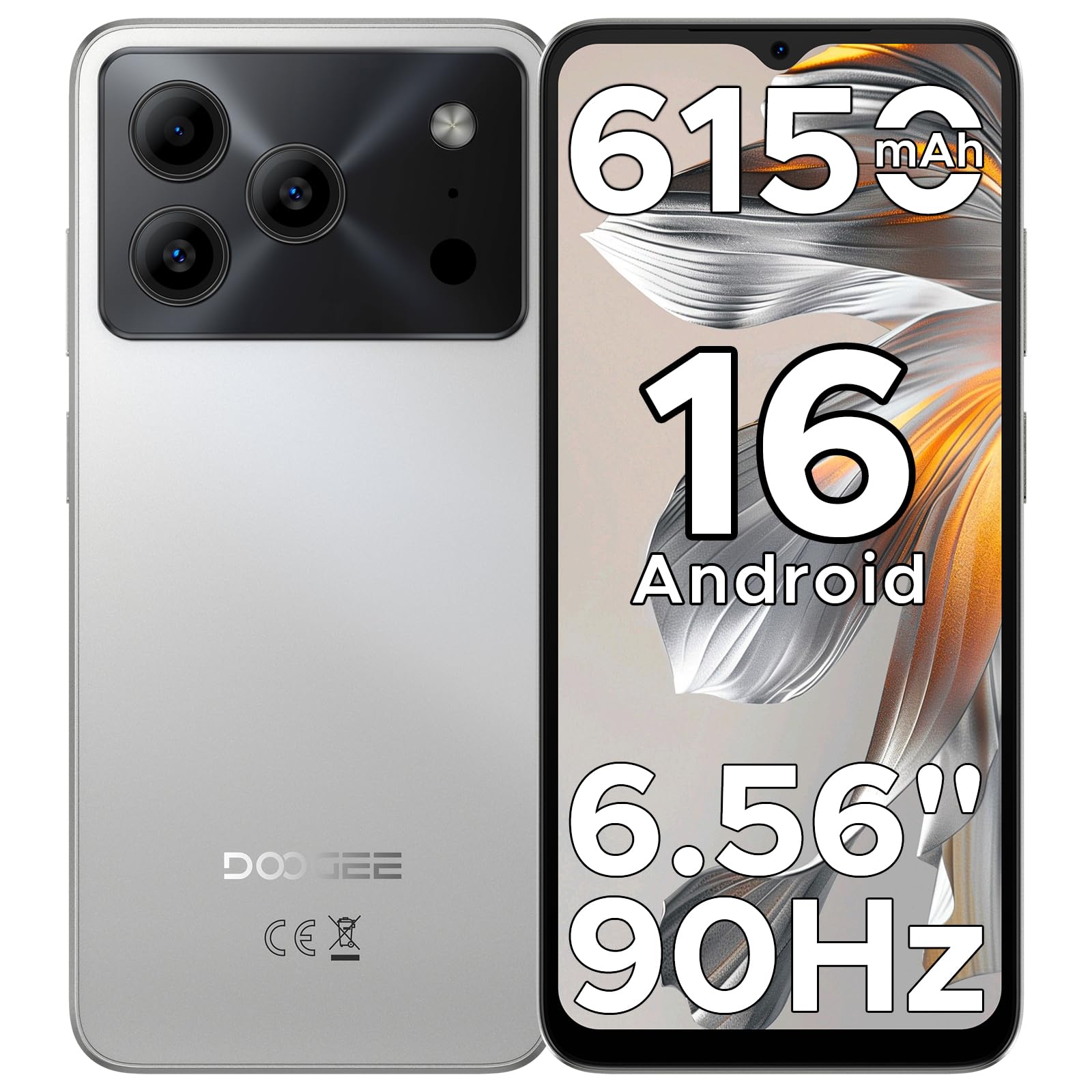
Image: The DOOGEE Note 56 smartphone, showcasing its slim design and key features such as the 8.45mm ultra-slim body, 6150mAh Silicon-Carbon Battery, Up-To-Date Android 16, 6.56" 90Hz Display, AI Scene Recognition, Instant Face Unlock, and 3.5mm Headphone Jack.

Vaizdas: Stambus planas view of the DOOGEE Note 56 highlighting its ultra-slim 8.45mm profile and lightweight 195g design, emphasizing its pocket-friendly and refined appearance.
Fiziniai mygtukai ir prievadai:
- Maitinimo mygtukas: Esantis šone, naudojamas įrenginiui įjungti / išjungti arba ekranui pažadinti / užmigdyti.
- Garsumo mygtukai: Įsikūręs šone, naudojamas medijos ir skambučių garsumui reguliuoti.
- C tipo USB prievadas: Įsikūręs apačioje, naudojamas įkrovimui ir duomenų perdavimui.
- 3.5 mm ausinių lizdas: Įsikūręs viršuje, skirtas laidinėms ausinėms prijungti.
- SIM/TF kortelės lizdas: Located on the side, for inserting SIM cards and a TF (microSD) card.
4. Sąranka
4.1. SIM ir TF kortelių įdėjimas
- Locate the SIM/TF card slot on the side of your phone.
- Insert the provided SIM eject tool into the small hole next to the slot to open the tray.
- Place your Nano-SIM card(s) and/or TF card into the tray according to the diagram on the tray.
- Atsargiai stumkite dėklą atgal į angą, kol jis bus lygiai su telefono korpusu.
4.2. Pradinis įjungimas ir sąranka
- Paspauskite ir palaikykite maitinimo mygtuką, kol pasirodys DOOGEE logotipas.
- Vykdykite ekrane pateikiamus nurodymus, kad pasirinktumėte kalbą, prisijungtumėte prie „Wi-Fi“ ir nustatytumėte „Google“ paskyrą.
- Configure security settings, including Face Unlock, for quick and secure access.
5. Naudojimo instrukcijos
5.1. „Android 16“ operacinė sistema
Your DOOGEE Note 56 runs on the latest Android 16 OS, offering an intuitive and secure user experience. Navigate through apps, customize your home screen, and access various features with ease.

Image: A visual representation of the Android 16 operating system interface on the DOOGEE Note 56, showing various app icons and system settings.
5.2. Veido atpažinimas atrakinant
For convenient and secure unlocking, your device supports Face Unlock. To set it up:
- Eikite į Nustatymai > Saugumas > Atrakinimas pagal veidą.
- Vykdykite ekrane pateikiamus nurodymus, kad užregistruotumėte savo veidą.
- Registracijos metu užtikrinkite gerą apšvietimą, kad rezultatai būtų optimalūs.

Image: A user demonstrating the Instant Face Unlock feature on the DOOGEE Note 56, highlighting its quick and secure access capabilities.
5.3. Gemini AI Integration
The DOOGEE Note 56 integrates Gemini AI features, enhancing your device's intelligence and responsiveness. This includes smart body sensing, dual system mode, super clipboard, memory expansion, screen optimization, and customizable screen colors.
Video: This video demonstrates how to utilize and upgrade Gemini AI features on a DOOGEE smartphone, showcasing its capabilities within the Android 16 operating system.
6. Kameros funkcijos
Capture memorable moments with the DOOGEE Note 56's advanced camera system.
6.1. Rear Camera (8MP)
The 8MP main camera delivers clear, natural photos. Features include:
- HDR: Padidina dinaminį diapazoną, kad būtų užtikrinta subalansuota ekspozicija sudėtingo apšvietimo sąlygomis.
- Pro režimas: Suteikia rankinį fotoaparato nustatymų valdymą.
- Naktinis režimas: Pagerina nuotraukų kokybę esant prastam apšvietimui.
- Dirbtinio intelekto scenos atpažinimas: Automatically detects 12 scenes and optimizes settings for stunning shots.
- Portreto režimas: Creates a depth-of-field effect for professional-looking portraits.
- Šypsenos fiksavimas: Automatiškai nufotografuoja, kai aptinkama šypsena.
- Panoramas: Capture wide-angle scenic views.
- Burst Shots: Fotografuokite kelias nuotraukas greitai iš eilės.
- Pramoginiai filtrai: Pritaikykite kūrybinius filtrus savo nuotraukoms.

Image: An illustration of the DOOGEE Note 56's camera capabilities, including AI Scene Recognition icons and various sample photos taken with the 8MP main camera and 5MP front camera.
6.2. Front Camera (5MP)
The 5MP front camera is perfect for selfies and video calls, featuring Beauty Mode and Portrait Effect for bright and natural results.
7. Ryšys
Stay connected with a range of network and wireless options.
- 4G dviguba SIM kortelė: Palaiko dvi SIM korteles, kad būtų galima lanksčiai naudoti tinklą.
- „Wi-Fi“: Prisijunkite prie belaidžių tinklų, kad galėtumėte naudotis internetu.
- "Bluetooth 4.2": Skirta prijungti prie belaidžių priedų.
- GPS: Navigacijos ir vietos nustatymo paslaugoms.
- FM radijas: Mėgaukitės mėgstamiausiomis radijo stotimis.
7.1. Supported Network Bands:
- GSM: B2/3/5/8
- WCDMA: B1/2/4/5/8
- TDD: B38 / 40/41
- FDD: B1/2/3/4/5/7/8/18/19/20/25/26/28A/28B/66
- Palaikymas: EDGE/GPRS
8. Baterijos valdymas
The DOOGEE Note 56 is equipped with a large 6150mAh Silicon-Carbon battery for extended usage.

Paveikslėlis: vidinis view of the DOOGEE Note 56 highlighting its 6150mAh Silicon-Carbon Battery, emphasizing its longer lifespan, unmatched durability, 1000 charge cycles, 4 years durable battery, 20% smaller size, and 5W reverse charging capability.
Video: This video highlights the 6150mAh Silicon-Carbon Battery of the DOOGEE Note 56, showcasing its capacity and efficiency.
8.1. Atvirkštinis OTG apmokestinimas
The device supports OTG (On-The-Go) reverse charging, allowing you to use your Note 56 to charge other compatible devices.
8.2. Tips for Extending Battery Life:
- Adjust screen brightness to a lower level.
- Išjunkite „Wi-Fi“, „Bluetooth“ ir GPS, kai jų nenaudojate.
- Uždarykite fonines programas.
- Įjunkite akumuliatoriaus tausojimo režimą nustatymuose.

Image: This image illustrates various usage scenarios for the DOOGEE Note 56, demonstrating its extended battery life for web browsing (7 hours), music playing (49.5 hours), video watching (14 hours), and calling (28 hours).
9. Saugojimas ir našumas
The DOOGEE Note 56 is powered by a UNISOC SC9863A Octa-Core processor, ensuring smooth performance for applications and daily tasks.
- RAM: 24GB (virtual RAM expansion, 8GB physical RAM).
- Vidinė saugykla: 64 GB.
- Išplečiama saugykla: Supports up to 2TB via TF (microSD) card (TF card needs to be purchased separately).

Image: A visual representation of the DOOGEE Note 56's internal memory and storage, showing 64GB ROM and 24GB RAM (3GB+21GB virtual expansion), emphasizing smooth multitasking and ample erdvės.
10. Ekranas
Experience immersive visuals on the 6.56-inch HD+ 90Hz IPS waterdrop screen.
- Dydis: 6.56 colių
- Rezoliucija: 720 x 1612 pikselių
- Atnaujinimo dažnis: 90 Hz
- Kraštinių santykis: 20:9
- PPI: 269

Paveikslėlis: „DOOGEE Note 56“ ekranasasing its 6.56-inch HD+ screen with a 90Hz refresh rate, designed for smooth viewing and social media interaction.
11. Priežiūra ir priežiūra
To ensure the longevity and optimal performance of your DOOGEE Note 56, follow these care guidelines:
- Venkite telefono laikymo ekstremaliose temperatūrose, tiesioginiuose saulės spinduliuose ar per didelėje drėgmėje.
- Naudokite tik patvirtintus įkroviklius ir laidus.
- Ekraną ir korpusą valykite minkštu, nepūkuotu skudurėliu.
- Utilize the provided TPU protective case and pre-applied protective film to guard against scratches and minor impacts.
12. Problemų sprendimas
If you encounter issues with your DOOGEE Note 56, try the following basic troubleshooting steps:
- Įrenginys neįsijungia: Įsitikinkite, kad akumuliatorius įkrautas. Prijunkite įkroviklį ir palaukite kelias minutes, prieš bandydami vėl įjungti.
- Ekranas nereaguoja: Restart the device by pressing and holding the Power button for about 10-15 seconds.
- Tinklo problemos: Check if your SIM card is properly inserted. Verify network settings and ensure you have an active plan with your carrier.
- Programėlės strigimas: Išvalykite probleminės programėlės talpyklą arba įdiekite ją iš naujo. Įsitikinkite, kad jūsų įrenginio programinė įranga yra atnaujinta.
For more complex issues, refer to the official DOOGEE support websvetainėje arba susisiekite su klientų aptarnavimo tarnyba.
13. Specifikacijos
| Funkcija | Detalė |
|---|---|
| Modelio pavadinimas | PASTABA 56 |
| Operacinė sistema | Android 16 |
| Procesorius | UNISOC SC9863A Octa-Core (1.6 GHz CPU Speed) |
| RAM | 24 GB (8 GB fizinės + 16 GB virtualios) |
| Vidinė saugykla | 64 GB |
| Išplečiama saugykla | Iki 2 TB per TF kortelę |
| Ekrano dydis | 6.56 colių |
| Ekrano raiška | 720 x 1612 (HD+) |
| Atnaujinimo dažnis | 90 Hz |
| Galinė kamera | 8 MP |
| Priekinė kamera | 5 MP |
| Baterijos talpa | 6150 milijonųamp Valandos (Li-Po) |
| Ryšys | 4G Dual SIM, Wi-Fi, Bluetooth 4.2, GPS, FM Radio, USB Type-C |
| Garso lizdas | 3.5 mm |
| Matmenys | 6.45 x 2.98 x 0.33 colio |
| Prekės svoris | 6.9 uncijos (195 gramų) |
| Ypatingos savybės | Dviguba SIM kortelė, išplečiama atmintis, palaiko USB OTG, veido atrakinimas |
14. Garantija ir palaikymas
Your DOOGEE Note 56 comes with a warranty. Please refer to the included Warranty Card in your product package for detailed information on warranty terms, conditions, and duration.
Dėl techninės pagalbos, paslaugų ar kitų klausimų apsilankykite oficialioje DOOGEE svetainėje website or contact their customer service channels. Keep your purchase receipt and warranty card handy for any claims.


