1. Įvadas
The UNI-T UT217A/UT217B is a versatile 2-in-1 device combining the functions of an AC/DC clamp meter and an oscilloscope. This instrument is designed for comprehensive electrical measurements, offering high precision and a user-friendly interface. It features a 2.8-inch high-definition LCD display and supports Bluetooth connectivity for mobile application integration, allowing for data transmission, analysis, and storage.
This manual provides essential information for the safe and effective operation of your UNI-T UT217A/UT217B device. Please read it thoroughly before use and retain it for future reference.
2. Saugos informacija
To ensure safe operation and prevent damage to the device or injury, observe the following safety precautions:
- Visada laikykitės vietinių ir nacionalinių saugos taisyklių.
- Nenaudokite prietaiso, jei jis atrodo pažeistas arba veikia neįprastai.
- Ensure the battery is adequately charged before use to avoid unexpected power loss during critical measurements.
- Prijungdami arba atjungdami bandymo laidus, venkite kontakto su srovėmis tekančiomis grandinėmis.
- Do not exceed the maximum input ratings specified for each function.
- Use only specified replacement parts and accessories.
- Laikykite prietaisą sausą ir švarų. Nenaudokite drėgnoje ar sprogioje aplinkoje.
- Atkreipkite dėmesį į aukštą tūrįtage warning indicator on the device.
3. Pakuotės turinys
Išpakuodami patikrinkite, ar visos prekės yra ir nepažeistos:
- UNI-T UT217A/UT217B osciloskopas Clamp Metras
- Bandymo laidai
- C tipo įkrovimo laidas
- Vartotojo vadovas
- Carrying Pouch (may vary by model/region)
4. Produktas baigtasview
Familiarize yourself with the components of your UNI-T UT217A/UT217B device:
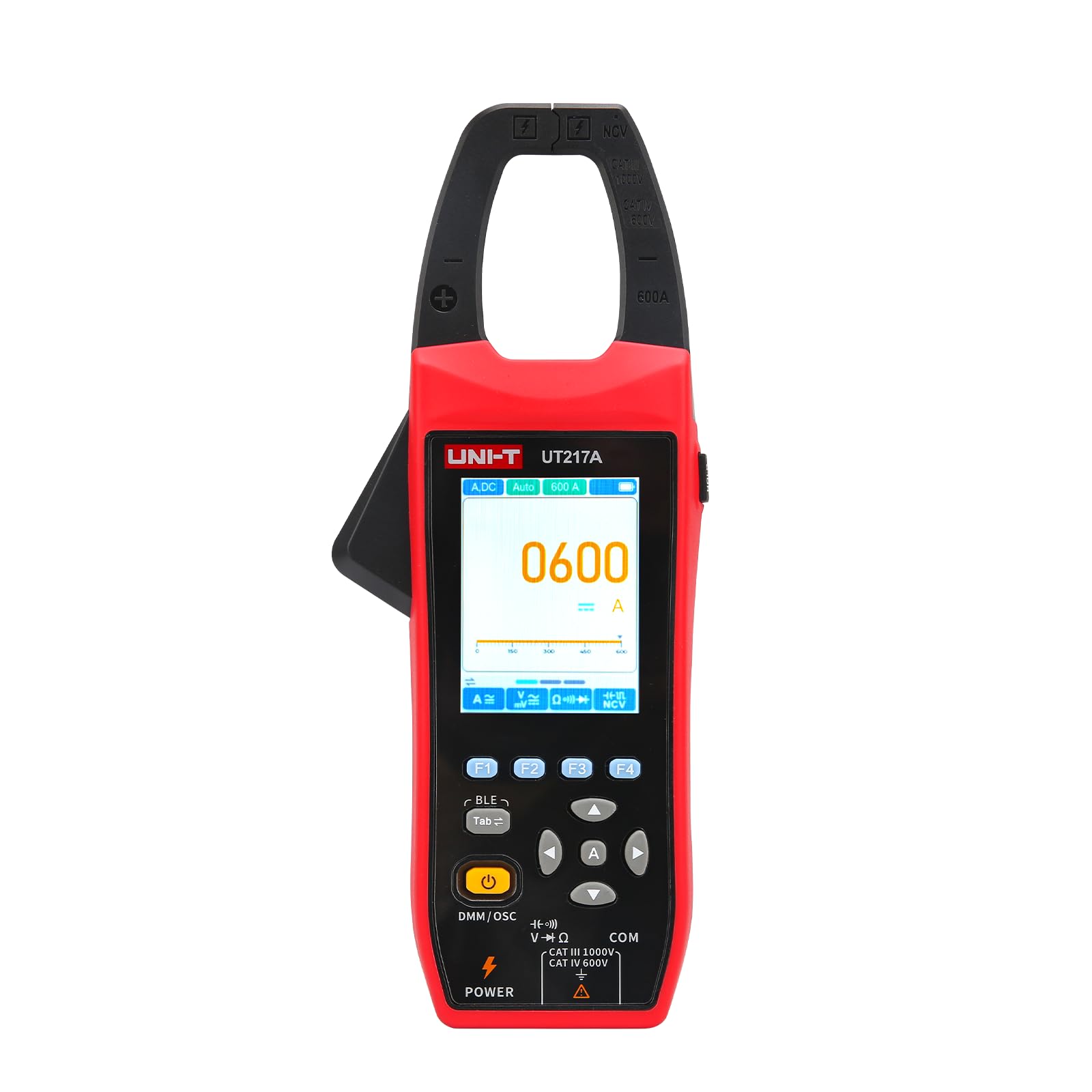
1 pav.: priekis view of the UNI-T UT217A/UT217B Oscilloscope Clamp Meter, showing the display, function dial, and clamp žandikaulis.
- Clamp Žandikaulis: Used for non-contact measurement of AC/DC current. The UT217A has a 31mm jaw opening, while the UT217B has a 38mm jaw opening.
- LCD ekranas: 2.8-inch high-definition screen displaying measurement readings, waveforms, and function indicators.
- Funkcinis ratukas: Rotary switch to select measurement modes (e.g., ACV, DCV, ACA, DCA, Resistance, Capacitance, Frequency, Oscilloscope).
- Funkciniai mygtukai: Buttons for range selection, hold, backlight, peak hold, and other specific functions.
- Įvesties gnybtai: Sockets for connecting test leads for voltage, varža, talpa ir kiti matavimai.
- C tipo prievadas: Skirta įkrauti įmontuotą 2600 mAh bateriją.
5. Sąranka
Prieš pirmą kartą naudodami įsitikinkite, kad prietaisas tinkamai paruoštas:
- Baterijos įkrovimas:
- Connect the provided Type-C charging cable to the device's Type-C port.
- Kitą laido galą prijunkite prie standartinio USB maitinimo adapterio (nepridedamas) arba kompiuterio USB prievado.
- The charging indicator on the display will show the charging status. Allow the device to fully charge before initial use. The built-in battery capacity is 2600mAh.
- Maitinimo įjungimas/išjungimas:
- Rotate the function dial from the 'OFF' position to any desired measurement function to power on the device.
- To power off, rotate the function dial back to the 'OFF' position.
6. Naudojimo instrukcijos
This section details the primary functions of the UNI-T UT217A/UT217B.
6.1 Clamp Meter Function (AC/DC Current Measurement)
- Rotate the function dial to the 'ACA' (AC Current) or 'DCA' (DC Current) position.
- Press the jaw release trigger to open the clamp žandikaulis.
- Enclose a single conductor (not a power cord with multiple wires) within the clamp žandikaulis. Įsitikinkite, kad žandikaulis yra visiškai uždarytas.
- Read the current value displayed on the LCD. The device features 20000 count true RMS automatic ranging.
- For surge current measurement (AC current only), select the appropriate function if available on the dial or via a button.
6.2 Oscilloscope Function (Waveform Measurement)
The oscilloscope function allows for simultaneous measurement of current and voltage bangos formos.
- Rotate the function dial to the 'Oscilloscope' position.
- Connect the test leads to the appropriate input terminals for voltagmatavimą arba naudokite clamp žandikaulis srovės bangos formos matavimui.
- The display will show the real-time waveform. Use the function buttons to adjust parameters such as time base, voltage scale, and trigger settings as needed.
- Analyze the waveform characteristics (e.g., frequency, amplitude, shape).
6.3 „Bluetooth“ ryšys
The device supports Bluetooth connection to a mobile phone application for enhanced functionality.
- Atsisiųskite ir įdiekite oficialią UNI-T mobiliąją programėlę iš savo įrenginio programėlių parduotuvės.
- Įsitikinkite, kad jūsų mobiliajame telefone įjungtas Bluetooth.
- Power on the UT217A/UT217B.
- Open the UNI-T application and follow the on-screen instructions to search for and connect to your device.
- Once connected, you can transmit measurement data, analyze trends, and store readings directly on your mobile device.
7. Priežiūra
Proper maintenance ensures the longevity and accuracy of your device.
- Valymas: Naudokite minkštą, damp šluoste su švelniu plovikliu valyti casing. Do not use abrasive cleaners or solvents. Ensure the device is powered off and disconnected from any power source before cleaning.
- Saugykla: Store the device in a cool, dry place, away from direct sunlight and extreme temperatures. If storing for extended periods, ensure the battery is partially charged (around 50%) to preserve battery health.
- Akumuliatoriaus priežiūra: The device has a built-in 2600mAh rechargeable battery. Avoid fully discharging the battery frequently. Recharge it regularly, especially if not used for a long time.
- Kalibravimas: For professional applications, periodic calibration by qualified personnel is recommended to maintain measurement accuracy.
8. Problemų sprendimas
Dažniausiai pasitaikančias problemas ir jų sprendimus rasite toliau pateiktoje lentelėje:
| Problema | Galima priežastis | Sprendimas |
|---|---|---|
| Įrenginys neįsijungia | Low battery; Function dial not set correctly | Charge the battery; Rotate dial to a measurement function |
| Netikslūs rodmenys | Improper connection; Environmental interference; Device malfunction | Check test lead connections; Move away from strong electromagnetic fields; Contact support if issue persists |
| „Bluetooth“ ryšys nepavyksta | Bluetooth off on phone; App not installed; Device not discoverable | Enable Bluetooth; Install UNI-T app; Restart device and app |
| Ekranas tuščias arba blankus | Low battery; Backlight off; Display damage | Charge battery; Press backlight button; Contact support |
9. Specifikacijos
Key technical specifications for the UNI-T UT217A/UT217B Oscilloscope Clamp Matuoklis:
| Funkcija | Aprašymas |
|---|---|
| Modelis | UT217A / UT217B |
| Funkcijos | AC/DC Clamp Meter, Oscilloscope |
| Ekranas | 2.8-inch High-Definition LCD |
| Suskaičiuoti | 20000 Count True RMS |
| Žandikaulio atidarymas | UT217A: 31mm; UT217B: 38mm |
| Osciloskopo funkcija | Measures current and voltage waveforms simultaneously |
| Ryšys | Bluetooth to mobile phone APP (transmit, analyze, store) |
| Ypatingos savybės | Surge current measurement (AC only), High voltage įspėjimas |
| Maitinimo šaltinis | Type-C charging, Built-in 2600mAh battery |
| Gamintojas | UNI-TREND TECHNOLOGY (CHINA) CO., LTD. |
| Produkto modelio numeris | YQ-UT217A |
10. Garantija ir palaikymas
UNI-T products are manufactured to high quality standards and are warranted against defects in materials and workmanship. For specific warranty terms and conditions, please refer to the warranty card included with your product or visit the official UNI-T websvetainę.
For technical support, service, or inquiries, please contact your local distributor or the UNI-T customer service department. Ensure you have your product model number (UT217A/UT217B) and purchase information available when seeking support.


