1. Įvadas
This manual provides detailed instructions for the setup, operation, and maintenance of your POLONO PM220S Label Maker Machine. Please read this manual thoroughly before using the device to ensure proper function and longevity.
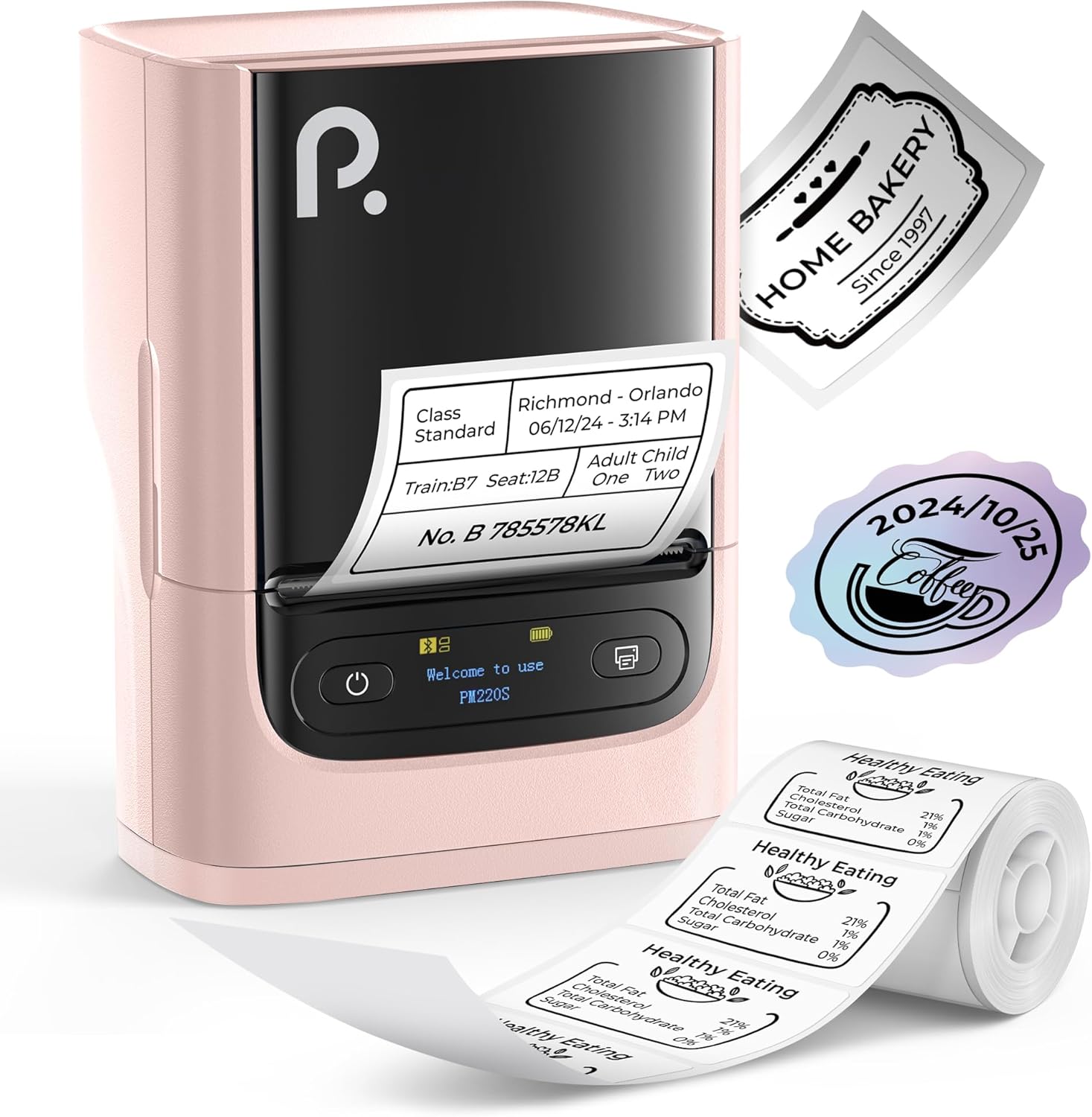
Figure 1: POLONO PM220S Label Maker Machine with sampetiketės.
2. Produktas baigtasview
2.1 Į komplektą įeinantys komponentai
- POLONO PM220S Label Maker Machine
- Label Tape (50x30mm, pre-installed or included)
- USB įkrovimo laidas
- Vartotojo vadovas (šis dokumentas)
2.2 Pagrindinės savybės
- Bluetooth ryšys: Seamless connection with iOS, Android, and PC devices.
- Intuitive LED Screen: Displays battery level, Bluetooth connection status, and alerts for paper shortages or timed shutdowns.
- Feature-Rich "Labelnize" App: Offers label templates, supports QR codes, barcodes, tables, text, icons, 90+ fonts, 14+ languages, and 450+ material presets.
- Premium Thermal Printing: BPA-Free Direct Thermal Technology with 203 DPI for high-definition, inkless printing.
- Platus etikečių suderinamumas: Supports label widths from 23-54mm (0.91"-2.12").
- Nešiojamas dizainas: Compact and lightweight for easy transport and use in various environments.
3. Sąrankos instrukcijos
3.1 Įrenginio įkrovimas
Before first use, fully charge the label maker using the provided USB cable. The LED screen will indicate charging status.
3.2 App Installation and Driver Download
For mobile devices (iOS/Android), download the "Labelnize" app from your respective app store. For PC users, visit polono.com to download the necessary driver and application.

Figure 2: Universal compatibility with smartphones and laptops for app and driver installation.
3.3 Prisijungimas per Bluetooth
- Ensure the PM220S is powered on.
- On your mobile device, open the "Labelnize" app.
- Within the app, search for and connect to the PM220S via Bluetooth. Do not connect directly via your device's Bluetooth settings for mobile devices.
- For PC, ensure the driver is installed, then connect through the downloaded application.
3.4 Etikečių juostos įdėjimas
- Atidarykite etikečių skyriaus dangtelį.
- Insert the label roll with the printing surface facing upwards.
- Adjust the paper slot guides to secure the tape according to its width (23-54mm) for precise alignment.
- Uždarykite dangtelį.

Figure 3: Proper loading of label tape into the PM220S.
4. Naudojimo instrukcijos
4.1 Using the "Labelnize" App
- Open the "Labelnize" app on your connected device.
- Select from various pre-designed templates or create your own custom labels.
- The app allows you to add text, barcodes, QR codes, tables, icons, and more.
- Customize labels using a selection of over 90 fonts and 14 languages.
- Utilize the 450+ material presets for different label applications.
- Svarbu: For optimal results, use specialized POLONO labels. Avoid tearing the green back sticker to prevent printing issues.
4.2 Understanding the LED Screen Display
The integrated LED screen provides real-time feedback on the printer's status:
- Baterijos lygis: Indicates the current charge of the device.
- „Bluetooth“ ryšys: Shows if the device is successfully connected via Bluetooth.
- Popierinis Šorastage įspėjimas: Notifies when the label roll is low or empty.
- Laikinas išjungimas: Displays countdown for automatic power-off to conserve battery.

Figure 4: LED screen display functions for real-time status monitoring.
4.3 Etiketės spausdinimas
- Design your label within the "Labelnize" app.
- Review the label preview tikslumui užtikrinti.
- Tap the "Print" button in the app.
- The label maker will print the label using thermal technology.
- Carefully tear off the printed label.
5. Priežiūra
5.1 Bendroji priežiūra
- Laikykite prietaisą švarų ir be dulkių ir šiukšlių.
- Saugokite, kad prietaisas nepatektų į ekstremalias temperatūras ar tiesioginius saulės spindulius.
- Nenaudojamą prietaisą laikykite sausoje vietoje.
5.2 Spausdinimo galvutės valymas
If print quality degrades, the thermal print head may need cleaning:
- Išjunkite etikečių spausdintuvą ir atjunkite jį nuo bet kokio maitinimo šaltinio.
- Atidarykite etiketės skyrių.
- Švelniai nuvalykite terminio spausdinimo galvutę vatos tamponu.ampsu izopropilo alkoholiu.
- Prieš uždarydami dangtį ir tęsdami naudojimą, leiskite spausdinimo galvutei visiškai išdžiūti.
6. Problemų sprendimas
| Problema | Galima priežastis | Sprendimas |
|---|---|---|
| Įrenginys neįsijungia | Išsikrovusi baterija arba maitinimo problema. | Visiškai įkraukite įrenginį. Įsitikinkite, kad maitinimo mygtukas paspaustas teisingai. |
| Nepavyksta prisijungti per Bluetooth | Incorrect connection method or app issue. | Ensure you are connecting through the "Labelnize" app, not directly via phone settings. Restart both the device and the app. For PC, verify driver installation. |
| Prasta spausdinimo kokybė / Blankus spausdinimas | Dirty print head, incorrect label type, or low battery. | Clean the print head (see Section 5.2). Ensure you are using thermal labels. Charge the device. |
| Labels are misaligned or jammed | Improper label loading or paper slot adjustment. | Open the cover, remove any jammed labels, and reload the tape ensuring the paper slot guides are adjusted correctly for the label width. Avoid tearing the green back sticker. |
| "Paper Shortage" alert | Label roll is empty or incorrectly loaded. | Replace the label roll or re-seat it correctly. |
7. Specifikacijos
| Prekės ženklas | POLONO |
| Modelio pavadinimas | PM220S |
| Ryšio technologija | Bluetooth |
| Spausdinimo technologija | Šiluminis |
| Maksimali spausdinimo raiška | 203 DPI |
| Maksimalus spausdinimo greitis (vienspalvis) | 45.0 mm/s |
| Palaikomi medijos dydžiai | 23-54mm (0.91"-2.12") width, 50x30mm included |
| Gaminio matmenys | 3.3 colio gylis x 4.4 colio plotis x 2.5 colio aukštis (8.4 x 11.2 x 6.4 cm) |
| Prekės svoris | 13.4 uncijos (380 g) |
| Ypatinga funkcija | Portable, Inkless Printing, LED Display |
8. Garantija ir palaikymas
For warranty information, technical support, or to purchase accessories and replacement labels, please visit the official POLONO websvetainė adresu polono.com or contact POLONO customer service directly.
Išsaugokite pirkimo įrodymą, kad galėtumėte kreiptis dėl garantijos.


