1. Įvadas
This manual provides detailed instructions for the setup, operation, and maintenance of your artfone A400 4G VoLTE Big Button Cell Phone. Designed for ease of use, this device features large buttons, a clear display, and essential functions for reliable communication. Please read this manual thoroughly to ensure proper usage and to maximize the phone's capabilities.
2. Kas yra dėžutėje
Išpakuodami patikrinkite, ar yra visi daiktai:
- 1 x „artfone A400“ mobilusis telefonas (be baterijos)
- 1x 1800 mAh baterija
- 1x USB įkrovimo laidas
- 1x įkrovimo bazė / stovas
- 1x vartotojo vadovas

2.1 paveikslas: Package contents of the artfone A400, showing the phone, battery, USB-C cable, charging dock, and user manual.
3. Įrenginys baigtasview
Familiarize yourself with the physical components of your artfone A400.

3.1 paveikslas: Priekyje view of the artfone A400 in its charging dock, highlighting the large buttons and 1800mAh battery indicator. The back view shows the camera, SOS button, and speaker.
3.1 Pagrindinės savybės ir komponentai
- 2.4 colių ekranas: Clear screen for easy viewing.
- Dideli mygtukai: Ergonomically designed for comfortable dialing and navigation.
- SOS mygtukas: Located on the back for quick access to emergency contacts.
- Garsumo mygtukai: Located on the side, also used for the time-telling function.
- Žibintuvėlio jungiklis: Dedicated side switch for easy activation.
- Keypad Lock Switch: Side switch to prevent accidental key presses.
- 2 MP kamera: Paprastam nuotraukų darymui.
- Garsiakalbis: Enhanced audio for calls and multimedia.
- USB-C prievadas: Tiesioginiam įkrovimui.
- Charging Dock Connectors: For convenient drop-in charging.

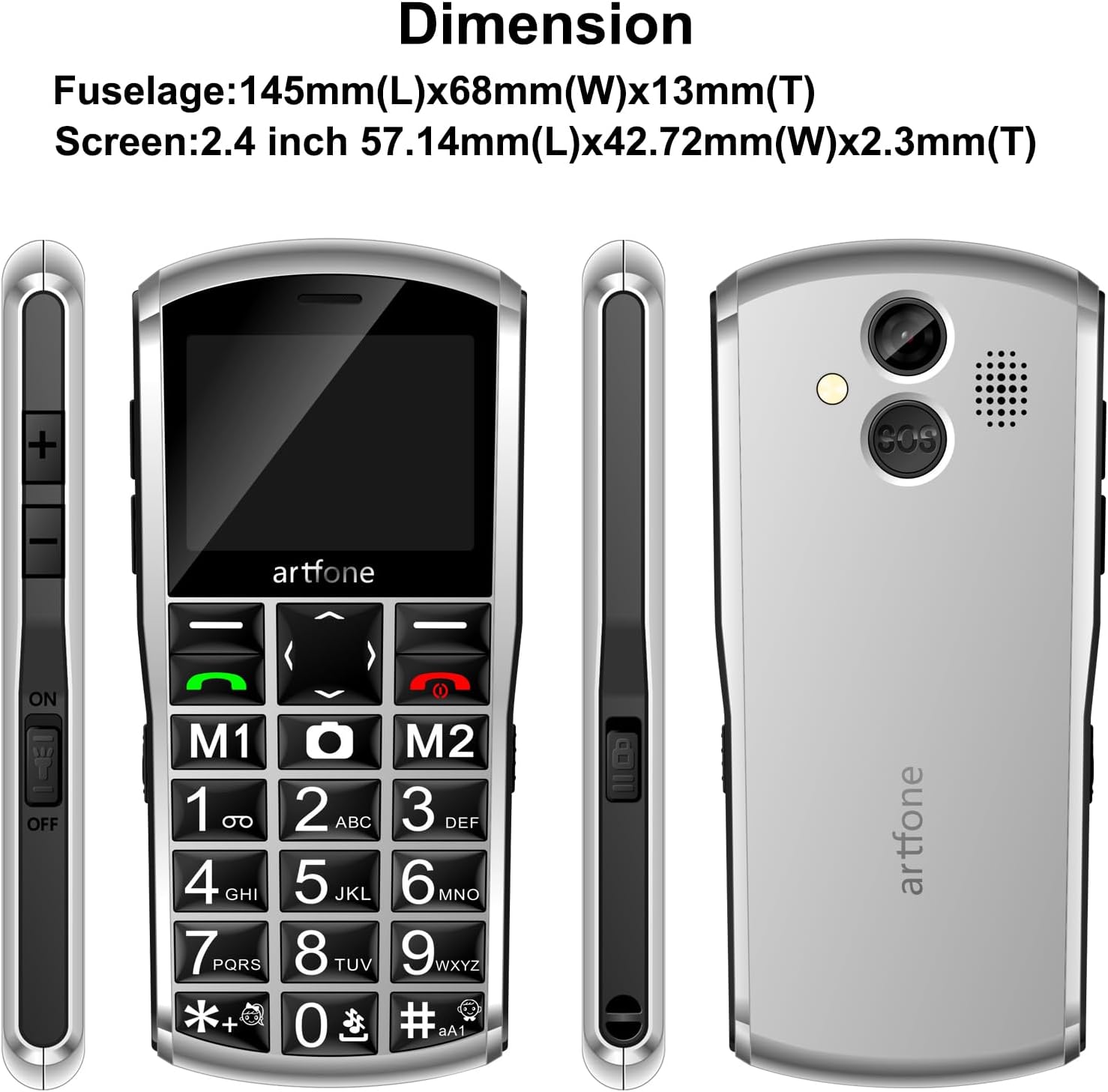
3.2 paveikslas: The artfone A400 showing its dimensions (145mm L x 68mm W x 13mm T) and various side views, including the volume buttons, power switch, and charging port.

3.3 paveikslas: Išsamią view of the artfone A400's side buttons, including volume controls, the power switch, and the prominent SOS button on the back.

3.4 paveikslas: The artfone A400 keypad, emphasizing the large fonts and keys designed for easy visibility and use.
3.5 paveikslas: The artfone A400's front receiver and rear speaker, designed for clear audio during calls and multimedia playback.
4. Sąranka
4.1 Akumuliatoriaus įdėjimas
- Nuimkite telefono galinį dangtelį, švelniai jį atlenkdami nuo įpjovos.
- Insert the 1800mAh battery into the battery compartment, ensuring the gold contacts align with the phone's terminals.
- Uždėkite galinį dangtelį, tvirtai spausdami, kol jis užsifiksuos vietoje.
4.2 SIM Card and Micro-SD Card Installation
The artfone A400 supports dual SIM cards (Nano-SIM) and a Micro-SD card for expanded storage.
- With the back cover and battery removed, locate the SIM card slots.
- Carefully insert your Nano-SIM card(s) into the designated slots. Ensure the metal contacts face downwards and the card is correctly oriented.
- If desired, insert a Micro-SD card (up to 64GB) into its dedicated slot for additional storage for photos, music, etc.
- Įdėkite bateriją ir galinį dangtelį.

4.1 paveikslas: Vidinis view of the artfone A400, illustrating the placement of Nano-SIM cards and a Micro-SD card.
4.3 Telefono įkrovimas
Your phone can be charged using the included USB-C cable or the charging dock.
- Įkrovimo stotelės naudojimas: Connect the USB charger cable to the charging dock, then place the phone into the dock. Ensure the phone is seated correctly and the charging indicator appears on the screen.
- Naudojant USB-C laidą: Connect the USB charger cable directly to the USB-C port on the bottom of the phone and to a power adapter.
A full charge typically takes approximately three hours. The battery indicator on the screen will show charging status.
5. Naudojimo instrukcijos
5.1 Maitinimo įjungimas/išjungimas
- Norėdami įjungti: Paspauskite ir palaikykite raudoną maitinimo / skambučio baigimo mygtuką, kol ekranas užsidegs.
- Norėdami išjungti: Press and hold the red End Call/Power button until the power-off options appear, then select 'Power off'.
5.2 Skambinimas ir skambučių priėmimas
- Norėdami paskambinti: Įveskite telefono numerį naudodami klaviatūrą ir paspauskite žalią skambinimo mygtuką.
- Norėdami atsiliepti į skambutį: Kai suskambės telefonas, paspauskite žalią skambinimo mygtuką.
- Norėdami baigti skambutį: Paspauskite raudoną mygtuką Baigti skambutį.
5.3 SOS avarinė funkcija
SOS mygtukas leidžia greitai susisiekti su iš anksto nustatytais pagalbos numeriais.
- SOS kontaktų nustatymas: Navigate to the SOS settings in the phone's menu. You can add up to 5 emergency contacts.
- Using the SOS Button: In an emergency, press and hold the SOS button located on the back of the phone for 3 seconds. The phone will automatically call and send an emergency text message to your pre-set contacts until one answers.

5.1 paveikslas: A hand demonstrating how to press the SOS button on the back of the artfone A400 for emergency calls.

5.2 paveikslas: Visual representation of the SOS function, showing how pressing the SOS button can alert up to 5 pre-selected emergency contacts.
5.4 Time-Telling Function
The phone can announce the current time verbally.
- Norėdami suaktyvinti: Press and hold the Volume Up (+) button on the side of the phone. The phone will announce the current time.

5.3 paveikslas: A hand holding the artfone A400, with an inset showing the volume '+' button, indicating its use for the time reporting function.
5.5 Contacts and Speed Dial
Store up to 1000 contacts and assign speed dial numbers.
- Kontaktų pridėjimas: Navigate to the 'Contacts' menu, select 'Add New', and enter the name and number. You can also associate contact photos.
- Greitasis rinkimas: Assign numbers to M1, M2, and keys 1-9, *, # for quick dialing. Refer to the phone's menu for specific instructions on setting up speed dial.
5.6 Pranešimai
The phone supports text messaging using T9 predictive text input.
- Composing Messages: Go to the 'Messages' menu, select 'New Message', and use the keypad to type your message.
- T9 Input: Press the number keys corresponding to the letters of your word. The phone will suggest words, which you can select.
5.7 Multimedia and Tools
The artfone A400 includes several useful features:
- Kamera: Access the camera from the menu to take photos.
- FM radijas: Įsijunkite vietines radijo stotis.
- Garso / vaizdo atkūrimas: Leisti mediją files stored on a Micro-SD card.
- Žibintuvėlis: Activate using the dedicated side switch.
- Calculator, Alarm, Calendar: Standard utility functions are available in the 'Tools' menu.
6. Funkcijos Overview
The artfone A400 is designed with specific user needs in mind, offering a range of practical features.
- 4G VoLTE Connectivity: Ensures clear call quality and reliable network performance on compatible 2G, 3G, and 4G LTE networks (T-Mobile and its MVNOs only).
- Patobulintas naudojimas: Features a redesigned operating system with larger fonts and clearer menu icons, ideal for users with visual impairments. The automatic keyboard backlight improves visibility in low-light conditions.
- Ilgai veikianti baterija: Equipped with an 1800mAh battery for extended usage and standby time.
- Dvigubo įkrovimo parinktys: Conveniently charge via the included USB-C cable or the desktop charging dock.
- Asmeniniai kontaktai: Supports associating contact photos with phone numbers for easy caller identification.
- Garsiakalbis: Suteikia amplified audio for calls and alerts, ensuring important sounds are not missed.
„6.1“ vaizdo įrašas: An official product video from Shenzhen Yujie Communication Co., Ltd, showcasing various features of the artfone A400, including its large buttons, SOS function, and charging methods. This video provides a visual demonstration of the phone's user-friendly design.
7. Priežiūra
To ensure the longevity and optimal performance of your artfone A400, follow these maintenance guidelines:
- Valymas: Telefono ekraną ir korpusą valykite minkšta, sausa šluoste. Venkite naudoti skystus valiklius ar abrazyvines medžiagas.
- Akumuliatoriaus priežiūra: Avoid extreme temperatures. Do not expose the battery to direct sunlight or very cold conditions. Charge the phone regularly, but avoid overcharging for extended periods.
- Saugykla: Jei telefoną ilgesnį laiką nenaudosite, įsitikinkite, kad jis yra iš dalies įkrautas (apie 50 %) ir laikomas vėsioje, sausoje vietoje.
- Apsauga: While durable, the phone's plastic shell can scratch. Consider using a protective pouch if available.
8. Problemų sprendimas
If you encounter issues with your artfone A400, refer to the following common problems and solutions:
| Problema | Galima priežastis | Sprendimas |
|---|---|---|
| Telefonas neįsijungia | Žemas akumuliatoriaus lygis; akumuliatorius netinkamai įdėtas; | Charge the phone for at least 30 minutes; Reinstall the battery, ensuring proper contact. |
| Negaliu skambinti / priimti skambučių | No SIM card; SIM card not inserted correctly; Out of network coverage; Incorrect network settings | Ensure SIM card is inserted correctly; Check network signal; Verify phone is compatible with your carrier (T-Mobile and MVNOs only). |
| Poor call quality/Loud speaker not working | Volume too low; Obstruction of speaker/microphone | Adjust volume using side buttons; Ensure speaker and microphone are clear of debris. |
| SOS funkcija neveikia | SOS contacts not set up; No network signal | Set up emergency contacts in the SOS settings; Ensure phone has network coverage. |
| Screen is dim or unresponsive | Žemas akumuliatoriaus lygis; programinės įrangos triktis | Charge the phone; Restart the phone. |
9. Specifikacijos
Key technical specifications for the artfone A400:
- Modelio pavadinimas: A400
- Operacinė sistema: „Artfone“ operacinė sistema
- Korinio ryšio technologija: 4G (VoLTE), 3G, 2G
- Belaidžio ryšio operatorių suderinamumas: T-Mobile and its MVNOs only (Not compatible with AT&T, Verizon, or locked SIM cards)
- Ekrano dydis: 2.4 colių
- Baterijos talpa: 1800 milijonųamp Valandos (mAh)
- Pokalbių telefonu laikas: Iki 8 valandų
- Atminties saugojimo talpa: 0.13 GB (Internal), expandable with Micro-SD card (up to 64GB)
- Įdiegtos RAM atminties dydis: 48 MB
- Ryšio technologija: „Bluetooth“, USB (USB-C)
- Garso lizdas: 3.5 mm
- Kamera: Galinis
- Ypatingos savybės: VoLTE, SOS Button, Time-Telling Function, Loud Speaker, Charging Dock, Dual SIM, Speed Dial, Large Buttons, Keyboard Backlight
- Prekės svoris: 9.1 uncijos
- Pakuotės matmenys: 5.98 x 4.65 x 2.32 colio
10. Garantija ir palaikymas
For warranty information or technical support, please refer to the documentation included with your purchase or contact artfone customer service. Keep your purchase receipt as proof of purchase for warranty claims.


