1. Įvadas
This manual provides instructions for the safe and efficient operation of your vretti Bluetooth Thermal Label Printer, model B0FNW9FCS5. Please read this manual thoroughly before using the device and retain it for future reference.
2. Saugos informacija
- Ensure the printer is connected to a power source with the correct voltage.
- Saugokite spausdintuvą nuo vandens ar per didelės drėgmės.
- Venkite spausdintuvo laikymo tiesioginiuose saulės spinduliuose arba šalia šilumos šaltinių.
- Nebandykite patys ardyti ar taisyti spausdintuvo. Kreipkitės į kvalifikuotus techninės priežiūros darbuotojus.
- Laikyti vaikams nepasiekiamoje vietoje.
- Use only vretti approved accessories and power adapters.
3. Pakuotės turinys
Patikrinkite, ar pakuotėje yra visi reikalingi daiktai:
- vretti Bluetooth Thermal Label Printer (Model B0FNW9FCS5)
- Maitinimo adapteris
- USB kabelis
- Greitos pradžios vadovas
- Sample Labels (50 premium labels)
4. Sąranka
4.1 Fizinis ryšys
- Prijunkite maitinimo adapterį prie spausdintuvo, o tada – prie maitinimo lizdo.
- Connect the USB cable from the printer to your computer (if using USB connection).
- Įjunkite spausdintuvą maitinimo jungikliu.
4.2 Etikečių įkėlimas
The printer features an integrated paper bin designed for easy label loading.
- Atidarykite viršutinį spausdintuvo dangtį.
- Place the roll of thermal labels into the integrated paper bin. Ensure the labels feed from the bottom of the roll and the printable side faces upwards.
- Adjust the guide rails to fit the width of your labels snugly, without creasing them. The printer supports label widths from 0.78 inches (19mm) to 4.6 inches (116mm).
- Feed the first label through the print mechanism until it is positioned correctly.
- Uždarykite viršutinį dangtį.

4.2.1 paveikslas: Label loading into the integrated paper bin. The visualization window allows monitoring label supply. Adjustable guide rails ensure proper label alignment for various sizes like 2"x3", 3"x3", and 4"x6".
4.3 Tvarkyklės ir programinės įrangos diegimas
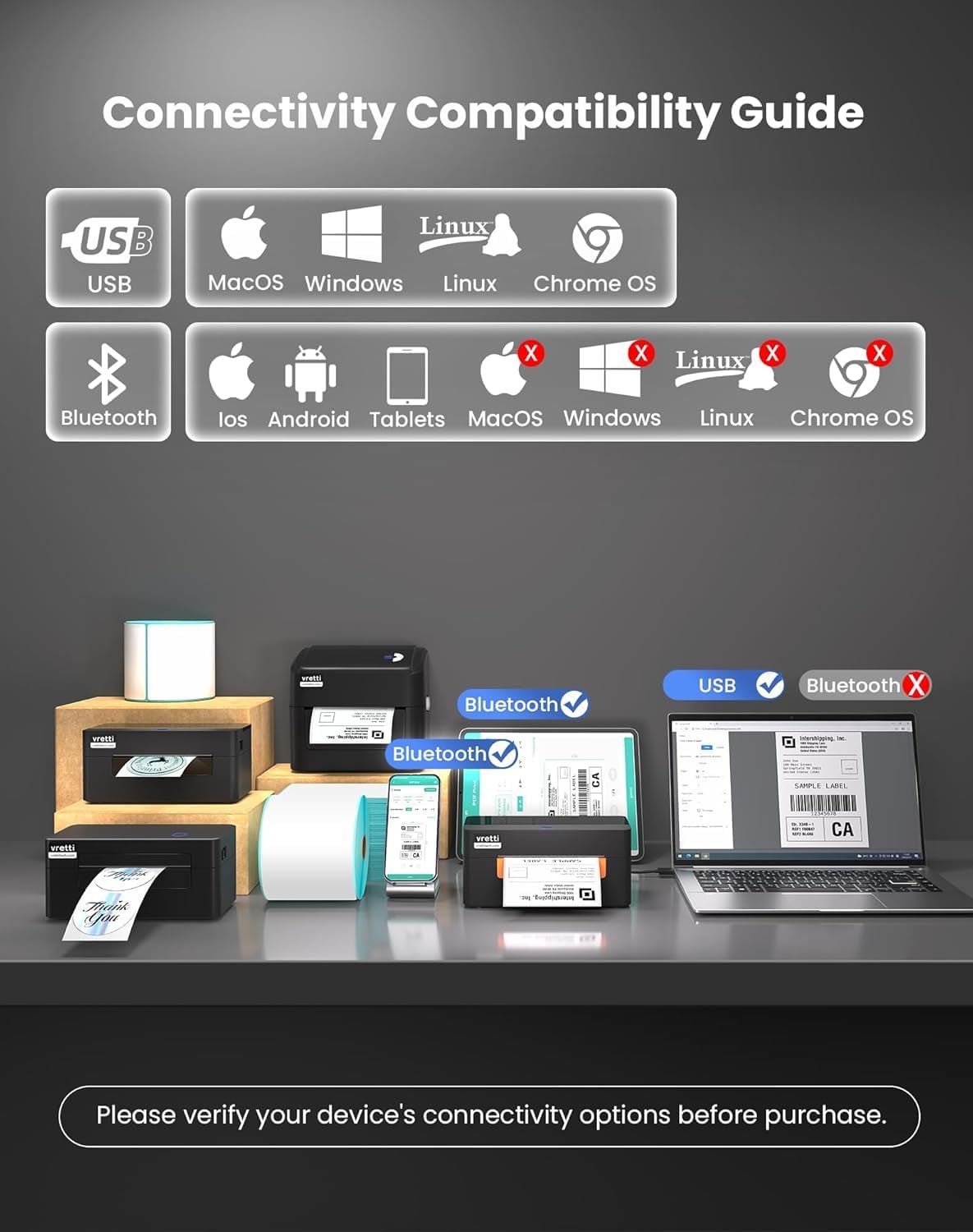
The vretti printer offers dual connectivity options: USB and Bluetooth.

4.3.1 paveikslas: Connectivity Compatibility Guide. USB connection is compatible with MacOS, Windows, Linux, and Chrome OS. Bluetooth connection is compatible with iOS, Android, and Tablets. Bluetooth is not supported for MacOS, Windows, Linux, or Chrome OS.
4.3.1 USB Connection (Windows/Mac/Linux/ChromeOS)
For most operating systems, the printer is designed for "Plug & Play" functionality. Connect the USB cable, and your system should automatically detect and install the necessary drivers within approximately 60 seconds. If drivers do not install automatically, refer to the included Quick Start Guide or the manufacturer's webSvetainė, kurioje pateikiamos rankinio tvarkyklių diegimo instrukcijos.
4.3.2 paveikslas: The vretti label printer is designed for quick deployment, allowing users to master its operation rapidly, often within 2 minutes for basic setup.
4.3.2 Bluetooth Connection (iOS/Android/Tablets)
- Ensure Bluetooth is enabled on your mobile device or tablet.
- Turn on the vretti printer.
- On your device, search for available Bluetooth devices and select the vretti printer (e.g., "vretti Printer" or similar).
- Vykdykite visus ekrane pateikiamus nurodymus, kad užbaigtumėte susiejimo procesą.
- Install the vretti printing application from your device's app store (e.g., Apple App Store, Google Play Store) to manage print jobs.
5. Naudojimo instrukcijos
5.1 Etikečių spausdinimas
The vretti thermal label printer uses direct thermal printing technology, eliminating the need for toner or ink. It is optimized for 4x6 inch shipping labels and barcodes.
- Ensure labels are properly loaded (refer to Section 4.2).
- Atidarykite dokumentą arba programą, iš kurios norite spausdinti.
- Programos meniu pasirinkite „Spausdinti“.
- Choose the vretti printer from the list of available printers.
- Adjust print settings as needed, such as label size (e.g., 4x6 inches) and orientation.
- Pradėkite spausdinimo užduotį.

5.1.1 paveikslas: The printer delivers 203 dpi resolution, ensuring clear and scannable barcodes with a 99.99% recognition rate for labels such as DHL 4x6 shipping labels and QR codes.

5.1.2 paveikslas: The vretti printer offers a print speed of 152 mm/s, capable of producing 72 labels per minute. Its direct thermal technology eliminates ink/toner, leading to significant cost savings and a print head lifespan three times longer than standard printers.
6. Priežiūra
6.1 Spausdinimo galvutės valymas
The printer features automatic cleaning functionality. However, if print quality degrades, manual cleaning may be necessary.
- Išjunkite spausdintuvą ir atjunkite jį nuo maitinimo šaltinio.
- Atidarykite viršutinį dangtį.
- Švelniai nuvalykite spausdinimo galvutę nepūkuota šluosteampsu izopropilo alkoholiu.
- Prieš uždarydami dangtį ir įjungdami spausdintuvą, leiskite spausdinimo galvutei visiškai išdžiūti.
6.2 Bendras valymas
Spausdintuvo išorę nuvalykite minkštu, sausu skudurėliu. Nenaudokite abrazyvinių valiklių ar tirpiklių.
7. Problemų sprendimas
| Problema | Galima priežastis | Sprendimas |
|---|---|---|
| Spausdintuvas neįsijungia | No power, faulty power adapter | Patikrinkite maitinimo jungtis, pabandykite kitą lizdą. |
| Prasta spausdinimo kokybė | Dirty print head, incorrect label type, low-quality labels | Clean the print head (Section 6.1). Ensure you are using thermal labels. Try new labels. |
| Etiketės netinkamai tiekiamos | Labels improperly loaded, guide rails not adjusted | Reload labels, adjust guide rails (Section 4.2). |
| Nepavyksta prisijungti per Bluetooth | Bluetooth not enabled, incorrect pairing, device incompatibility | Ensure Bluetooth is on. Re-pair the device. Confirm your device is compatible (iOS/Android/Tablets only). |
| Printer not recognized by computer (USB) | Driver issue, faulty USB cable, incorrect port | Try a different USB port or cable. Reinstall drivers if necessary. |
8. Specifikacijos
| Funkcija | Detalė |
|---|---|
| Prekės ženklas | vretti |
| Modelio numeris | B0FNW9FCS5 |
| Spausdinimo technologija | Tiesioginis terminis |
| Spausdinimo raiška | 203 dpi |
| Spausdinimo greitis | Up to 152 mm/s (72 labels/min) |
| Etiketės plotis | 0.78 colio – 4.6 colio (19 mm – 116 mm) |
| Ryšys | USB (Windows/Mac/Linux/ChromeOS), Bluetooth 5.0 (iOS/Android/Tablets) |
| Maksimali lapų talpa | 500 labels (integrated bin) |
| Matmenys (I x P x A) | 29.5 x 20.5 x 18.8 cm (apytiksliai) |
| Maitinimo šaltinis | Išorinis maitinimo adapteris |
9. Garantija ir palaikymas
vretti products are manufactured to high-quality standards. For warranty information and technical support, please refer to the warranty card included with your product or visit the official vretti website. Please have your model number (B0FNW9FCS5) and purchase date available when contacting support.


