1. Įvadas
The Chargeworx Smart Location Tag is designed to help you keep track of your personal items. This device utilizes the Apple Find My network, allowing you to locate your belongings using the Find My app on your compatible iOS device. This manual provides instructions for setting up, operating, and maintaining your Smart Location Tag.
2. Produktas baigtasview
The Chargeworx Smart Location Tag is a compact, lightweight device that can be attached to various items such as keys, bags, or luggage. It communicates with the Apple Find My network to provide location information.
Pagrindinės funkcijos:
- Apple Find My Network Integration: Locate your items using the Apple Find My app.
- Įspėjimai apie paliktus: Receive notifications if you leave your tagged item behind.
- Prarastas režimas: Mark your item as lost to receive location updates and contact information if found.
- Įrenginio bendrinimas: Share access to your tag's location with trusted friends and family.
- Kompaktiškas dizainas: Easily attaches to various personal items.

2.1 vaizdas: The Chargeworx Smart Location Tag packaging, illustrating the two-pack and key features like 'Left Behind Alerts' and 'Locate items WORLDWIDE'.
3. Sąrankos instrukcijos
Follow these steps to set up your Chargeworx Smart Location Tag with your Apple device.
3.1. Reikalavimai
- An iPhone, iPad, or iPod touch with iOS 14.5 or later, or iPadOS 14.5 or later.
- The Find My app enabled.
- „Bluetooth“ įjungtas.
- A stable internet connection (Wi-Fi or cellular data).
3.2. Pairing Your Smart Location Tag
- Ensure your Chargeworx Smart Location Tag has a working battery installed.
- Bring the Smart Location Tag close to your iOS device.
- Atidarykite Rasti Mano programą savo iOS įrenginyje.
- Bakstelėkite Daiktai skirtuką ekrano apačioje.
- Bakstelėkite + Pridėti elementą, tada pasirinkite Kitas palaikomas elementas.
- Follow the on-screen instructions to name your item and register it to your Apple ID.
- Once paired, your Smart Location Tag will appear in the Items list within the Find My app.

3.1 vaizdas: An iPhone displaying the Apple Find My app interface, showing a map with various devices and items, including a Smart Location Tag, listed below.
4. Naudojimo instrukcijos
Once your Chargeworx Smart Location Tag is set up, you can use the Find My app to manage and locate your items.
4.1. Jūsų daikto paieška
- Atidarykite Rasti Mano programėlė.
- Bakstelėkite Daiktai skirtuką.
- Select your Chargeworx Smart Location Tag iš sąrašo.
- The app will display the item's current or last known location on a map.
- If the item is nearby, you can tap Groti garsą to help locate it.
- If the item is not nearby, you can tap Kryptys to get walking or driving directions to its location.
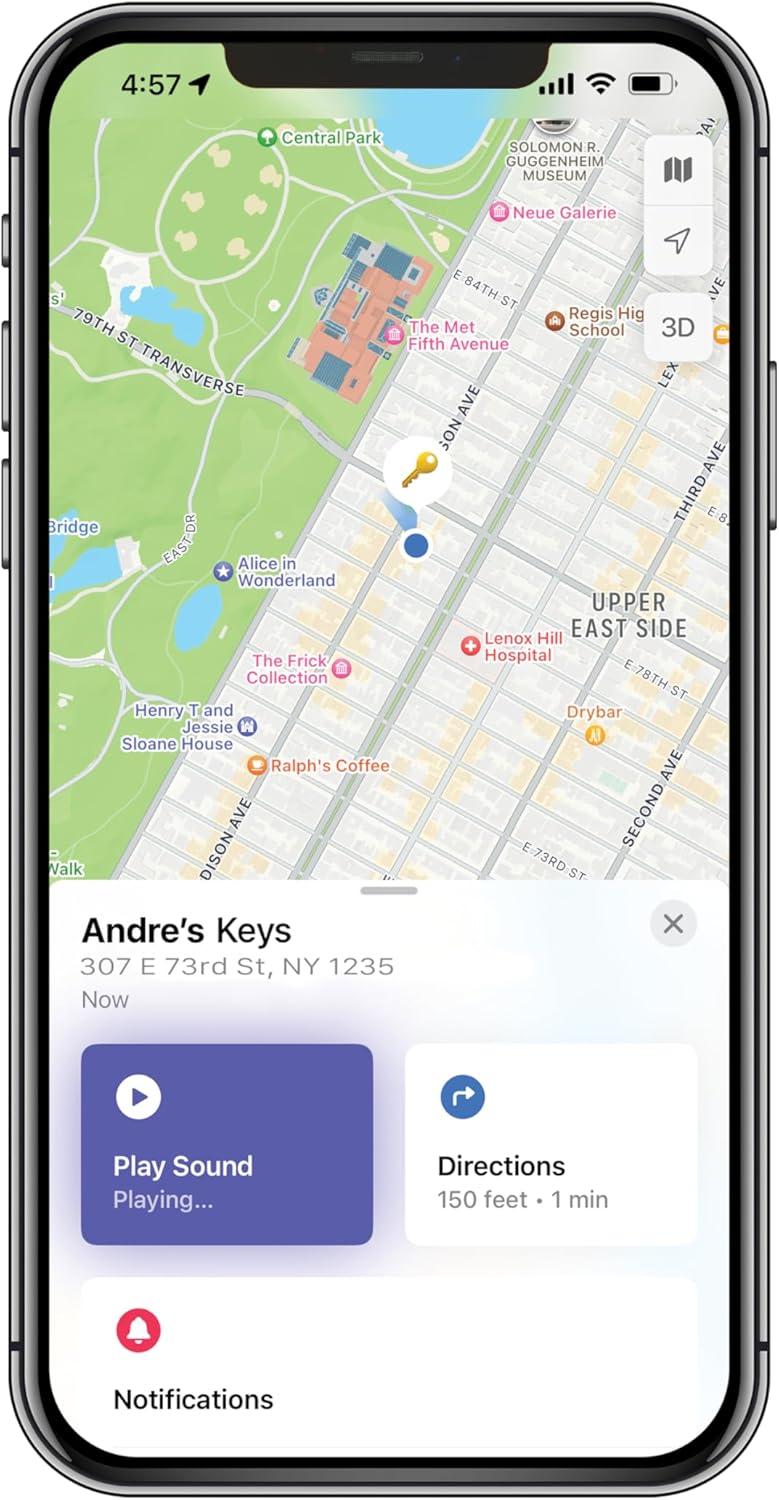
4.1 vaizdas: An iPhone screen displaying the Apple Find My app, showing a map with a key icon indicating the item's location, along with 'Play Sound' and 'Directions' buttons.
4.2. Left Behind Alerts
Left Behind Alerts notify you when you leave your item at an unfamiliar location. To manage these alerts:
- Į Rasti Mano app, select your Smart Location Tag.
- Slinkite žemyn ir bakstelėkite Pranešti, kai paliekama.
- Toggle the feature on or off.
- You can also set specific locations where you don't want to be notified (e.g., your home or office) by tapping Nauja Vieta under 'Notify Me, Except At'.
4.3. Prarastas režimas
If your item is truly lost, you can activate Lost Mode to help recover it.
- Į Rasti Mano app, select your Smart Location Tag.
- Slinkite žemyn ir bakstelėkite Įgalinti under 'Lost Mode'.
- Follow the prompts to enter a phone number or email address where you can be contacted.
- You can also write a custom message that will be displayed to anyone who finds your item and scans it with an NFC-enabled smartphone.
- Confirm to activate Lost Mode.
When Lost Mode is active, you will receive a notification if your item is detected by another device on the Apple Find My network.

4.2 vaizdas: An iPhone screen displaying the 'Lost Mode' setup within the Apple Find My app, prompting for contact information and a message for a lost item.
4.4. Sharing Your Item
You can share access to your Smart Location Tag's location with family and friends who also use the Find My app.
- Į Rasti Mano app, select your Smart Location Tag.
- Slinkite žemyn ir bakstelėkite Pridėti asmenį under 'Share This Item'.
- Select the contact you wish to share with and follow the on-screen instructions.
5. Priežiūra
Proper maintenance ensures the longevity and optimal performance of your Chargeworx Smart Location Tag.
5.1. Baterijos keitimas
The Chargeworx Smart Location Tag uses a replaceable coin cell battery (e.g., CR2032). When the battery level is low, you will receive a notification in the Find My app.
- Locate the battery compartment on your Smart Location Tag.
- Use a small tool (e.g., a coin) to twist open the battery cover.
- Išimkite seną bateriją.
- Įdėkite naują CR2032 bateriją teigiama (+) puse į viršų.
- Uždėkite akumuliatoriaus dangtelį ir pasukite, kad jį pritvirtintumėte.
5.2. Valymas
To clean your Smart Location Tag, wipe it with a soft, dry, or slightly damp cloth. Avoid using harsh chemicals, abrasive cleaners, or submerging the device in water.
6. Problemų sprendimas
If you encounter issues with your Chargeworx Smart Location Tag, refer to the following common solutions.
| Problema | Galimas sprendimas |
|---|---|
| Tag not appearing in Find My app |
|
| Inaccurate location or no location updates |
|
| Left Behind Alerts not working |
|
| Cannot hear the sound from the tag |
|
7. Specifikacijos
- Modelis: B0FP48NM7X
- Pakuotės matmenys: 3 x 3 x 1 colio
- Prekės svoris: 4 uncijos
- Ryšio technologija: Bluetooth
- Ypatingos savybės: Realaus laiko stebėjimas
- Suderinami įrenginiai: iOS Devices (iPhone, iPad, iPod touch with iOS/iPadOS 14.5 or later)
- Medžiaga: Plastikiniai
- Baterija: CR2032 coin cell (not included)
- Gamintojas: Chargeworx
8. Garantija ir palaikymas
8.1. Informacija apie garantiją
The Chargeworx Smart Location Tag paprastai ateina su a 1 metų ribota garantija from the date of purchase. This warranty covers manufacturing defects under normal use. Please retain your proof of purchase for warranty claims. For specific terms and conditions, refer to the warranty card included with your product or visit the official Chargeworx websvetainę.
8.2. Pagalba klientams
If you require further assistance or have questions not covered in this manual, please contact Chargeworx customer support. Contact information can usually be found on the product packaging, the official Chargeworx websvetainėje arba per savo mažmenininką.