1. Įvadas
This manual provides essential information for the safe and efficient operation of your Thomson 43UF4S35 43-inch 4K UHD Smart LED TV with Fire TV. Please read this manual thoroughly before using your television and retain it for future reference. This television combines a stunning 4K UHD display with the intuitive Fire TV operating system, offering integrated Alexa voice control, Apple AirPlay support, and comprehensive connectivity options for a complete entertainment experience.
2. Saugos informacija
Kad išvengtumėte gaisro, elektros smūgio ar sužalojimų, laikykitės šių saugos priemonių:
- Saugokite televizorių nuo lietaus ar drėgmės.
- Užtikrinkite tinkamą vėdinimą; neužblokuokite ventiliacijos angų.
- Nestatykite televizoriaus ant nestabilaus vežimėlio, stovo, trikojo, laikiklio ar stalo.
- Saugokite maitinimo laidą, kad ant jo neužeitų ar nesuspaustų.
- Atjunkite televizorių nuo elektros tinklo žaibuojant arba kai jis ilgą laiką nenaudojamas.
- Visus techninės priežiūros darbus patikėkite kvalifikuotam techninės priežiūros personalui.
3. Pakuotės turinys
Patikrinkite, ar pakuotėje yra visi daiktai:
- Thomson 43UF4S35 43-inch 4K UHD Smart LED TV
- Maitinimo adapteris
- Maitinimo kabelis
- Nuotolinio valdymo pultas (su baterijomis)
- TV stovas (2 vnt.)
- Vartotojo vadovas (šis dokumentas)
4. Fizinis viršusview
4.1. Matmenys

Vaizdas: Priekyje view of the Thomson 43UF4S35 TV with key dimensions labeled in centimeters. The TV measures 97 cm in width, 60 cm in total height with the stand, and has a screen height of 56 cm. The TV's depth is 9 cm, and the stand's depth is 27 cm.

Vaizdas: Šoninis profesionalasfile of the Thomson 43UF4S35 TV, illustrating its slim design and the attached stand.
4.2. Galinio skydelio jungtys

Vaizdas: Išsamus view of the rear connection panel of the Thomson 43UF4S35 TV. Ports are clearly labeled for Audio Out, CI+ slot, Headphone jack, three HDMI 2.1 inputs, LAN (Ethernet) port, Satellite input, Antenna input, and two USB 2.0 ports.
- GARSO IŠĖJIMAS: Skirta išorinėms garso sistemoms prijungti.
- CI+: Common Interface Plus slot for conditional access modules (CAM) to decrypt pay-TV channels.
- AUSINĖS: 3.5 mm lizdas ausinėms prijungti.
- 3 HDMI 2.1 jungtis: Didelės raiškos multimedijos sąsajos įvestys, skirtos prijungti tokius įrenginius kaip „Blu-ray“ grotuvai, žaidimų konsolės ar priedėliai.
- LAN: Ethernet prievadas laidiniam tinklui prijungti.
- PALYDOVAS: Input for satellite dish connection (DVB-S2).
- ANTENOS: Input for terrestrial antenna connection (DVB-T2) or cable TV (DVB-C).
- 2 USB 2.0: Universal Serial Bus ports for connecting USB storage devices for media playback or software updates.
5. Sąranka
5.1. Stovo surinkimas
- Atsargiai padėkite televizorių ekranu žemyn ant minkšto, lygaus paviršiaus, kad nepažeistumėte ekrano.
- Attach the two stand pieces to the designated slots on the bottom of the TV using the provided screws. Ensure they are securely fastened.
- Pakelkite televizorių vertikaliai ir pastatykite jį ant stabilaus, lygaus paviršiaus.
5.2. Maitinimo prijungimas
Connect the power adapter to the TV's power input, then plug the power cable into a wall outlet. The TV will enter standby mode.
5.3. Initial Setup (Fire TV)
- Norėdami įjungti televizorių, paspauskite nuotolinio valdymo pulto maitinimo mygtuką.
- Vykdykite ekrane pateikiamus nurodymus, kad pasirinktumėte kalbą, prisijunkite prie „Wi-Fi“ tinklo ir prisijunkite prie „Amazon“ paskyros.
- The Fire TV interface will guide you through setting up live TV channels (via the Triple Tuner) and installing your favorite streaming applications.
- Sukurti vartotojo profesionalųfiles for personalized recommendations and settings.
6. Televizoriaus valdymas
6.1. Nuotolinio valdymo pultas

Vaizdas: The Bluetooth remote control for the Thomson 43UF4S35 TV, featuring a central navigation pad, number buttons, and dedicated quick access buttons for popular streaming services like Netflix, Prime Video, Amazon Music, and an Alexa voice control button.
The included Bluetooth remote control allows for easy navigation. It features dedicated buttons for quick access to popular streaming services such as Netflix, Prime Video, and Amazon Music. The central navigation pad is used for menu selection and browsing.
6.2. Priešgaisrinės televizijos sąsaja

Vaizdas: A visual representation of the Fire TV home screen, displaying a selection of streaming applications and options for multiple user profiles, indicating the personalized nature of the interface.
The Fire TV operating system provides a user-friendly interface for accessing streaming services, live TV, and apps. Navigate using the remote control to browse content, launch applications, and manage settings. User profiles can be created to tailor recommendations and settings for different household members.
6.3. „Alexa“ balso valdymas
Press the Alexa button on your remote control and speak your commands. You can ask Alexa to:
- Ieškokite movies or TV shows.
- Paleiskite programas.
- Valdykite išmaniuosius namų įrenginius.
- Check the weather or get information.
6.4. „Apple AirPlay“
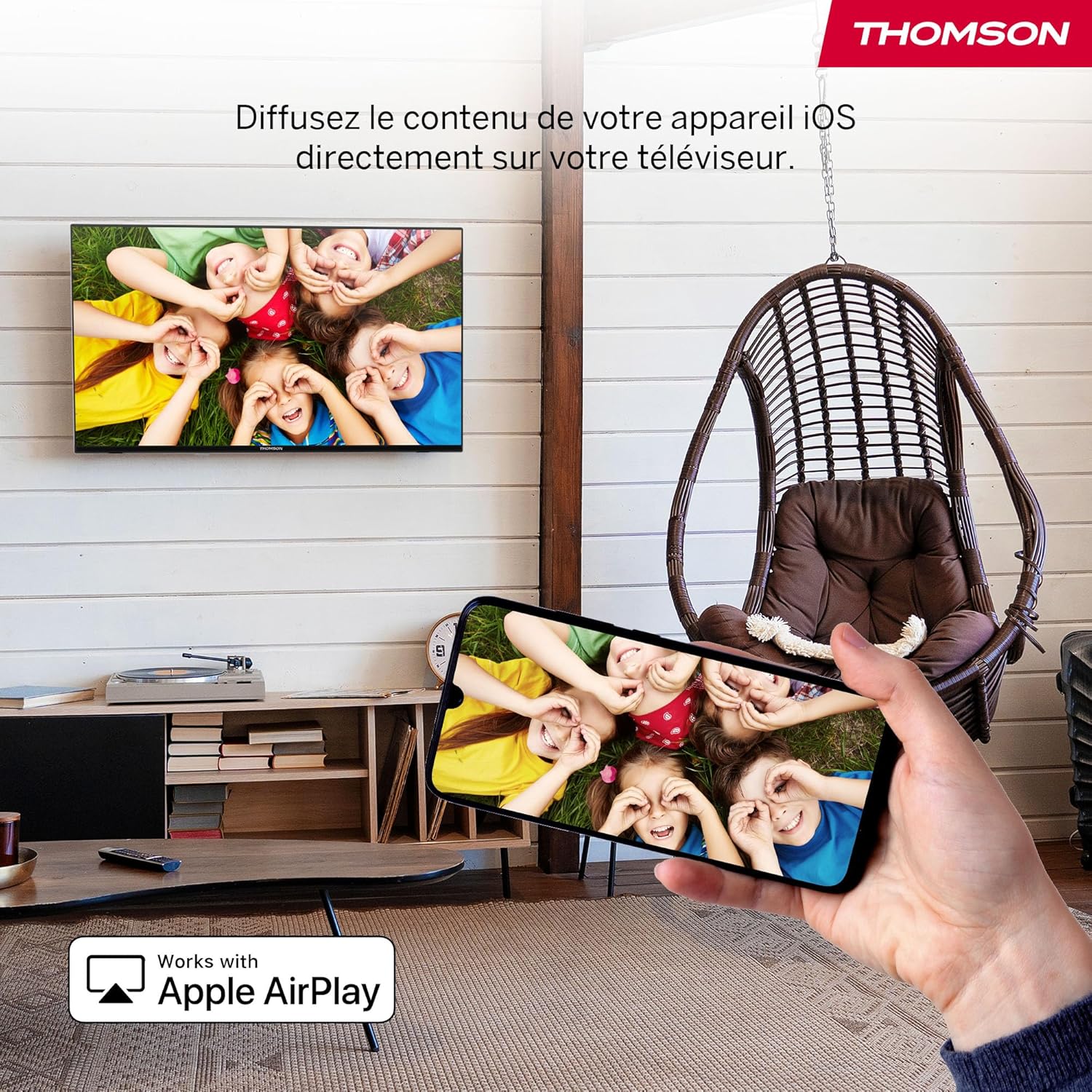
Vaizdas: An illustration of Apple AirPlay in use, showing content from an iPhone being wirelessly streamed or mirrored to the Thomson TV, enabling seamless content sharing from iOS devices.
The TV supports Apple AirPlay, allowing you to stream content directly from your iPhone, iPad, or Mac. Ensure your Apple device and the TV are connected to the same Wi-Fi network. Select the AirPlay icon on your Apple device and choose your Thomson TV from the list of available devices.
6.5. Trigubas derintuvas
The integrated Triple Tuner supports DVB-C (cable), DVB-S2 (satellite), and DVB-T2 (terrestrial antenna) signals. Connect your preferred signal source to the corresponding input on the rear panel. During initial setup or via the TV settings, you can scan for available channels.
6.6. Smart Home Dashboard

Vaizdas: A view of the Smart Home Dashboard accessible on the Thomson TV, presenting an organized interface for managing and controlling various smart home devices, including cameras and lighting, directly from the television screen.
Access the integrated Smart Home Dashboard to control compatible connected devices in your home. This feature allows you to manage smart lights, cameras, and other smart appliances directly from your TV screen.
7. Vaizdas ir garsas
7.1. 4K UHD with Dolby Vision

Vaizdas: A side-by-side comparison illustrating the visual difference between Standard Dynamic Range (SDR) and Dolby Vision. The Dolby Vision image on the right displays significantly improved contrast, brighter highlights, and more vibrant colors in a landscape scene.
Experience exceptional clarity with 4K UHD resolution, offering four times the detail of Full HD. Dolby Vision further enhances the visual experience by providing superior brightness, contrast, and color accuracy, bringing scenes to life with stunning realism.
7.2. Dolby Atmos Sound
Vaizdas: A visual representation of the Dolby Atmos audio experience, showing sound waves expanding from the television screen to envelop viewers, suggesting a multi-dimensional and immersive sound environment.
Dolby Atmos delivers rich, multi-dimensional sound that flows around you, creating an immersive audio experience. For the full effect, connect your TV to a compatible Dolby Atmos sound system.
8. Ryšys
Your Thomson TV offers a variety of connection options:
- HDMI: Connect up to three HDMI devices for high-definition audio and video.
- USB: Use the two USB 2.0 ports to play media from USB drives or for service updates.
- LAN (eternetas): Stabiliam laidiniam interneto ryšiui.
- „Wi-Fi“: Connect wirelessly to your home network for streaming and online features.
- Bluetooth: Pair Bluetooth-enabled devices such as headphones or soundbars.
- CI+: Insert a Conditional Access Module for encrypted digital TV services.
9. Priežiūra
Kad užtikrintumėte televizoriaus ilgaamžiškumą ir optimalų veikimą:
- Valymas: Gently wipe the screen with a soft, dry, lint-free cloth. For stubborn marks, use a screen-specific cleaner applied to the cloth, not directly to the screen. Clean the TV body with a soft, dry cloth.
- Vėdinimas: Įsitikinkite, kad televizoriaus gale esančios ventiliacijos angos nėra užblokuotos.
- Programinės įrangos atnaujinimai: The Fire TV system will periodically check for and install software updates automatically when connected to the internet.
10. Problemų sprendimas
Jei kyla problemų, žr. šiuos įprastus sprendimus:
| Problema | Galimas sprendimas |
|---|---|
| Nėra galios | Patikrinkite, ar maitinimo laidas tvirtai prijungtas prie televizoriaus ir sieninio lizdo. Įsitikinkite, kad lizdas veikia. |
| Nėra vaizdo, bet yra garsas | Patikrinkite, ar pasirinktas teisingas įvesties šaltinis. Patikrinkite išorinių įrenginių jungtis. |
| Nėra garso, bet vaizdas yra | Check volume levels and mute settings. Ensure external audio devices are correctly connected and powered on. |
| Nuotolinio valdymo pultas neveikia | Replace batteries. Ensure there are no obstructions between the remote and the TV. Re-pair the Bluetooth remote if necessary (refer to Fire TV settings). |
| Nepavyksta prisijungti prie „Wi-Fi“. | Įsitikinkite, kad jūsų maršrutizatorius įjungtas ir veikia. Iš naujo įveskite „Wi-Fi“ slaptažodį. Pabandykite iš naujo paleisti televizorių ir maršrutizatorių. |
| Prasta vaizdo kokybė | Check antenna/cable/satellite connections. Adjust picture settings (brightness, contrast, sharpness). Ensure the content source is high quality. |
11. Specifikacijos
| Funkcija | Detalė |
|---|---|
| Prekės ženklas | Tomsonas |
| Modelio numeris | 43UF4S35 |
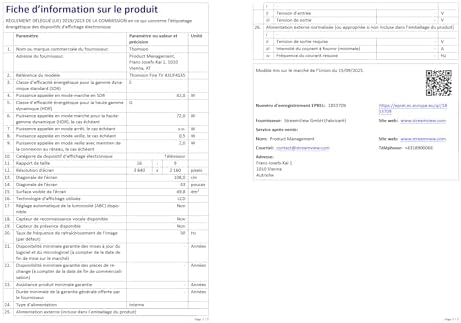
| Ekrano dydis | 43 colių (109 cm) |
| Rezoliucija | 4K UHD (3840 2160 x XNUMX XNUMX) |
| Ekrano technologija | LCD |
| Atnaujinimo dažnis | 50 Hz |
| Operacinė sistema | Gaisro televizija |
| Ypatingos savybės | Dolby Vision, Dolby Atmos, Alexa Voice Control, Apple AirPlay, Smart Home Dashboard |
| Ryšys | Wi-Fi, Bluetooth, Ethernet (LAN), 3x HDMI 2.1, 2x USB 2.0, CI+, Audio Out, Headphones, Satellite, Antenna |
| Trigubas derintuvas | DVB-C, DVB-S2, DVB-T2 |
| Spalva | Juoda |
| Krašto santykis | 16:9 |
| Gaminio matmenys (D x P x A) | 9 cm x 97 cm x 60 cm |
| Įtraukti komponentai | Power Adapter, Power Cable, Remote Control, Stand, User Manual |
| Gamintojas | STRAUKASVIEW GMBH |
| Kilmės šalis | Turkija |
12. Garantija ir palaikymas
Your Thomson 43UF4S35 TV comes with a 3 metų gamintojo garantijaŠi garantija taikoma medžiagų ir gamybos defektams, atsiradusiems įprasto naudojimo sąlygomis. Išsaugokite pirkimo įrodymą, jei galėtumėte pateikti pretenzijas dėl garantijos.
For technical support, troubleshooting assistance, or warranty service, please contact your retailer or the manufacturer, STREAMVIEW GMBH. Refer to your purchase documentation for specific contact details.


