1. Įvadas
This manual provides detailed instructions for the installation, operation, and maintenance of your MINCO M4A Tuya WiFi Smart Thermostat. This device is designed to control gas boiler heating systems, offering precise temperature management and smart home integration via Tuya WiFi connectivity. Please read this manual thoroughly before installation and use to ensure safe and efficient operation.
2. Saugos informacija
- Elektros sauga: Installation must be performed by a qualified electrician in accordance with local electrical codes. Always disconnect power before installation or maintenance.
- ttage: Įsitikinkite, kad termostato garsumastage rating matches your power supply (AC100-240V).
- Aplinka: Do not install the thermostat in areas with high humidity, direct sunlight, or extreme temperatures.
- Vaikai: Prietaisą laikykite vaikams nepasiekiamoje vietoje.
- Numatytas naudojimas: This thermostat is designed for controlling gas boiler heating systems only. Do not use it for other applications.
3. Produktas baigtasview
The MINCO M4A Smart Thermostat provides intelligent control over your heating system. It features a clear display, touch controls, and WiFi connectivity for remote management via the Tuya Smart app.
3.1 Pagrindinės savybės
- Išmanusis valdymas: Remote control via mobile app (Tuya Smart).
- Voice Linkage: Suderinamas su balso asistentais, kad būtų galima valdyti laisvų rankų įranga.
- Programuojamas: Time-sharing programming for energy saving.
- Energy Consumption Statistics: Monitor and manage energy usage.
- Lengvas montavimas: Single fire wire power supply, no complex wiring for certain setups.
3.2 Thermostat Components

Image showing both white and black versions of the MINCO M4A thermostat alongside a smartphone displaying the Tuya Smart app interface. This illustrates the device's appearance and its remote control capability.
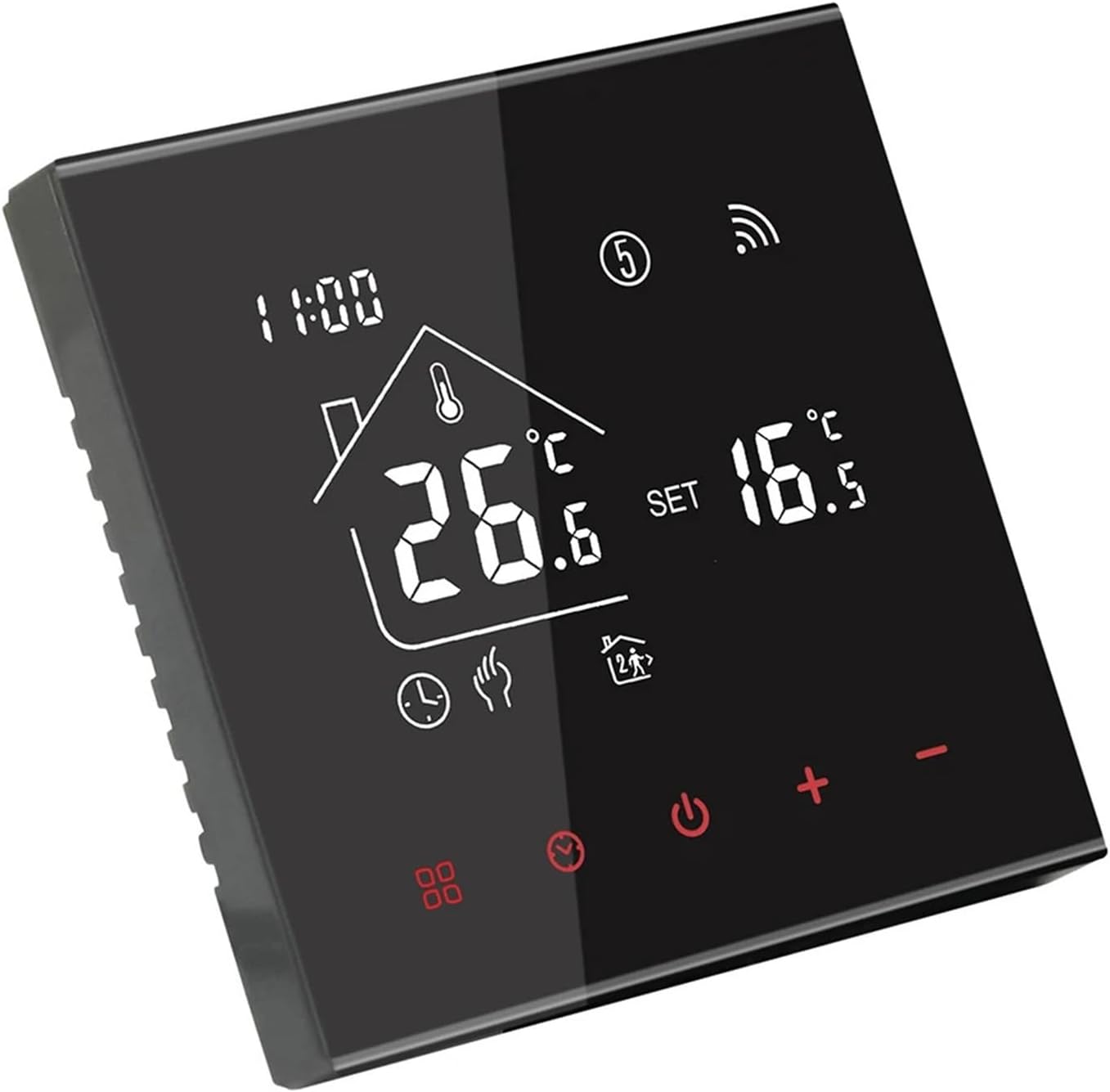
Kampuotas view of the black MINCO M4A Smart Thermostat, highlighting its sleek design and digital display showing current temperature (26.6°C) and set temperature (16.5°C).

Kampuotas view of the white MINCO M4A Smart Thermostat, showcasing its clean aesthetic and digital display with temperature readings.
The thermostat features a large LCD display for clear temperature readings and settings, along with intuitive touch buttons for control. The WiFi icon indicates connectivity status, and various mode icons show the current operating state.
4. Sąranka
4.1 Elektros instaliacija
ĮSPĖJIMAS: Prieš pradėdami montavimą, atjunkite visą šildymo sistemos maitinimą pagrindiniu grandinės pertraukikliu. To nepadarius, gali kilti elektros smūgis arba sugesti įranga.
- Montavimas: Choose a suitable location on an interior wall, away from drafts, direct sunlight, and heat sources. The recommended installation height is approximately 1.5 meters (5 feet) from the floor.
- Laidai: Refer to the wiring diagrams below for proper connection. Ensure all connections are secure. This model is designed for gas boiler systems.
- Termostato tvirtinimas: Mount the thermostat base to the wall using screws. Connect the display unit to the base.
- Atkurti maitinimą: Baigus montavimą ir patikrinus visus prijungimus, atkurkite šildymo sistemos elektros tiekimą.

Detailed diagram showing the dimensions (86mm x 86mm front, 14mm depth, 27mm back box depth) and wiring terminals for the black MINCO M4A thermostat. The wiring diagram indicates connections for AC100-240V power (L, N) and boiler control (NO, NC, L7, L8).

Detailed diagram showing the dimensions (86mm x 86mm front, 14mm depth, 27mm back box depth) and wiring terminals for the white MINCO M4A thermostat. The wiring diagram indicates connections for AC100-240V power (L, N) and boiler control (NO, NC, L7, L8).
Wiring Terminal Legend:
- L: Live Wire (AC100-240V)
- N: Neutral Wire (AC100-240V)
- NE: Normally Open (Boiler Control)
- NC: Normally Closed (Boiler Control)
- L7, L8: Auxiliary connections (refer to specific boiler manual if applicable)
4.2 App Pairing (Tuya Smart)
- Atsisiųsti programą: Atsisiųskite programėlę „Tuya Smart“ arba „Smart Life“ iš savo išmaniojo telefono programėlių parduotuvės („iOS“ arba „Android“).
- Registruotis / Prisijungti: Susikurkite paskyrą arba prisijunkite prie esamos paskyros.
- Pridėti įrenginį: In the app, tap the "+" icon to add a new device. Select "Small Home Appliances" > "Thermostat" or search for "Thermostat".
- Įjunkite susiejimo režimą: On the thermostat, press and hold the WiFi icon or a designated button (refer to on-screen instructions if available) until the WiFi indicator on the thermostat starts blinking rapidly.
- Prisijunkite prie WiFi: Follow the in-app instructions to connect the thermostat to your 2.4GHz WiFi network. Ensure your phone is also connected to the same 2.4GHz network during pairing.
- Įrenginys pridėtas: Once successfully paired, the app will confirm the device has been added. You can then rename the thermostat for easy identification.
5. Operacija
5.1 Pagrindiniai valdikliai
- Maitinimo įjungimas/išjungimas: Paspauskite maitinimo mygtuką (⏻), kad įjungtumėte arba išjungtumėte termostatą.
- Temperatūros reguliavimas: Use the "+" and "-" buttons to increase or decrease the desired set temperature. The display will show both the current room temperature and the set temperature.
- Režimo pasirinkimas: Press the mode button (often represented by a fan or gear icon) to cycle through available modes (e.g., Manual, Auto/Program).
5.2 Advanced Features (via Tuya Smart App)
- Nuotolinio valdymo pultas: Adjust temperature, change modes, and power on/off from anywhere using the Tuya Smart app.
- Planavimas: Set up daily or weekly heating schedules to automatically adjust temperatures based on your routine, optimizing comfort and energy savings.
- Valdymas balsu: Integrate with Amazon Alexa or Google Assistant for voice commands (e.g., "Alexa, set living room thermostat to 22 degrees").
- Scenos automatizavimas: Create smart scenes within the Tuya app to automate thermostat behavior based on other smart devices or conditions (e.g., "Turn on heating when outdoor temperature drops below 10°C").
- Energijos stebėjimas: View historical energy consumption data to identify patterns and further optimize usage.
6. Priežiūra
- Valymas: Nuvalykite termostato ekraną irasinminkštu, sausu skudurėliu. Nenaudokite abrazyvinių valiklių, tirpiklių ir nepurkškite tiesiai ant įrenginio.
- Nėra naudotojo aptarnaujamų dalių: The thermostat contains no user-serviceable parts. Do not attempt to open or repair the device yourself.
- Programinės įrangos atnaujinimai: Ensure your Tuya Smart app and thermostat firmware are kept up-to-date for optimal performance and security. Updates are typically managed through the app.
7. Problemų sprendimas
| Problema | Galima priežastis | Sprendimas |
|---|---|---|
| Termostatas neįsijungia. | Nėra maitinimo šaltinio; neteisingas laidų išvedžiojimas. | Check circuit breaker. Verify wiring connections (L, N) are correct and secure. Consult a qualified electrician if unsure. |
| Šildymo sistema nereaguoja. | Incorrect wiring to boiler; thermostat in wrong mode; boiler issue. | Ensure boiler control wires (NO, NC) are correctly connected. Check thermostat mode (e.g., Manual, Auto). Verify boiler is operational. |
| Nepavyksta prisijungti prie „Wi-Fi“. | Incorrect WiFi password; 5GHz network; thermostat too far from router; pairing mode not active. | Ensure correct 2.4GHz WiFi network and password. Move thermostat closer to router. Re-enter pairing mode on thermostat. |
| Netikslus temperatūros rodmuo. | Termostatas veikiamas skersvėjų ar šilumos šaltinių. | Jei įmanoma, perkelkite termostatą. Įsitikinkite, kad jutiklio veikimui neturi įtakos jokie išoriniai veiksniai. |
| Programos valdymas neveikia. | Thermostat offline; app issues; internet connectivity problems. | Check if thermostat WiFi icon is solid. Restart app. Check home internet connection. |
8. Specifikacijos
- Modelis: M4A Gas Boiler 3A H
- Maitinimas: AC100-240V
- Dabartinė apkrova: 3A (for Gas Boiler)
- Ryšys: „Wi-Fi“ (2.4 GHz)
- Temperatūros jutiklis: NTC
- Temperatūros tikslumas: ±0.5°C
- Set-point Range: 5-35°C
- Matmenys: 86mm x 86mm x 14mm (front panel)
- Montavimas: Wall-mounted (standard 60mm back box)
- Prekės svoris: 1.76 uncijos (apie 50 g)
- Gamintojas: Tang Xiaoli Electronic Commerce Shenzhen
9. Garantija ir palaikymas
This product comes with a standard manufacturer's warranty. For specific warranty terms and conditions, please refer to the documentation provided with your purchase or contact your retailer. For technical support, troubleshooting assistance, or inquiries regarding your MINCO M4A Smart Thermostat, please contact the seller or manufacturer directly.
Gamintojas: Tang Xiaoli Electronic Commerce Shenzhen


