1. Įvadas
This manual provides essential information for the safe operation, assembly, maintenance, and troubleshooting of your Varstrom VS10 Electric Scooter. Please read this manual thoroughly before first use to ensure proper function and to prevent injury or damage.
2. Saugos gairės
Operating an electric scooter carries inherent risks. Adhere to the following safety guidelines:
- Always wear a helmet and appropriate protective gear (knee pads, elbow pads).
- Laikykitės visų vietinių eismo įstatymų ir taisyklių.
- Nevažiuokite šlapia, lyjant stipriai ar slidžiais paviršiais.
- Avoid riding at night or in low visibility conditions. If unavoidable, ensure all lights are functional and wear reflective clothing.
- Laikykitės saugaus greičio ir atstumo nuo kitų transporto priemonių ir pėsčiųjų.
- Neatlikite triukų ar staigių manevrų.
- Prieš kiekvieną važiavimą įsitikinkite, kad paspirtukas yra visiškai įkrautas ir visi komponentai yra tvirtai pritvirtinti.
- Didžiausia keliamoji galia yra 120 kg. Neviršykite šios ribos.
- Šis paspirtukas skirtas tik suaugusiesiems.
3. Pakuotės turinys
Patikrinkite, ar pakuotėje yra visi reikalingi daiktai:
- Varstrom VS10 Electric Scooter
- Įkroviklis
- Vartotojo vadovas (šis dokumentas)
4. Produktas baigtasview
Familiarize yourself with the main components of your Varstrom VS10 Electric Scooter.

Vaizdas: Šoninė view of the Varstrom VS10 Electric Scooter, showcasing bendrą dizainą ir komponentus.
Pagrindinės funkcijos:
- Variklis: 500W Brushless DC Motor for efficient power delivery.
- Baterija: 48V 15.6Ah Lithium-ion battery for extended range.
- Padangos: 10-inch puncture-proof solid tires.
- Sustabdymas: Front dual suspension and rear dual suspension for ride comfort.
- Apšvietimas: Integrated headlight, bright rear brake light, and dual handlebar turn signals.
- Ekranas: Intelligent LED screen showing speed, battery level, and riding mode.
- Valdymas: App control via smartphone for various settings.
- Perkeliamumas: Greitas sulankstymo mechanizmas lengvam laikymui ir transportavimui.
5. Surinkimas ir sąranka
5.1 Paspirtuko išskleidimas
The scooter is shipped in a folded state. Follow these steps to unfold it:
- Padėkite paspirtuką ant lygaus paviršiaus.
- Raskite sulankstymo mechanizmo fiksatorių šalia vairo kolonėlės pagrindo.
- Release the latch and carefully lift the steering column until it locks into the upright position. Ensure the locking mechanism is fully engaged.
- Raise the handlebars and secure them if they are folded down.

Image: Illustration showing the folded and unfolded dimensions of the Varstrom VS10 Electric Scooter, demonstrating its compact storage capability.
5.2 Pradinis įkrovimas
Prieš pirmąją važiavimą pilnai įkraukite paspirtuko akumuliatorių.
- Įsitikinkite, kad paspirtukas išjungtas.
- Raskite įkrovimo prievadą, paprastai esantį denio šone.
- Prijunkite įkroviklį prie įkrovimo prievado, tada įjunkite įkroviklį į standartinį sieninį lizdą.
- Įkrovimo indikatorius ant įkroviklio paprastai įkrovimo metu šviečia raudonai, o visiškai įkrovus – žaliai.
- Įkrovimo laikas yra maždaug 6–7 valandos. Neperkraukite.

Vaizdas: Išsamus view of the scooter's battery compartment and charging specifications, highlighting the 48V 15.6Ah battery and 6-7 hour charging time.
6. Operacija
6.1 Maitinimo įjungimas/išjungimas
- Norėdami įjungti: paspauskite ir palaikykite nuspaudę LED ekrano maitinimo mygtuką, kol ekranas įsijungs.
- Norėdami išjungti: paspauskite ir palaikykite maitinimo mygtuką, kol ekranas išsijungs.
6.2 LED Display and Controls
The integrated LED display provides real-time information and control options.

Image: Close-up of the scooter's intelligent LED screen, displaying current speed, selected gear (riding mode), and battery level.
- Greičio ekranas: Rodo dabartinį važiavimo greitį.
- Baterijos ekranas: Rodo likusį akumuliatoriaus įkrovą.
- Gear Shift (Riding Modes): Press the 'Set/Switch' button to cycle through Eco, Drive, and Sport modes.
6.3 Važiavimo režimai
- Ekologinis režimas: Lowest speed, maximum range, suitable for beginners or crowded areas.
- Vairavimo režimas: Medium speed, balanced performance for daily commuting.
- Sporto režimas: Highest speed, maximum power, for experienced riders on open roads.
6.4 Kruizo kontrolė
To activate cruise control, maintain a consistent speed for a few seconds. The scooter will beep, and cruise control will engage. To disengage, press the brake lever or accelerate.
6.5 Apšvietimo sistema
The scooter is equipped with a comprehensive lighting system for visibility and safety.
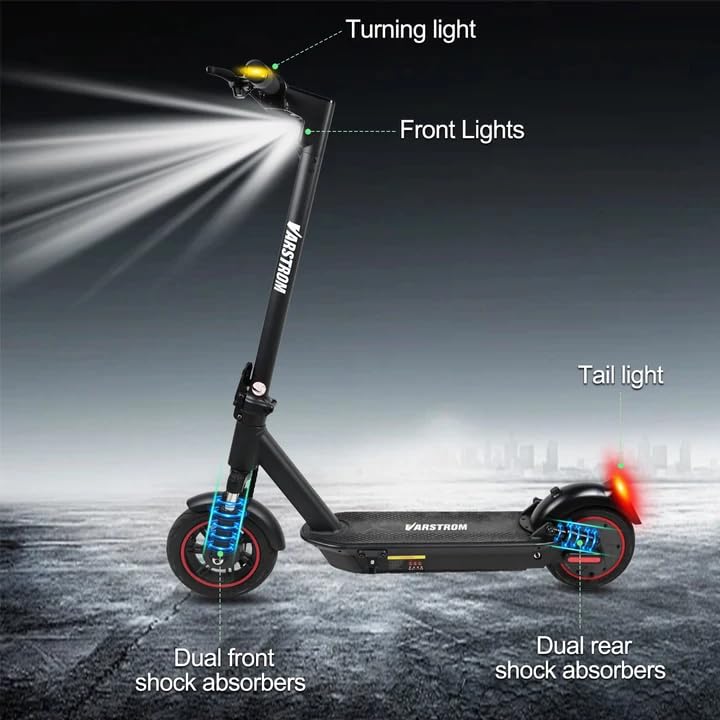
Image: Diagram illustrating the scooter's front lights, turning lights on the handlebars, tail light, and the dual front and rear shock absorbers.
- Priekinis žibintas: Turn on/off via the app or dedicated button (if available).
- Tail Light/Brake Light: The rear light illuminates when the scooter is powered on and brightens when the brake is applied.
- Posūkio signalai: Activate turn signals using the controls on the handlebars to indicate your turning direction.
6.6 Stabdymas
The scooter features front braking. Apply the brake lever gently to slow down. For emergency stops, apply firm and even pressure to the brake lever. Avoid sudden braking at high speeds.
6.7 „Tuya“ išmaniosios programėlės valdymas
Enhance your riding experience by connecting your scooter to the Tuya Smart app.

Image: Screenshot of the Tuya Smart App interface, showing options to unlock the scooter, control cruise, turn on/off headlights, switch riding modes, and set speed limits.
- Atsisiųskite programėlę „Tuya Smart“ iš savo išmaniojo telefono programėlių parduotuvės.
- Įsitikinkite, kad jūsų paspirtukas įjungtas, o telefone įjungtas „Bluetooth“ ryšys.
- Open the app and follow the instructions to add a new device. You may need to hold the brake and power button simultaneously to activate Bluetooth pairing mode.
- Per programėlę galite:
- Unlock/Lock the scooter remotely.
- Adjust lights.
- Switch riding modes.
- Set cruise control.
- Toggle units (km/mph).
- View real-time ride data.
- Enable/disable zero start (safety feature).
7. Priežiūra
7.1 Akumuliatoriaus priežiūra
- Reguliariai įkraukite bateriją, net jei jos nenaudojate, kad palaikytumėte jos būklę.
- Venkite visiškai iškrauti akumuliatorių.
- Paspirtuką laikykite vėsioje, sausoje vietoje, toliau nuo tiesioginių saulės spindulių ir ekstremalių temperatūrų.
- Naudokite tik pateiktą įkroviklį.
7.2 Valymas
Nuvalykite paspirtuką reklamaamp audiniu. Nenaudokite aukšto slėgio vandens srovės ir nemerkite paspirtuko į vandenį, nes tai gali pažeisti elektrinius komponentus.
7.3 Padangų patikra
Although the tires are puncture-proof solid tires, regularly inspect them for any signs of damage, cracks, or embedded debris.
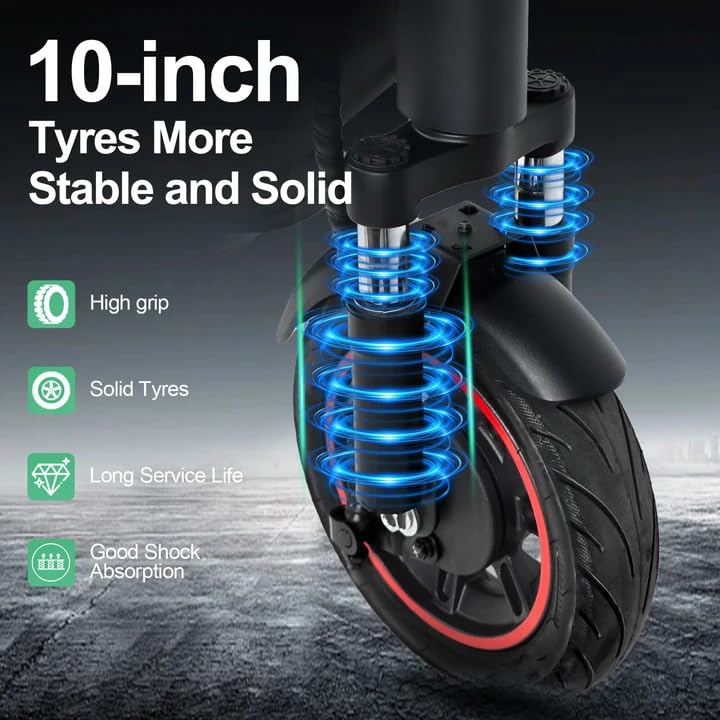
Image: Close-up of the scooter's 10-inch solid tires and dual suspension system, emphasizing stability and shock absorption.
8. Problemų sprendimas
| Problema | Galima priežastis | Sprendimas |
|---|---|---|
| Paspirtukas neįsijungia | Išsikrovusi baterija; Atsilaisvinusios jungtys; Maitinimo mygtuko gedimas | Charge the battery; Check all visible connections; Contact support if issue persists. |
| Sumažintas diapazonas arba galia | Low battery; Overload; Cold weather; Tire damage | Fully charge battery; Ensure load is within limits; Battery performance decreases in cold; Inspect tires. |
| Programa neprisijungia | Bluetooth off; Scooter not in pairing mode; App issue | Ensure phone Bluetooth is on; Activate scooter's Bluetooth pairing mode (brake + power button); Restart app/phone. |
| Brakes not responsive | Brake cable loose or damaged | Inspect brake cable and lever; Seek professional service if necessary. |
9. Specifikacijos
| Parametras | Vertė |
|---|---|
| Variklis | 500W Brushless (50N·m torque) |
| Baterija | 48V 15.6Ah Ličio |
| Maksimalus diapazonas | Up to 60 km per charge |
| Maksimalus greitis | 25 km/val |
| Įkrovimo laikas | 6-7 valandas |
| Padangos | 10-inch Puncture-Proof Solid Tires |
| Sustabdymas | Front Dual Suspension + Rear Dual Suspension |
| Maksimali apkrova | 120 kg |
| Laipiojimo kampas | 15° |
| Unfolding Size (LWH) | 117 x 53 x 120 cm |
| Folding Size (LWH) | 117 x 53 x 56 cm |
| Svoris | 19.6 kg |
| Ypatingos savybės | Digital Display, Foldable, Rechargeable, App Control, Cruise Control, Turning Indicator Light |

Paveikslėlis: Išpjova view illustrating the 500W brushless DC motor, highlighting its power and efficiency, alongside key performance metrics.
10. Garantija ir palaikymas
For warranty information, technical support, or service inquiries, please refer to the purchase documentation or contact your retailer. Keep your proof of purchase for warranty claims.


