1. Įvadas
Thank you for choosing the EWEADN V102 Wired Gaming Keyboard. This manual provides essential information for setting up, operating, and maintaining your new keyboard. Please read it thoroughly to ensure optimal performance and longevity of your device.

Figure 1: EWEADN V102 Wired Gaming Keyboard
2. Pakuotės turinys
Įsitikinkite, kad pakuotėje yra visi daiktai:
- EWEADN V102 Wired Gaming Keyboard
- C tipo USB kabelis
- Vartotojo vadovas (šis dokumentas)
3. Sąrankos instrukcijos
3.1 Klaviatūros prijungimas
- Klaviatūroje raskite C tipo USB prievadą.
- Prijunkite vieną pateikto USB Type-C laido galą prie klaviatūros.
- Connect the other end of the USB Type-C cable to an available USB port on your computer or compatible device.
- Klaviatūra yra „plug-and-play“ tipo ir turėtų būti automatiškai atpažinta jūsų operacinės sistemos.

Figure 2: Wired Type-C Connectivity
4. Naudojimo instrukcijos
4.1 Multi-Function Control Knob
The smart rotary knob provides quick control over various functions:
- Vienas paspaudimas: Toggles between backlight modes.
- Pasukti: Adjusts backlight brightness.
- Hold FN + Rotate Knob: Switches to multimedia mode for volume control (rotate) and mute (press).

Figure 3: Multi-Function Control Knob
Video 1: Demonstration of the EWEADN V102 Keyboard's multi-function knob and lighting effects.
4.2 Ekranas
The integrated display screen shows real-time status indicators without requiring additional software:
- Caps Lock status
- Num Lock status
- Win Lock status
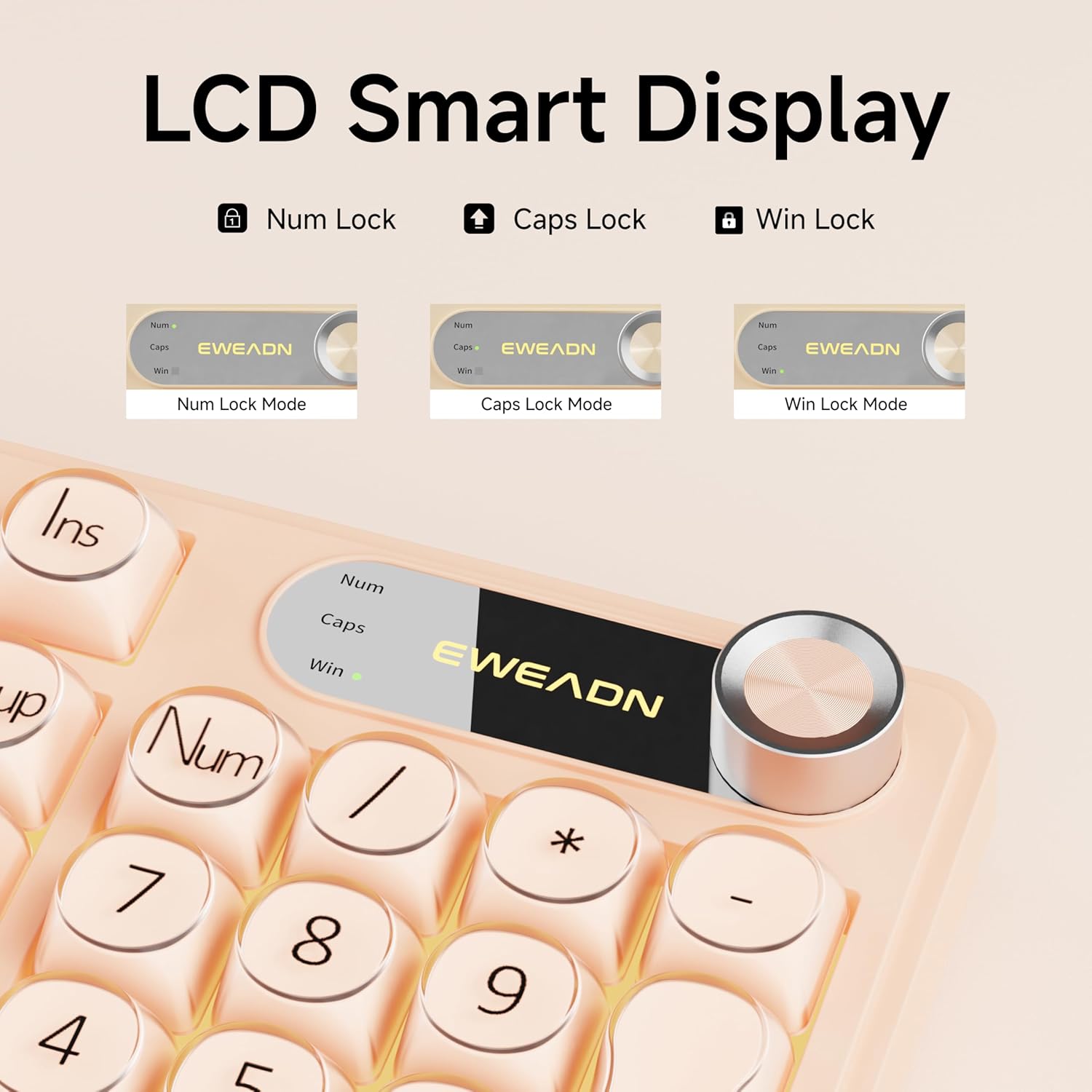
Figure 4: LCD Smart Display
4.3 RGB apšvietimas
Customize your typing experience with dynamic RGB lighting:
- FN + INS: Switches between 12 stunning RGB lighting effects.
- FN + PGUP / PGDN: Adjusts backlight brightness (5 levels).
- FN + "_" or "+": Adjusts lighting speed (5 levels).
- FN + Grįžimo klavišas: Įjungia / išjungia foninį apšvietimą.

Figure 5: RGB Backlight Control Functions
Video 2: Demonstration of various RGB lighting effects on the keyboard.
4.4 Dual-System Compatibility
The V102 keyboard is designed for broad compatibility across multiple operating systems and devices:
- Windows
- Mac (FN + S for Mac layout)
- Android
- iOS
- Xbox
- PS4
- PS5

Figure 6: Dual-System Connection for Windows and Mac
4.5 Ergonomiškas dizainas
The keyboard features a streamlined layout and adjustable typing angles for enhanced comfort during extended use. It includes a numeric keypad for efficient data entry.

Figure 7: 98-Key Layout and Adjustable Feet
4.6 Tylus veikimas
The membrane keyboard design is engineered to reduce typing sound, providing a quieter experience suitable for various environments.

Figure 8: Silent Computer Keyboard Design
4.7 Apsipylimui atspari konstrukcija
The keyboard features a spill-resistant design to protect against accidental liquid spills. In case of a spill, promptly disconnect the keyboard and allow it to dry completely before reconnecting.

Figure 9: Spill-Resistant Design
5. Priežiūra
To ensure the longevity and optimal performance of your EWEADN V102 keyboard, follow these maintenance guidelines:
- Valymas: Use a soft, lint-free cloth to wipe the surface of the keyboard. For deeper cleaning, use a can of compressed air to remove dust and debris from between the keys. Avoid using harsh chemicals or abrasive materials.
- Saugykla: Klaviatūrą laikykite vėsioje, sausoje vietoje, apsaugotoje nuo tiesioginių saulės spindulių ir ekstremalių temperatūrų.
- Tvarkymas: Venkite klaviatūros numetimo ir per didelės jėgos poveikio, nes tai gali pažeisti vidinius komponentus.
6. Problemų sprendimas
Jei kyla problemų dėl klaviatūros, žr. šiuos įprastus sprendimus:
- Klaviatūra nereaguoja: Ensure the USB Type-C cable is securely connected to both the keyboard and your device. Try connecting to a different USB port or a different device to rule out port or device issues.
- Foninis apšvietimas neveikia: Check if the backlight is turned off using the FN + Backspace shortcut. Adjust brightness using FN + PGUP/PGDN.
- Raktai neregistruojami: Ensure no debris is lodged under the keys. If the issue persists, contact customer support.
- Incorrect layout (Mac users): Press FN + S to switch to the Mac layout.
Daugiau pagalbos rasite skyriuje „Garantija ir palaikymas“.
7. Specifikacijos
| Modelis | V102 |
| Išdėstymas | 98-Key Compact Layout with Number Pad |
| Ryšys | Wired USB Type-C |
| Foninis apšvietimas | Dynamic RGB (12 effects, 5 brightness levels, 5 speed levels) |
| Ypatingos savybės | Multi-Function Control Knob, Display Screen, Silent Membrane Keys, Spill-Resistant Design, Adjustable Typing Angles |
| Suderinami įrenginiai | Laptop, PC, Gaming Console (Windows, Mac, Android, iOS, Xbox, PS4, PS5) |
| Medžiaga | Polibutileno tereftalatas |
| Prekės svoris | 2.4 svaro |
| Pakuotės matmenys | 17.68 x 7.05 x 1.97 colio |
8. Garantija ir palaikymas
Your EWEADN V102 Wired Gaming Keyboard is backed by a standard warranty. For specific warranty details, please refer to the product packaging or contact your retailer.
Pagalba klientams
For technical assistance, troubleshooting, or any product-related inquiries, please contact EWEADN customer support:
- Pagalba el. paštu: eweadnkeyboard@outlook.com
- Palaikymas internetu: Aplankykite EWEADN Store on Amazon and click 'Ask a question' to contact the seller.


