1. Produktas baigtasview
The DOOGEE Note 56 is a modern smartphone designed for daily use, featuring a powerful Octa-Core processor, a large 6150 mAh battery, and a vibrant 6.56-inch HD+ display with a 90 Hz refresh rate. This manual provides essential information for setting up, operating, and maintaining your device.

1.1 pav.: Priekinė ir galinė dalys view of the DOOGEE Note 56, showcasindėl savo elegantiško dizaino ir kameros konfigūracijos.
2. Kas yra dėžutėje
- DOOGEE Note 56 išmanusis telefonas
- Maitinimo adapteris
- USB kabelis
- SIM išstūmimo įrankis
- Greitos pradžios vadovas
- Apsauginis dėklas (gali skirtis priklausomai nuo regiono)
- Ekrano apsauga (iš anksto užklijuota arba pridėta)
3. Sąranka
3.1 SIM kortelių ir „MicroSD“ kortelių įdėjimas
The DOOGEE Note 56 supports Dual SIM functionality and MicroSD card expansion up to 2TB. Follow these steps to insert your cards:
- Išjunkite telefoną.
- Suraskite SIM kortelės dėklą įrenginio šone.
- Įkiškite SIM kortelės išstūmimo įrankį į mažą skylutę šalia dėklo ir švelniai stumkite, kol dėklas iššoks.
- Place your Nano-SIM cards and/or MicroSD card into the designated slots on the tray. Ensure they are correctly oriented.
- Atsargiai stumkite dėklą atgal į telefoną, kol jis spragtelėdamas užsifiksuos.
3.2 Powering On/Off and Initial Setup
To power on your device, press and hold the Power button until the DOOGEE logo appears. To power off, press and hold the Power button, then select 'Power off' from the options. On first use, follow the on-screen instructions to set up your language, Wi-Fi, Google account, and security features.
4. Prietaiso valdymas
4.1 Pagrindinė navigacija
The DOOGEE Note 56 runs on Android 16, offering an intuitive user interface. Use gestures or the navigation bar at the bottom of the screen to navigate:
- Pagrindinis puslapis: Swipe up from the bottom or tap the Home button to return to the home screen.
- Atgal: Swipe from the left or right edge, or tap the Back button to go back to the previous screen.
- Naujausios programos: Swipe up and hold from the bottom, or tap the Recent Apps button to view ir perjungti atidarytas programas.
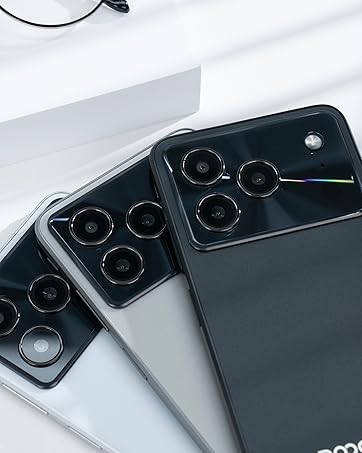
Figure 4.1: Android 16 operating system interface on the DOOGEE Note 56.
4.2 Skambučiai ir žinutės
To make a call, open the Phone app, enter the number, and tap the call icon. For messaging, open the Messages app, select a contact or start a new conversation, type your message, and send.
4.3 Kameros funkcijos
The DOOGEE Note 56 features an 8 MP rear camera and a 5 MP front camera. Open the Camera app to access various modes such as Photo, Video, Portrait, and more. Tap the shutter button to capture photos or start/stop video recording.

Figure 4.2: Camera features and AI scene recognition.
4.4 Ekrano nustatymai
Customize your 6.56-inch HD+ 90 Hz IPS display by going to Nustatymai > Ekranas. Here you can adjust brightness, dark mode, screen timeout, and refresh rate for a smoother visual experience.

Figure 4.3: The 90 Hz HD+ display provides smooth visuals.
5. Saugojimas ir našumas
The DOOGEE Note 56 is equipped with 24GB RAM (3GB physical + 21GB virtual) and 64GB of internal storage, expandable up to 2TB via a MicroSD card (sold separately). This configuration ensures smooth multitasking and ampvietos jūsų programėlėms, nuotraukoms ir vaizdo įrašams.
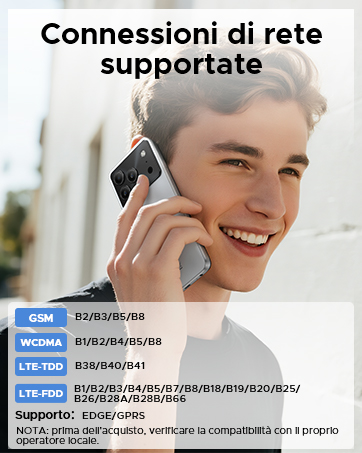
Figure 5.1: Memory configuration of the DOOGEE Note 56.
6. Ryšys ir saugumas
6.1 Tinklo ryšys
The device supports 4G LTE for fast mobile data. Ensure your SIM cards are active and correctly inserted. For Wi-Fi, go to Nustatymai > Tinklas ir internetas > „Wi-Fi“ and connect to your preferred network.

Figure 6.1: Supported network connections for the DOOGEE Note 56.
6.2 Veido ID
Unlock your phone quickly and securely using Face ID. To set it up, go to Nustatymai > Sauga > Veido atrakinimas ir vykdykite ekrane pateikiamus nurodymus, kad užregistruotumėte savo veidą.
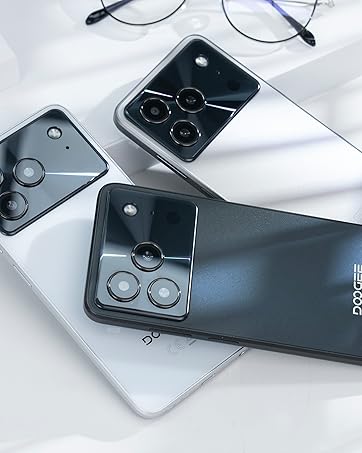
Figure 6.2: Instant facial recognition for unlocking.
6.3 OTG and GPS
The device supports OTG (On-The-Go) for connecting USB accessories like flash drives. GPS functionality provides accurate location services for navigation and location-based apps.
7. Baterijos valdymas
The DOOGEE Note 56 is equipped with a 6150 mAh silicon-carbon battery, offering extended usage. It supports 10W fast charging. To optimize battery life:
- Sureguliuokite ekrano ryškumą.
- Uždarykite nenaudojamas programas, veikiančias fone.
- Įjunkite akumuliatoriaus tausojimo režimą, kai reikia.
- Venkite ekstremalių temperatūrų.
Figure 7.1: The 6150 mAh battery provides long-lasting power.

Figure 7.2: Estimated usage times on a single charge.
8. Priežiūra
8.1 Programinės įrangos naujiniai
Reguliariai tikrinkite, ar yra programinės įrangos atnaujinimų, kad įsitikintumėte, jog jūsų įrenginyje yra naujausios funkcijos ir saugos pataisymai. Eikite į Nustatymai > Sistema > Sistemos naujinimas kad patikrintumėte, ar yra atnaujinimų, ir juos įdiegtumėte.
8.2 Įrenginio valymas
Telefono ekraną ir korpusą valykite minkštu, nepūkuotu audiniu. Venkite naudoti stiprias chemines medžiagas ar abrazyvines medžiagas.
9. Problemų sprendimas
9.1 Bendrosios problemos ir sprendimai
- Telefonas neįsijungia: Įsitikinkite, kad akumuliatorius įkrautas. Prijunkite prie įkroviklio bent 10 minučių, tada pabandykite įjungti.
- Programėlės stringa: Clear the cache of the problematic app (Settings > Apps > [App Name] > Storage & cache > Clear cache). If the issue persists, reinstall the app.
- Prastas akumuliatoriaus veikimo laikas: Review Section 7 for battery optimization tips.
- Tinklo ryšio problemos: Check if SIM cards are properly inserted. Restart the phone. Verify network settings in Settings > Network & internet.
10. Specifikacijos
| Funkcija | Specifikacija |
|---|---|
| Modelis | PASTABA 56 |
| Operacinė sistema | Android 16 |
| Ekranas | 6.56-inch HD+ IPS, 90 Hz |
| Procesorius | Aštuonių branduolių |
| RAM | 24 GB (3GB + 21GB virtual) |
| Vidinė saugykla | 64 GB |
| Išplečiama saugykla | Up to 2 TB MicroSD |
| Galinė kamera | 8 MP |
| Priekinė kamera | 5 MP |
| Baterijos talpa | 6150 mAh |
| Įkrovimas | 10W greitas įkrovimas |
| Matmenys | 8.45 mm storio |
| Svoris | 262 g |
| Ryšys | 4G, Dual SIM, Wi-Fi, Bluetooth, GPS, OTG |
| Saugumas | Veido ID |
11. Oficialūs produktų vaizdo įrašai
Video 11.1: DOOGEE Note 56 Plus Smartphone Overview. This video highlights the ultra-thin design, camera features, and overall elegance of the Note 56 Plus, which shares many characteristics with the Note 56 model.
Video 11.2: DOOGEE Note 56 Plus Ultra-thin Smartphone. This video focuses on the slim profile and aesthetic appeal of the Note 56 Plus, demonstrating its comfortable handling and modern look.
12. Garantija ir palaikymas
Your DOOGEE Note 56 smartphone comes with a limited warranty. Please refer to the warranty card included in your product packaging for specific terms and conditions. For technical support or service inquiries, please visit the official DOOGEE websvetainėje arba susisiekite su jų klientų aptarnavimo tarnyba.
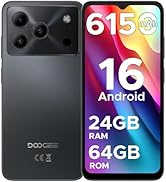
Figure 12.1: DOOGEE customer service details, including warranty and support options.


