1. Įvadas
This manual provides detailed instructions for the safe and effective operation of your Ourlife M40TR 5K WiFi Action Camera. Please read this manual thoroughly before using the device and retain it for future reference. This camera is designed to capture high-quality video and photos in various environments, including underwater, with features such as dual screens, Electronic Image Stabilization (EIS), and remote control capabilities.
2. Pakuotės turinys
Patikrinkite, ar pakuotėje yra visi toliau išvardyti daiktai. Jei kurių nors daiktų trūksta arba jie pažeisti, susisiekite su klientų aptarnavimo tarnyba.
- Ourlife M40TR veiksmo kamera
- Neperšlampamas korpusas
- 32GB atminties kortelė
- 2.4G belaidis nuotolinis valdymas
- USB kabelis
- Vairo / stulpo tvirtinimas
- Various Mounts (Mount1, Mount2, Mount3, Mount4, Mount5)
- 1 klipas
- Tvarsčiai
- 3M lipnios pagalvėlės
- Vielinis lynas
- Vartotojo vadovas

Paveikslėlis: Ourlife M40TR Action Camera, waterproof housing, 32GB memory card, remote control, and various mounting accessories.
3. Produktas baigtasview
Ourlife M40TR features a compact design with dual screens for versatile shooting. The main screen is a 2-inch touchscreen, complemented by a 1.3-inch front display for easy selfies and vlogging. It supports 5K Ultra HD video recording and 50MP photos, enhanced by Electronic Image Stabilization (EIS) and a 170° ultra-wide-angle lens with 5X digital zoom.

Paveikslėlis: Ourlife M40TR Action Camera showcasing its dual color screens and 5K 30FPS capability.

Image: Icons illustrating key features: 5K Video, Dual Color Screen, EIS, 50MP Photos, Dashcam Mode, 170° Wide Angle Lens, Time Lapse, 100FT Waterproof, WiFi Connect, Remote.
4. Sąranka
4.1. Akumuliatoriaus įdėjimas
The camera uses a rechargeable Lithium Ion battery. Ensure the battery is fully charged before first use. To install the battery:
- Atidarykite baterijų skyriaus dangtelį, esantį fotoaparato apačioje.
- Insert the battery with the correct orientation, matching the contacts.
- Saugiai uždarykite akumuliatoriaus skyriaus dangtelį.
4.2. SD kortelės diegimas
A 32GB Micro SD card is included. The camera supports Micro SD cards up to 256GB.
- Raskite „Micro SD“ kortelės lizdą kameros šone.
- Insert the Micro SD card with the contacts facing the front of the camera until it clicks into place.
- Norėdami išimti, švelniai stumkite kortelę, kol ji iššoks.
4.3. Vandeniui atsparaus dėklo naudojimas
The included waterproof housing allows the camera to be used at depths of up to 30 meters (100 feet). Ensure the camera is securely placed inside the housing and the latch is firmly closed before submerging.
Video: Demonstration of the Ourlife M40TR Action Camera's waterproof capabilities, showing it submerged in water.

Paveikslėlis: Ourlife M40TR Action Camera in its waterproof housing, submerged in water with a diver in the background, illustrating its 30M (100FT) waterproof depth.
5. Naudojimo instrukcijos
5.1. Maitinimo įjungimas/išjungimas
- To power on: Press and hold the Power/Mode button until the screen lights up.
- To power off: Press and hold the Power/Mode button until the screen turns off.
5.2. Dviejų ekranų veikimas
The camera features a 2-inch main touchscreen and a 1.3-inch front display. You can switch between the front and rear screens for different shooting perspectives.
- To switch screens: Press and hold the 'M' button on the side of the camera.
- Note: Only one screen is active at a time to conserve battery.

Paveikslėlis: Ourlife M40TR Action Camera displaying its dual screens, with the front screen showing a selfie view and the rear screen showing the main camera view.
5.3. Režimo pasirinkimas
The camera offers multiple shooting modes accessible via the touchscreen interface.
Video: A user navigating through the mode selection menu on the Ourlife M40TR Action Camera's touchscreen.
Galimi režimai:
- Normalus vaizdo įrašas
- Slow Video
- Ciklo vaizdo įrašas
- „Time Lapse“ vaizdo įrašas
- Įprasta nuotrauka
- Automatinis laikmatis Nuotrauka
- Burst Photos
- Laiko tarpo nuotrauka
- Dashcam Mode
5.4. Video and Photo Resolution Settings
Adjust video and photo resolutions to suit your needs. Access these settings through the camera's menu.

Paveikslėlis: Ourlife M40TR Action Camera highlighting its 5K Ultra HD video display, supporting various resolutions including 4K 60fps/30fps, 2.7K 30fps, 1080P 60fps/30fps, and 720P 120fps/60fps/30fps.

Paveikslėlis: Ourlife M40TR Action Camera demonstrating its 50MP photo capability, with options for 50MP, 30MP, 24MP, 20MP, 12MP, and 8MP.
5.5. Elektroninis vaizdo stabilizavimas (EIS)
The built-in EIS technology helps to stabilize video footage, reducing blur and shakiness, especially during active movements.

Image: A split image showing the difference between EIS off (blurry) and EIS on (stable) during a cycling activity.

Image: Visual representation of EIS Anti-Shake Technology, ensuring crystal-clear photos and videos devoid of blurriness or ghosting.
5.6. Platus kampas ir priartinimas
The 170° ultra-wide-angle lens captures expansive scenes, and the 5X digital zoom allows for closer shots.
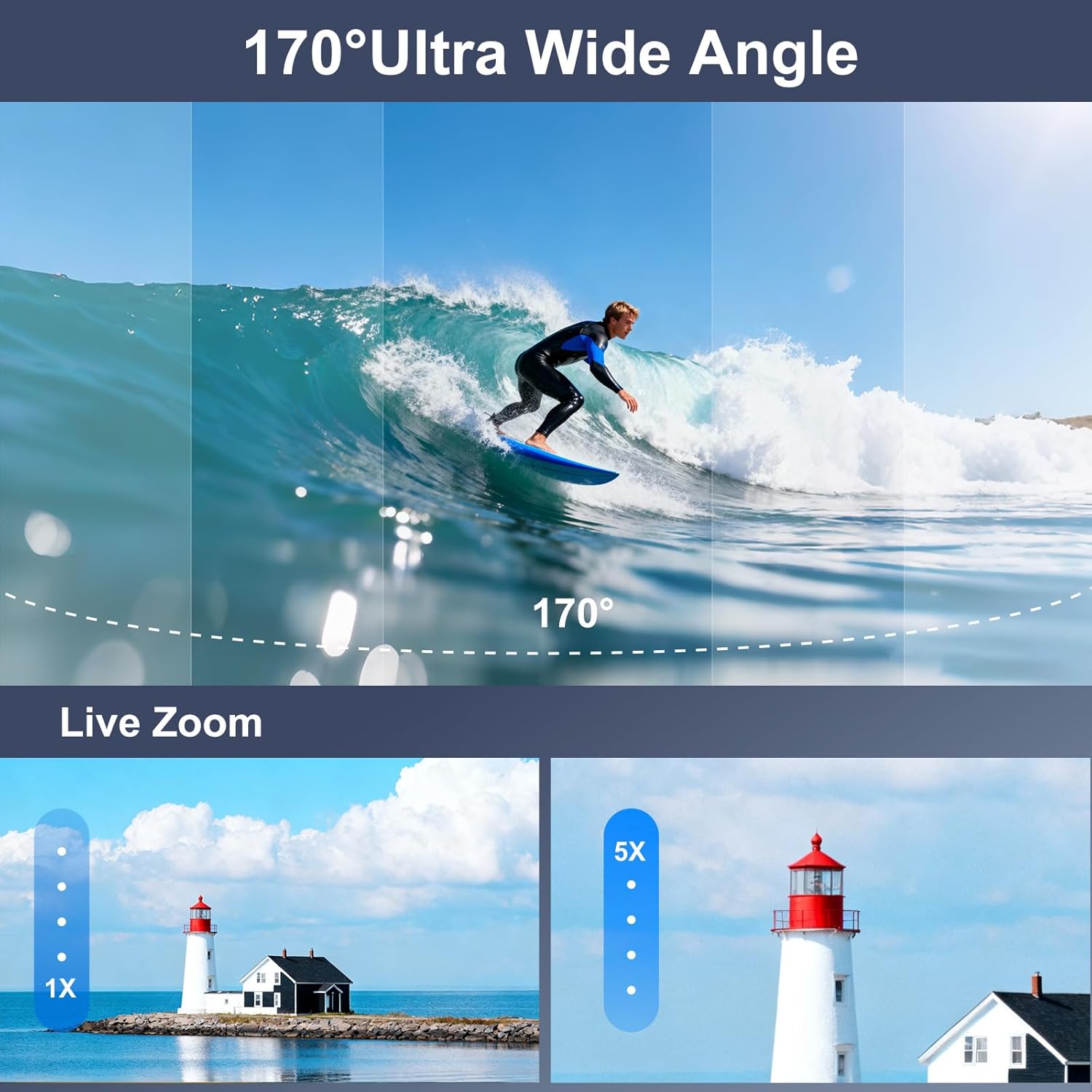
Image: A visual comparison of a 170° ultra-wide-angle shot of a surfer and a demonstration of 5X digital zoom on a lighthouse.

Image: A paraglider captured with the Ourlife M40TR Action Camera, illustrating the expansive 170° ultra-wide view kampu.
5.7. Nuotolinio valdymo pulto naudojimas
The 2.4G wireless remote control allows you to operate the camera from up to 15 meters away, switching between video and photo modes with a single button.

Image: A cyclist using the 2.4GHz wireless remote control on their wrist to operate the Ourlife M40TR Action Camera, highlighting its 15m range.
5.8. Wi-Fi Connection & App
Connect your camera to the SupCam Pro app via Wi-Fi for live preview, remote control, and instant sharing of content.

Paveikslėlis: Ourlife M40TR Action Camera wirelessly connected to a smartphone, showing instant sharing of photos and videos to social media platforms.

Image: Step-by-step guide on how to connect the Ourlife M40TR Action Camera to Wi-Fi using the SupCam Pro App, including a QR code for app download. Download the SupCam Pro App: https://qr04.cn/Acp9lo
5.9. Duomenų perdavimas
Transfer your photos and videos to your computer using Wi-Fi, USB cable, or a card reader.

Image: Visual guide demonstrating three methods for downloading pictures and videos from the Ourlife M40TR Action Camera to a computer: via Mobile App (Wi-Fi), USB Connection, and Card Reader.
6. Priežiūra
6.1. Valymas
- Kameros objektyvą ir ekranus valykite minkštu, nepūkuotu audiniu.
- For the waterproof housing, rinse with fresh water after each use in saltwater and allow to air dry.
6.2. Sandėliavimas
- Fotoaparatą laikykite vėsioje, sausoje vietoje, apsaugotoje nuo tiesioginių saulės spindulių.
- Išimkite bateriją, jei fotoaparato nenaudosite ilgesnį laiką.
7. Problemų sprendimas
If you encounter any issues with your Ourlife M40TR Action Camera, please refer to the following common solutions:
- Kamera neįsijungia: Įsitikinkite, kad akumuliatorius yra visiškai įkrautas ir teisingai įdėtas.
- SD kortelės klaida: Format the SD card in the camera's settings menu. If the issue persists, try a different compatible SD card.
- „Wi-Fi“ ryšio problemos: Ensure the camera's Wi-Fi is enabled and you are within range. Restart both the camera and your smartphone.
- Prasta vaizdo įrašų / nuotraukų kokybė: Check the selected resolution settings. Ensure the lens is clean and free from smudges.
- Vandens nuotėkis korpuse: Before each use, inspect the waterproof housing for any cracks or damage. Ensure the rubber seal is clean and properly seated.
Dėl papildomos pagalbos kreipkitės į klientų aptarnavimo tarnybą.
8. Specifikacijos
| Funkcija | Detalė |
|---|---|
| Prekės ženklo pavadinimas | Ourljei |
| Modelio numeris | AT-M40R |
| Vaizdo įrašymo raiška | 5K |
| Nuotraukų jutiklių technologija | CMOS |
| Ypatingos savybės | EIS, 170° Adjustable View Angle, Anti-Shake, Remote Control, Speakers, Time Lapse, Timer, Car Mode |
| Atsparus vandeniui gylis | Up to 30 meters (100FT) with waterproof case |
| Ryšio technologija | Wi-Fi, bevielis |
| Ekrano dydis | 2 Inches (main), 1.3 Inches (front) |
| „Flash“ atminties tipas | Micro SD (supports up to 256GB) |
| Baterijos | Reikalinga 1 ličio jonų baterija (pridedama) |
| Prekės svoris | 14.9 uncijos |
| Pakuotės matmenys | 11.34 x 7.52 x 3.11 colio |
9. Garantija ir palaikymas
Ourlife offers the following support for your product:
- 30-day Guarantee & Refunds: For initial purchase satisfaction.
- 1-year Exchange: Dėl gaminio defektų ar gedimų.
- 24-hour Official Support: Susisiekite el. paštu adresu info@ourlifesmart.com dėl bet kokių klausimų ar pagalbos.

Paveikslėlis: Ourlife customer support details, including email address (info@ourlifesmart.com), 24-hour official support, 30-day guarantee & refunds, and 1-year exchange policy.


