1. Įvadas
This manual provides detailed instructions for the safe and effective use of your NJTY Non-Contact Voltage Tester, Model T-03A. This device is designed for non-contact detection of AC voltage, offering a safe method for identifying live wires, checking for circuit breaks, and performing general electrical troubleshooting.

Image 1: NJTY Non-Contact Voltage Tester, Model T-03A. This image shows the overall design of the voltage tester, highlighting its compact and pen-like form factor with a red and black casing, green and red buttons, and an integrated LED flashlight at the tip.
2. Saugos informacija
Always adhere to local safety regulations and practices when working with electricity. This device is designed to enhance safety, but it does not replace proper electrical safety procedures. Failure to follow these instructions may result in electric shock, injury, or death.
- Nenaudokite testerio, jei jis atrodo pažeistas arba neveikia tinkamai.
- Verify the tester's functionality on a known live circuit before and after each use.
- Always wear appropriate personal protective equipment (PPE), such as insulated gloves and safety glasses.
- Neviršykite nurodyto tūriotage range (12V-1000V AC or 48V-1000V AC).
- Keep fingers behind the finger guard during operation.
- Avoid direct contact with live conductors. This is a non-contact device.
- Do not use the device in wet conditions or in explosive atmospheres.
- The integrated laser pointer should not be aimed directly at eyes or reflective surfaces.
3. Produktas baigtasview
Familiarize yourself with the components of your voltage testeris:

Image 2: Diagram illustrating the key components of the NJTY Voltage Tester. Labels include the NCV sensor head (probe), laser pointer, flashlight, signal/indicator lights, high/low signal indicator, power button, sensitivity switch (H/L), lighting/laser switch, and battery cover.
- Probe (NCV Sensor Head): Aptinka AC ttage be kontakto.
- Lazerinis žymeklis: Emits a red laser for targeting test points.
- Žibintuvėlis: Suteikia apšvietimą esant silpnam apšvietimui.
- Signal / Indicator: Visual indication of voltage aptikimas.
- High/Low Signal Indicator: Displays the detected voltage lygiu.
- Maitinimo mygtukas: Įjungia ir išjungia įrenginį.
- Sensitivity Switch (H/L): Toggles between high and low sensitivity modes.
- Lighting / Laser Switch: Activates the flashlight or laser pointer.
- Baterijos dangtelis: Access point for battery replacement.
4. Sąranka
4.1 Akumuliatoriaus įdėjimas
The NJTY Voltage Tester requires two AAA batteries (included). To install or replace batteries:
- Unscrew the battery cover at the bottom of the tester (refer to Image 2, item 9).
- Įdėkite dvi 1.5 V AAA baterijas, užtikrindami teisingą poliškumą (+/-).
- Replace the battery cover and screw it securely.

3 paveikslėlis: Stambus planas view of the battery cover at the base of the NJTY Voltage Tester, showing how it can be unscrewed for battery access.
5. Naudojimo instrukcijos
5.1 Maitinimo įjungimas/išjungimas
- Norėdami įjungti, paspauskite ir palaikykite Maitinimo mygtukas (refer to Image 2, item 6) until the indicator lights illuminate.
- Norėdami išjungti, paspauskite ir palaikykite Maitinimo mygtukas again. The device will also automatically shut down after five minutes of inactivity to conserve battery life.
5.2 Jautrumo režimai
The tester features two sensitivity modes for different applications:
- High Sensitivity Mode (12V-1000V AC): Suitable for detecting lower voltages or for general detection. Press the Sensitivity Switch (H/L) (refer to Image 2, item 7) to select this mode.
- Low Sensitivity Mode (48V-1000V AC): Ideal for detecting higher voltages or when precise localization is needed to avoid false positives from adjacent wires. Press the Sensitivity Switch (H/L) norėdami pasirinkti šį režimą.

Image 4: Comparison of high and low sensitivity modes. The top row shows high sensitivity (12-1000V) detecting live wire and null wire. The bottom row shows low sensitivity (48-1000V) detecting live wire and null wire, demonstrating how the tester indicates voltage presence with visual and audible alerts.
5.3 Nekontaktinis ttage (NCV) aptikimas
Norint aptikti kintamosios srovės tūrįtage:
- Turn on the tester and select the desired sensitivity mode.
- Padėkite Probe (NCV Sensor Head) near the conductor, outlet, or device you wish to test.
- Jei AC ttage is detected, the tester will emit an audible alarm and the Signal / Indicator lights will illuminate, with the High/Low Signal Indicator showing the relative strength of the detected field.

Image 5: The voltage tester in use, demonstrating NCV detection on an electrical outlet and a wire. It also shows the buzzer alarm, flashlight illuminating a circuit box, and the laser pointer targeting a ceiling light.
5.4 Lūžio taškų testavimas
This feature helps locate breaks in live wires:
- Ensure the wire is live and the tester is in an appropriate sensitivity mode.
- Perkelkite Probe (NCV Sensor Head) along the length of the wire.
- The tester will indicate voltage up to the point of the break. The absence of a signal beyond a certain point indicates a break in the circuit.

Image 6: Illustration of breakpoint testing. The tester indicates voltage on one side of a broken wire, and no voltage on the other side, pinpointing the location of the break.
5.5 Žibintuvėlis
To activate the integrated LED flashlight for illuminating dark work areas:
- Paspauskite Lighting / Laser Switch (refer to Image 2, item 8) once.
- Norėdami išjungti žibintuvėlį, paspauskite jį dar kartą.

Image 7: The integrated LED flashlight of the voltage tester illuminating a dark electrical panel, demonstrating its utility in low-light environments.
5.6 Lazerinis rodyklė
To activate the laser pointer for precise targeting:
- Paspauskite ir palaikykite Lighting / Laser Switch (refer to Image 2, item 8) for a few seconds.
- Release the button to turn off the laser pointer.
- Atsargiai: Do not stare into the laser beam or point it at people or animals.
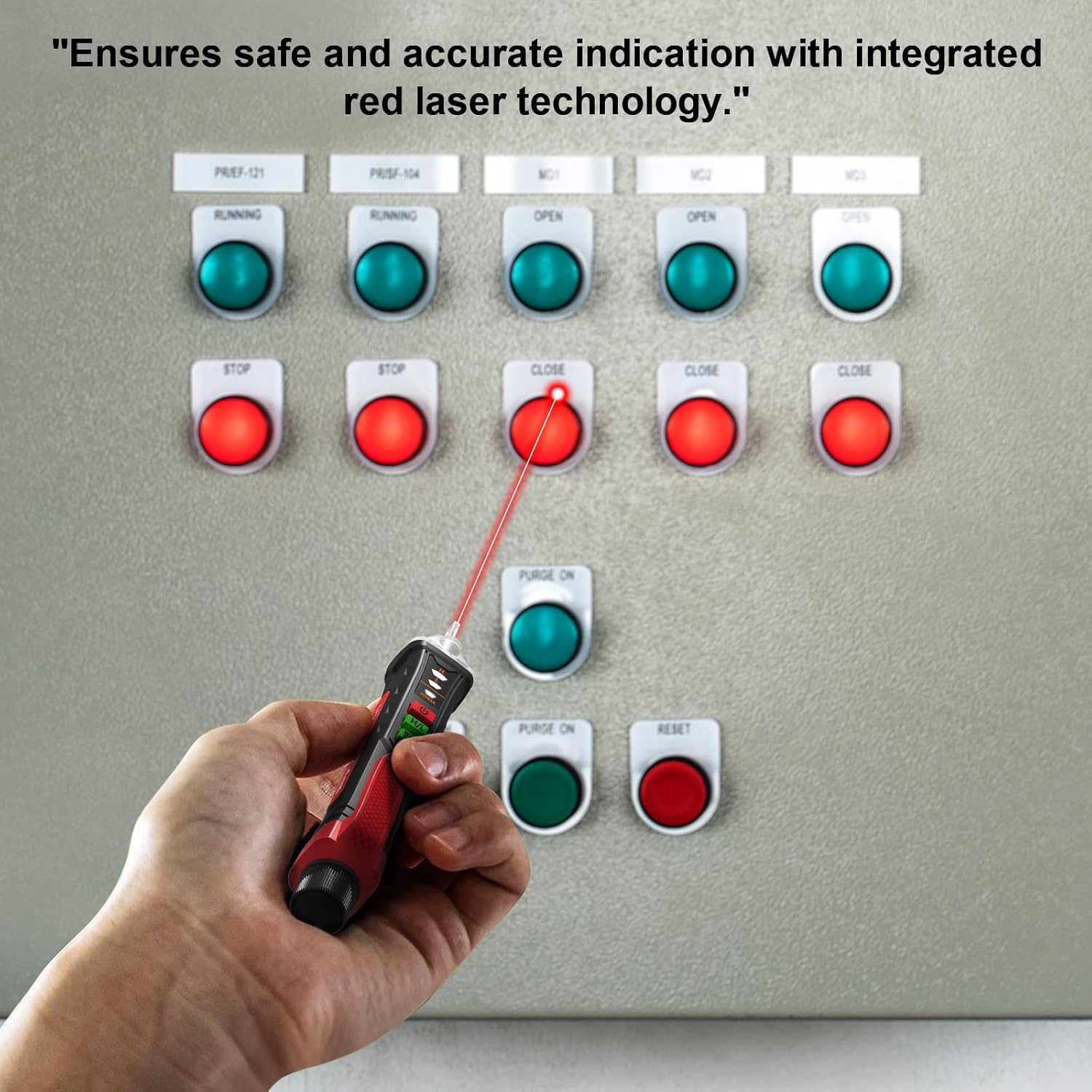
Image 8: A hand holding the voltage tester, using its red laser pointer to indicate a specific button on an electrical control panel, highlighting its precision targeting capability.
6. Priežiūra
- Valymas: Prietaisą valykite sausa, minkšta šluoste. Nenaudokite abrazyvinių valiklių ar tirpiklių.
- Saugykla: Store the tester in a cool, dry place, away from direct sunlight and extreme temperatures. If storing for extended periods, remove the batteries to prevent leakage.
- Baterijos keitimas: Kad rodmenys būtų tikslūs, nedelsdami pakeiskite baterijas, kai pasirodys išsikrovusių baterijų indikatorius.
7. Problemų sprendimas
| Problema | Galima priežastis | Sprendimas |
|---|---|---|
| Testeris neįsijungia. | Neišsikrovusios arba neteisingai įdėtos baterijos. | Patikrinkite baterijų poliškumą; pakeiskite baterijas. |
| No detection on a known live circuit. | Low battery, incorrect sensitivity mode, or device malfunction. | Replace batteries, switch to high sensitivity mode (12V-1000V), or contact customer support. |
| False positives (detects voltage where none exists). | High sensitivity mode in a noisy electrical environment. | Switch to low sensitivity mode (48V-1000V). |
8. Specifikacijos
| Funkcija | Detalė |
|---|---|
| Modelis | T-03A |
| Prekės ženklas | NJTY |
| AC ttage Diapazonas | 12V-1000V (High Sensitivity), 48V-1000V (Low Sensitivity) |
| Dažnis | 50/60Hz |
| Maitinimo šaltinis | 2 x 1.5 V AAA baterijos |
| Automatinis išjungimas | Po 5 minučių neveikimo |
| Rodikliai | Audible alarm, LED indicator lights |
| Papildomos funkcijos | Integrated LED flashlight, Laser pointer, Breakpoint testing |
| Gaminio matmenys | 0.1 x 0.1 x 0.1 colio |
| Prekės svoris | 1.8 uncijos |
9. Kas yra dėžutėje
- 1 x NJTY Voltage Tester Pen
- 2 x 1.5 V AAA baterijos
- 1 x anglų kalbos vadovas (šis dokumentas)
10. Garantija ir palaikymas
NJTY provides comprehensive after-sales support for sixty months from the date of purchase. If you encounter any issues with your NJTY Non-Contact Voltage Tester, Model T-03A, please contact our customer service team for assistance. Please refer to your purchase documentation for specific contact details.


