1. Produktas baigtasview
The LEKATO 2-in-1 Drum Looper Pedal is a versatile guitar effect pedal combining a high-sampling-rate looper with a built-in drum machine. It operates at 44.1 kHz, 24-bit, offering both looping and drum functions independently or simultaneously.

1 pav.: priekis view of the LEKATO LP-02 2-in-1 Drum Looper Pedal, highlighting its dual functionality as a looper and drum machine.
2. Sąrankos instrukcijos
2.1 Maitinimo šaltinis
This pedal requires a 9V DC negative-center power adapter (not included). Ensure the power supply provides less than 80 mA. Do not use a power supply with different specifications to avoid damage to the unit.
2.2 Jungtys
- Prijunkite gitarą ar kitą instrumentą prie V ĮVESTIS domkratas dešinėje pedalo pusėje.
- Prijunkite V OUTPUT domkratą kairėje pedalo pusėje prie savo amp„Lifier“ arba „Next“ efektų pedalas.
- Connect the 9V DC power adapter to the power input jack.
2.3 Buffer Bypass
The pedal features Buffer Bypass, which helps maintain signal strength over long cable runs or when using multiple pedals. This prevents tone loss that can occur due to cable capacitance in True Bypass systems.

Figure 2: Detail of the footswitch, indicating the Buffer Bypass functionality for signal integrity.
3. Operacija
3.1 Valdymas baigtasview
- LOOP Knob: Adjusts the playback volume of the recorded loop.
- DRUM Knob: Adjusts the playback volume of the drum machine.
- DRUM SELECT Knob: Selects one of the 8 available drum styles. This knob is analog and not notched, requiring careful adjustment to select the desired style.
- Kojinis jungiklis: A multi-function switch used for recording, playback, overdubbing, undo/redo, and tap tempo.
- LED indikatorius: A single multi-colored LED indicates the pedal's status (e.g., recording, playing, overdubbing, drum tempo). Refer to the quick start guide for specific LED patterns and colors.

Figure 3: The three control knobs for adjusting loop volume, drum volume, and selecting drum styles.
3.2 Looper Module
The looper module offers up to 6 minutes of recording time and supports unlimited overdubs. Recorded tracks are automatically saved.
- Įrašas: Press the footswitch once to start recording. The LED will indicate recording status.
- Atkūrimas: Press the footswitch again to stop recording and start playback.
- Overdub: Atkūrimo metu vieną kartą paspauskite kojinį jungiklį, kad pradėtumėte įterpti įrašą. Paspauskite dar kartą, kad sustabdytumėte įterpimą.
- Anuliuoti / perdaryti: Hold the footswitch for approximately 5 seconds to undo the last recorded layer. Repeat to redo.
- Sustabdyti: Norėdami sustabdyti atkūrimą, dukart paspauskite kojinį jungiklį.
- Išvalyti: While stopped, hold the footswitch for an extended period (e.g., 15 seconds as per some documentation, but often shorter in practice) to clear the entire loop.
Files can be exported or imported using dedicated software (refer to manufacturer's website for software details).

Figure 4: The looper module's key features, including its 6-minute loop capacity and data management options.
3.3 Drum Machine Module
The built-in drum machine features 8 musical styles, each with real drum samples. It includes a tap tempo function.
- Selecting Drum Style: Naudokite DRUM SELECT knob to choose one of the 8 available drum styles (e.g., Blues, Rock, Pop, Country, Metal, Ballad, R&B, Dance).
- Bakstelėkite Tempo: While the drum machine is playing, tap the footswitch at your desired tempo to adjust the drum speed. The drum speed can also automatically match the tempo of a 4/4 time phrase when used with the looper.

Figure 5: The drum machine functionality, detailing the variety of grooves and real drum sampmažiau prieinama.
4. Priežiūra
- Pedalą valykite minkštu, sausu skudurėliu. Venkite naudoti abrazyvinius valiklius ar tirpiklius.
- Pedalą laikykite sausoje vietoje, atokiau nuo ekstremalių temperatūrų ir drėgmės.
- Ensure all cable connections are secure before and after use.
- Visada atjunkite maitinimo šaltinį, kai pedalas ilgesnį laiką nenaudojamas.
5. Problemų sprendimas
5.1 Nėra galios
- Ensure the 9V DC negative-center power adapter is correctly connected and functioning.
- Patikrinkite, ar maitinimo lizdas aktyvus.
5.2 Nėra garso išvesties
- Patikrinkite visas įvesties ir išvesties kabelio jungtis.
- Ensure the LOOP and DRUM volume knobs are not set to minimum.
- Test with different cables and an amplifier to rule out external equipment issues.
5.3 Difficulty with Footswitch Functions
- The single footswitch performs multiple functions based on the number, duration, and order of presses. Refer to the 'Operation' section and practice the specific press sequences for recording, playback, overdub, undo/redo, and tap tempo.
- Consistent timing is crucial for accurate loop recording and drum tempo setting.
5.4 Unclear LED Indications
- The single multi-colored LED indicates various statuses. Consult the quick start guide or manufacturer's documentation for a detailed explanation of LED color and flash patterns.
6. Specifikacijos
| Funkcija | Specifikacija |
|---|---|
| Modelio numeris | BCUSM03626 |
| Gaminio matmenys | 5.08 x 5.08 x 9.65 cm (2 x 2 x 3.8 colio) |
| Prekės svoris | 176 g |
| Ciklo laikas | Iki 6 minučių |
| Įgarsinimas | Neribota |
| Būgnų grioveliai | 8 musical styles with real drum samples |
| Samplingo norma | 44.1 kHz, 24 bitų |
| Maitinimo šaltinis | Corded Electric (9V DC, negative-center) |
| Veikimo srovė | Mažiau nei 80 mA |
| Techninės įrangos sąsaja | USB Type C (for import/export) |
| Signalo formatas | Skaitmeninis |
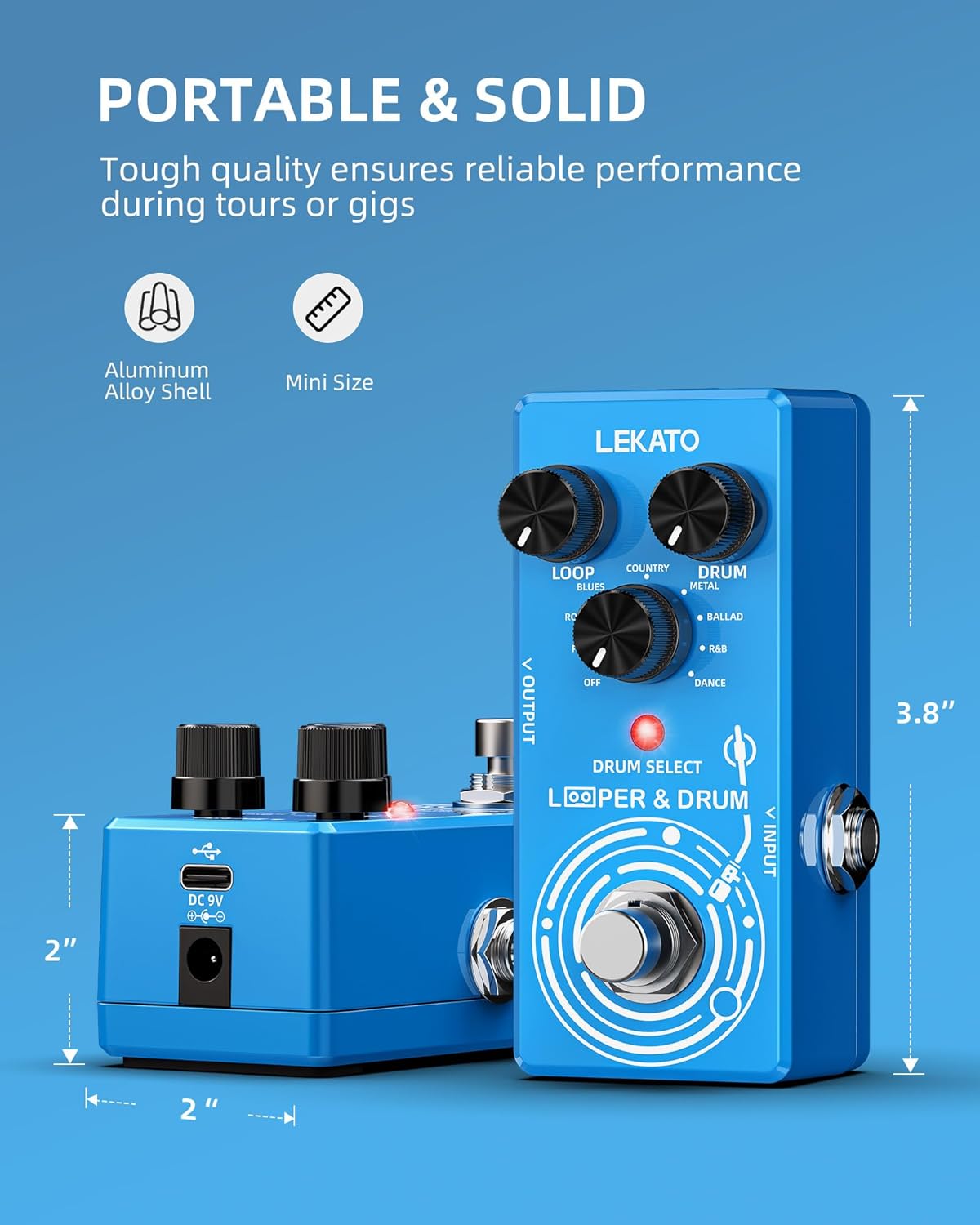
Figure 6: Physical dimensions of the LEKATO 2-in-1 Drum Looper Pedal.
7. Garantija ir palaikymas
For warranty information and technical support, please refer to the documentation provided with your purchase or visit the official LEKATO websvetainėje. Konkrečios garantijos sąlygos gali skirtis priklausomai nuo regiono ir mažmenininko.


