1. Įvadas
Thank you for choosing the MCHOSE ACE 68 Mechanical Gaming Keyboard. This 60% compact keyboard is engineered for high-performance gaming, featuring Hall Effect magnetic switches, Rapid Trigger technology, adjustable actuation, and an 8000Hz polling rate for ultra-low latency. This manual will guide you through the setup, operation, and maintenance of your new keyboard to ensure optimal performance.
2. Kas yra dėžutėje
- MCHOSE ACE 68 Mechanical Gaming Keyboard
- USB kabelis (C tipo)
- Klaviatūros dangtelis ir jungiklio ištraukiklis
- 2 x pakaitiniai jungikliai
- Apsauga nuo dulkių
- Vartotojo vadovas (šis dokumentas)
3. Sąranka
3.1 Techninės įrangos prijungimas
- Connect the provided USB Type-C cable to the port on the MCHOSE ACE 68 keyboard.
- Plug the other end of the USB cable into an available USB port on your computer (PC, Laptop, Gaming Console, PS5, XBOX).
- Jūsų operacinė sistema automatiškai atpažins klaviatūrą.
3.2 Software Installation (M HUB Web Vairuotojas)
For advanced customization and optimal performance, it is recommended to use the MCHOSE M HUB web vairuotojas.
- Atidarykite savo web browser and navigate to the MCHOSE official websvetainė: https://www.mchose.com.cn.
- Select your preferred language from the options provided on the websvetainę.
- Click on the 'Enter M HUB WEB' mygtukas.
- On the M HUB page, click on the image corresponding to the 'Ace 68' keyboard to enter its configuration interface.

Paveikslėlis: 1 veiksmas – Webpage input for MCHOSE HUB web vairuotojas.

Image: Step 2 - Language selection and entering M HUB WEB.
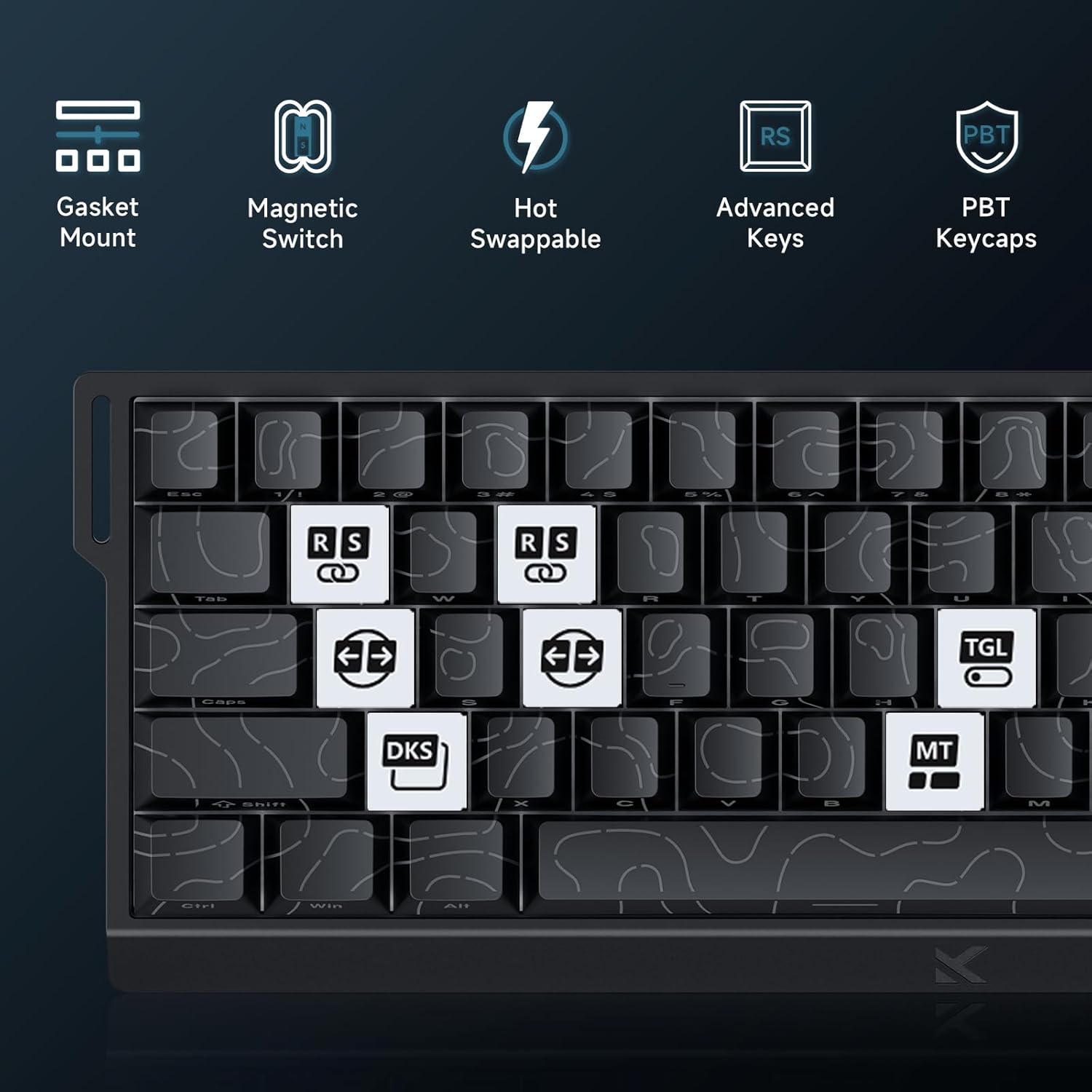
Image: Step 3 - Selecting the Ace 68 device within the M HUB web sąsaja.
4. Naudojimo instrukcijos
4.1 Apklausos dažnis ir vėlavimas
The MCHOSE ACE 68 features an 8000Hz polling rate and a 128K scan rate, resulting in an ultra-low 0.1ms latency. This ensures rapid and precise input registration.

Image: Visual representation of 8000Hz Polling Rate and 0.1ms Report Rate, highlighting fast actuation and response time.
4.2 Rapid Trigger and Adjustable Actuation
The keyboard's magnetic switches allow for dynamic actuation and deactivation points, eliminating traditional input latency.
- Greitas paleidiklis: Keys activate when pressed and deactivate when released, without a fixed reset point. This allows for faster repeated inputs.
- Reguliuojamas valdymas: Customize the actuation point of each key from 0.1mm to 4.0mm using the M HUB software. This provides precise control over key sensitivity.

Image: Comparison of Rapid Trigger (dynamic reset) versus traditional fixed actuation/reset points.
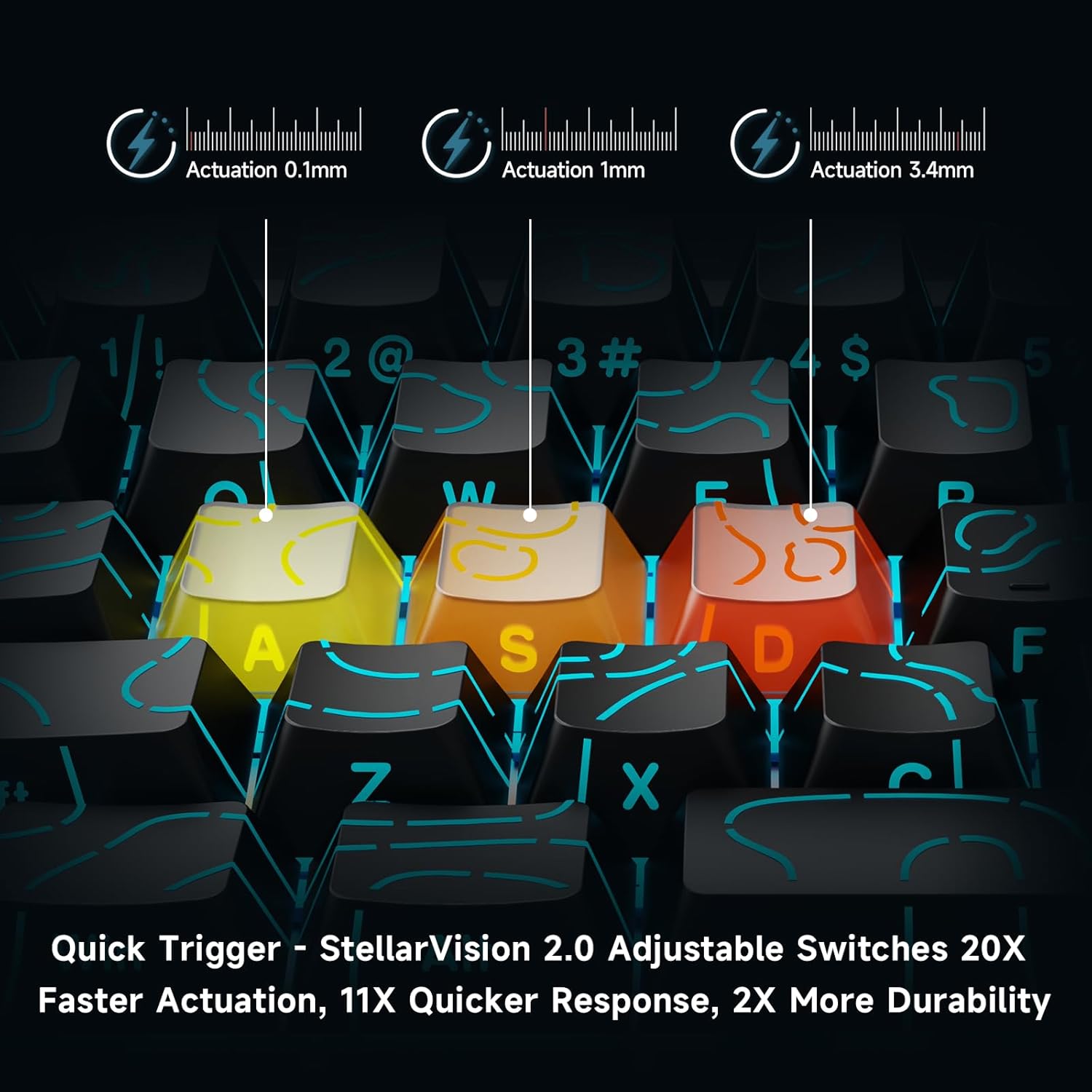
Image: Visual demonstration of adjustable actuation points (0.1mm, 1mm, 3.4mm) for StellarVision 2.0 switches.
4.3 Advanced Key Functionality (M HUB Software)
The M HUB software allows for advanced customization of key behavior:
- RS (Reivis ir šmaikštus): Monitors at least two selected keys and activates the key pressed the furthest. When both are at the same depth, it uses your selected SOCD resolution. This enhances movement in games.
- SOCD (Simultaneous Opposing Cardinal Directions): When opposing direction keys (e.g., Left + Right) are pressed together, you can set it to neutralize, prioritize the last-pressed, or hold the first-pressed direction.
- DKS (Dynamic Key Press): Map up to four separate actions along a single key's travel at actuation, bottom-out, first release, and full release for complex macros or multi-stage komandos.
- MT (Mod-Tap): Assign a key to send one keycode on a quick tap and a different (usually modifier) code when held, blending typing and modifier layers seamlessly.
- TGL (perjungti): Turn any key into an on/off switch-press once to latch the output; press again to cancel. A hold still provides momentary behavior.

Vaizdas: Viršview of key features including Advanced Keys (RS, DKS, TGL, MT).

Image: Diagram explaining the concept of 4-in-1 Action Keys, allowing multiple actions per key based on press depth.
4.4 RGB apšvietimo pritaikymas
The MCHOSE ACE 68 features customizable RGB backlighting with 16.8 million colors and 22+ dynamic lighting effects.
- FN Key Combinations: Use the Function (FN) key in combination with other keys to adjust lighting effects directly on the keyboard.
- M HUB Software: For full customization, including per-key lighting and advanced effects, use the M HUB web vairuotojas.

Image: FN key combinations for adjusting RGB lighting effects, brightness, and speed.

Image: The MCHOSE ACE 68 keyboard displaying various preset RGB lighting effects.
5. Priežiūra
5.1 Valymas
- Prieš valydami atjunkite klaviatūrą nuo kompiuterio.
- Use a soft, dry cloth to wipe down the keycaps and keyboard body.
- Norėdami giliau valyti, naudokite suspausto oro balionėlį, kad pašalintumėte dulkes ir šiukšles iš tarpų tarp klavišų dangtelių.
- Venkite naudoti stiprias chemines medžiagas ar abrazyvines medžiagas, nes jos gali pažeisti klaviatūros apdailą arba klavišų dangtelių užrašus.
5.2 Klaviatūros dangtelio ir jungiklio keitimas
The MCHOSE ACE 68 features hot-swappable magnetic switches, allowing for easy replacement without soldering.
- Norėdami švelniai nuimti norimą klavišo dangtelį, naudokite pateiktą klavišo dangtelio traukiklį.
- Use the provided switch puller to carefully extract the magnetic switch from its socket.
- Sulygiuokite naujo jungiklio kaiščius su spausdintinės plokštės skylėmis ir tvirtai paspauskite, kol jis spragtelėdamas užsifiksuos.
- Uždėkite klavišo dangtelį atgal ant naujo jungiklio.

Image: Diagram showing the hot-swappable PCB, pre-lubed magnetic switch, plate-mounted stabilizers, hot-swap socket, and north-facing per-key LEDs.
6. Problemų sprendimas
- Klaviatūra nereaguoja:
- Įsitikinkite, kad USB laidas yra tvirtai prijungtas prie klaviatūros ir kompiuterio.
- Pabandykite prijungti klaviatūrą prie kito kompiuterio USB prievado.
- Išbandykite klaviatūrą kitame kompiuteryje, kad atmestumėte su sistema susijusias problemas.
- Input Lag or Dropped Inputs:
- Ensure the M HUB web driver is installed and updated to the latest version.
- Check the polling rate setting in the M HUB software; ensure it is set correctly for your needs.
- If 'Berserk Mode' is enabled in the M HUB software, be aware that while it offers maximum accuracy, it may impact stability with mixed switch configurations. Try disabling it if issues persist.
- Ensure no other software or background processes are interfering with keyboard input.
- RGB apšvietimas neveikia / yra netinkamas:
- Check FN key combinations for lighting control (refer to section 4.4).
- Verify lighting settings within the M HUB software.
- Įsitikinkite, kad klaviatūros programinė įranga yra atnaujinta.
- Keys Not Actuating Correctly:
- Check the adjustable actuation settings for the specific key in the M HUB software.
- If a switch feels faulty, consider replacing it using the provided spare switches and switch puller (refer to section 5.2).
7. Specifikacijos
| Funkcija | Detalė |
|---|---|
| Modelio numeris | MCHOSE ACE 68 |
| Klaviatūros išdėstymas | 60 % kompaktiškas (61 klavišai) |
| Jungiklio tipas | TTC Dragon Lord Magnetic Switches (Hall Effect) |
| Įjungimo diapazonas | 0.1 mm - 4.0 mm (reguliuojamas) |
| Apklausos rodiklis | 8000 Hz |
| Ataskaitų rodiklis | 0.1 ms |
| Klaviatūros | PBT Keycaps, Cherry Profile, Shine-through legends |
| Foninis apšvietimas | RGB (16.8 Million Colors, 22+ Effects) |
| Ryšys | Laidinis (USB-C) |
| Suderinami įrenginiai | PC, Laptop, Gaming Console, PS5, XBOX |
| Gaminio matmenys | 12.6" ilgio x 4.56" pločio x 1.54" aukščio (32 cm x 11.7 cm x 3.9 cm) |
| Prekės svoris | 2.55 svaro (1.16 kg) |
| Ypatingos savybės | Rapid Trigger, Adjustable Actuation, Hot-Swappable Switches, Programmable Keys, Gasket Mount |
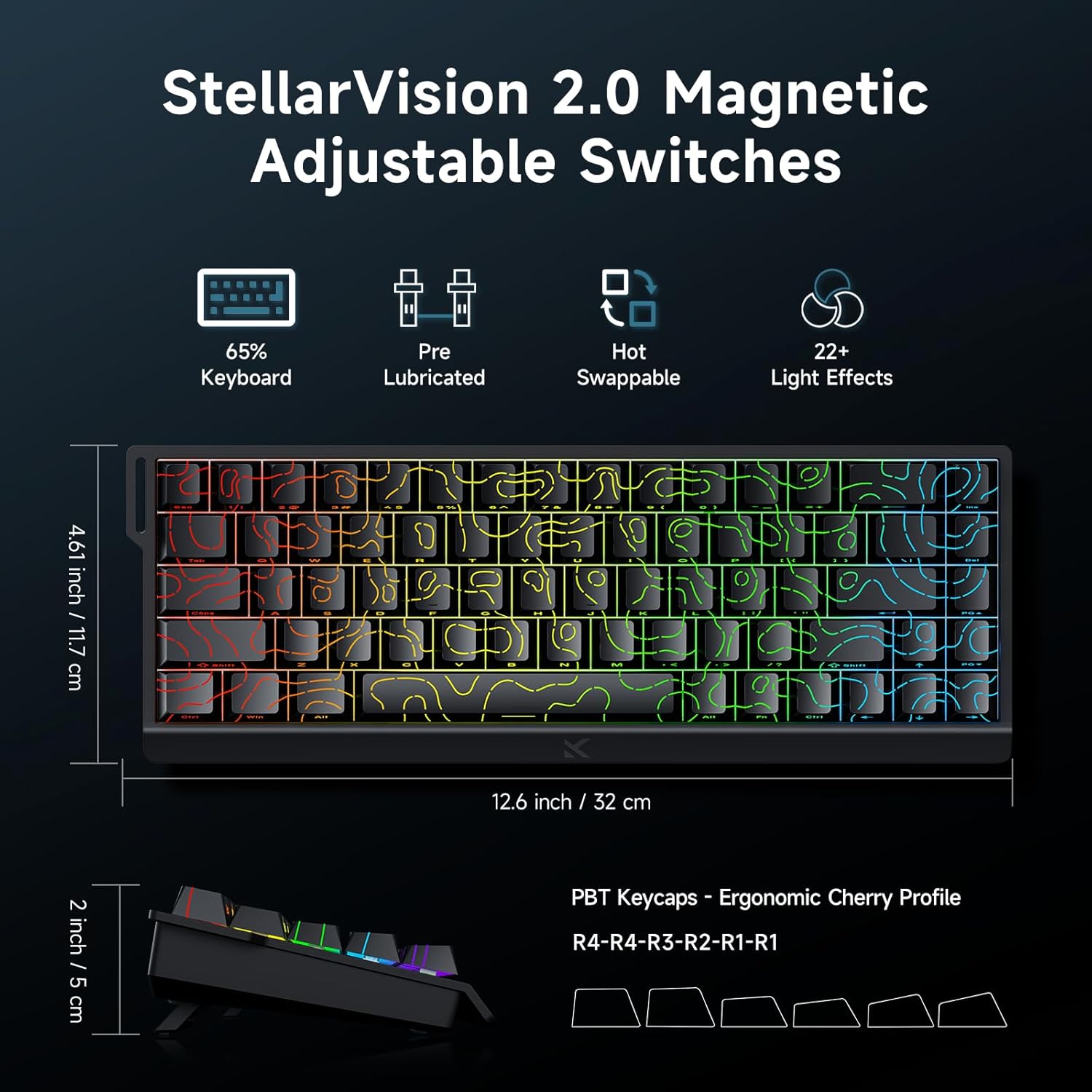
Image: MCHOSE ACE 68 keyboard with dimensions (12.6 inches / 32 cm length, 4.61 inches / 11.7 cm width, 2 inches / 5 cm height) and key features like StellarVision 2.0 Magnetic Adjustable Switches, pre-lubricated, hot-swappable, and 22+ light effects.

Image: Detailed specifications of the Uranus Magnetic Switch eSports, including switch type, actuation range (0.1-3.4mm), lifespan (100 Million Clicks), sensitivity (0.005mm), total travel (3.4mm), and trigger pressure (32 +/- 5 gf).
8. Garantija ir palaikymas
MCHOSE products are designed for durability and performance. For warranty information, technical support, or further assistance, please visit the official MCHOSE websvetainėje arba susisiekite tiesiogiai su jų klientų aptarnavimo tarnyba. Išsaugokite pirkimo kvitą garantiniams reikalavimams.
Oficialus Websvetainė: https://www.mchose.com.cn


