Produktas baigtasview
The Thlevel Smart Key Lock Box Model G22 provides secure key storage with advanced access control features. It is designed for various applications, including homes, rentals, offices, and property management. The lock box offers multiple unlocking methods and robust construction for durability.
- Išmanioji prieiga: Control your lock box using the free TTLock App, generating virtual passwords and sharing time-limited access permissions.
- Patvari konstrukcija: Made from zinc alloy with IP65 certification, it resists water, dust, and extreme temperatures (-20°C to 55°C).
- Removable Shackle: Easily hang the key safe on doorknobs or railings without tools. The shackle locks with the main unit to prevent theft.
- Dual Backup Power: Powered by 3 AAA batteries (not included) with real-time low-battery alerts. An emergency USB-C power bank port provides instant charging to prevent lockouts.
- Erdvus interjeras: Securely holds up to 5 keys, 3 access cards, and 1 car key fob.
Sąranka
1. Išpakavimas ir komponentai
Upon opening the package, you will find the Thlevel Smart Key Lock Box, a small screwdriver, mounting screws, and a USB-C cable. The lock box itself is made from durable metal with a keypad on the front.
Video: Unboxing the Thlevel Smart Key Lock Box and reviewing its components.
2. Akumuliatoriaus įdėjimas
The lock box requires 3 AAA batteries (not included). To install, use the provided screwdriver to open the battery compartment located inside the lock box. Insert the batteries according to the polarity markings, then secure the cover.
3. Programėlės atsisiuntimas ir prisijungimas
Download the 'TTLock' app from your smartphone's app store. Ensure your phone's Bluetooth is enabled. Open the app, register an account, and follow the on-screen instructions to add your device. You may need to press a button on the lock box keypad to wake it up for Bluetooth connection.

Image: Step-by-step guide on connecting the lock box to the TTLock mobile application.
4. Fizinis įrengimas
The lock box features a removable shackle for versatile mounting. To install, remove the shackle, place it onto a doorknob or railing, and then reattach the lock box. Alternatively, use the provided screws to wall-mount the unit.

Image: Visual instructions for installing the lock box with its removable shackle.
Naudojimo instrukcijos
1. Unlocking via App
Once connected to the TTLock app, open the app and select your lock box. Tap the unlock icon on the screen to remotely unlock the device via Bluetooth. The lock box will emit an audible signal upon successful unlocking.
2. Unlocking via PIN Code
Enter a valid 6-9 digit PIN code on the lock box keypad. After entering the code, press the unlock button (usually a checkmark or similar symbol) to open the lock box. The keypad lights up for visibility.
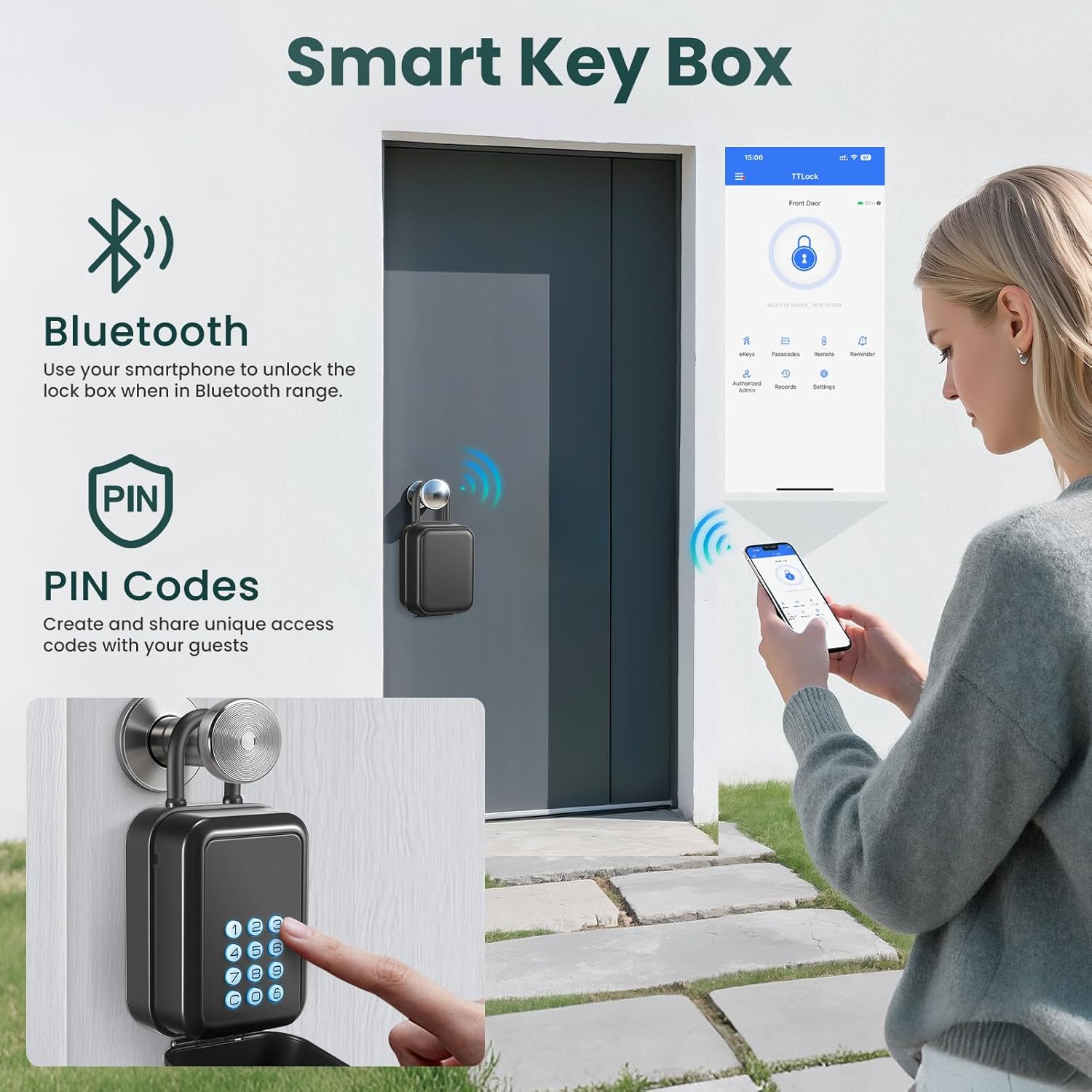
Image: Demonstrates unlocking the key box using both Bluetooth via the app and direct PIN entry on the keypad.
3. Sharing Access (eKeys & Passcodes)
The TTLock app allows you to generate and share various types of access: timed, one-time, permanent, or recurring eKeys and passcodes. This feature is ideal for granting temporary access to family, cleaners, tenants, or guests without physical key exchange. You can specify start and end times for timed access.

Image: Illustrates the process of generating and sharing temporary passcodes through the app for different users.
4. Access History and Reminders
The TTLock app maintains a detailed record of all unlock events, showing who unlocked the device and when. You can also set up various reminders, such as notifications for family members arriving home, forced door openings, or low battery alerts.
Priežiūra
1. Baterijos keitimas
When the app indicates a low battery, replace the 3 AAA batteries promptly. Follow the battery installation steps outlined in the Setup section. Ensure the battery compartment is securely closed after replacement to maintain the IP65 rating.
2. Valymas
Clean the exterior of the lock box with a soft, damp cloth. Avoid using abrasive cleaners or solvents that could damage the finish or electronic components. The IP65 rating ensures protection against dust and water splashes, but direct submersion is not recommended.
3. Vidinė daiktų laikymo vieta
The spacious interior is designed to hold multiple items. Ensure items are placed neatly to avoid obstructing the closing mechanism or damaging the internal components. The interior can accommodate up to 5 keys, 3 access cards, and 1 car key fob.

Vaizdas: Išsamus view of the lock box interior, highlighting its storage capacity for various items.
Trikčių šalinimas
1. Lock Box Not Responding
- Patikrinkite baterijas: Ensure the AAA batteries are correctly installed and not depleted. The app provides low-battery alerts.
- Avarinis maitinimas: If batteries are completely dead, connect a USB-C power bank to the emergency port on the bottom of the keypad to temporarily power the device and unlock it.

Image: Demonstrates using the emergency USB-C power port to power the lock box when batteries are low.
2. Programėlės ryšio problemos
- „Bluetooth“ įjungtas: Patikrinkite, ar jūsų išmaniajame telefone įjungtas „Bluetooth“ ryšys.
- Wake Up Device: Press any button on the lock box keypad to wake it up and make it discoverable by the app.
- Artumas: Ensure your smartphone is within Bluetooth range of the lock box.
- Programos leidimai: Check that the TTLock app has necessary Bluetooth and location permissions on your phone.
3. PIN Code Not Working
- Teisingas kodas: Double-check that the entered PIN code is correct.
- Galiojimo laikotarpis: If using a timed or one-time passcode, ensure it is still within its valid period.
- Programų sinchronizavimas: If a new passcode was recently created, ensure the lock box has synced with the app (requires Bluetooth connection).
Specifikacijos
| Prekės ženklas | Lygis |
| Modelio numeris | G22 |
| Užrakto tipas | Smeigtukas |
| Spalva | Juoda |
| Medžiaga | Zinc alloy + ABS plastic |
| Ypatinga funkcija | Anti-Peeping Password |
| Montavimo tipas | Sieninis laikiklis |
| Prekės svoris | 0.6 kilogramo |
| Maitinimo šaltinis | 3 AAA Batteries (not included), USB-C Emergency Port |
Garantija ir palaikymas
Informacija apie garantiją
This Thlevel Smart Key Lock Box Model G22 comes with a standard manufacturer's warranty. Please refer to the product packaging or contact customer support for specific warranty terms and conditions.
Pagalba klientams
For technical assistance, troubleshooting, or any product-related inquiries, please contact Thlevel customer support. Contact details can typically be found on the product packaging, the official Thlevel websvetainėje arba per savo pirkimo platformą.


