Įvadas
This manual provides detailed instructions for the MECHEER JK-TM02-FR Digital Programmable Timer Outlet. This device allows you to automate the on/off cycles of electrical appliances, helping to save energy and enhance home security. Please read this manual carefully before use to ensure proper operation and safety.
Saugos instrukcijos
- Nemerkite laikmačio į vandenį ar kitą skystį.
- Do not connect any appliance that exceeds the maximum load rating (16A, 3680W).
- Įsitikinkite, kad laikmatis yra tvirtai įjungtas į įžemintą lizdą.
- Do not disassemble or attempt to repair the unit. Contact qualified personnel for service.
- Laikyti vaikams nepasiekiamoje vietoje.
Produktas baigtasview
The MECHEER JK-TM02-FR is a digital timer outlet designed for easy programming and control of your electrical devices. It features a clear LCD screen and intuitive buttons for setting various programs.
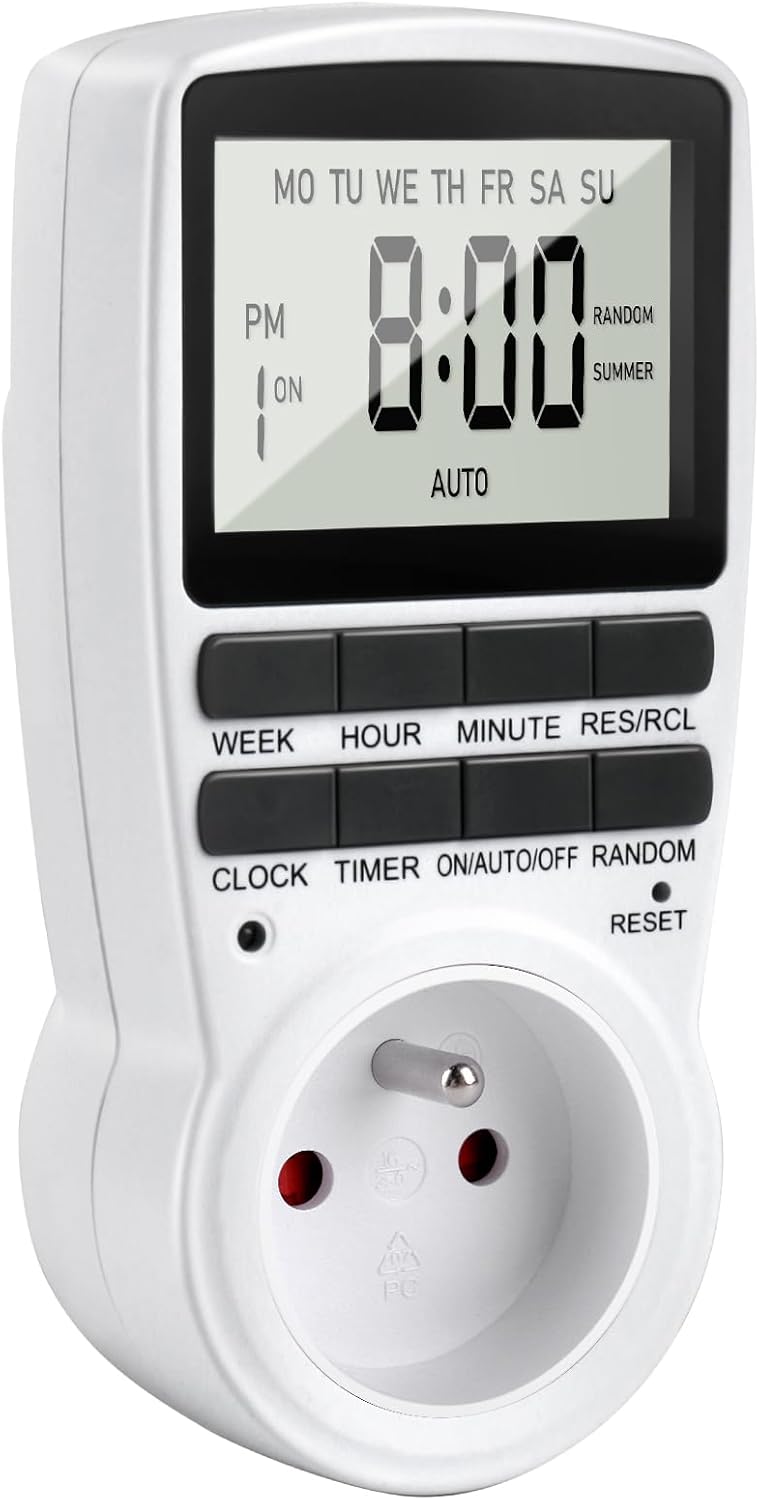
1 paveikslas: Priekyje view of the MECHEER JK-TM02-FR Digital Programmable Timer Outlet, showing the LCD display and control buttons.
Pagrindinės funkcijos:
- Up to 16 On/Off programs.
- Multiple day combinations (daily, specific days, weekdays, weekends).
- Random mode for enhanced home security.
- Rankinio valdymo funkcija.
- Didelis LCD ekranas su apšvietimu.
- Built-in backup battery to retain settings during power outages.
Mygtukų funkcijos:
- SAVAITĖ: Nustato savaitės dieną.
- VALANDA: Nustato valandą.
- MINUTĖ: Nustato minutę.
- RES/RCL: Atkuria arba iškviečia programos nustatymus.
- LAIKRODIS: Įjungia arba išjungia laikrodžio nustatymo režimą.
- LAIKMATIS: Įjungiamas programos nustatymo režimas.
- ON/AUTO/OFF: Cycles through ON, AUTO, and OFF modes.
- NETINKAMA: Activates/deactivates random mode.
- NUSTATYTI: Resets the unit to factory defaults (requires a pointed object).
Sąranka
1. Initial Charge and Reset:
Before first use, plug the timer into a live electrical outlet for at least 30 minutes to charge the internal backup battery. After charging, use a small pointed object (like a pen tip) to press the RESET button to clear all memory and reset the unit to factory defaults. The display will show "0:00".
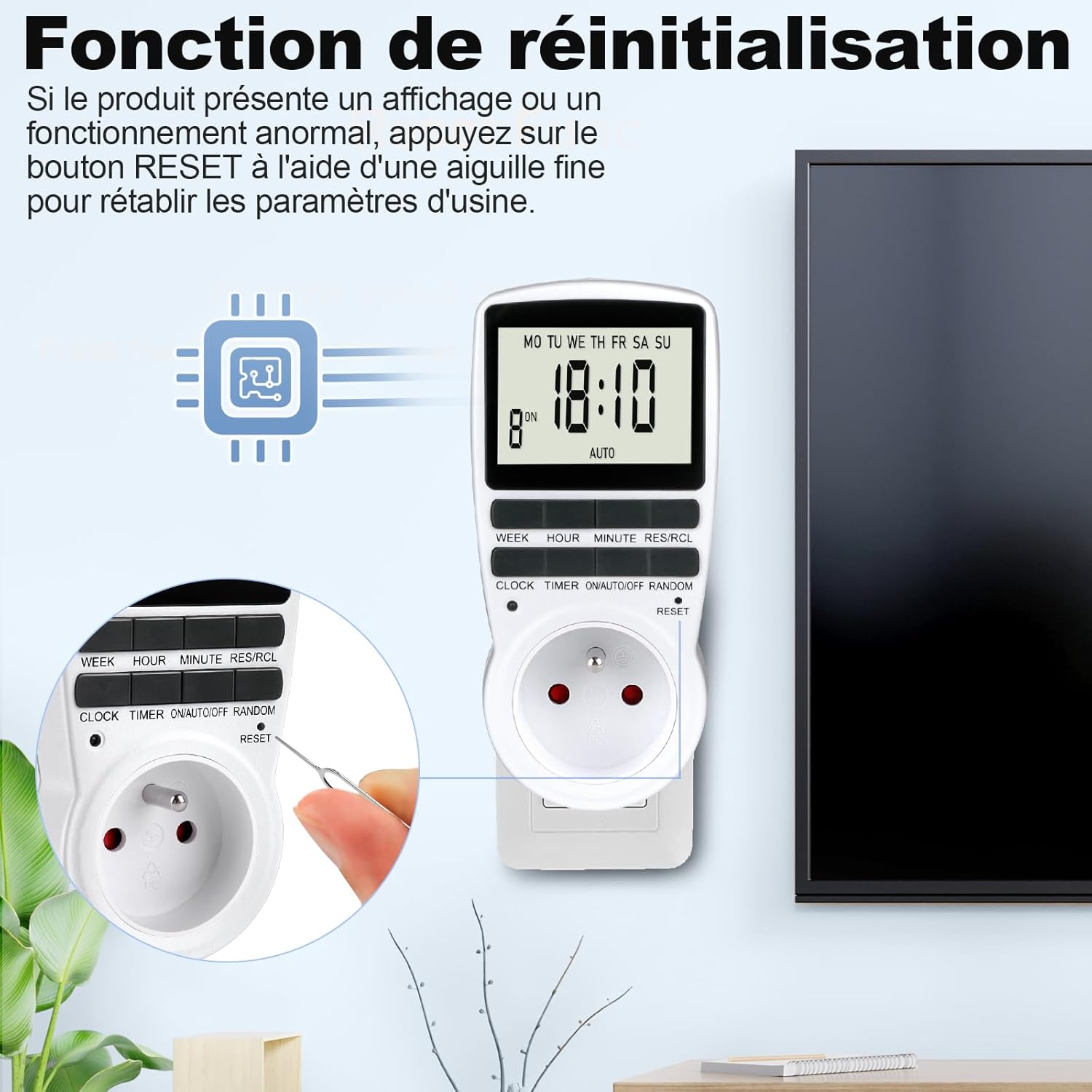
2 paveikslas: Locating and pressing the RESET button with a pointed object to clear settings.
2. Dabartinio laiko nustatymas:
- Paspauskite LAIKRODIS mygtuką.
- Laikant LAIKRODIS, paspauskite SAVAITĖ mygtuką kelis kartus, kol bus rodoma teisinga savaitės diena.
- Laikant LAIKRODIS, paspauskite VALANDA mygtuką kelis kartus, kol bus rodoma teisinga valanda.
- Laikant LAIKRODIS, paspauskite MINUTĖ mygtuką kelis kartus, kol bus rodoma teisinga minutė.
- Atleiskite LAIKRODIS mygtuką. Dabartinis laikas nustatytas.

3 paveikslas: Visual guide for setting the current time (Step 1: Set current time, Step 2: Set schedule, Step 3: Activate AUTO mode).
To switch between 12-hour (AM/PM) and 24-hour formats, press the LAIKRODIS ir LAIKMATIS mygtukus vienu metu.
Naudojimo instrukcijos
1. Programming On/Off Cycles (16 Programs):
The timer allows you to set up to 16 distinct ON/OFF programs. Each program consists of an ON time and an OFF time.
- Paspauskite LAIKMATIS mygtuką vieną kartą. Ekrane bus rodoma „1 ON“. Tai skirta pirmajai įjungimo programai.
- Paspauskite SAVAITĖ to select the desired day(s) for this program. Options include:
- PIR ANT TRE KET PEN ŠEŠ SEK (Kasdien)
- MO (Monday only)
- TU (Tuesday only)
- ... (Each individual day)
- PIR ANT TRE KET PEN (Darbo dienomis)
- ŠEŠ SEK (savaitgaliai)
- PIR ANT TRE KET PEN ŠEŠ (Pirmadienis–Šeštadienis)
- MO WE FR (Mon, Wed, Fri)
- TU TH SA (Tue, Thu, Sat)
- MO TU WE (Mon, Tue, Wed)
- TH FR SA (Thu, Fri, Sat)
- MO WE FR SU (Mon, Wed, Fri, Sun)
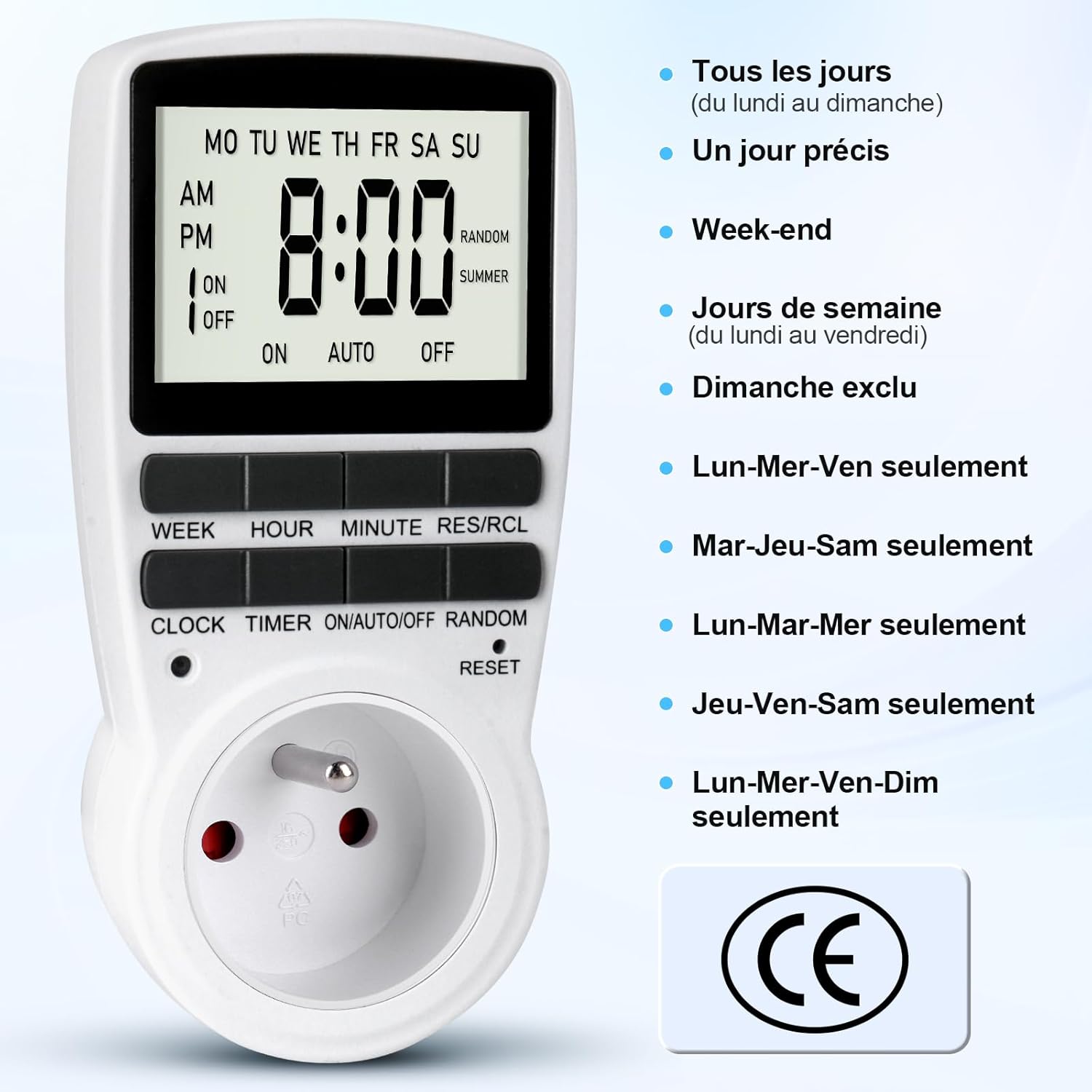
4 paveikslas: Various day combination options available for programming the timer.
- Paspauskite VALANDA to set the desired hour for the ON time.
- Paspauskite MINUTĖ to set the desired minute for the ON time.
- Paspauskite LAIKMATIS again. The display will show "1 OFF". This is for the first OFF program.
- Repeat steps 2-4 to set the desired day(s), hour, and minute for the OFF time.
- Spauskite toliau LAIKMATIS to cycle through "2 ON", "2 OFF", up to "16 ON", "16 OFF", and set additional programs as needed.
- Nustatę visas norimas programas, paspauskite LAIKRODIS mygtuką, kad grįžtumėte į dabartinio laiko rodymą.

5 paveikslas: Illustration of setting multiple On/Off programs, such as for an aquarium light or a toaster.

6 paveikslas: Example of a daily On/Off timer, such as turning on a coffee machine at 7:00 AM and off at 8:00 AM.
2. Activating Programs (ON/AUTO/OFF Mode):
Once programs are set, you need to select the operating mode:
- Paspauskite ON/AUTO/OFF mygtuką, norėdami pereiti per režimus:
- ĮJUNGTA: The connected appliance is continuously ON, ignoring all programs.
- AUTOMATINIS: The connected appliance will operate according to the programmed ON/OFF times. The display will show "AUTO".
- IŠJUNGTA: The connected appliance is continuously OFF, ignoring all programs.
- For your programs to run, ensure the timer is in AUTO režimu.
3. Random Mode (Anti-Theft):
The random mode is designed to deter intruders by making it appear as if someone is home. When activated, the timer will randomly turn the connected appliance ON and OFF within a specific time window (e.g., 6:00 PM to 6:00 AM).
- Įsitikinkite, kad laikmatis įjungtas AUTO režimu.
- Paspauskite ATSITIKTINIAI button. "RANDOM" will appear on the display.
- Norėdami išjungti, paspauskite ATSITIKTINIAI button again. "RANDOM" will disappear from the display.

7 paveikslas: Using the random mode to simulate occupancy and enhance home security while away.
4. Summer Time Adjustment:
To adjust for daylight saving time (summer time):
- Paspauskite LAIKRODIS ir ATSITIKTINIAI buttons simultaneously. The display will show "SUMMER" and the time will advance by one hour.
- Repeat the action to revert to standard time.
Priežiūra
The MECHEER JK-TM02-FR timer requires minimal maintenance.
- Valymas: Nuvalykite įrenginį sausa, minkšta šluoste. Nenaudokite abrazyvinių valiklių ir nemerkite jo į vandenį.
- Atsarginė baterija: The internal NiMH 1.2V backup battery maintains your programmed settings for over 100 hours during a power outage, provided it is adequately charged. Regular use (plugged into an outlet) keeps the battery charged.
Trikčių šalinimas
- Ekranas tuščias arba nereaguoja:
- Ensure the timer is plugged into a live electrical outlet.
- The internal battery might be depleted. Plug the timer in for at least 30 minutes to charge.
- Perform a full reset by pressing the RESET button with a pointed object. Note that this will erase all programmed settings.
- Programos neveikia:
- Patikrinkite, ar įjungtas laikmatis AUTO režimu. Paspauskite ON/AUTO/OFF until "AUTO" is displayed.
- Verify that the current time is set correctly.
- Review your programmed ON/OFF times to ensure they are set as intended.
- Ensure the connected appliance is switched ON (if it has its own power switch).
- Random mode is not working:
- Ensure "RANDOM" is displayed on the screen. If not, press the ATSITIKTINIAI mygtuką.
- Confirm the timer is in AUTO režimu.
Specifikacijos
| Prekės ženklas | MECHEER |
| Modelio numeris | JK-TM02-FR |
| Spalva | Pilka |
| Medžiaga | Polikarbonatas |
| Gaminio matmenys (I x P x A) | 5 x 8 x 15 cm |
| Prekės svoris | 150 g |
| Maksimali apkrova | 16A / 3680W |
| Darbinė temperatūra | -10°C iki 40°C |
| Minimalus nustatymo laikas | 1 minutė |
| Tikslumas | ±1 Minute/Month |
| Atsarginė baterija | NiMH 1.2V (>100 Hours) |
Garantija ir palaikymas
For information regarding warranty coverage, please refer to the purchase documentation or contact your retailer. For technical support or further assistance, please contact MECHEER customer service through the platform where the product was purchased.


