Įvadas
This manual provides comprehensive instructions for the installation, operation, and maintenance of your Fenvi FU-AX900BT Wi-Fi 6 USB Adapter with Bluetooth 5.2. Please read this manual carefully before using the device to ensure proper functionality and to maximize its performance. The FU-AX900BT is designed to provide high-speed Wi-Fi 6 (802.11ax) connectivity and Bluetooth 5.2 capabilities to your desktop or laptop computer.

1 vaizdas: Fenvi FU-AX900BT Wi-Fi 6 USB Adapter. This image shows the compact USB adapter with its high-gain external antenna attached, ready for connection to a computer's USB port.
Pakuotės turinys
Patikrinkite, ar pakuotėje yra visi reikalingi daiktai:
- Fenvi FU-AX900BT Wireless USB Adapter
- Instrukcijų vadovas (šis dokumentas)
Pagrindinės savybės
The Fenvi FU-AX900BT offers the following key features:
- Didelės galios išorinė antena: Provides stronger signal reception and extended range, beneficial for systems located further from the router or in environments with obstacles.
- 2 viename rinkinys: Integrates both Wi-Fi 6 (802.11ax) AX900 and Bluetooth 5.2 connectivity.
- Dviejų dažnių greičiai: Supports up to 600 Mbps on the 5 GHz band and 287 Mbps on the 2.4 GHz band for efficient data transfer.
- MU-MIMO ir OFDMA: Enhances network efficiency and performance, especially in busy network environments with multiple devices.
- WPA3 sauga: Provides advanced encryption for secure wireless connections.
- USB 3.0 sąsaja: Ensures high throughput for optimal Wi-Fi and Bluetooth performance.
- Platus suderinamumas: Suderinamas su „Windows 11“ ir „Windows 10“ operacinėmis sistemomis.

2 vaizdas: Baigėsiview of Fenvi FU-AX900BT features. This graphic highlights Wi-Fi 6 (802.11ax) upgrade, dual-band speeds (900 Mbps total), high-gain antenna, 3-year warranty, Bluetooth 5.3 (note: product description states 5.2), WPA3 security, and OFDMA technology.

3 vaizdas: Wi-Fi 6 Performance with OFDMA and MU-MIMO. This illustration compares Wi-Fi 5 and Wi-Fi 6 data transmission, showing how OFDMA and MU-MIMO improve efficiency by allowing multiple devices to communicate simultaneously without waiting.
Sistemos reikalavimai
- Operacinė sistema: Windows 11 or Windows 10 (64-bit recommended).
- USB prievadas: Available USB 3.0 port (backward compatible with USB 2.0, but USB 3.0 is recommended for optimal performance).
- Procesorius: Intel Core i3 / AMD Ryzen 3 or higher recommended.
- RAM: 4 GB ar daugiau.
Sąrankos instrukcijos
1. Fizinis įrengimas
- Išpakuokite adapterį: Carefully remove the Fenvi FU-AX900BT USB adapter from its packaging.
- Identify a USB 3.0 Port: Locate an available USB 3.0 port on your desktop or laptop computer. USB 3.0 ports are typically blue internally or marked with a "SS" (SuperSpeed) symbol.
- Įdėkite adapterį: Gently insert the FU-AX900BT adapter into the chosen USB 3.0 port. Ensure it is fully seated.
- Sureguliuokite anteną: Position the high-gain external antenna for optimal signal reception. The antenna can typically be rotated 180 degrees and tilted 90 degrees to find the best orientation.

4 vaizdas: Antenna Benefits and Adjustment. This image illustrates the benefits of the external antenna, including stronger signal, wider coverage, faster data transfer, and better penetration, along with showing its multi-directional adjustment capabilities (180° rotation, 90° tilt).
2. Tvarkyklės diegimas
For Windows 11/10, the operating system may automatically detect and install the necessary drivers. If automatic installation does not occur or if you experience issues, manual driver installation is required.
- Patikrinkite įrenginių tvarkytuvę:
- Right-click on the Start button and select "Device Manager".
- Look for "Network adapters" and "Bluetooth" sections. If you see an unrecognized device or a device with a yellow exclamation mark, drivers need to be installed.
- Atsisiųsti tvarkykles: Visit the official Fenvi support website (refer to the product packaging or Fenvi's main websvetainė, skirta tiksliam URL) and download the latest drivers for the FU-AX900BT model.
- Įdiegti tvarkykles:
- Extract the downloaded driver file (if it's a compressed archive).
- Run the setup executable (e.g., "setup.exe" or "install.exe") and follow the on-screen instructions.
- Iš naujo paleiskite kompiuterį, jei būsite paraginti.
- Patikrinkite įdiegimą: After restarting, check Device Manager again. The Fenvi FU-AX900BT should now appear correctly under "Network adapters" and "Bluetooth".
Naudojimo instrukcijos
1. Prisijungimas prie Wi-Fi
- Prieigos tinklo nustatymai: Sistemos dėkle (dažniausiai apatiniame dešiniajame ekrano kampe) spustelėkite „Wi-Fi“ piktogramą.
- Pasirinkite savo tinklą: Atsiras galimų „Wi-Fi“ tinklų sąrašas. Pasirinkite norimą tinklą (SSID).
- Įveskite slaptažodį: Jei būsite paraginti, įveskite savo tinklo „Wi-Fi“ slaptažodį (saugos raktą).
- Prisijunkite: Spustelėkite „Prisijungti“. Dabar jūsų kompiuteris turėtų būti prijungtas prie „Wi-Fi“ tinklo.
2. „Bluetooth“ įrenginių susiejimas
The FU-AX900BT supports Bluetooth 5.2, allowing you to connect various Bluetooth peripherals.
- Įjungti Bluetooth:
- Eikite į Nustatymai > Bluetooth ir įrenginiai („Windows 11“) arba Nustatymai > Prietaisai > Bluetooth ir kiti įrenginiai (Windows 10).
- Įsitikinkite, kad „Bluetooth“ įjungtas.
- Įjunkite įrenginio susiejimo režimą: Refer to your Bluetooth device's manual to put it into pairing mode. This usually involves holding a button until an indicator light flashes.
- Pridėti įrenginį:
- In Windows Bluetooth settings, click "Add device" or "Add Bluetooth or other device".
- Select "Bluetooth" from the options.
- Your computer will scan for nearby Bluetooth devices. Select your device from the list.
- Visiškas susiejimas: Follow any on-screen prompts or enter a PIN if required by your device. Once paired, the device will appear in your list of connected Bluetooth devices.

5 vaizdas: Bluetooth 5.3 Connectivity. This graphic illustrates the Fenvi adapter connecting to various Bluetooth devices such as headphones, mobile phones, gaming consoles, and wireless mice, highlighting improved connection stability over longer distances.
Priežiūra
- Laikyti švarų: Reguliariai valykite adapterį minkštu, sausu skudurėliu. Venkite naudoti skystus valiklius ar tirpiklius.
- Venkite kliūčių: Ensure the antenna is not obstructed by other objects to maintain optimal signal strength.
- Tvirtas ryšys: Ensure the adapter is always firmly seated in the USB port.
- Programinės įrangos atnaujinimai: Regularly check the Fenvi official websvetainę, kurioje rasite atnaujintų tvarkyklių, kad būtų užtikrintas suderinamumas ir našumo patobulinimai.
Trikčių šalinimas
| Problema | Galimas sprendimas |
|---|---|
| No Wi-Fi connection or slow speeds. |
|
| Bluetooth devices cannot pair or connect. |
|
| Kompiuteris neatpažįsta adapterio. |
|
Specifikacijos
| Modelis | FU-AX900BT |
| Prekės ženklas | Fenvi |
| Standartinis belaidis internetas | IEEE 802.11ax („Wi-Fi 6“) |
| Bluetooth versija | 5.2 |
| Sąsaja | USB 3.0 |
| Duomenų perdavimo sparta („Wi-Fi“) | Iki 600 Mbps (5 GHz), iki 287 Mbps (2.4 GHz) |
| Saugumas | WPA3 |
| Savybės | MU-MIMO, OFDMA, High-Gain External Antenna |
| OS suderinamumas | Langai 11 Windows 10 |
| Gaminio matmenys | 10 x 2 x 2 cm |
| Prekės svoris | 60 g |
| Kilmės šalis | Kinija |
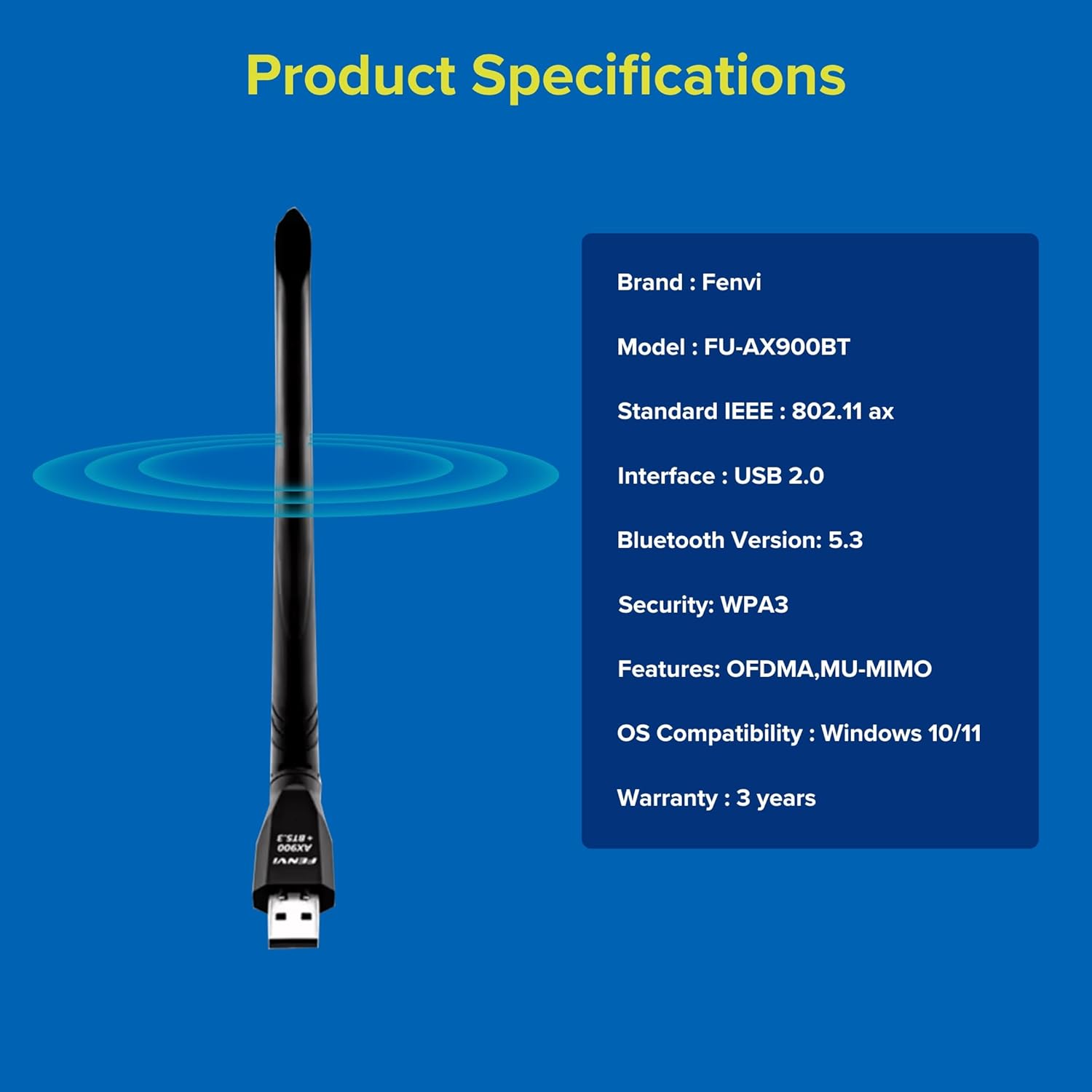
6 vaizdas: Fenvi FU-AX900BT Product Specifications. This graphic summarizes key specifications such as brand, model, Wi-Fi standard, interface, Bluetooth version, security, features, OS compatibility, and warranty.
Garantija ir palaikymas
The Fenvi FU-AX900BT comes with a 3-Year India Warranty. For technical support, warranty claims, or further assistance, please contact Fenvi customer support through their official websvetainę arba mažmenininką, iš kurio buvo pirktas produktas.
Prašome išsaugoti pirkimo kvitą kaip pirkimo įrodymą garantijos tikslais.


