1. Įvadas
This manual provides essential instructions for the safe and efficient operation of your WISCENT Bluetooth Stereo System WTB-799. Please read this manual thoroughly before using the product and retain it for future reference.
The WISCENT WTB-799 is a compact home audio system featuring a CD player, Bluetooth 5.0 wireless streaming, FM radio, USB playback, and a 3.5mm AUX-in port. It delivers 40W peak power (2 x 20W RMS) through its two-way speaker system, designed for balanced sound reproduction.
2. Saugos informacija
- Maitinimo šaltinis: Užtikrinkite maitinimo šaltinio ttage matches the rating indicated on the unit.
- Vėdinimas: Neužblokuokite ventiliacijos angų. Palikite pakankamai vietos aplink įrenginį tinkamam oro cirkuliavimui.
- Vanduo ir drėgmė: Saugokite įrenginį nuo lietaus, drėgmės ar lašančių/taškomų skysčių. Nestatykite ant įrenginio daiktų, pripildytų skysčių, pavyzdžiui, vazų.
- Šiluma: Laikykite įrenginį atokiau nuo šilumos šaltinių, tokių kaip radiatoriai, šildytuvai, viryklės ar kiti prietaisai (įskaitant ampkeltuvai), kurie gamina šilumą.
- Valymas: Prieš valydami atjunkite įrenginį nuo elektros lizdo. Naudokite minkštą, sausą šluostę. Nenaudokite skystų ar aerozolinių valiklių.
- Aptarnavimas: Nemėginkite patys aptarnauti šio gaminio. Visą techninę priežiūrą patikėkite kvalifikuotam aptarnavimo personalui.
- CD grotuvas: This product contains a laser. Do not open the CD compartment while a disc is playing. Avoid direct exposure to the laser beam.
3. Pakuotės turinys
Atsargiai išpakuokite visus daiktus ir įsitikinkite, kad gavote šiuos daiktus:
- Main Unit (Stereo System)
- 2 x Bookshelf Speakers
- Nuotolinio valdymo pultas (AAA baterijos nepridedamos)
- Kintamosios srovės laidas
- 3.5 mm AUX kabelis
- Vartotojo vadovas (šis dokumentas)

4. Produktas baigtasview
4.1 Priekinio skydelio valdikliai

- Įjungimo mygtukas: Įjungia arba išjungia įrenginį.
- PLAY/PAUSE mygtukas: Starts or pauses playback for CD, USB, or Bluetooth.
- SKIP/TUNE Buttons (◀◀ / ▶▶): Skips tracks on CD/USB, navigates radio frequencies, or fast forwards/rewinds.
- SCAN mygtukas: Initiates automatic scanning for FM radio stations.
- RPT (REPEAT) Button: Cycles through repeat modes (one, all, random) for CD/USB.
- GARSUMO rankenėlė: Reguliuoja pagrindinį garsumo lygį.
- EQ/FUN Button: Selects sound equalizer presets or switches input functions (CD, Bluetooth, FM, USB, AUX).
- USB prievadas: Skirta prijungti USB atmintines MP3 atkūrimui.
- AUX-IN lizdas: Skirta išoriniams garso įrenginiams prijungti per 3.5 mm laidą.
- Ausinių lizdas: Privačiam klausymuisi su ausinėmis.
4.2 Galinio skydelio jungtys
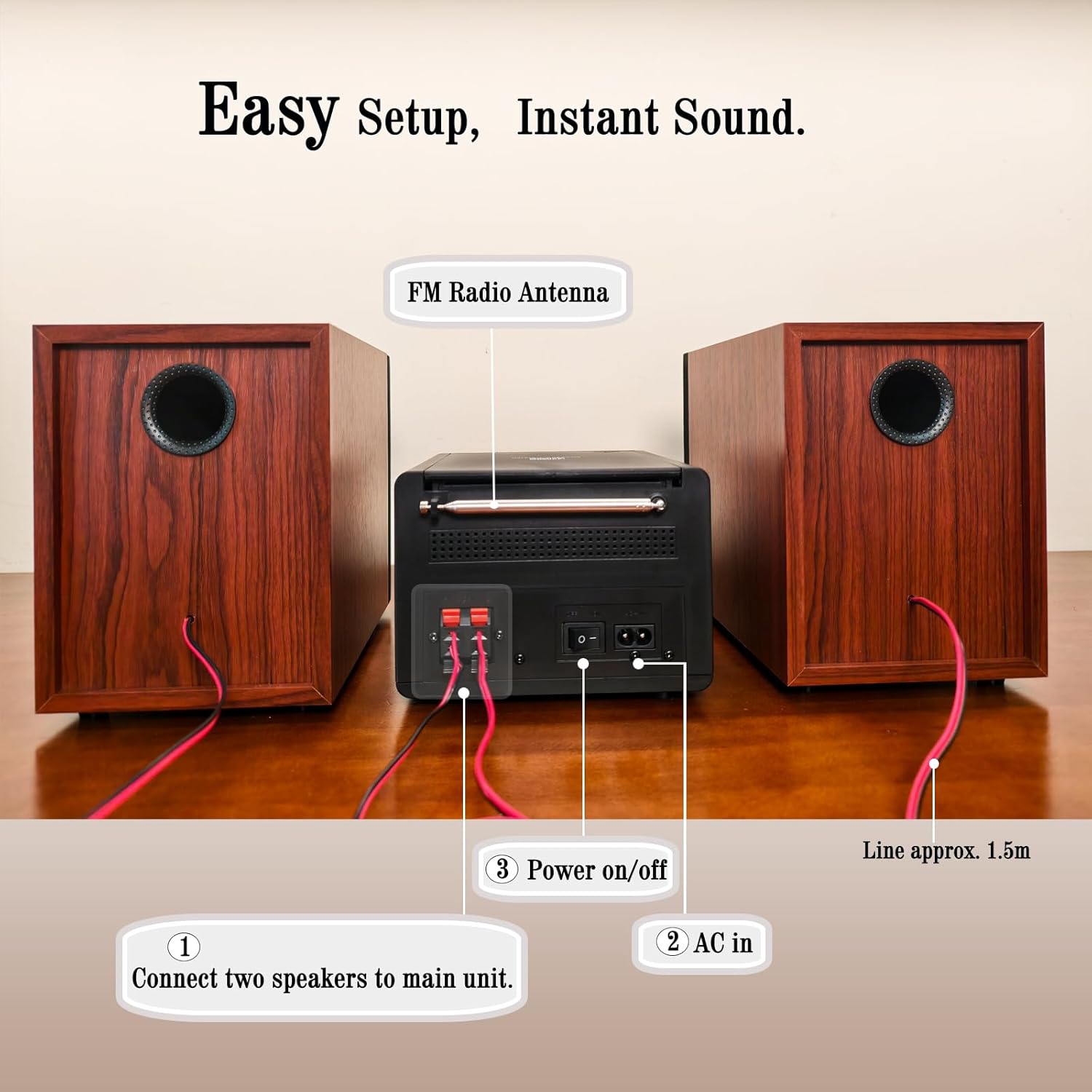
- Garsiakalbių terminalai: Connect the included bookshelf speakers.
- FM radijo antena: Extend for optimal FM signal reception.
- AC IN: Prijunkite kintamosios srovės maitinimo kabelį.
- Maitinimo įjungimo/išjungimo jungiklis: Pagrindinis įrenginio maitinimo jungiklis.
5. Sąranka
5.1 Garsiakalbių prijungimas
- Identify the speaker wires. Each speaker has two wires, typically red (+) and black (-).
- Connect the red wire from each speaker to the red (+) terminal on the main unit.
- Connect the black wire from each speaker to the black (-) terminal on the main unit.
- Ensure a secure connection for both speakers.
5.2 FM antenos prijungimas
Extend the FM wire antenna located at the rear of the main unit for improved radio reception. Position it for the best possible signal.
5.3 Maitinimo prijungimas
- Plug the AC power cable into the AC IN port on the rear of the main unit.
- Kitą kintamosios srovės maitinimo laido galą prijunkite prie standartinio sieninio lizdo.
- Ensure the main Power On/Off switch on the rear panel is in the 'ON' position.
6. Naudojimo instrukcijos
6.1 Maitinimo įjungimas/išjungimas
Paspauskite GALIA button on the front panel or the remote control to turn the unit on or off (standby mode).
6.2 Šaltinio pasirinkimas
Paspauskite EQ/PRAMOGOS button repeatedly on the front panel or the FUNKCIJA button on the remote control to cycle through available input sources: CD, Bluetooth, FM Radio, USB, AUX-in.
6.3 CD atkūrimas

- Open the CD compartment cover on top of the main unit.
- Uždėkite kompaktinį diską (CD, CD-R, CD-RW arba MP3 CD) ant ašies etikete į viršų.
- Uždarykite CD skyriaus dangtelį.
- Select 'CD' mode using the EQ/PRAMOGOS mygtuką.
- Playback should start automatically. If not, press the PALEISTI / PAUZĖ mygtuką.
- Naudokite PRALEIDIMAS / DERINIMAS mygtukus, kad galėtumėte naršyti takelius.
- Paspauskite RPT button to select repeat modes (Repeat One, Repeat All, Random Play).
6.4 Bluetooth poravimas
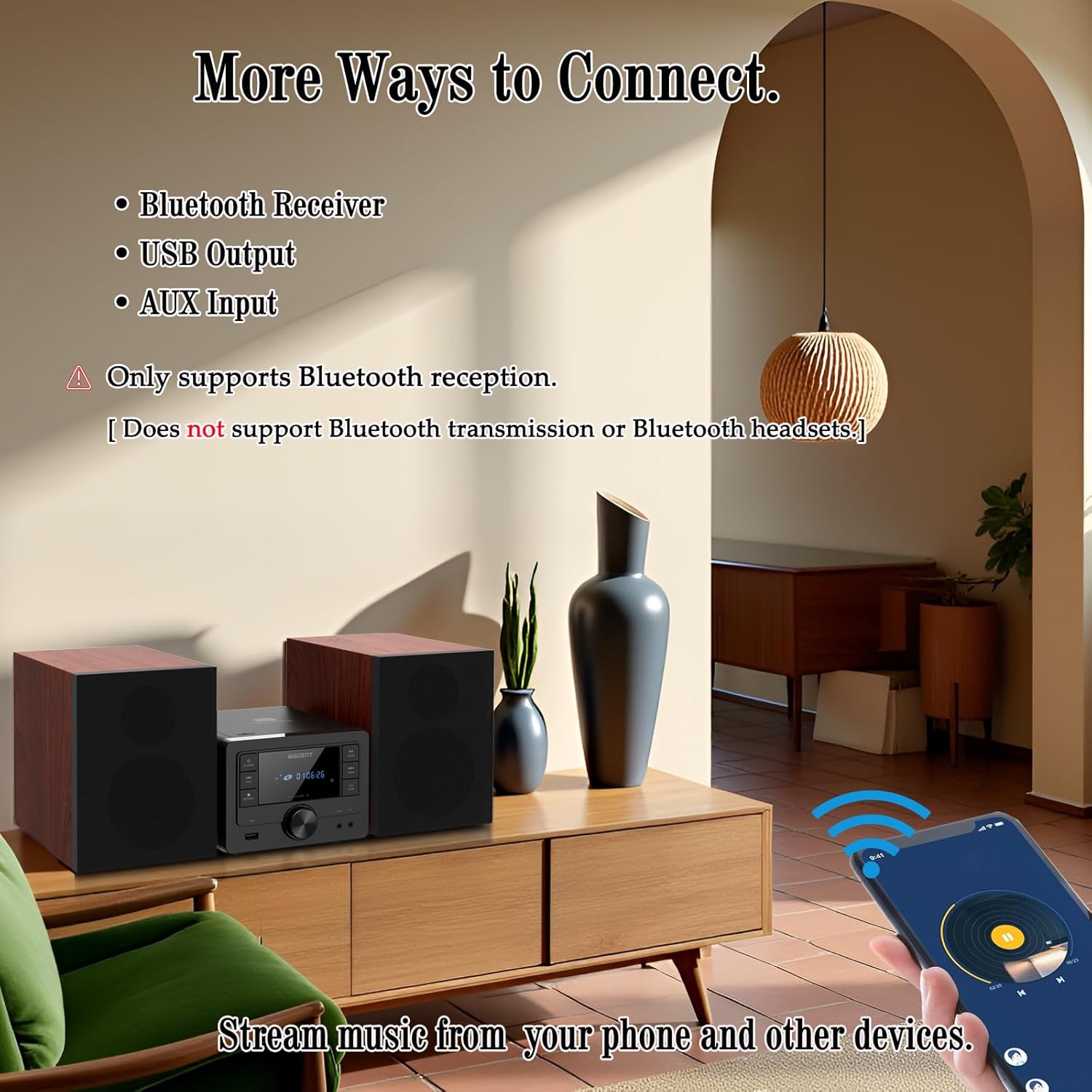
- Select 'Bluetooth' mode using the EQ/PRAMOGOS button. The display will show 'BT' and flash, indicating it's in pairing mode.
- On your Bluetooth-enabled device (smartphone, tablet), go to its Bluetooth settings and enable Bluetooth.
- Ieškokite available devices and select 'WTB-799' from the list.
- Once paired, the display will stop flashing and show 'BT' steadily.
- You can now stream audio from your device to the stereo system.
- Pastaba: This system supports Bluetooth reception only. It cannot transmit audio to Bluetooth headphones or other Bluetooth speakers.
6.5 FM radijo veikimas
- Select 'FM' mode using the EQ/PRAMOGOS mygtuką.
- Paspauskite NUSKAITYTI mygtuką, kad automatiškai nuskaitytumėte ir išsaugotumėte galimas FM stotis.
- Naudokite PRALEIDIMAS / DERINIMAS buttons to manually tune to a specific frequency or navigate through saved stations.
6.6 USB atkūrimas
- Insert a USB flash drive (formatted with MP3 files) į USB prievadą priekiniame skydelyje.
- Select 'USB' mode using the EQ/PRAMOGOS mygtuką.
- Playback should start automatically. If not, press the PALEISTI / PAUZĖ mygtuką.
- Naudokite PRALEIDIMAS / DERINIMAS mygtukus, kad galėtumėte naršyti takelius.
- Paspauskite RPT button to select repeat modes (Repeat One, Repeat All, Random Play).
6.7 AUX įvesties jungtis
- Connect one end of the 3.5mm AUX cable to the AUX-IN jack on the front panel of the stereo system.
- Kitą AUX laido galą prijunkite prie išorinio garso įrenginio (pvz., išmaniojo telefono, MP3 grotuvo) ausinių lizdo arba garso išvesties.
- Select 'AUX' mode using the EQ/PRAMOGOS mygtuką.
- Valdykite atkūrimą ir garsumą iš išorinio įrenginio.
6.8 Sound Settings (EQ Modes)
Paspauskite EQ/PRAMOGOS button (or EQ button on the remote) repeatedly to cycle through the available equalizer presets:
- Butas: Neutral sound profile.
- Rokas: Enhanced bass and treble.
- Pop: Slightly boosted bass and vocals.
- Klasika: Emphasizes mid-range frequencies.
- Džiazas: Slightly boosted bass and treble with a warm tone.
6.9 Nuotolinio valdymo pulto naudojimas
The included remote control allows for convenient operation from a distance. Insert two AAA batteries (not included) into the remote control before use. Point the remote control towards the main unit's front panel sensor.
7. Priežiūra
- Valymas: Use a soft, dry cloth to clean the unit's exterior. Do not use abrasive cleaners, waxes, or solvents.
- CD Player Lens: Jei kyla problemų dėl CD atkūrimo, naudokite komerciškai įsigyjamą CD lęšio valymo diską.
- Saugykla: Kai ilgesnį laiką nenaudojate įrenginio, atjunkite jį nuo elektros tinklo ir laikykite jį vėsioje, sausoje vietoje.
8. Problemų sprendimas
| Problema | Galima priežastis | Sprendimas |
|---|---|---|
| Nėra galios | Power cable not connected; Rear power switch off; Wall outlet not active. | Check power cable connection; Ensure rear power switch is ON; Test wall outlet with another device. |
| Nėra garso | Volume too low; Incorrect input source; Speakers not connected properly; Mute function active. | Increase volume; Select correct input source; Check speaker wire connections; Deactivate mute. |
| CD negroja | CD inserted incorrectly; CD dirty/scratched; Incorrect source selected. | Reinsert CD label side up; Clean or replace CD; Select 'CD' source. |
| „Bluetooth“ nesusieja | Unit not in pairing mode; Bluetooth on device off; Device too far. | Select 'Bluetooth' source (display flashes); Enable Bluetooth on your device; Move device closer to the unit. |
| Prastas FM priėmimas | Antena netinkamai ištiesta / pastatyta. | Fully extend and reposition the FM antenna. |
| USB neatpažintas | USB diskas netinkamai suformatuotas; nesuderinamas file types; USB drive damaged. | Ensure USB is FAT32 formatted with MP3 files; Išbandykite kitą USB atmintinę. |
| Nuotolinio valdymo pultas neveikia | Išsikrovusios / neteisingai įdėtos baterijos; kliūtis tarp nuotolinio valdymo pulto ir įrenginio. | Replace batteries (AAA); Ensure correct battery polarity; Remove obstructions. |
9. Specifikacijos
- Prekinis ženklas: WISCENT
- Modelis: WTB-799
- Ryšio technologija: Pagalbinis, „Bluetooth 5.0“, USB
- Garsiakalbio tipas: Stereo, 2-way (Woofer & Tweeter)
- Išėjimo galia: 40W Peak (2 x 20W RMS)
- CD suderinamumas: CD, CD-R, CD-RW, MP3 CD
- FM radijo dažnis: 87.5 ~ 108 MHz
- USB prievadas: USB 2.0 (for MP3 playback)
- Gaminio matmenys (pagrindinis įrenginys): 6.3" x 7.5" x 4.7" (160x190x120 mm)
- Product Dimensions (Each Speaker): 5.3" x 8.1" x 7.5" (135x205x190 mm)
- Prekės svoris: Maždaug 3.3 svaro
- Spalva: Juoda
10. Garantija ir palaikymas
For warranty information and technical support, please refer to the warranty card included with your product or contact the retailer where you purchased the WISCENT Bluetooth Stereo System WTB-799. You may also visit the official WISCENT webSvetainė, kurioje rasite tolesnę pagalbą.
Gamintojas: WISCENT


