1. Įvadas
This manual provides essential instructions for the safe and effective use of your DNT Optics TNC335R ThermNight Thermal & Night Vision Multispectral Scope, bundled with the QDM150 Quick Detach Mount. The TNC335R is an advanced optical device designed for enhanced observation capabilities in various lighting conditions, offering both thermal and night vision functionalities. Please read this manual thoroughly before operating the device.
2. Saugos informacija
- Akių sauga: Niekada nežiūrėkite tiesiai į saulę ar kitus intensyvius šviesos šaltinius per optinį taikiklį, nes tai gali sukelti negrįžtamą akių pažeidimą.
- Baterijos sauga: Use only recommended battery types. Do not mix old and new batteries, or different types of batteries. Dispose of batteries according to local regulations.
- Montavimas: Ensure the scope is securely mounted to your firearm using the QDM150 mount. Improper mounting can lead to injury or damage to the device.
- Aplinkos sąlygos: Avoid exposing the device to extreme temperatures, direct impact, or corrosive substances.
- Priežiūra: Do not attempt to disassemble or modify the scope. Refer all servicing to authorized DNT Optics personnel.
3. Pakuotės turinys
Patikrinkite, ar pakuotėje yra visi reikalingi daiktai:
- DNT Optics TNC335R ThermNight Multispectral Scope
- QDM150 Quick Detach Mount
- Objektyvo dangteliai
- Įkraunama baterija
- USB įkrovimo laidas
- Lęšių valymo šluostė
- Vartotojo vadovas (šis dokumentas)
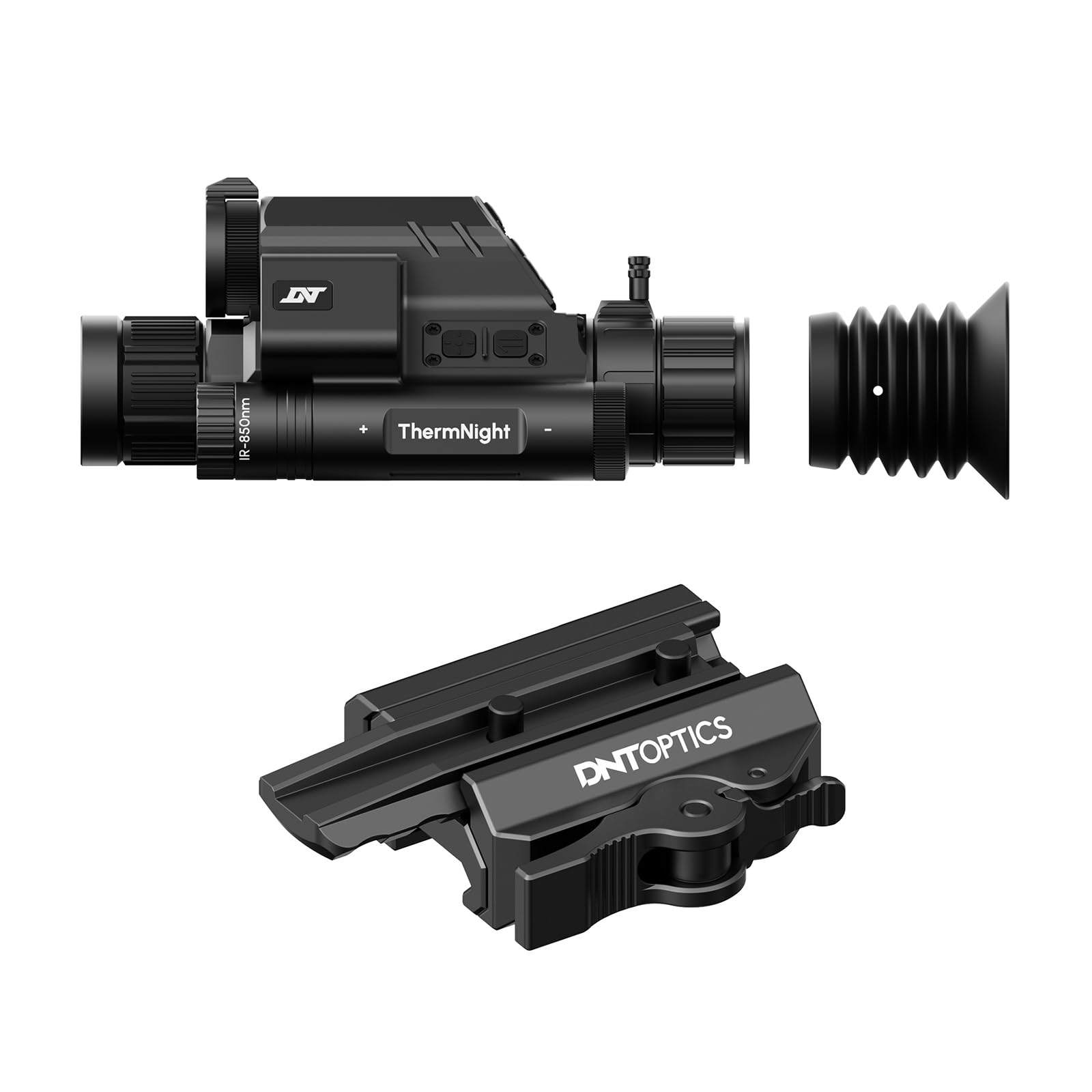
Image 1: DNT Optics TNC335R ThermNight Multispectral Scope with QDM150 mount. This image displays the main scope unit alongside its quick-detach mounting system, providing a visual reference for the product.
4. Sąranka
4.1 Akumuliatoriaus įdėjimas
- Raskite baterijų skyrių ant optinio taikiklio.
- Atsukite akumuliatoriaus dangtelį.
- Insert the rechargeable battery, ensuring correct polarity (+/-).
- Tvirtai užsukite akumuliatoriaus dangtelį.
- Prieš pirmą kartą naudodami, visiškai įkraukite bateriją naudodami pridedamą USB laidą.
4.2 Mounting the QDM150
- Attach the QDM150 mount to the scope according to the mount's specific instructions, ensuring it is firmly secured.
- Position the scope with the QDM150 mount onto your rifle's Picatinny rail.
- Engage the quick-detach levers to lock the mount onto the rail. Verify that the scope is stable and does not wobble.
4.3 Initial Power-On and Zeroing
- Paspauskite ir palaikykite maitinimo mygtuką, kol ekranas įsijungs.
- Perform initial zeroing of the scope according to standard rifle scope zeroing procedures. Refer to the detailed zeroing guide available on the DNT Optics websvetainę, kurioje rasite išsamias instrukcijas.
5. Operacinis
5.1 Maitinimo įjungimas/išjungimas
- Maitinimas: Paspauskite ir palaikykite maitinimo mygtuką maždaug 3 sekundes.
- Išjungti: Press and hold the power button for approximately 5 seconds until the display shuts down.
5.2 Režimo pasirinkimas
The TNC335R offers multiple observation modes:
- Terminis režimas: Detects heat signatures. Ideal for low-light or obscured conditions.
- Naktinio matymo režimas: Amplifies ambient light for clear viewing in near-darkness.
- Dienos režimas: Standard optical viewing for daylight conditions.
Press the 'Mode' button to cycle through the available observation modes.
5.3 Reticle Adjustment
Use the directional buttons or rotary dial (depending on model variant) to adjust the reticle's position for precise aiming. Refer to the on-screen menu for specific reticle options and adjustments.
5.4 Ryškumas ir kontrastas
Navigate to the 'Display Settings' in the main menu to adjust screen brightness and image contrast for optimal viewveikimas skirtingose aplinkose.
5.5 Skaitmeninis mastelis
Press the 'Zoom' button to cycle through available digital magnification levels. Note that higher digital zoom levels may reduce image clarity.
6. Priežiūra
6.1 Valymas
- Objektyvai: Use the provided lens cleaning cloth or a soft, lint-free cloth specifically designed for optics. Gently wipe the lens surfaces. For stubborn dirt, use a small amount of lens cleaning fluid.
- Korpusas: Wipe the scope's body with a soft, damp skudurėliu. Venkite abrazyvinių valiklių ar tirpiklių.
6.2 Akumuliatoriaus priežiūra
- Reguliariai įkraukite bateriją, net jei jos nenaudojate dažnai, kad pailgintumėte jos tarnavimo laiką.
- Store the device with a partially charged battery if storing for extended periods.
6.3 Saugykla
Store the scope in a cool, dry place, away from direct sunlight and extreme temperatures. Use the lens caps to protect the optical surfaces.
7. Problemų sprendimas
| Problema | Galima priežastis | Sprendimas |
|---|---|---|
| Įrenginys neįsijungia. | Low or depleted battery; incorrectly installed battery. | Charge the battery; ensure battery is installed with correct polarity. |
| Vaizdas neryškus arba neaiškus. | Lens caps still on; dirty lenses; focus adjustment needed. | Remove lens caps; clean lenses; adjust the focus ring. |
| Mygtukai nereaguoja. | Įrenginys užstrigo; išsikrovęs akumuliatorius. | Perform a soft reset (refer to DNT Optics website for specific instructions); charge battery. |
| QDM150 mount feels loose. | Levers not fully engaged; mounting screws loose. | Ensure quick-detach levers are fully locked; tighten any accessible mounting screws. |
8. Specifikacijos
- Prekinis ženklas: DNT Optics
- Modelio pavadinimas: TNC335R
- Prekės svoris: 29.8 uncijos
- Medžiaga: Aliuminis
- Suderinami įrenginiai: Šautuvas, Šautuvas
- Naktinis matymas: Taip
- Tinklelio tipas: Kryžius
- Gijos tipas: 1/2"-28
- Spalva: Juoda
9. Garantija ir palaikymas
DNT Optics products are covered by a limited warranty. For detailed warranty information, product registration, and technical support, please visit the official DNT Optics websvetainėje arba susisiekite su jų klientų aptarnavimo skyriumi. Išsaugokite pirkimo kvitą kaip pirkimo įrodymą garantijos pretenzijoms.
Oficialus Websvetainė: DNT Optics Store on Amazon