Įvadas
This manual provides detailed instructions for the setup, operation, and maintenance of your LIGE EF21-B Smart Watch. Please read this manual thoroughly before using the device to ensure proper function and to maximize your user experience. Keep this manual for future reference.
Kas yra dėžutėje
Upon opening your LIGE EF21-B Smart Watch package, you should find the following items:
- 1 x LIGE EF21-B Smart Watch
- 1 x nerūdijančio plieno dirželis
- 1 x silikoninis dirželis
- 1 x USB magnetinis įkrovimo laidas
- 1 x Type-C Magnetic Charging Cable
- 1 x naudojimo instrukcija

Image: The LIGE EF21-B Smart Watch shown with both USB and Type-C magnetic charging cables, highlighting the included accessories.
Sąranka
1. Išmaniojo laikrodžio įkrovimas
Before initial use, fully charge your smart watch. Connect the magnetic charging cable to the charging contacts on the back of the watch and plug the USB or Type-C end into a compatible power source (e.g., computer, wall adapter). The watch display will indicate charging status. A full charge typically takes approximately 3 hours.

Image: The LIGE EF21-B Smart Watch connected to its magnetic charger, displaying a charging animation and indicating its 600mAh battery capacity.
2. Programos diegimas
To unlock the full functionality of your LIGE EF21-B Smart Watch, you need to install the companion application, FitCloudPro, savo išmaniajame telefone.
- Scan the QR code provided in the watch's interface or in the included manual to download the FitCloudPro app.
- Arba ieškokite „FitCloudPro“ savo išmaniojo telefono programėlių parduotuvėje („Google Play Store“, jei naudojate „Android“, „Apple App Store“, jei naudojate „iOS“).
- Install the application and grant necessary permissions when prompted.
3. Prietaiso poravimas
After installing the app and fully charging your watch:
- Atidarykite „FitCloudPro“ programėlę savo išmaniajame telefone.
- Įsitikinkite, kad jūsų išmaniajame telefone įjungtas „Bluetooth“.
- Programėlėje eikite į skyrių „Įrenginys“ arba „Pridėti įrenginį“.
- The app will search for available devices. Select "EF21-B" from the list to initiate pairing.
- Follow any on-screen prompts on both your phone and watch to confirm the pairing.
Naudojimo instrukcijos
Pagrindinė navigacija
The LIGE EF21-B Smart Watch features a 1.43-inch AMOLED touchscreen display and a rotary encoder crown for navigation.
- Jutiklinis ekranas: Swipe left, right, up, or down to navigate through menus and access different features. Tap to select items.
- Rotary Encoder Crown: Rotate the crown to scroll through lists, adjust settings, or zoom in/out on certain interfaces. Press the crown to return to the home screen or confirm selections.
- Šoniniai mygtukai: The watch includes additional side buttons that can be customized for quick access to specific functions or apps.

Vaizdas: Stambus planas view of the LIGE EF21-B Smart Watch's 1.43-inch AMOLED display, showcasing its vibrant colors and sharp resolution.
„Bluetooth“ skambučiai ir pranešimai
Once paired with your smartphone, the watch supports Bluetooth calling and message notifications.
- Skambinimas / atsiliepimas į skambučius: You can answer or reject incoming calls directly from your watch. Use the built-in microphone and speaker for hands-free communication.
- Pranešimų priminimai: Receive real-time notifications for calls, SMS, and various social media apps directly on your watch display.

Image: A user interacting with the LIGE EF21-B Smart Watch to answer a Bluetooth call, demonstrating its clear two-way communication capabilities.

Image: The LIGE EF21-B Smart Watch showing incoming notifications from various social media applications, ensuring discreet awareness of important messages.
Sveikatos stebėjimas
Laikrodis siūlo išsamias sveikatos stebėjimo funkcijas:
- Širdies ritmo stebėjimas: Nuolat stebi jūsų širdies ritmą visą dieną. View realaus laiko duomenys ir istorinės tendencijos „FitCloudPro“ programėlėje.
- Miego stebėjimas: Automatically records your sleep patterns, including deep sleep, light sleep, and wake times. Provides insights to help improve sleep quality.
- Kraujo deguonies (SpO2) stebėjimas: Matuoja deguonies kiekį kraujyje.
- Streso lygio stebėjimas: Tracks daily stress levels to help you manage well-being.
Pastaba: šis prietaisas nėra medicinos prietaisas. Sveikatos duomenys skirti tik informaciniams tikslams ir neturėtų būti naudojami medicininei diagnozei ar gydymui.

Image: The LIGE EF21-B Smart Watch displaying continuous heart rate monitoring data, showing BPM and historical trends.

Image: The LIGE EF21-B Smart Watch displaying sleep monitoring data, including total sleep time and sleep stage breakdown over several days.
Sporto režimai
Laikrodis palaiko daugiau nei 200 sporto režimų, kad būtų galima tiksliai sekti jūsų fizinę veiklą.
- Laikrodžio meniu pasirinkite norimą sporto šaką.
- The watch will record data such as distance, steps, calories burned, and heart rate during your workout.
- Review detailed analysis of your training results in the FitCloudPro app.

Image: The LIGE EF21-B Smart Watch displaying its interface for selecting from over 100 sports modes, with examples of users engaged in golf, climbing, and running.
Kitos funkcijos
The LIGE EF21-B Smart Watch includes several additional smart features:
- AI balso asistentas: Interact with your watch using voice commands for various tasks.
- Žibintuvėlis: Utilize the built-in LED flashlight for convenience in low-light conditions.
- Muzikos valdymas: Valdykite muzikos atkūrimą išmaniajame telefone tiesiai iš savo laikrodžio.
- Orų prognozė: Gaukite orų naujienas realiuoju laiku.
- Žadintuvas: Nustatykite žadintuvus ir priminimus.
- Rasti mano telefoną: Raskite pamestą išmanųjį telefoną.
- Fotoaparato nuotolinis valdymas: Naudokite laikrodį kaip nuotolinį telefono kameros užraktą.
- Vandens priminimas: Receive prompts to drink water throughout the day.
- Skaičiuotuvas: Yra pagrindinė skaičiuotuvo funkcija.

Image: The LIGE EF21-B Smart Watch showcasing its diverse range of smart features, including music control, weather, health monitoring, and a flashlight icon.
Vaizdo įrašas: Viršijimasview of the LIGE EF21-B Smart Watch's key features, including its AMOLED display, rotary crown, health monitoring, sports modes, and charging capabilities.
Priežiūra
Valymas
Norėdami išlaikyti laikrodžio išvaizdą ir funkcionalumą:
- Laikrodžio ekraną ir korpusą nuvalykite minkštu, nepūkuotu skudurėliu.
- Įsisenėjusiam purvui šiek tiek pamirkykiteampNuvalykite šluostę vandeniu. Venkite naudoti stiprias chemines medžiagas ar abrazyvines medžiagas.
- Reguliariai valykite įkrovimo kontaktus, kad užtikrintumėte efektyvų įkrovimą.
Atsparumas vandeniui (IP68)
The LIGE EF21-B Smart Watch is rated IP68, meaning it is resistant to dust and can withstand immersion in water up to 1.5 meters for up to 30 minutes. This makes it suitable for daily use, such as washing hands or light rain exposure. However, it is not recommended for hot showers, saunas, or diving, as steam and high water pressure can compromise the seals.
Akumuliatoriaus priežiūra
Norėdami pailginti baterijos veikimo laiką:
- Venkite dažnai visiškai iškrauti akumuliatorių.
- Laikykite laikrodį vėsioje, sausoje vietoje, kai ilgesnį laiką jo nenaudojate.
- Naudokite tik pridėtus įkrovimo laidus.
Trikčių šalinimas
If you encounter issues with your LIGE EF21-B Smart Watch, refer to the following common solutions:
| Problema | Galimas sprendimas |
|---|---|
| Laikrodis neįsijungia | Įsitikinkite, kad laikrodis yra visiškai įkrautas. Paspauskite ir kelias sekundes palaikykite nuspaudę maitinimo mygtuką. |
| Nepavyksta susieti su telefonu | Ensure Bluetooth is enabled on your phone and the watch. Restart both devices. Make sure the FitCloudPro app has necessary permissions. |
| Pranešimai negauti | Check app permissions for notifications on your phone. Ensure the watch is connected via Bluetooth. Verify notification settings within the FitCloudPro app. |
| Netikslūs sveikatos duomenys | Ensure the watch is worn snugly on your wrist. Clean the sensor on the back of the watch. Remember, this is not a medical device. |
| Trumpas baterijos veikimo laikas | Reduce screen brightness, disable unnecessary features (e.g., always-on display), and limit frequent heart rate monitoring. |
Jei problema išlieka, susisiekite su klientų aptarnavimo tarnyba.
Specifikacijos
Key technical specifications for the LIGE EF21-B Smart Watch:
- Modelis: EF21-B
- Ekranas: 1.43-inch AMOLED, 466x466 pixels
- Baterijos talpa: 600mAh ličio polimeras
- Baterijos veikimo laikas: 10+ days (typical use), 30+ days (standby)
- Įkrovimo laikas: Maždaug 3 val
- Atsparumas vandeniui: IP68
- Ryšys: Bluetooth
- Suderinamumas: Android 8.0+ / iOS 12.0+ (via FitCloudPro App)
- Jutikliai: Heart Rate, Blood Oxygen, Pedometer
- Ypatingos savybės: Bluetooth Call, Voice Assistant, 200+ Sports Modes, Flashlight, Music Control, Notifications, Sleep Monitor, Activity Tracker
- Matmenys: Watch case approx. 47-48mm diameter, 22mm lug width. Max wrist circumference: 250mm, Min wrist circumference: 150mm.
- Svoris: 180 gramų (apie 6.3 uncijos)
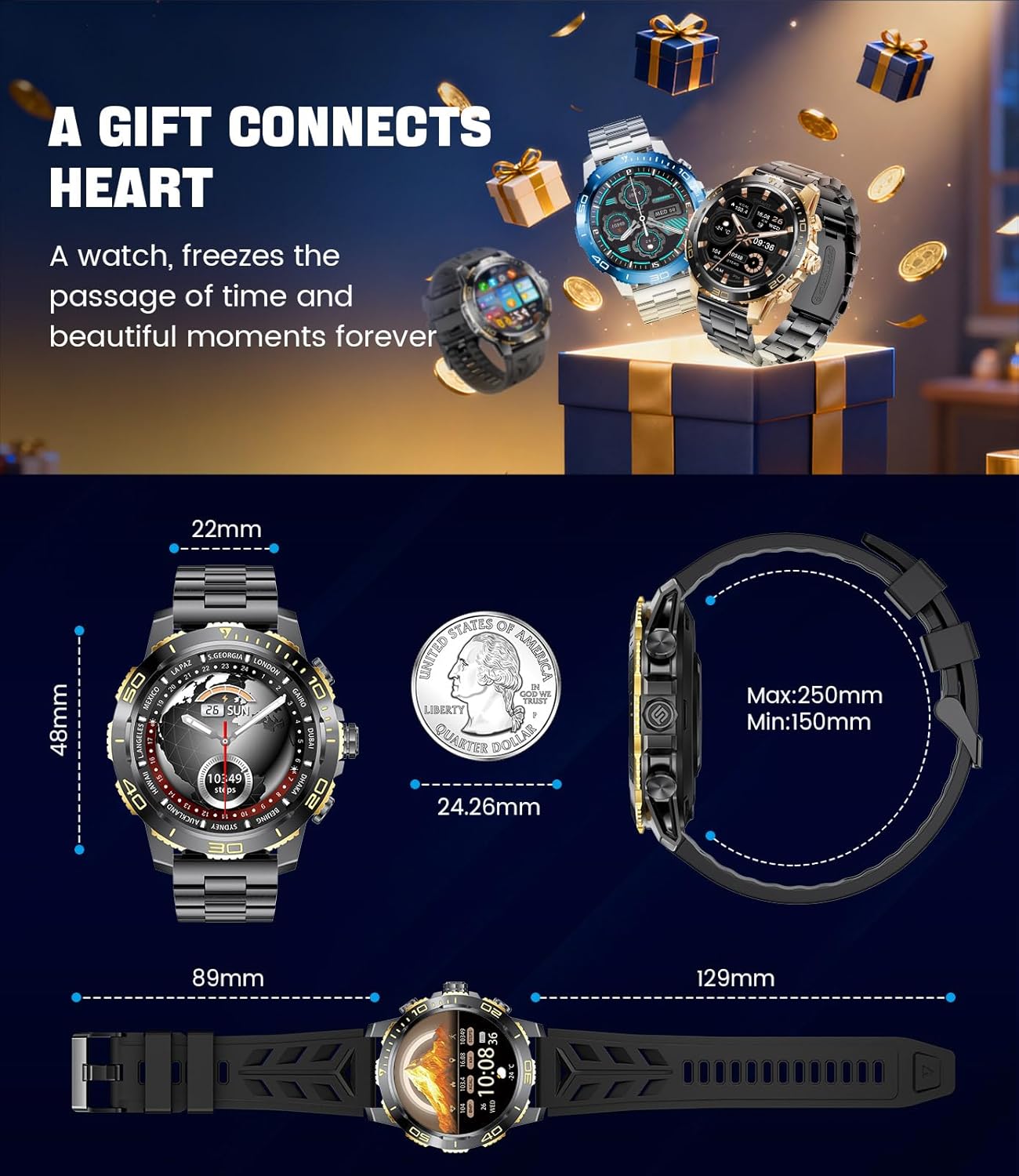
Image: Detailed dimensions of the LIGE EF21-B Smart Watch, including case diameter, strap width, and wrist circumference range.
Garantija ir palaikymas
Your LIGE EF21-B Smart Watch comes with a manufacturer's warranty. Please refer to the warranty card included in your packaging for specific terms and conditions.
For any questions, technical support, or warranty claims, please contact LIGE customer service through the platform where you purchased the product. Our professional customer service team is available to assist you.