1. Įvadas
Thank you for choosing the Eureka N6 Plus Robot Vacuum Cleaner. This manual provides essential information for the safe operation, maintenance, and troubleshooting of your device. Please read it thoroughly before use and keep it for future reference. The Eureka N6 Plus combines powerful suction, intelligent navigation, and convenient app control to deliver an efficient and effortless cleaning experience for modern homes.
2. Saugos instrukcijos
Kad sumažintumėte sužalojimo ar žalos riziką, perskaitykite ir laikykitės visų saugos priemonių.
- Šį prietaisą gali naudoti vaikai nuo 8 metų ir asmenys, turintys ribotų fizinių, jutiminių ar protinių gebėjimų arba neturintys patirties ir žinių, jei jie yra prižiūrimi arba yra instruktuojami, kaip saugiai naudoti prietaisą ir supranta su tuo susijusius pavojus. .
- Neleiskite vaikams žaisti su prietaisu. Vaikai negali jo valyti ir atlikti jo priežiūros be priežiūros.
- Naudokite tik originalų gamintojo pateiktą maitinimo adapterį ir įkrovimo stotelę.
- Do not use the robot to pick up large objects, sharp debris, liquids, or burning/smoking materials.
- Ensure the robot operates on stable, level surfaces. Avoid operating near stairs or elevated areas without proper barriers.
- Plaukus, laisvus drabužius, pirštus ir visas kūno dalis laikykite toliau nuo angų ir judančių dalių.
- Nemerkite roboto ar jo įkrovimo pagrindo į vandenį ar kitus skysčius.
- Before cleaning or performing maintenance, ensure the robot is turned off and disconnected from the power supply.
- Kai nenaudojate, robotą laikykite sausoje, vėsioje vietoje.
3. Pakuotės turinys
Išpakuodami patikrinkite, ar yra visi komponentai ir ar jie geros būklės.
- Eureka N6 Plus Robot Vacuum Cleaner
- Self-emptying Charging Base
- Maitinimo adapteris
- Instrukcijų vadovas
4. Produktas baigtasview
Familiarize yourself with the main components of your Eureka N6 Plus robot vacuum cleaner and its self-emptying base.
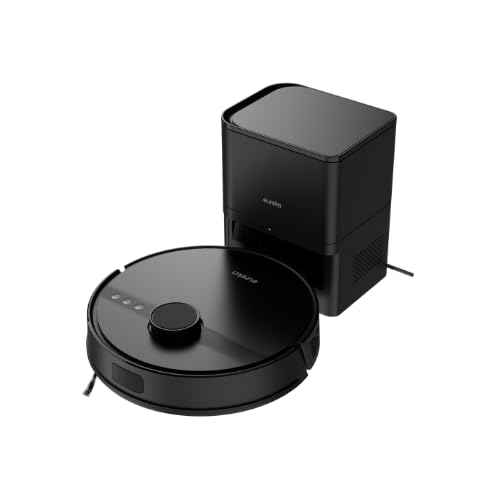
Image 4.1: Eureka N6 Plus Robot Vacuum Cleaner with its self-emptying base and a smartphone displaying the control app interface. The robot is dark grey with a central button, and the base is a matching dark grey tower.

4.2 paveikslėlis: Iš viršaus į apačią view of the Eureka N6 Plus Robot Vacuum Cleaner, highlighting the integrated water tank for mopping functionality. The robot is black with a central LiDAR sensor and control buttons.
Roboto komponentai:
- LiDAR Sensor: Tiksliai navigacijai ir žemėlapių sudarymui.
- Valdymo mygtukai: Power/Start, Home/Recharge.
- Šiukšlių dėžė / vandens bakas: Integrated for vacuuming and mopping.
- Šoniniai šepečiai: Šluostyti šiukšles nuo kraštų ir kampų.
- Pagrindinis šepetys: Anti-tangle design for effective cleaning.
- Skardžio jutikliai: To prevent falls from stairs.
- Įkrovimo kontaktai: For connection to the charging base.
Self-Emptying Charging Base:
- Dulkių maišelio skyrius: Houses the 2.5-liter disposable dust bag.
- Įkrovimo dokas: Where the robot returns to charge and empty its dustbin.
- Maitinimo indikatorius: Rodo įkrovimo būseną.
5. Sąranka
5.1 Įkrovimo stotelės išdėstymas
- Place the self-emptying charging base against a wall in an open area.
- Ensure there is at least 0.5 meters (1.6 feet) of clear space on both sides and 1.5 meters (4.9 feet) in front of the base.
- Prijunkite maitinimo adapterį prie įkrovimo bazės ir įjunkite jį į sieninį lizdą.
- Ensure the power cable is neatly arranged to prevent the robot from tangling.
5.2 Pradinis įkrovimas
- Place the robot onto the charging base. Ensure the charging contacts on the robot align with those on the base.
- The robot will automatically begin charging. Allow it to fully charge before its first use (approximately 4-6 hours). The indicator light on the robot will change to indicate a full charge.
5.3 Programėlės ryšys
- Download the "Eureka Robot" app from your smartphone's app store (available for iOS and Android).
- Atidarykite programą ir susikurkite paskyrą.
- Follow the in-app instructions to add your Eureka N6 Plus robot. This typically involves connecting to the robot's Wi-Fi hotspot temporarily and then connecting it to your home Wi-Fi network.
- Once connected, you can control the robot, schedule cleanings, adjust settings, and view cleaning maps from your smartphone.
6. Naudojimo instrukcijos
6.1 Valymo ciklo pradžia
- Rankinis paleidimas: Press the Power/Start button on the robot once. The robot will begin cleaning in Auto mode.
- Programėlės paleidimas: Open the "Eureka Robot" app, select your device, and tap the 'Start' or 'Clean' button. You can also select specific cleaning modes or areas.
6.2 Valymo ciklo sustabdymas / pristabdymas
- Press the Power/Start button on the robot once to pause. Press again to resume.
- Use the 'Pause' or 'Stop' button in the app.
6.3 Grįžimas į įkrovimo stotelę
- Paspauskite roboto mygtuką „Pagrindinis / Įkrovimas“.
- Use the 'Recharge' or 'Dock' button in the app. The robot will automatically return to its charging base.
6.4 Šluostymo funkcija
The Eureka N6 Plus features a simultaneous vacuuming and mopping function.
- Fill the integrated water tank with clean water. Do not use detergents or cleaning solutions not approved for robot vacuums.
- Attach the mopping pad securely.
- In the app, you can select the desired water flow level (three adjustable levels) suitable for different hard floor types.
- The robot will vacuum and mop simultaneously.
6.5 Valdymas balsu
The Eureka N6 Plus supports voice control via Alexa and Google Assistant.
- Enable the "Eureka Robot" skill/action in your Alexa or Google Home app.
- Link your Eureka Robot account.
- Use commands such as "Alexa, tell Eureka Robot to start cleaning" or "Hey Google, ask Eureka Robot to go home."
7. Priežiūra
Reguliarus valymas užtikrina optimalų roboto dulkių siurblio veikimą ir pailgina jo tarnavimo laiką.
7.1 Self-Emptying Dust Bag (Base)
- The 2.5-liter dust bag in the self-emptying base should be replaced when full. The app will notify you.
- Open the top cover of the charging base, remove the full bag, and insert a new one.
7.2 Roboto šiukšliadėžė ir filtras
- Even with the self-emptying feature, it is recommended to periodically check and manually empty the robot's internal dustbin.
- Clean the HEPA filter regularly by tapping it to remove dust. Replace the filter every 3-6 months, depending on usage. Do not wash the HEPA filter with water.
7.3 Pagrindinis ir šoniniai šepečiai
- Pagrindinis šepetys: Nuimkite pagrindinio šepečio dangtelį ir iškelkite šepetį. Valymo įrankiu pašalinkite aplink šepetį susivėlusius plaukus ir šiukšles.
- Šoniniai šepečiai: Check side brushes for wear or damage. Remove any tangled hair. Replace if bristles are bent or missing.
7.4 Jutikliai ir įkrovimo kontaktai
- Wipe all sensors (cliff sensors, wall sensors, LiDAR sensor window) and charging contacts on both the robot and the base with a clean, dry cloth.
7.5 Vandens bakas ir šluostė
- Po kiekvieno plovimo išpilkite iš bako likusį vandenį.
- Clean the mopping pad thoroughly and allow it to air dry before storing.
8. Problemų sprendimas
If you encounter issues with your Eureka N6 Plus, refer to the following common problems and solutions.
| Problema | Galima priežastis | Sprendimas |
|---|---|---|
| Robotas neįsijungia | Išsikrovusi baterija; Nepaspaustas maitinimo mygtukas; Robotas užstrigo. | Įkraukite robotą; paspauskite ir palaikykite maitinimo mygtuką; pašalinkite visas kliūtis. |
| Robotas neranda įkrovimo bazės | Base obstructed; Base not powered; Robot too far. | Užtikrinkite, kad aplink pagrindą būtų laisvos vietos; Patikrinkite maitinimo jungtį; Rankiniu būdu pastatykite robotą prie pagrindo. |
| Prastas valymo efektyvumas | Pilna dulkių talpykla / dulkių maišelis; užsikimšęs filtras; susivėlę šepečiai. | Empty dustbin/replace dust bag; Clean/replace filter; Clean main and side brushes. |
| Programos ryšio problemos | Neteisingas „Wi-Fi“ slaptažodis; Maršrutizatorius per toli; Robotas neprisijungęs. | Patikrinkite „Wi-Fi“ prisijungimo duomenis; Perkelkite robotą arčiau maršrutizatoriaus; Paleiskite robotą ir maršrutizatorių iš naujo. |
| Robotas dažnai užstringa | Obstacles on floor; Dark surfaces triggering cliff sensors. | Clear cables, toys, and small objects; Use no-go zones in app for problematic areas. |
9. Specifikacijos
Detailed technical specifications for the Eureka N6 Plus Robot Vacuum Cleaner.
| Funkcija | Specifikacija |
|---|---|
| Prekės ženklas | EUREKA |
| Modelio pavadinimas | N6 Plus Black |
| Matmenys (I x P x A) | 35 L x 35 W x 41.1 A cm |
| Prekės svoris | 5.5 kilogramo |
| Baterijos tipas | Ličio jonų |
| ttage | 14.4 voltų |
| Baterijos veikimo laikas | Up to 120 minutes (continuous cleaning) |
| Siurbimo galia | Approximately 5000 Pa |
| Dulkių maišelio talpa (pagrindas) | 2.5 litrai |
| Filtro tipas | HEPA |
| Navigacijos tipas | LiDAR jutiklis |
| Kontrolės metodas | Programėlių valdymas, balso valdymas („Alexa“, „Google Assistant“) |
| Ypatingos savybės | Self-emptying base, Simultaneous vacuuming and mopping, Anti-tangle brush, Three adjustable water levels |
| Rekomenduojami paviršiai | Visų tipų grindys |
10. Garantija ir palaikymas
10.1 Informacija apie garantiją
The Eureka N6 Plus Robot Vacuum Cleaner comes with a manufacturer's warranty. Please refer to the warranty card included in your package for specific terms and conditions. Spare parts availability in the EU is guaranteed for 3 years.
10.2 Pagalba klientams
For technical assistance, warranty claims, or general inquiries, please contact Eureka customer support through the following channels:
- Websvetainė: Apsilankykite oficialioje „Eureka“ svetainėje webDUK ir pagalbos išteklių svetainė.
- El. paštas: Refer to your warranty card or the Eureka websvetainėje, kad gautumėte tinkamą palaikymo el. pašto adresą.
- Telefonas: Contact numbers for your region can be found on the Eureka websvetainę.
Please have your model number (N6 Plus Black) and purchase information ready when contacting support.


