1. Produktas baigtasview
The OnePlus 15 is an advanced Android smartphone designed for high performance and extended usage. It features a powerful Snapdragon 8 Elite Gen 5 processor, a large 7,300mAh battery, and a vibrant 6.78-inch 165 Hz AMOLED display. The device is equipped with a triple 50 MP camera system for detailed photography and offers robust durability with IP66/IP68/IP69 and IP19K ratings for dust and water resistance.
Pagrindinės funkcijos:
- Massive 7,300 mAh Battery: Provides extended power for all-day use and beyond.
- Tri-Chip System: Integrates the Snapdragon 8 Elite Gen 5, a dedicated Wi-Fi chip, and a CPU scheduler for optimized performance, connectivity, and efficiency.
- Triple 50 MP Camera System: Captures high-quality images with wide, ultra-wide, and telephoto capabilities.
- Patvarus dizainas: Built to resist dust and water, with IP66/IP68/IP69 and IP19K ratings for enhanced protection.
- 6.78-inch 165 Hz AMOLED Display: Delivers vivid colors, smooth motion, and exceptional clarity.
2. Kas yra dėžutėje
Patikrinkite, ar jūsų prekės pakuotėje yra visi šie daiktai:
- OnePlus 15 Smartphone x1
- Įkroviklis x1
- USB duomenų kabelis x1
- SIM Ejector Tool x1
- Trumpas vadovas x1
- Safety Guide x1

Image: Contents of the OnePlus 15 retail box, showing the smartphone, charger, USB data cable, SIM ejector tool, quick guide, and safety guide.
3. Sąranka
3.1 SIM kortelės montavimas
- Raskite SIM kortelės dėklą „OnePlus 15“ šone.
- Įkiškite pateiktą SIM kortelės išstūmimo įrankį į mažą SIM kortelės dėklo angą. Tvirtai spauskite, kol dėklas iššoks.
- Place your Nano-SIM card(s) into the tray with the gold contacts facing down. Ensure they are correctly oriented according to the tray's outline.
- Carefully push the SIM tray back into the phone until it is flush with the device.
3.2 Pradinis įjungimas ir konfigūracija
- Paspauskite ir palaikykite maitinimo mygtuką (esantį įrenginio dešinėje), kol pasirodys „OnePlus“ logotipas.
- Vykdykite ekrane pateikiamus nurodymus, kad pasirinktumėte kalbą, prisijunkite prie „Wi-Fi“ tinklo ir sukonfigūruotumėte „Google“ paskyrą.
- You may be prompted to transfer data from an old device. Follow the instructions or skip this step to set up as a new device.
- Configure security settings such as fingerprint unlock, face unlock, or a PIN/pattern.

Vaizdas: priekis view of the OnePlus 15 smartphone, showcasing its display and front camera.
4. Prietaiso valdymas
4.1 Screen and Navigation
The OnePlus 15 features a 6.78-inch 165 Hz AMOLED display. Navigate the interface using touch gestures:
- Bakstelėkite: Pasirinkite elementą arba įjunkite funkciją.
- Perbraukimas: Slinkite per ekranus arba sąrašus.
- Žiupsnelis: Priartinkite arba atitolinkite vaizdus ir web puslapių.
- Ilgas paspaudimas: Pasiekite kontekstinius meniu arba perkelkite piktogramas.
4.2 Mygtukai ir prievadai
Familiarize yourself with the physical controls and connections:
- Maitinimo mygtukas: Located on the right side. Press to wake/sleep the screen, long press to power off or restart.
- Garsumo mygtukai: Located on the left side. Adjust media volume, ringtone volume, and alarm volume.
- C tipo USB prievadas: Located at the bottom. Used for charging, data transfer, and connecting Type-C headphones.
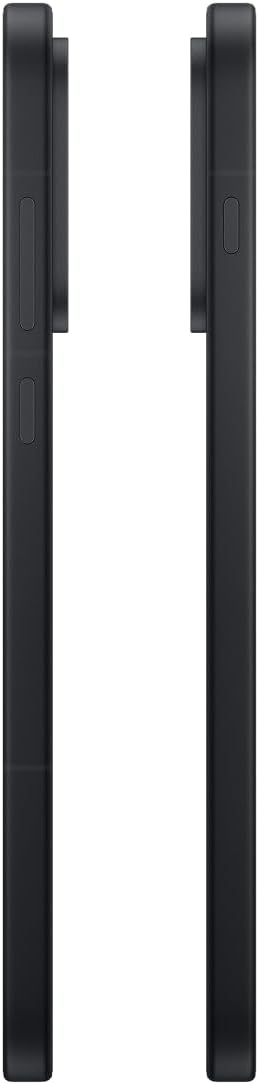
Vaizdas: Šoninė view of the OnePlus 15, showing the placement of the power and volume buttons.
4.3 Kameros naudojimas
The OnePlus 15 features a versatile triple 50 MP camera system. To open the camera app, tap the camera icon on your home screen or lock screen.
- Perjungti režimus: Braukite ekrane kairėn arba dešinėn, kad perjungtumėte fotografavimo, vaizdo įrašo, portreto ir kitus režimus.
- Mastelio keitimas: Pinch in or out on the viewfinder, or tap the zoom icons (e.g., 0.6x, 1x, 2x) to adjust magnification.
- Užfiksuoti: Palieskite užrakto mygtuką, kad nufotografuotumėte arba pradėtumėte / sustabdytumėte vaizdo įrašymą.
- Nustatymai: Access camera settings for features like flash, timer, aspect ratio, and more.

Paveikslėlis: Nugara view of the OnePlus 15, highlighting the triple 50 MP camera system.
4.4 Akumuliatoriaus valdymas
Your OnePlus 15 is equipped with a 7,300 mAh battery. To optimize battery life:
- Sureguliuokite ekrano ryškumą ir nustatykite trumpesnį ekrano skirtąjį laiką.
- Išjunkite „Wi-Fi“, „Bluetooth“ ir GPS, kai jų nenaudojate.
- Close background apps that are consuming power.
- Utilize Battery Saver mode when your battery is low.
- Use the provided charger and USB cable for optimal fast charging.
5. Priežiūra
5.1 Įrenginio valymas
Norėdami išvalyti „OnePlus 15“:
- Ekraną ir galinį skydelį nuvalykite minkštu, nepūkuotu skudurėliu.
- Įsisenėjusioms dėmėms šiek tiek pamirkykiteampnuvalykite šluostę vandeniu arba ekrano valikliu.
- Venkite naudoti stiprias chemines medžiagas, abrazyvines medžiagas ar suslėgtą orą.
5.2 Programinės įrangos naujiniai
Reguliarūs programinės įrangos atnaujinimai suteikia naujų funkcijų, saugumo patobulinimų ir klaidų ištaisymų. Norėdami patikrinti, ar yra atnaujinimų:
- Eikite į Nustatymai > Apie įrenginį > „OxygenOS“ versija.
- Bakstelėkite Patikrinkite, ar nėra atnaujinimų.
- If an update is available, follow the on-screen instructions to download and install it. Ensure your device has sufficient battery and is connected to Wi-Fi before updating.
6. Problemų sprendimas
Jei kyla problemų dėl „OnePlus 15“, išbandykite šiuos įprastus trikčių šalinimo veiksmus:
- Įrenginys nereaguoja: Paspauskite ir palaikykite maitinimo mygtuką maždaug 10 sekundžių, kad priverstumėte paleisti iš naujo.
- Programėlės stringa: Išvalykite probleminės programėlės talpyklą ir duomenis Nustatymai > Programėlės > [Programėlės pavadinimas] > Saugykla ir talpykla.
- Baterija greitai išsikrauna: Review akumuliatoriaus naudojimas Nustatymai > Baterija to identify power-hungry apps. Adjust settings as described in Section 4.4.
- Tinklo ryšio problemos: Toggle Airplane Mode on and off, restart your device, or reset network settings in Nustatymai > Sistemos nustatymai > Atsarginė kopija ir nustatymas iš naujo > Iš naujo nustatyti telefoną > Iš naujo nustatykite „Wi-Fi“, mobilųjį ir „Bluetooth“..
- Screen protector installation: For assistance with screen protector installation, refer to the following video guide:
Video: Installation guide for a screen protector on the OnePlus 15 5G. This video demonstrates the steps to correctly apply a screen protector to your device.
7. Specifikacijos
| Modelio pavadinimas | „OnePlus 15“. |
| Prekės modelio numeris | CPH2749 |
| Gaminio matmenys | 6.36 x 3.02 x 0.33 colio |
| Prekės svoris | 1.29 svaro |
| Operacinė sistema | Android 16 |
| CPU modelis | Snapdragon 8 Elite Gen 5 |
| CPU greitis | 4.61 GHz |
| Įdiegtos RAM atminties dydis | 12 GB |
| Atminties talpa | 256 GB |
| Ekrano dydis | 6.78 colių |
| Rezoliucija | 2772*1272 |
| Atnaujinimo dažnis | 165 Hz |
| Baterijos talpa | 7300 milijonųamp Valandos |
| Telefoninių pokalbių laikas | 68.7 valandų |
| Ryšio technologijos | „Bluetooth“, infraraudonųjų spindulių, NFC, USB, „Wi-Fi“ |
| Ypatingos savybės | Dual SIM, Wireless Charging |
| Gamintojas | „OnePlus“. |
8. Svarbi saugos informacija
Please read all safety information before using your device to ensure safe and proper use. Improper use may cause damage to the device or personal injury.
- Nelaikykite prietaiso ilgą laiką tiesioginiuose saulės spinduliuose ar ekstremaliose temperatūrose.
- Use only approved chargers, batteries, and accessories.
- Venkite numesti įrenginį ir stipriai jį sutrenkti.
- Keep the device away from water and liquids, despite its water resistance ratings, to prevent potential damage.
- Nebandykite ardyti ar modifikuoti įrenginio.
9. Garantija ir palaikymas
Your OnePlus 15 is covered by a manufacturer's warranty. For detailed warranty information, technical support, or service inquiries, please visit the official OnePlus websvetainėje arba susisiekite su klientų aptarnavimo tarnyba.
Papildomos pagalbos ir informacijos apie produktą galite rasti adresu „OnePlus“ parduotuvė.


