1. Įvadas
The yeewise Solar Security Camera System provides comprehensive outdoor surveillance with advanced features designed for ease of use and reliable performance. This 4-Cam Kit includes 4MP QHD resolution cameras with 360° pan & tilt capabilities, color night vision, motion detection, and local storage via a Homebase unit. The cameras are solar-powered and support both 2.4GHz and 5GHz Wi-Fi for stable connectivity.
2. Kas yra dėžutėje
- 4 x Security Camera with Solar Panel
- 1 x Homebase with 64GB SD Card
- 1 x naudojimo instrukcija (šis dokumentas)
- Įkrovimo kabelis
- Tvirtinimo varžtai
3. Sąranka ir diegimas
Setting up your yeewise Solar Security Camera System is designed to be straightforward. Follow these steps for initial setup and installation.
3.1. Homebase Connection
The Homebase unit acts as the central hub for your cameras, storing recordings locally and providing a stable Wi-Fi connection. It supports both Ethernet and dual-band Wi-Fi (2.4GHz & 5GHz).
- Power On Homebase: Connect the Homebase to a power source using the provided charging cable.
- Atsisiųsti programą: Download the yeewise app on your smartphone or tablet.
- Pridėti įrenginį: Open the app and tap the '+' button to add the Base Station. The app will automatically detect nearby devices.
- Prisijunkite prie „Wi-Fi“: Follow the on-screen instructions to connect your Homebase to your Wi-Fi network (2.4GHz or 5GHz). Alternatively, you can connect via Ethernet cable.
- Patvirtinkite sąranką: Check the live feed on your app to confirm the Homebase is successfully connected and functioning.
Video: Unboxing and Setup for Yeewise Wireless Homebase Series. This video demonstrates the initial unboxing and connection process for the Homebase unit and cameras.
3.2. Kameros montavimas
The solar security cameras are designed for easy, wire-free outdoor installation. Each camera comes with a high-conversion solar panel for continuous power.
- Pasirinkite vietą: Select a sunny location for the solar panel to ensure optimal charging. The 10-foot cable allows flexible placement of the panel relative to the camera.
- Pritvirtinkite kamerą: Use the provided mounting screws to securely attach the camera to a wall or desired surface.
- Prijunkite saulės skydelį: Plug the solar panel's USB-C cable into the camera's charging port.
- Įjunkite kamerą: Turn on the camera using the on/off switch, usually located near the charging port. The camera will automatically initialize and connect to the Homebase.
- Sureguliuoti kampą: Adjust the camera's pan (355° horizontal) and tilt (90° vertical) to cover your desired monitoring area.

Image: A yeewise solar security camera mounted on a building's exterior wall, with its solar panel positioned above it to capture sunlight. This illustrates the typical installation of the camera and its solar power source.

Image: A graphic illustrating the versatility of the yeewise solar security cameras, showing them installed in different environments such as a residential home, a farm, and a small business, highlighting their wire-free installation.
4. Sistemos valdymas
Your yeewise security system offers a range of features accessible through the mobile application.
4.1. Gyvai View ir Valdymas
- Daugiakamera View: View up to 4 cameras simultaneously on one screen within the app.
- „Pan & Tilt“: Remotely control the camera's 355° horizontal and 90° vertical rotation to adjust viewing angles and eliminate blind spots.
- 2K QHD raiška: Experience crystal-clear 2K video quality, capturing 80% more clarity than 1080p.
- Skaitmeninis priartinimas: Utilize the 8x digital zoom feature for closer inspection of details.
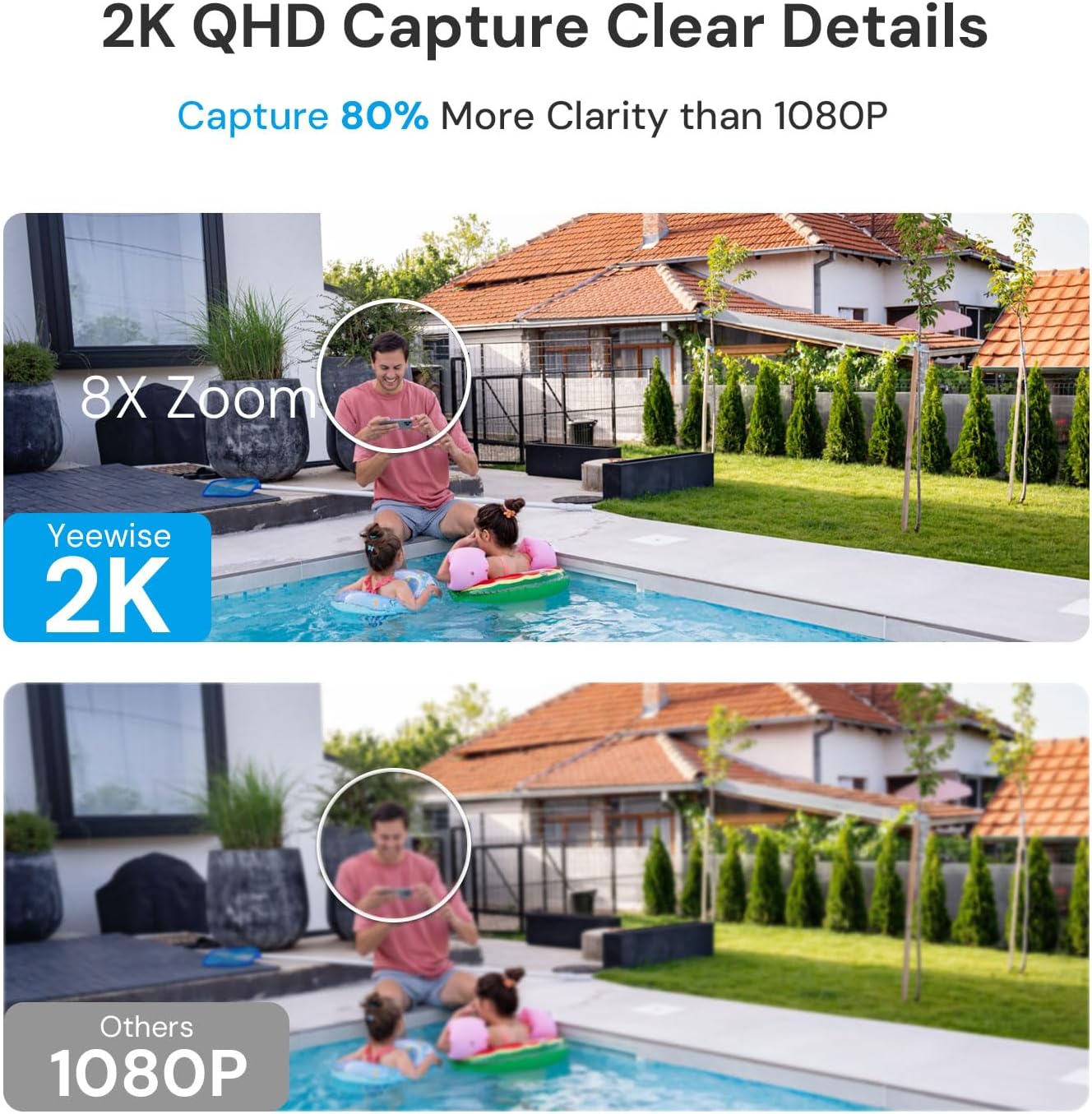
Image: A yeewise security camera illustrating its 360-degree pan and tilt functionality, showing how it can cover a wide area without blind spots.

Image: A smartphone displaying a live feed from four yeewise security cameras simultaneously, demonstrating the multi-camera viewing capability within the app.
4.2. Išplėstinės stebėjimo funkcijos
- Spalvotas naktinis matymas: Equipped with 4 LEDs and spotlight capabilities, the cameras deliver vibrant color night vision in low light conditions, providing clearer details than traditional black and white infrared.
- PIR judesio aptikimas: Advanced human detection filters out false alarms, sending instant alerts only when real people are detected. The camera can track moving subjects.
- Dvipusis garsas: Bendraukite su lankytojais arba atbaidykite įsibrovėlius naudodami įmontuotą mikrofoną ir garsiakalbį.
- Momentiniai įspėjimai: Receive real-time notifications on your device for motion events, allowing for quick response.
- Privatumo zonos: Create custom privacy zones within the app to block out areas you do not wish to record.

Image: A split image showing the difference between color night vision and infrared night vision from a yeewise security camera, highlighting the enhanced clarity and detail of color mode.

Image: A smartphone displaying a real-time alert notification from the yeewise security camera, indicating human body detection via PIR motion detection, with a spotlight and siren icons.
Video: Demonstrates the clear camera quality of the yeewise solar security camera, showing a person walking in a backyard during daylight.
Vaizdo įrašas: Pakartotinaiview of the Yeewise 4x Solar Cam System, highlighting its features and performance in detecting intruders.
5. Priežiūra
- Saulės įkrovimas: Ensure the solar panel receives at least 3 hours of direct sunlight daily to maintain continuous power.
- Atsparumas oro sąlygoms: The cameras are IP65 waterproof and built to withstand various weather conditions, from -4°F/-20°C to 122°F/50°C.
- Vietinė saugykla: The Homebase includes a 64GB SD card for up to 4 months of video loop recording. This can be expanded up to 512GB. Regularly check the storage status via the app.

Image: The yeewise Homebase unit, emphasizing its local storage capability (64GB included, expandable to 512GB) and the absence of monthly fees for recordings.

Image: A yeewise solar security camera mounted outdoors during rainy weather, illustrating its rugged and weatherproof design for reliable year-round protection.
6. Problemų sprendimas
- Nėra galios: Ensure the solar panel is receiving adequate sunlight. Check the USB-C connection between the solar panel and the camera. Verify the camera's on/off switch is in the 'on' position.
- Ryšio problemos: Confirm the Homebase is connected to your Wi-Fi network (2.4GHz or 5GHz) or via Ethernet. Ensure the cameras are within range of the Homebase's Wi-Fi signal. Restart the Homebase and cameras if connection is lost.
- Prasta vaizdo kokybė: Check for obstructions in front of the camera lens. Ensure the lens is clean. Verify your internet connection speed.
- Klaidingi judėjimo įspėjimai: Adjust the motion detection sensitivity settings in the app. Utilize privacy zones to exclude areas with frequent non-threatening movement.
- SD Card Issues: If the included 64GB SD card fails or requires reformatting, consider replacing it with a new Micro SD card (up to 512GB).
7. Specifikacijos
| Funkcija | Detalė |
|---|---|
| Prekės ženklas | taip |
| Modelio pavadinimas | YDK4 |
| Naudojimas viduje / lauke | Viduje, Lauke |
| Maitinimo šaltinis | Varomas saulės energija |
| Ryšio technologija | Wireless (Wi-Fi 6, Dual-Band 2.4Ghz & 5Ghz) |
| Vaizdo įrašymo raiška | 2K (4MP QHD), 1080p, 1440p |
| Ypatingos savybės | 2-Way Audio, HD Resolution, Local Recording, PTZ Technology, Waterproof, Color Night Vision, Motion Detection, Digital Zoom (8x) |
| „Pan & Tilt“ | 355° horizontaliai, 90° vertikaliai |
| Naktinio matymo diapazonas | 33 pėdų |
| Sandėliavimas | 64GB Micro SD Card (included), expandable up to 512GB |
| Atsparumo vandeniui lygis | IP65 Atsparus vandeniui |
| Darbinė temperatūra | -4°F/-20°C iki 122°F/50°C |
| Suderinami įrenginiai | Išmanusis telefonas, planšetinis kompiuteris |
| Kontrolės metodas | Programėlė, nuotolinio valdymo pultas |
| Prekės svoris | 3.5 svaro |
| UPC | 647581991299 |
8. Garantija ir palaikymas
- Garantija: yeewise offers a One Year Warranty for replacement only, no repair.
- Grąžinimo politika: Enjoy a 30-day worry-free return policy.
- Palaikymas: Dėl papildomos pagalbos ar klausimų apsilankykite oficialioje svetainėje yeewise Store on Amazon.
