1. Įvadas
This manual provides detailed instructions for the installation, configuration, and operation of your ASRock X870 Taichi Creator Motherboard. This high-performance ATX motherboard is designed to support AMD Ryzen 9000, 8000, and 7000 Series Processors with an AM5 socket, offering advanced features for creators and enthusiasts.
2. Saugos informacija
Please read the following safety guidelines carefully before installing or operating your motherboard to prevent damage to the product or injury to yourself.
- Prieš liesdami bet kokius komponentus, visada atjunkite maitinimo laidą nuo sieninio lizdo.
- Wear an anti-static wrist strap to prevent electrostatic discharge (ESD) when handling components.
- Užtikrinkite tinkamą ventiliaciją kompiuterio korpuse, kad jis neperkaistų.
- Saugokite pagrindinę plokštę nuo drėgmės ir ekstremalių temperatūrų.
- Refer to the CPU and other component manuals for specific installation instructions.
3. Pakuotės turinys
Patikrinkite, ar pagrindinės plokštės pakuotėje yra visi toliau išvardyti daiktai. Jei kurio nors daikto trūksta arba jis pažeistas, susisiekite su pardavėju.
- ASRock X870 Taichi Creator pagrindinė plokštė
- Greito montavimo vadovas
- Reguliavimo pranešimas
- SATA duomenų kabeliai
- „Wi-Fi“ antena
- M.2 varžtai ir atramos
- ASRock Graphics Card Holder
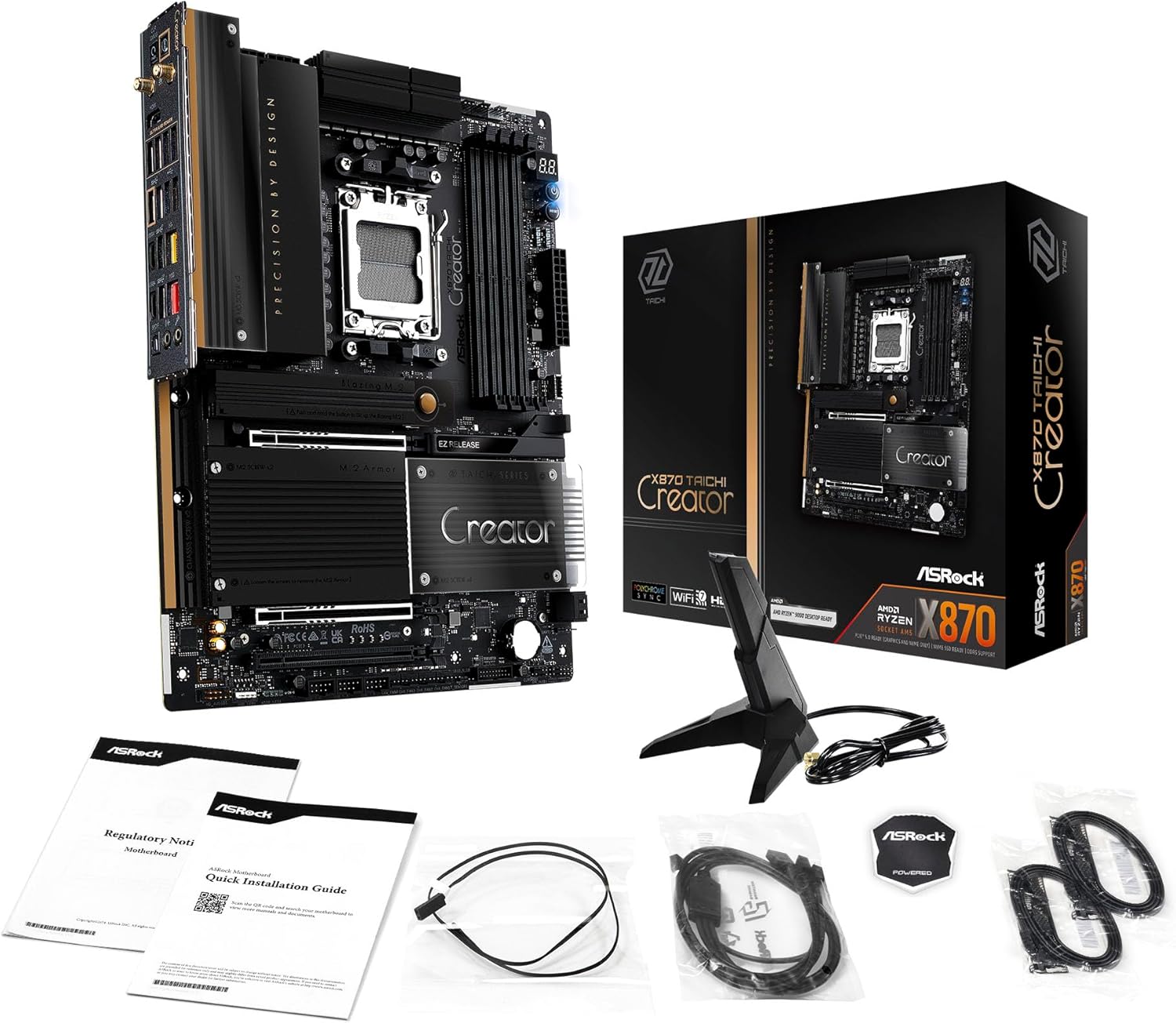
Image: The ASRock X870 Taichi Creator Motherboard shown alongside its retail packaging and various accessories, including cables, documentation, and a graphics card holder.
4. Sąranka ir diegimas
Norėdami tinkamai įdiegti pagrindinę plokštę ir jos komponentus, atlikite šiuos veiksmus.
4.1. CPU diegimas (AM5 lizdas)
- Raskite AM5 procesoriaus lizdą pagrindinėje plokštėje.
- Gently lift the CPU retention lever.
- Align the triangular mark on your AMD Ryzen processor with the corresponding mark on the socket.
- Carefully place the CPU into the socket without applying force.
- Lower the retention lever until it clicks into place, securing the CPU.

Paveikslėlis: Iš viršaus į apačią view of the ASRock X870 Taichi Creator Motherboard, highlighting the central AM5 CPU socket and surrounding components like VRMs and RAM slots.
4.2. Atminties (RAM) diegimas
The motherboard supports 4 x DDR5 DIMM slots for dual-channel memory technology.
- Atidarykite spaustukus abiejuose DIMM lizdo galuose.
- Suderinkite DDR5 atminties modulio įpjovą su DIMM lizdo rakteliu.
- Tvirtai įkiškite atminties modulį į lizdą, kol spaustukai užsifiksuos savo vietoje.
- For dual-channel configuration, refer to your motherboard manual for recommended slot pairing.
4.3. Saugojimo įrenginio diegimas
The motherboard features M.2 slots and SATA3 ports for storage.
4.3.1. M.2 SSD diegimas
The board includes 1 Ultra M.2 (PCIe Gen3x4), 1 Hyper M.2 (PCIe Gen4x4), and 2 Blazing M.2 (PCIe Gen5x4) slots.
- Locate the desired M.2 slot and remove the M.2 heatsink if present.
- Įdėkite M.2 SSD diską į lizdą 30 laipsnių kampu.
- Gently push down the SSD and secure it with the provided M.2 screw or standoff.
- Optimaliam šiluminiam našumui užtikrinti vėl prijunkite M.2 radiatorių.
4.3.2. SATA Device Installation
Connect SATA storage devices (HDDs/SSDs) to the 4 SATA3 ports using SATA data cables.
4.4. PCIe plokštės diegimas
The motherboard provides 2 PCIe 5.0 x16 (x8/x8) slots and 1 PCIe 3.0 x16 slot.
- Select an available PCIe slot.
- Nuimkite atitinkamą išplėtimo lizdo dangtelį nuo kompiuterio korpuso.
- Align your PCIe card with the slot and press down firmly until it is seated correctly.
- Pritvirtinkite kortelę prie kompiuterio korpuso varžtu.
4.5. Maitinimo jungtys
Prijunkite 24 kontaktų ATX maitinimo jungtį ir 8 kontaktų (arba 4+4 kontaktų) procesoriaus maitinimo jungtį iš maitinimo bloko (PSU) prie atitinkamų pagrindinės plokštės prievadų.
4.6. Priekinio skydelio ir galinės įvesties/išvesties jungtys
Connect your PC case's front panel connectors (power button, reset button, USB ports, audio jacks) to the appropriate headers on the motherboard. Connect peripherals to the rear I/O panel.

Vaizdas: Stambus planas view of the rear I/O panel of the ASRock X870 Taichi Creator Motherboard, showing various ports including USB, HDMI, Ethernet, and audio jacks.
5. Naudojimo instrukcijos
5.1. Pradinis paleidimas ir BIOS / UEFI sąranka
- Surinkę kompiuterį, prijunkite monitorių, klaviatūrą ir pelę.
- Įjunkite sistemą. Paleidimo metu kelis kartus paspauskite Del or F2 klavišą, kad patektumėte į BIOS / UEFI sąrankos programą.
- Configure boot order, enable XMP/EXPO for memory, and adjust other settings as needed.
- Save changes and exit the BIOS/UEFI. The system will restart.
5.2. Tvarkyklės diegimas
After installing your operating system, install the necessary drivers for the motherboard components. These can typically be found on the ASRock support website or the included driver CD/USB drive.
- Lustų rinkinio tvarkyklės
- LAN Drivers (10Gbps, 5Gbps)
- Wi-Fi 7 + Bluetooth Drivers
- Garso tvarkyklės (Realtek ALC4082)
- USB tvarkyklės
6. Priežiūra
6.1. Valymas
Regularly clean your PC to prevent dust buildup, which can lead to overheating. Use compressed air to remove dust from fans, heatsinks, and other components. Ensure the system is powered off and unplugged before cleaning.
6.2. BIOS atnaujinimai
Reguliariai tikrinkite ASRock website for BIOS/UEFI updates. Updates can improve system stability, add support for new CPUs, or fix bugs. Follow the instructions provided by ASRock carefully when performing a BIOS update.
7. Problemų sprendimas
Jei kyla problemų, vadovaukitės toliau pateiktais įprastais trikčių šalinimo veiksmais.
- Nėra galios: Ensure all power cables (24-pin ATX, 8-pin CPU) are securely connected. Check your PSU and wall outlet.
- Nėra ekrano: Verify that your monitor is connected to the correct graphics output (dedicated GPU or integrated graphics). Reseat your graphics card and RAM modules.
- Sistemos nestabilumas: Check CPU and GPU temperatures. Ensure RAM is properly seated and configured (XMP/EXPO settings). Update drivers and BIOS.
- BIOS atminties atkūrimas: The motherboard features a BIOS Flashback button on the rear I/O panel. This allows you to update the BIOS without a CPU or RAM installed. Refer to the ASRock website for detailed instructions on using this feature.
- Išvalyti CMOS: If your system fails to boot after changing BIOS settings, you can clear the CMOS to reset BIOS settings to default. Locate the 'CLR CMOS' button or jumper on the motherboard (often near the rear I/O).
8. Specifikacijos
| Funkcija | Specifikacija |
|---|---|
| Prekės ženklas | ASRock |
| Modelio pavadinimas | X870 |
| Prekės modelio numeris | 90-MXBTE0-A0UAYZ |
| CPU lizdas | Lizdas AM5 |
| Suderinami procesoriai | AMD Ryzen 9000, AMD Ryzen 8000, AMD Ryzen 7000 Series |
| Lustų rinkinio tipas | AMD X870 |
| RAM atminties technologija | DDR5 |
| aTMINTINĖS JUNGTYS | 4 x DDR5 DIMM Slots (Dual Channel, up to 8000+(OC), 256GB max) |
| Grafikos išvestis | 2 x USB4 Type-C (up to 8K 30Hz), 1 x HDMI 2.1 (up to 4K 120Hz) |
| PCIe lizdai | 2 x PCIe 5.0 x16 (x8/x8), 1 x PCIe 3.0 x16 |
| Sandėliavimas | 4 x SATA3, 1 x Ultra M.2 (PCIe Gen3x4), 1 x Hyper M.2 (PCIe Gen4x4), 2 x Blazing M.2 (PCIe Gen5x4) |
| LAN | 10Gbps LAN, 5Gbps LAN |
| Belaidis LAN | 802.11be Wi-Fi 7 + Bluetooth |
| Garsas | „Realtek ALC4082“ 7.1 kanalo HD garso kodekas, „Nahimic Audio“ |
| USB prievadai (gale) | 2 x USB 2.0, 6 x USB 3.2 Gen1, 2 x USB 3.2 Gen2, 2 x USB4 Type-C |
| USB prievadai (priekyje) | 6 x USB 2.0, 4 x USB 3.2 Gen1, 1 x USB 3.2 Gen2x2 Type-C |
| Formos faktorius | ATX |
| Power Phase Design | 18+2+1 Power Phase, 80A SPS |
9. Informacija apie garantiją
ASRock motherboards typically come with a limited manufacturer's warranty. The duration and terms of the warranty may vary by region and retailer. Please retain your proof of purchase for warranty claims. For detailed warranty information, refer to the official ASRock websvetainėje arba susisiekite su pirkimo vieta.
10. Techninė pagalba
For technical assistance, driver downloads, BIOS updates, and further product information, please visit the official ASRock support websvetainė:
Taip pat galite susisiekti su „ASRock“ klientų aptarnavimo tarnyba tiesiogiai per jų websvetainė, skirta suasmenintam palaikymui.


