Įvadas
This manual provides comprehensive instructions for the safe and efficient operation of your Crosley CR3505A-LN Cruiser Portable CD Player. Please read this manual thoroughly before using the device and retain it for future reference. This portable audio player combines classic design with modern functionality, offering CD playback, Bluetooth connectivity, FM radio, and auxiliary input.
Kas yra dėžutėje
Išpakuodami patikrinkite, ar yra visi daiktai:
- Crosley CR3505A-LN Portable CD Player
- USB-C kabelis
Produkto savybės
- Portable Music Player: Equipped with a rechargeable lithium battery, providing up to 4 hours of playback at 50% volume after a 3.5-hour charge.
- Versatile Audio Options: Features built-in stereo speakers and a headphone jack. Supports CD playback, Bluetooth streaming to wireless headphones/speakers, and auxiliary input for other devices.
- Retro Style, Modern Function: Blends nostalgic aesthetics with contemporary features, including a tonearm-inspired power switch and a built-in FM radio.
- Designed for Portability: Lightweight construction with a magnetic lid closure for easy transport.
Komponento identifikavimas
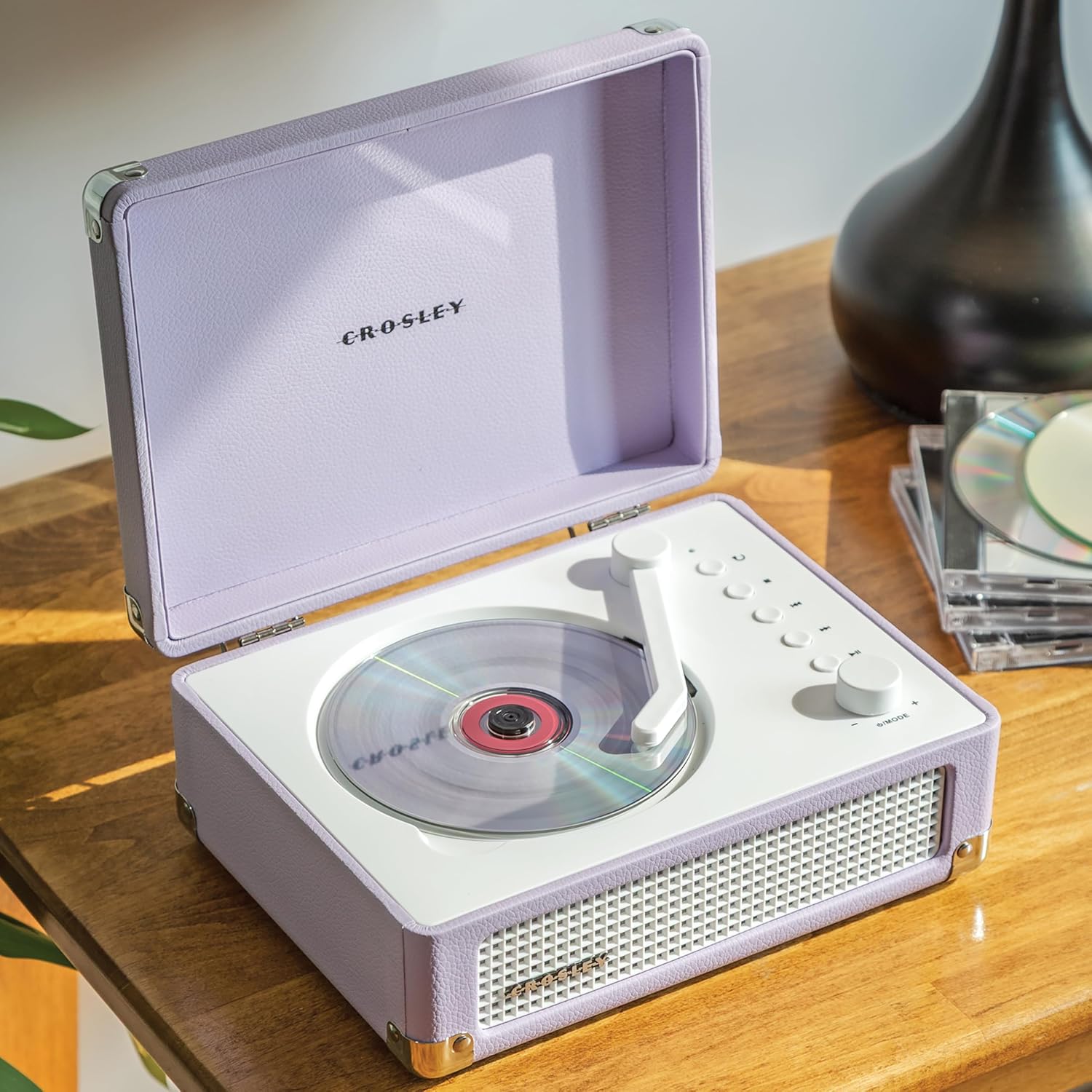
1 paveikslas: viršuje view of the Crosley CR3505A-LN with lid open, highlighting the CD compartment and control panel.

2 pav.: galinis view of the unit, displaying the headphone jack, AUX In port, and USB-C charging port.
Valdymo skydas baigtasview
- Tonearm-inspired Power Switch: Activates/deactivates the unit and initiates CD playback.
- Mode/Power Dial: Rotates to adjust volume. Press to cycle through modes (CD, Bluetooth, FM, AUX).
- Pakartojimo mygtukas: Repeats current track or album.
- Stop mygtukas: Sustabdo CD grojimą.
- Ankstesnio takelio / atsukimo mygtukas: Peršoka į ankstesnį takelį arba atsuka atgal atkūrimo metu.
- Kitas takelis / greito perjungimo mygtukas: Peršoka į kitą takelį arba peršoka į priekį atkūrimo metu.
- Atkūrimo / pristabdymo mygtukas: Controls playback for CD and Bluetooth.
- Bluetooth/FM Indicator Light: Indicates current mode and pairing status.
Sąranka
Akumuliatoriaus įkrovimas
- Connect the supplied USB-C cable to the DC 5V port on the rear of the unit (Figure 2).
- Kitą USB-C laido galą prijunkite prie suderinamo USB maitinimo adapterio (nepridedamas).
- Indikatoriaus lemputė rodys įkrovimo būseną. Pilnas įkrovimas trunka maždaug 3.5 valandas.
Maitinimo įjungimas/išjungimas
To power on the unit, move the tonearm-inspired switch over the CD spindle. To power off, move the switch back to its resting position.
Naudojimo instrukcijos
CD atkūrimas
- Open the lid of the CD player.
- Carefully place a CD onto the spindle in the CD compartment, label side up.
- Uždarykite dangtį.
- Move the tonearm-inspired switch over the CD spindle to power on and initiate playback.
- Use the Play/Pause, Stop, Previous Track/Rewind, and Next Track/Fast Forward buttons to control playback.
- Press the Repeat button to cycle through repeat modes (repeat one track, repeat all tracks, random play).
"Bluetooth" poravimas
- Įjunkite įrenginį.
- Press the Mode/Power dial repeatedly until the Bluetooth indicator light flashes blue, indicating pairing mode.
- On your Bluetooth-enabled device (e.g., smartphone, tablet), search for "Crosley CR3505A-LN" in the Bluetooth settings.
- Select the device to pair. Once connected, the Bluetooth indicator light will turn solid blue.
- You can now stream audio from your device to the CD player.
FM radijas
- Įjunkite įrenginį.
- Press the Mode/Power dial repeatedly until the FM indicator light illuminates.
- Use the Previous Track/Rewind and Next Track/Fast Forward buttons to tune to desired FM stations.
Pagalbinis įėjimas
- Įjunkite įrenginį.
- Press the Mode/Power dial repeatedly until the AUX indicator light illuminates.
- Connect an external audio device (e.g., MP3 player) to the AUX In port on the rear of the unit (Figure 2) using a 3.5mm audio cable (not included).
- Audio from the external device will now play through the CD player's speakers.
Garsumo valdymas
Rotate the Mode/Power dial clockwise to increase volume and counter-clockwise to decrease volume.
Priežiūra
Valymas
- Prieš valydami, visada atjunkite įrenginį nuo maitinimo šaltinio.
- Išorinius paviršius valykite minkštu, sausu skudurėliu. Nenaudokite abrazyvinių valiklių, vaško ar tirpiklių.
- For the CD lens, use a specialized CD lens cleaner. Avoid touching the lens directly.
Akumuliatoriaus priežiūra
- Norėdami pailginti akumuliatoriaus veikimo laiką, venkite dažnai visiškai jį iškrauti.
- If storing the unit for an extended period, charge the battery to approximately 50% every few months.
Trikčių šalinimas
| Problema | Galima priežastis | Sprendimas |
|---|---|---|
| Nėra galios | Battery is discharged; Unit is not powered on. | Charge the battery using the USB-C cable; Ensure the tonearm-inspired switch is moved to the ON position. |
| CD negroja | CD inserted incorrectly; CD is dirty or scratched; Unit is not in CD mode. | Reinsert CD label side up; Clean or replace CD; Press Mode/Power dial to select CD mode. |
| Bluetooth neprisijungia | Įrenginys neporavimo režime; Įrenginys per toli; Prijungtas anksčiau poruotas įrenginys. | Press Mode/Power dial until Bluetooth light flashes; Move device closer; Disconnect from other Bluetooth devices. |
| Prastas FM radijo priėmimas | Silpnas signalas; trukdžiai. | Adjust the unit's position; Try tuning to a stronger station. |
| Nėra garso | Per mažas garsumas; pasirinktas neteisingas režimas; prijungtos ausinės. | Increase volume; Ensure correct mode (CD, BT, FM, AUX) is selected; Disconnect headphones if using speakers. |
Specifikacijos
- Gaminio matmenys: 6.75 x 8.75 x 3.75 colio
- Prekės svoris: 2.54 svaro
- Prekės modelio numeris: CR3505A-LN
- Prekinis ženklas: Kroslis
- Spalva: Levandos
- Ryšio technologija: Bluetooth
- Diskų skaičius: 1
Saugos informacija
- Nelaikykite įrenginio ekstremalioje temperatūroje, drėgmėje ar tiesioginiuose saulės spinduliuose.
- Avoid placing the unit near heat sources or in areas with poor ventilation.
- Neardykite ir nebandykite taisyti įrenginio patys. Visus techninės priežiūros darbus patikėkite kvalifikuotiems specialistams.
- Laikykite įrenginį atokiau nuo vandens ar kitų skysčių.
- Naudokite tik nurodytą įkrovimo laidą.
Garantija ir palaikymas
Crosley products are designed in the USA and come with USA-based customer support. For warranty information or technical assistance, please refer to the official Crosley websvetainėje arba susisiekite tiesiogiai su jų klientų aptarnavimo tarnyba. Išsaugokite pirkimo kvitą kaip pirkimo įrodymą garantijos pretenzijoms.


