1. Produktas baigtasview
The KLIM Cassette Player Boombox is a versatile audio device combining classic cassette playback with modern features like AM/FM radio, Bluetooth connectivity, and USB playback/recording. Its portable design allows for use at home or on the go.
Pagrindinės funkcijos:
- Kasečių grotuvas ir įrašymo įrenginys
- AM/FM radijo imtuvas
- Bluetooth Connectivity for wireless streaming
- USB Port for MP3 playback and recording
- Integrated Microphone for direct recording
- Headphone Jack for private listening
- Dual Power: AC power cord or 4 x C-type batteries (not included)
- Portable design with a carrying handle
Kas yra dėžutėje:
- KLIM Cassette Player Boombox
- Kintamosios srovės maitinimo laidas
- Vartotojo vadovas

1 pav.: priekis view of the KLIM Cassette Player Boombox, showcasing its controls and cassette compartment.
2. Sąranka
Įrenginio maitinimas:
The KLIM Cassette Player Boombox can be powered in two ways:
- Kintamosios srovės maitinimas: Connect the included AC power cord to the device's power input and then to a standard wall outlet.
- Baterijos galia: For portable use, insert 4 x C-type batteries (not included) into the battery compartment located on the underside of the device. Ensure correct polarity.

2 pav. Apatinė dalis view showing the battery compartment for portable power.
3. Naudojimo instrukcijos
3.1. Cassette Player/Recorder
- Slide the function selector to 'TAPE'.
- Press the 'OPEN' button to open the cassette compartment.
- Insert a cassette tape with the open side facing up.
- Uždarykite kasetės skyrių.
- Use the 'PLAY', 'STOP/EJECT', 'FFWD' (Fast Forward), and 'REW' (Rewind) buttons to control playback.
- To record, ensure a blank tape is inserted. Press the 'REC' button to start recording from the built-in microphone, radio, or USB.

3 paveikslas: viršuje view of the boombox with a cassette tape inserted into the compartment.
3.2. AM/FM radijas
- Slide the function selector to 'RADIO'.
- Ištieskite teleskopinę anteną, kad gautumėte optimalų priėmimą.
- Use the 'BAND' switch to select between AM and FM frequencies.
- Rotate the 'TUNING' knob to find your desired radio station.
3.3. Bluetooth ryšys
- Slide the function selector to 'BT' (Bluetooth).
- The device will enter pairing mode, indicated by a flashing light or audible prompt.
- Išmaniajame telefone arba planšetiniame kompiuteryje įjunkite Bluetooth ir ieškokite galimų įrenginių.
- Select 'KLIM Cassette Player' (or similar name) from the list to pair.
- Susiejus, galite belaidžiu būdu transliuoti garsą iš savo įrenginio.
3.4. USB atkūrimas ir įrašymas
- Slide the function selector to 'USB'.
- Įdėkite USB atmintinę, kurioje yra MP3 garso įrašų files į USB prievadą.
- The device will automatically begin playing the audio files. Use the playback controls (play/pause, skip) to navigate.
- To record to USB, ensure a USB drive is inserted. Press the 'REC' button while in radio or cassette mode to record the audio source directly to the USB drive.
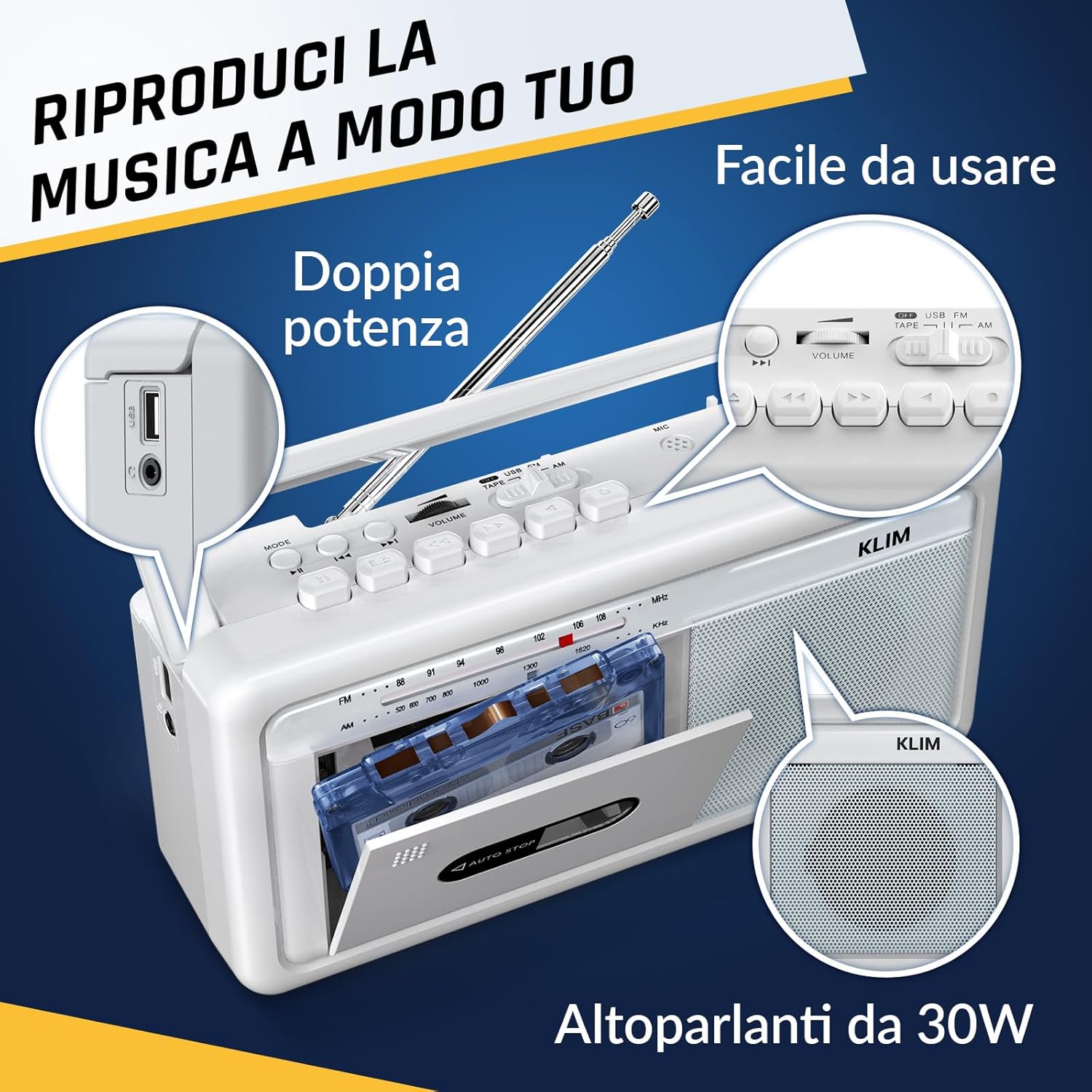
4 pav.: šonas view highlighting the USB port for media playback and recording.
3.5. Ausinių naudojimas
Connect standard 3.5mm headphones to the headphone jack for private listening. The internal speakers will automatically mute when headphones are connected.
Video 1: Instructions on how to record a tape to USB using the WTB-795 model. This video demonstrates the USB recording functionality.
2 vaizdo įrašas: Viršview of a retro cassette player with USB, Bluetooth, and AM/FM radio features, similar to the KLIM Cassette Player Boombox.
4. Priežiūra
- Įrenginį valykite minkštu, sausu skudurėliu. Venkite naudoti skystus valiklius ar tirpiklius.
- Regularly clean the cassette head and pinch rollers with a cotton swab lightly damppraturtintas izopropilo alkoholiu, kad būtų užtikrinta optimali garso kokybė ir išvengta kasečių pažeidimų.
- Keep the device away from direct sunlight, heat sources, and excessive dust or moisture.
- Kai ilgesnį laiką nenaudojate, išimkite baterijas, kad išvengtumėte jų ištekėjimo.
5. Problemų sprendimas
| Problema | Galimas sprendimas |
|---|---|
| Nėra galios | Check if the AC power cord is securely connected. If using batteries, ensure they are inserted correctly and are not depleted. |
| Iš garsiakalbių nėra garso | Increase the volume. Ensure headphones are not connected. Check the function selector is in the correct mode (TAPE, RADIO, BT, USB). |
| Prastas radijo priėmimas | Extend the telescopic antenna fully. Adjust the antenna direction. Try moving the unit to a different location. |
| Kasetė negroja / neįrašo | Ensure the tape is inserted correctly. Check if the tape is damaged. Clean the cassette head and pinch rollers. |
| Bluetooth neprisijungia | Ensure the unit is in Bluetooth mode. Make sure your device's Bluetooth is enabled and within range. Try unpairing and re-pairing the device. |
| USB atkūrimo problemos | Ensure the USB drive is formatted correctly (FAT32) and contains compatible audio files (MP3, WAV, WMA, AAC, FLAC). Try a different USB drive. |
6. Specifikacijos
- Prekinis ženklas: KLIM
- Modelis: Kasečių grotuvas
- Gaminio matmenys: 25 x 13.1 x 7.6 cm
- Prekės svoris: 1 kg
- Suderinami įrenginiai: MP3 grotuvas, išmanusis telefonas, planšetinis kompiuteris
- Garso išvesties režimas: Stereo
- Palaikomi garso formatai: Cassette, Analog Radio, MP3, WAV, WMA, AAC, FLAC, Bluetooth
- Maitinimo šaltinis: Corded Electric (AC) / 4 x C-type Batteries (not included)
- Ryšio technologija: USB, Bluetooth
- Spalva: Šerkšnas Baltas
- Prekės numeris: KLSIN4825
7. Garantija ir palaikymas
The KLIM Cassette Player Boombox comes with a 5 metų garantija. For any questions, technical assistance, or warranty claims, please contact KLIM customer support. Our team is available 24/7 to assist you.
Please refer to the contact information provided in your product packaging or visit the official KLIM websvetainėje, kur rasite daugiau informacijos.


