1. Įvadas
Thank you for choosing the Thomson 24-inch HD LED Smart TV, model 24HT2S15. This manual provides essential information to help you set up, operate, and maintain your new television. Please read it thoroughly before use and retain it for future reference.

Vaizdas: priekis view of the Thomson 24-inch HD LED Smart TV, showcasing its frameless design and key features like HD resolution and Dolby Audio.
Pagrindinės funkcijos:
- TiVo OS with Voice Control: Intuitive interface combining live TV and streaming apps, personalized recommendations, and voice commands.
- Belaidis ekranas: Mirror your smartphone, tablet, or laptop screen to the TV.
- Dolby Audio: Enhanced sound experience with improved dialogue, detail, and surround effects.
- HDR10: Sharper contrast and realistic colors for an immersive viewpatirtį.
- Nuotolinio valdymo pultas su foniniu apšvietimu: Easy navigation in low light with direct access buttons for popular streaming services.
- Adjustable Side Feet: Flexible positioning options for the TV.
- Trigubas imtuvas: Integrated tuners for cable, satellite, and antenna reception.
2. Kas yra dėžutėje
Išpakuodami įsitikinkite, kad yra visi šie daiktai:
- Thomson 24-inch HD LED Smart TV (Model 24HT2S15)
- Nuotolinio valdymo pultas
- Maitinimo adapteris
- Vartotojo vadovas
- Garantijos kortelė
- Adjustable Side Feet (2x)
If any items are missing or damaged, please contact your retailer or Thomson customer support.
3. Sąranka
3.1 Išpakavimas ir įdėjimas
Carefully remove the TV from its packaging. It is recommended to have two people for this process. Place the TV on a stable, flat surface or mount it on a wall using a compatible VESA mount (not included).
Užtikrinkite tinkamą vėdinimą aplink televizorių. Neužblokuokite ventiliacijos angų.
3.2 Stovo tvirtinimas
If you are not wall-mounting the TV, attach the included side feet:
- Padėkite televizorių ekranu žemyn ant minkšto, švaraus audinio, kad nepažeistumėte ekrano.
- Sulygiuokite kiekvieną stovą su atitinkamomis varžtų skylėmis televizoriaus apačioje.
- Secure the stands using the provided screws. The feet are adjustable from 30 cm to 60 cm distance.

Image: The Thomson 24-inch Smart TV showing its dimensions, including a screen diagonal of 60 cm (24 inches), width of 53 cm, and height of 37 cm with the stand. The adjustable stand feet are also illustrated.
3.3 Išorinių įrenginių prijungimas
Connect your external devices to the TV's ports. Refer to the diagram below for port locations.

Paveikslėlis: detalus view of the rear connection panel of the Thomson 24-inch Smart TV, illustrating various ports including 2x USB 2.0, Antenna input, Satellite input, 3x HDMI 1.4 (one with ARC), Service port, Headphone jack, AV IN, Digital Optical Audio Out, and LAN port.
- Galia: Connect the power adapter to the TV and then to a wall outlet.
- Antena / Palydovas: Connect your antenna or satellite cable to the respective input.
- HDMI: Use HDMI cables to connect devices like Blu-ray players, game consoles, or set-top boxes. HDMI 1.4/ARC supports Audio Return Channel.
- USB: Įkiškite USB atmintines, kad galėtumėte atkurti medijos failus arba atnaujinti programinę įrangą.
- LAN: Prijunkite Ethernet kabelį laidiniam interneto ryšiui.
- AV IN: Senesniems įrenginiams, naudojantiems kompozicinį vaizdo įrašą ir stereo garsą.
- Ausinės: Prijunkite ausines privačiam klausymuisi.
- Skaitmeninė optinė garso išvestis: Prijunkite prie išorinės garso sistemos, kad galėtumėte klausytis skaitmeninio garso.
3.4 Pradinis įjungimas ir pirmoji sąranka
- Prijunkite televizorių prie maitinimo lizdo.
- Paspauskite maitinimo mygtuką ant nuotolinio valdymo pulto arba televizoriaus.
- Follow the on-screen instructions to select your language, country, and perform channel scanning for your triple tuner (cable/satellite/antenna).
- Prisijunkite prie savo „Wi-Fi“ tinklo pasirinkdami jį iš sąrašo ir įvesdami slaptažodį.
- Complete the TiVo OS setup, including signing in or creating an account.
4. Televizoriaus valdymas
4.1 Nuotolinio valdymo pulto funkcijos
The backlit remote control provides easy access to all TV functions, even in dim lighting. It includes dedicated buttons for popular streaming services.

Image: The Thomson Smart TV remote control, highlighting its backlit buttons, voice control microphone, and direct access buttons for Netflix, YouTube, Prime Video, Disney+, and Canal+.
- Maitinimo mygtukas: Įjungia/išjungia televizorių.
- Skaičių mygtukai: Pasirinkite kanalus tiesiogiai.
- Navigacijos skydelis (aukštyn / žemyn / kairėn / dešinėn / gerai): Naršyti meniu ir pasirinkti parinktis.
- Atgal/Išeiti: Grįžkite į ankstesnį ekraną arba išeikite iš meniu.
- Garsumo didinimas / sumažinimas: Sureguliuokite garsumo lygį.
- Kanalas aukštyn/žemyn: Keisti televizijos kanalus.
- Nutildyti: Nutildyti arba įjungti garsą.
- Pagrindinis puslapis: Access the TiVo OS home screen.
- Valdymo balsu mygtukas: Activate voice commands (microphone icon).
- Tiesioginės prieigos mygtukai: Launch Netflix, YouTube, Prime Video, Disney+, Canal+ instantly.
4.2 TiVo OS and Smart Features
The TiVo OS provides a unified platform for live TV and streaming content. Explore personalized recommendations and access your favorite apps.

Image: The Thomson Smart TV screen showing various streaming application icons like Netflix, YouTube, Disney+, Prime Video, Plex, DAZN, Canal+, and Pluto TV, indicating integrated smart TV capabilities.
- Prieiga prie programos: Navigate to the home screen to find and launch pre-installed apps or download new ones from the app store.
- Valdymas balsu: Press the voice control button on your remote and speak commands to search for content, launch apps, or control TV functions.
- Belaidis ekranas: Use the Wireless Display feature to mirror content from your compatible smartphone, tablet, or laptop directly to your TV screen.

Image: An illustration demonstrating the voice control feature of the Thomson Smart TV, showing a remote control with a microphone icon and examples of voice commands like "Open Netflix" or "Play movies with Tom Hanks."

Image: The Thomson Smart TV displaying content mirrored from a smartphone, illustrating the Wireless Display and Google Cast features for seamless content sharing.
4.3 Vaizdo ir garso patobulinimai
- HDR10: Experience improved contrast, brightness, and color accuracy with HDR10 content. This technology enhances both bright and dark scenes for a more dynamic picture.
- Dolby Audio: Enjoy rich, clear, and powerful sound. Dolby Audio optimizes dialogue, enhances detail, and provides an immersive surround sound experience.

Image: A side-by-side comparison of picture quality, demonstrating the enhanced contrast and color vibrancy of HDR10 on the right compared to standard SDR on the left, with a building and landscape scene.

Image: An illustration depicting sound waves emanating from a TV screen, with the Dolby Audio logo prominently displayed, signifying enhanced audio quality for an immersive viewpatirtį.
5. Priežiūra
5.1 Televizoriaus valymas
- Ekranas: Švelniai nuvalykite ekraną minkštu, nepūkuotu skudurėliu. Jei dėmės sunkiai įveikiamos, šiek tiek nuvalykite.ampNuvalykite šluostę vandeniu arba specializuotu ekrano valikliu. Niekada nepurkškite skysčio tiesiai ant ekrano.
- Kabinetas: Televizoriaus korpusą ir stovą nuvalykite minkšta, sausa šluoste.
- Nuotolinio valdymo pultas: Nuotolinio valdymo pultą valykite minkšta, sausa šluoste.
Atsargiai:
- Prieš valydami visada atjunkite televizorių nuo elektros tinklo.
- Nenaudokite abrazyvinių valiklių, vaško ar tirpiklių.
5.2 Programinės įrangos naujiniai
Your Smart TV may receive software updates to improve performance and add new features. It is recommended to enable automatic updates or check for updates periodically through the TV's settings menu to ensure optimal functionality and security.
6. Problemų sprendimas
Jei kyla problemų dėl televizoriaus, žr. toliau pateiktas dažniausiai pasitaikančias problemas ir sprendimus:
| Problema | Galima priežastis | Sprendimas |
|---|---|---|
| Nėra galios | Atjungtas maitinimo laidas; problema su maitinimo lizdu | Įsitikinkite, kad maitinimo laidas yra tvirtai prijungtas. Patikrinkite lizdą su kitu įrenginiu. |
| Nėra vaizdo, bet yra garsas | Incorrect input source; faulty cable | Check the input source (e.g., HDMI 1, Antenna). Ensure cables are connected correctly. |
| Nėra garso, bet vaizdas yra | Garsas nutildytas arba per mažas; išorinės garso sistemos problema | Įjunkite televizoriaus nutildymą arba padidinkite garsumą. Patikrinkite garso nustatymus ir išorines garso jungtis. |
| Nuotolinio valdymo pultas neveikia | Išsikrovusios baterijos; kliūtis; nuotolinio valdymo pultas nesuporuotas | Replace batteries. Remove any obstructions. Re-pair the remote if necessary (refer to TV settings). |
| Nepavyksta prisijungti prie „Wi-Fi“. | Neteisingas slaptažodis; maršrutizatoriaus problema; televizorius per toli nuo maršrutizatoriaus | Verify Wi-Fi password. Restart your router. Move TV closer or use a wired LAN connection. |
| Išmaniosios funkcijos nereaguoja | Network issue; temporary software glitch | Check internet connection. Restart the TV by unplugging it for a minute and plugging it back in. |
If the problem persists after trying these solutions, please contact Thomson customer support.
7. Specifikacijos
Detailed technical specifications for the Thomson 24HT2S15 Smart TV:
| Funkcija | Detalė |
|---|---|
| Prekės ženklas | Tomsonas |
| Modelio numeris | 24HT2S15 |
| Ekrano dydis | 24 colio (60 cm) |
| Ekrano technologija | LED |
| Rezoliucija | 768p (1366 x 768 pikselių) |
| Atnaujinimo dažnis | 60 Hz |
| Krašto santykis | 16:9 |
| Ryšio technologija | Ethernet, HDMI, USB, „Wi-Fi“ |
| Ypatingos savybės | Parental Controls, TiVo OS, Voice Control, HDR10, Dolby Audio |
| Gaminio matmenys (su stovu) | 8P x 53l x 37H cm (approx. 8 x 53 x 37 cm) |
| Svoris | 3.33 kg |
| Įtraukti komponentai | Power Adapter, User Manual, Warranty Card, Remote Control |
| Palaikomos kalbos | Prancūzų, anglų, italų, ispanų, vokiečių |
| Energijos vartojimo efektyvumo klasė | E |
| EPREL produkto informacija | https://eprel.ec.europa.eu/qr/1969520 |
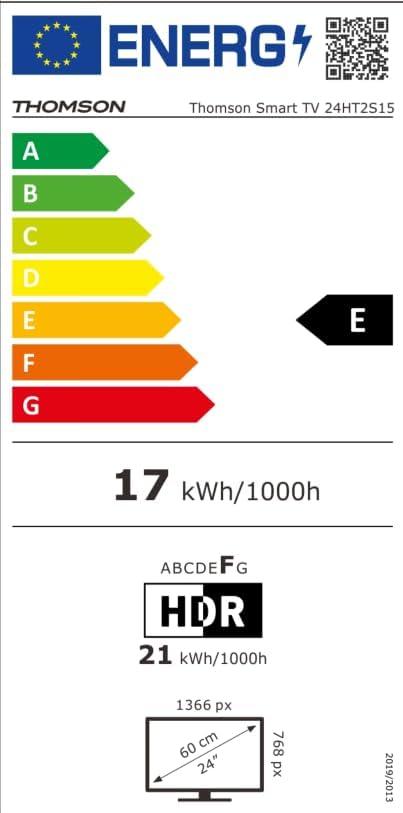
Image: The EU Energy Label for the Thomson Smart TV 24HT2S15, showing an energy efficiency class of E and energy consumption of 17 kWh/1000h for SDR and 21 kWh/1000h for HDR.
8. Garantija ir palaikymas
8.1 Informacija apie garantiją
Thomson products are covered by a 3-year warranty. For detailed information regarding warranty claims, returns, or defective products, please refer to the warranty card included in your package or visit the Thomson support websvetainę.
For specific information on purchases made via Amazon, consult Amazon's help pages regarding returns and defective products.
8.2 Pagalba klientams
If you require further assistance or have questions not covered in this manual, please contact Thomson customer support:
- Gamintojas: Srautasview GmbH
- El. paštas: kontaktas@streamview.com
- Websvetainė: www.streamview.com
- Telefonas: +4318900066
Please have your model number (24HT2S15) and purchase details ready when contacting support.