1. Įvadas
The Black Shark Wireless Gaming Headset Goblin X8 offers a versatile audio experience for gamers across multiple platforms. Featuring tri-mode connectivity (2.4GHz wireless, Bluetooth 6.0, and wired 3.5mm audio), 7.1 virtual surround sound, and a noise-canceling microphone, this headset is designed for immersive gameplay and clear communication. Its ergonomic design ensures comfort during extended use, complemented by a long-lasting battery.
2. Kas yra dėžutėje
- Black Shark BS-X8 Gaming Headset
- Wireless Dongle (USB & USB-C)
- 3.5 mm garso laidas
- USB-C įkrovimo laidas
- Vartotojo vadovas

3. Produkto ypatybės
3.1 Tri-Mode Connectivity & Ultra-Low Latency
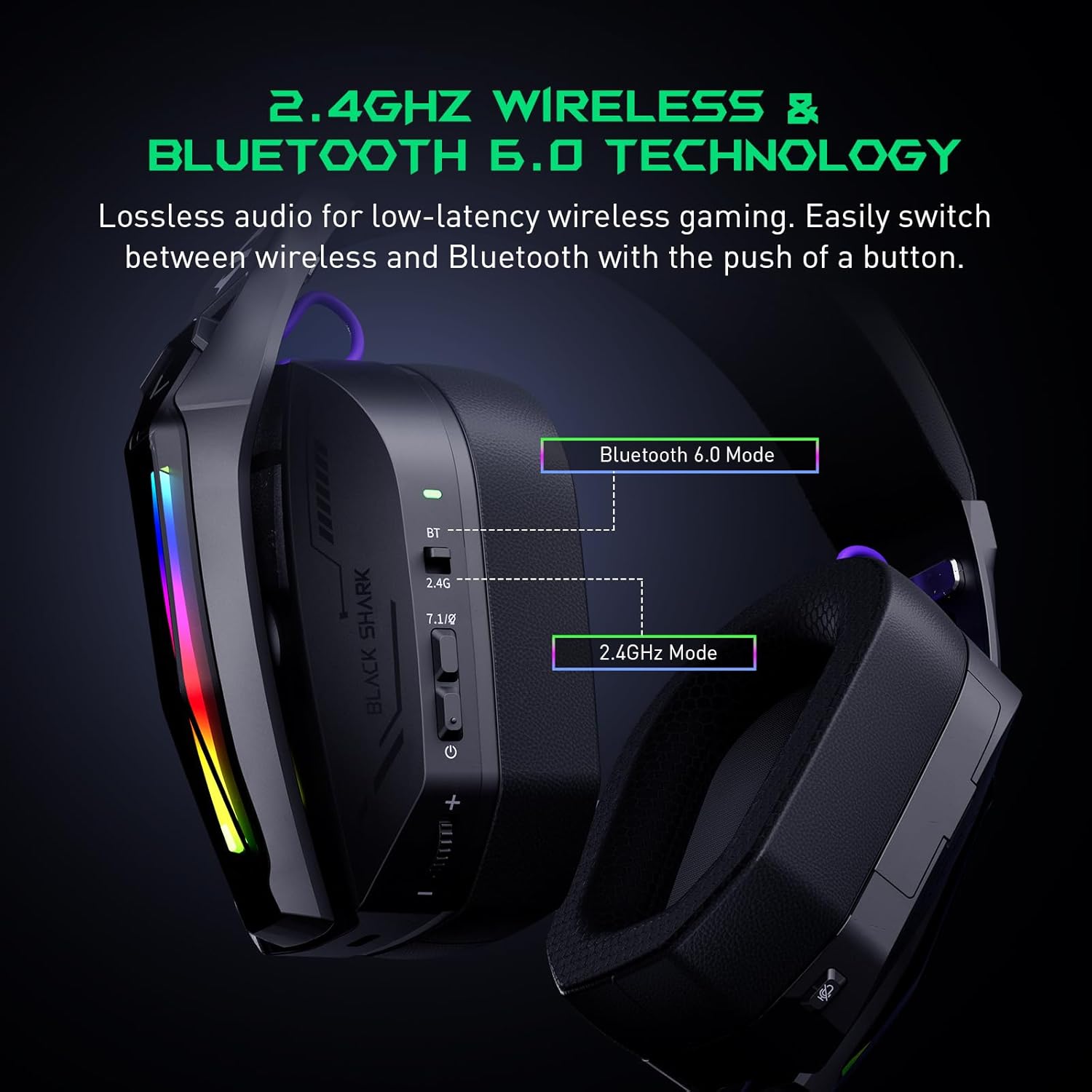
The Goblin X8 offers three connection methods: 2.4GHz wireless (via USB/Type-C dongle), Bluetooth 6.0, and a wired 3.5mm audio connection. The 2.4GHz mode provides ultra-low latency (under 20ms), ideal for competitive gaming. Bluetooth 6.0 ensures stable connectivity with under 30ms delay.


3.2 7.1 virtualus erdvinis garsas
Equipped with 40mm magnetic neodymium drivers and 2.4GHz lossless wireless technology, the headset delivers virtual 7.1 surround sound. This expands the audio dynamic range, providing exceptional scene reproduction and an immersive 3D sound experience in games.

3.3 Triukšmą slopinantis mikrofonas
The 120° adjustable, high-sensitivity microphone features omnidirectional noise cancellation technology. This effectively suppresses background noise, ensuring clear voice capture for communication during games or chats. It includes a one-touch mic mute switch for convenience.

3.4 Platus suderinamumas
This headset is compatible with a broad range of gaming devices, including PC, PS4, PS5, Switch, Xbox, laptops, tablets, TVs, iPads, and mobile phones, thanks to its triple-mode connectivity.

3.5 Ergonomic Design & Comfort
Designed for all-day comfort, the headset features an adjustable, ergonomic headband and breathable protein leather ear cups. This design reduces pressure and heat, preventing fatigue during long gaming sessions.
3.6 Ilgas baterijos veikimo laikas
The gaming headphones offer up to 40 hours of battery life for continuous use without RGB lights. With RGB lights on, the battery lasts for 20 hours. A low battery alert is provided when voltage nukrenta žemiau 3.2V.

4. Valdikliai ir indikatoriai
The headset features intuitive controls for easy management of audio and settings:
- Būsenos indikatorius: Displays connection and battery status.
- 2.4G & Bluetooth Switching: Toggle between wireless modes.
- Virtual 7.1 Surround Sound On/Off: Activate or deactivate surround sound.
- Maitinimo mygtukas: Turns the headset on/off.
- Tūrio ratas: Reguliuoja garso stiprumą.
- USB-C įkrovimo prievadas: Ausinių įkrovimui.
- Mikrofono nutildymo mygtukas: Nutildo arba įjungia mikrofoną.
- Hidden 2.4G USB Dongle: Stores the wireless dongle securely.

5. Sąranka
5.1 2.4 GHz belaidis ryšys
- Locate the hidden 2.4G USB dongle on the headset.
- Plug the USB-A or USB-C end of the dongle into your PC, PS4, PS5, or Switch.
- Slide the connectivity switch on the headset to the '2.4G' position.
- Ausinės automatiškai prisijungs prie rakto.
5.2 „Bluetooth 6.0“ ryšys
- Slide the connectivity switch on the headset to the 'BT' (Bluetooth) position.
- On your device (smartphone, tablet, laptop), go to Bluetooth settings and search for 'Black Shark Goblin X8'.
- Select the headset to pair and connect.
5.3 Wired 3.5mm Audio Connection
- Connect one end of the included 3.5mm audio cable to the headset's 3.5mm jack.
- Connect the other end to the 3.5mm audio port on your device (PC, PS4, PS5, Xbox controller, Switch, etc.).
- Ausinės veiks laidiniu režimu.
6. Naudojimo instrukcijos
6.1 Maitinimo įjungimas/išjungimas
- To power on, press and hold the Power Button until the status indicator lights up.
- To power off, press and hold the Power Button until the status indicator turns off.
6.2 Garsumo reguliavimas
- Rotate the Volume Wheel up to increase volume.
- Rotate the Volume Wheel down to decrease volume.
6.3 Mikrofono naudojimas
- To use the microphone, gently pull it down from its hidden position on the earcup.
- To mute the microphone, press the Mic Mute Button. Press again to unmute.
- To store the microphone, push it back into its hidden slot.
6.4 7.1 virtualus erdvinis garsas
- Press the Virtual 7.1 Surround Sound On/Off button to toggle the surround sound feature.
6.5 RGB apšvietimo efektų
- Double-press the Virtual 7.1 Surround Sound On/Off button to turn the RGB lights on or off.
7. Priežiūra
- Ausines laikykite švarias, nuvalydami jas minkštu, sausu skudurėliu.
- Venkite ausinių laikymo ekstremaliose temperatūrose, drėgmėje ar tiesioginiuose saulės spinduliuose.
- Do not attempt to disassemble or repair the headset yourself. Contact customer support for assistance.
- Store the headset in a safe place to prevent damage when not in use.
8. Problemų sprendimas
8.1 Nėra garso / prasta garso kokybė
- Įsitikinkite, kad ausinės įjungtos ir tinkamai prijungtos (2.4 GHz adapteris, „Bluetooth“ arba 3.5 mm laidas).
- Patikrinkite garsumo lygius tiek ausinėse, tiek prijungtame įrenginyje.
- If using 2.4GHz wireless, ensure the dongle is securely plugged in and the headset is in 2.4G mode.
- If using Bluetooth, ensure the headset is paired and connected in your device's Bluetooth settings.
- Test with a different audio source or device to rule out device-specific issues.
8.2 Mikrofonas neveikia
- Ensure the microphone is pulled down and not muted (check the Mic Mute Button).
- Patikrinkite prijungto įrenginio mikrofono įvesties nustatymus.
- Some devices (e.g., Nintendo Switch in 2.4GHz mode) may have limitations on microphone usage. Refer to the device's manual.
8.3 Ryšio problemos
- For 2.4GHz, ensure the dongle is within range and there are no major obstructions.
- „Bluetooth“ atveju įsitikinkite, kad ausinės veikia susiejimo režimu ir jūsų įrenginyje įjungtas „Bluetooth“ ryšys. Pabandykite atsieti ir vėl susieti.
- Įsitikinkite, kad ausinės yra visiškai įkrautos.
9. Specifikacijos
| Funkcija | Specifikacija |
|---|---|
| Modelio pavadinimas | Goblin X8 (BS-X8) |
| Ryšio technologija | Laidinis, belaidis (2.4 GHz, „Bluetooth 6.0“) |
| Garso tvarkyklės tipas | Dinaminis vairuotojas |
| Garso tvarkyklės dydis | 40 milimetrų |
| Garso vėlavimas | 20 Milliseconds (2.4GHz) |
| Bluetooth versija | 6.0 |
| Bluetooth diapazonas | 10 metrai |
| Baterijos veikimo laikas | 40 Hours (lights off), 20 Hours (lights on) |
| Įkrovimo laikas | 3 valandų |
| Mikrofonas | Noise Cancelling, 120° Adjustable |
| Ypatingos savybės | Surround Sound, Volume Control, Rechargeable Battery |
| Suderinami įrenginiai | PC, PS4, PS5, Switch, Xbox, Laptops, Tablets, TVs, iPads, Mobile Phones |
| Prekės svoris | 325 gramų (11.5 uncijos) |
10. Garantija ir palaikymas
For warranty information, technical support, or service inquiries, please refer to the official Black Shark websvetainėje arba susisiekite tiesiogiai su jų klientų aptarnavimo tarnyba. Išsaugokite pirkimo kvitą garantiniams reikalavimams.


