1. Įvadas
Thank you for choosing the KAIWEETS KC200D Digital Clamp Meter. This device is a compact, high-precision instrument designed for electrical measurements in various settings, including home, commercial, and industrial environments. It features True RMS technology for accurate readings of complex waveforms, Non-Contact Voltage (NCV) detection for enhanced safety, and a clear backlit LCD for easy readability. This manual provides essential information for safe and effective use of your clamp metras.
2. Saugos informacija
To ensure safe operation, please read and understand all safety warnings and operating instructions before using this instrument. Failure to observe these warnings can result in serious injury or death.
- Visada laikykitės vietinių ir nacionalinių saugos taisyklių.
- Nenaudokite matuoklio, jei jis atrodo pažeistas arba jei pažeista bandymo laidų izoliacija.
- Netepkite daugiau nei vardinis tūristage, as marked on the meter, between terminals or between any terminal and ground. The maximum operating voltage yra 600 V.
- Būkite ypač atsargūs dirbdami su voltagesant didesnei nei 60 V nuolatinės srovės arba 30 V kintamosios srovės RMS įtampai. Šios įtampostagtai kelia šoko pavojų.
- Keep your fingers behind the finger guards on the test leads during use.
- Nenaudokite matuoklio sprogioje dujų, garų ar dulkių aplinkoje.
- Prieš keisdami funkcijas, atjunkite bandymo laidus nuo grandinės.
- Always turn off the power to the circuit under test before connecting or disconnecting the test leads.
- Ensure the battery cover is securely closed before operating the meter.
3. Pakuotės turinys
Patikrinkite, ar yra visi toliau išvardyti daiktai ir ar jie nepažeisti:
- 1 x KAIWEETS KC200D Digital Clamp Metras
- 1 x Vartotojo vadovas
- 1 x saugojimo krepšys
- 2 x bandymo laidai (raudoni ir juodi)
- 2 x AAA 1.5 V baterijos
4. Produktas baigtasview
The KAIWEETS KC200D is designed for ease of use and durability. Familiarize yourself with the main components:
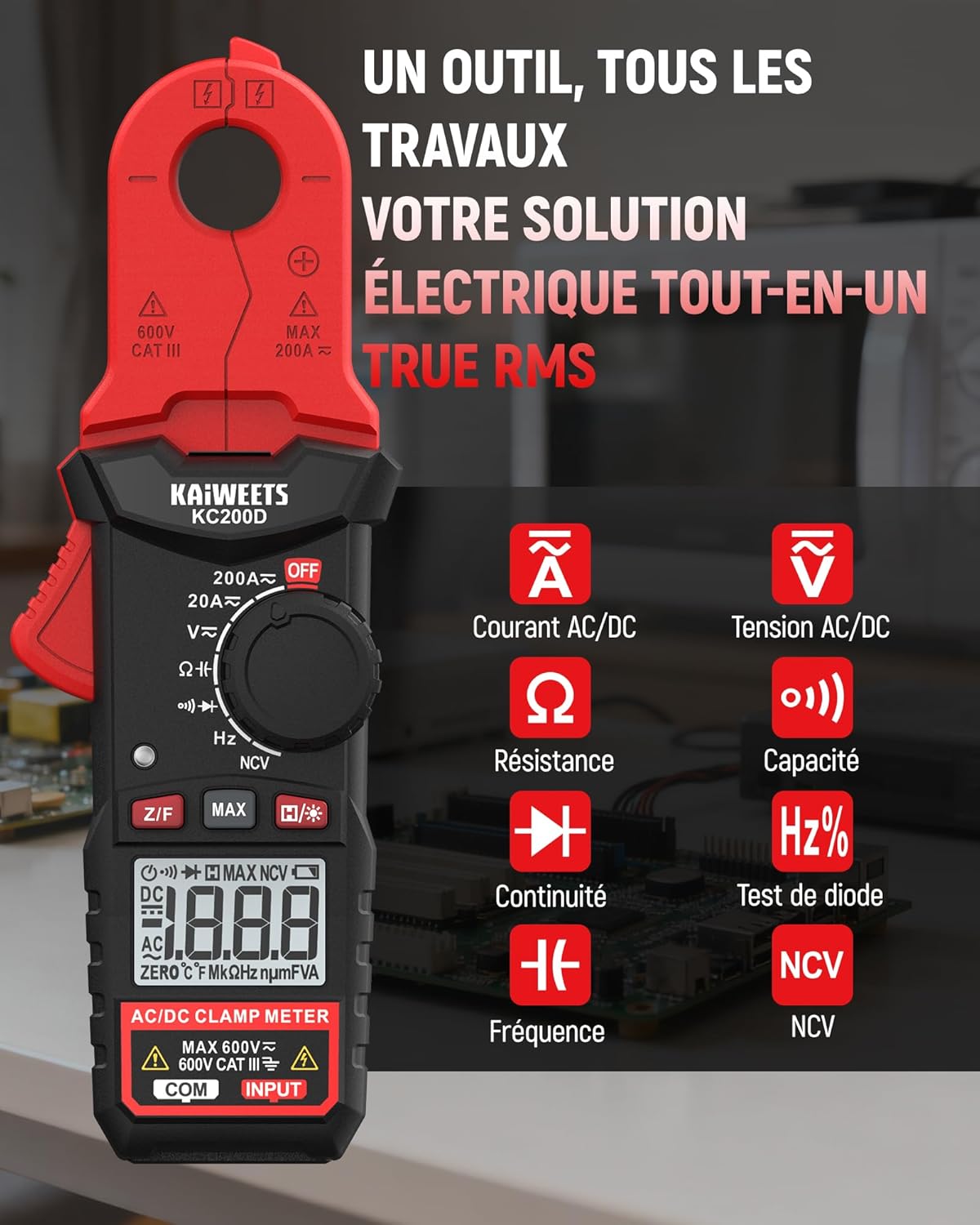
4.1 paveikslas: KAIWEETS KC200D Clamp Meter with its various measurement functions highlighted, including AC/DC Current, AC/DC Voltage, Resistance, Capacitance, Frequency, Diode Test, Continuity, and NCV.
4.1 Pagrindiniai komponentai
- Clamp Žandikaulis: Naudojamas bekontakčiam kintamosios/nuolatinės srovės matavimui.
- Funkcinis ratukas: Sukamasis jungiklis matavimo režimams pasirinkti.
- LCD ekranas: Rodo matavimo rodmenis, vienetus ir indikatorius.
- Mygtukai: For special functions like Data Hold, MAX/MIN, DC Zero, Backlight, and NCV.
- Įvesties gnybtai: Tūrio matavimo laidų prijungimuitage, varžos, talpos, dažnio, diodo ir tęstinumo matavimai.
5. Sąranka
5.1 Akumuliatoriaus įdėjimas
The KC200D requires two AAA 1.5V batteries (included).
- Įsitikinkite, kad skaitiklis yra IŠJUNGTAS.
- Raskite baterijų skyrių matuoklio gale.
- Baterijų skyriaus dangteliui atidaryti naudokite atsuktuvą.
- Insert the two AAA batteries, observing the correct polarity (+ and -).
- Uždėkite akumuliatoriaus skyriaus dangtelį ir pritvirtinkite jį varžtu.
5.2 Bandymo laidų prijungimas
Matavimams, kuriems reikalingi bandymo laidai (tūriotage, resistance, capacitance, frequency, diode, continuity):
- Insert the red test lead into the "INPUT" terminal.
- Insert the black test lead into the "COM" (Common) terminal.
6. Naudojimo instrukcijos
Always select the appropriate function before making any measurement. Turn the function dial to the desired measurement mode.
6.1 Kintamosios/nuolatinės srovės matavimas (Clamp)
Naudokite klamp jaw for non-contact current measurement. This method is ideal for safely measuring current without breaking the circuit.

6.1 paveikslas: Klamp jaw of the KC200D measuring current on a single electrical wire, demonstrating its compact design and precision.
- Pasukite funkcijų ratuką į padėtį 20A~ or 200A~ position for AC current, or 20A= or 200A= nuolatinei srovei.
- Paspauskite clamp gaiduką žandikauliui atverti.
- Encircle only vienas conductor with the clamp jaw. Do not clamp around multiple wires, as this will result in an inaccurate reading.
- For DC current measurement, press the Z/F button to zero the display before clamping.
- Skaitykite dabartinę vertę LCD ekrane.
6.2 AC/DC ttage Matavimas
Išmatuoti ttage, use the test leads.
- Pasukite funkcijų ratuką į padėtį V~ (Kintamosios srovės tūristage) arba V= (DC ttage) padėtis.
- Connect the red test lead to the positive side of the circuit and the black test lead to the negative side (or ground).
- Perskaitykite ttage reikšmė LCD ekrane.
6.3 Atsparumo matavimas
Prieš matuodami varžą, įsitikinkite, kad grandinė yra atjungta nuo įtampos.
- Pasukite funkcijų ratuką į padėtį Ω padėtis.
- Prijunkite bandymo laidus prie matuojamo komponento.
- Nuskaitykite varžos vertę LCD ekrane.
6.4 Talpos matavimas
Discharge capacitors completely before measurement to avoid damage to the meter or injury.
- Pasukite funkcijų ratuką į padėtį Talpa position (often shared with Diode/Continuity, press FUNC to cycle).
- Prijunkite bandymo laidus per kondensatorių.
- LCD ekrane perskaitykite talpos vertę.
6.5 Dažnio matavimas
Norėdami išmatuoti dažnį:
- Pasukite funkcijų ratuką į padėtį Hz % padėtis.
- Connect the test leads across the circuit where frequency is to be measured.
- Skaitykite dažnio reikšmę LCD ekrane.
6.6 Diodų bandymas
Įsitikinkite, kad diodas yra atjungtas nuo grandinės.
- Pasukite funkcijų ratuką į padėtį Diodas position (often shared with Capacitance/Continuity, press FUNC to cycle).
- Prijunkite raudoną bandymo laidą prie anodo, o juodą bandymo laidą – prie katodo.
- Į priekį nukreiptas tūristage drop will be displayed for a good diode. Reverse the leads; the display should show OL (Open Loop).
6.7 Tęstinumo testas
Įsitikinkite, kad grandinėje nėra įtampos.
- Pasukite funkcijų ratuką į padėtį Tęstinumas position (often shared with Diode/Capacitance, press FUNC to cycle).
- Connect the test leads across the component or wire.
- If there is continuity (low resistance), the meter will emit an audible beep.
6.8 Nekontaktinis ttage (NCV) aptikimas
The NCV function allows for quick and safe detection of live AC voltage be tiesioginio kontakto.

6.2 paveikslas: The KC200D performing Non-Contact Voltage (NCV) detection near an electrical outlet, showing visual indicators for low and high voltage buvimas.
- Pasukite funkcijų ratuką į padėtį NCV padėtis.
- Bring the top end of the meter near the conductor or outlet.
- The meter will emit an audible beep and illuminate LED indicators, with frequency increasing as voltage stiprumas didėja.
6.9 Specialiosios funkcijos

6.3 paveikslas: The KC200D highlighting its user-friendly functions: MAX for peak value, Z/F for DC current zeroing, H for data hold, backlight for low-light conditions, and auto-off for battery saving.
- Data Hold (H/* button): Paspauskite, kad užfiksuotumėte dabartinį rodmenį ekrane. Paspauskite dar kartą, kad atleistumėte.
- MAX/MIN (MAX button): Press to display the maximum or minimum measured value. Press again to cycle.
- DC Current Zero (Z/F button): For DC current measurements, press this button before clamping to zero out any residual readings.
- Backlight (H/* long press): Long press the H/* button to turn the display backlight ON or OFF for improved visibility in low-light conditions.
- Automatinis išjungimas: The meter automatically powers off after approximately 15 minutes of inactivity to conserve battery life. Press any button or rotate the function dial to wake it up.
7. Priežiūra
7.1 Valymas
Nuvalykite matuoklį sausa, minkšta šluoste. Nenaudokite abrazyvinių medžiagų ar tirpiklių.
7.2 Akumuliatoriaus keitimas
When the battery indicator appears on the LCD, replace the batteries as described in the Setup section (5.1 Battery Installation).
7.3 Saugykla
Jei matuoklis ilgesnį laiką nenaudojamas, išimkite baterijas, kad išvengtumėte ištekėjimo ir pažeidimų. Matuoklį laikykite jo nešiojimo maišelyje vėsioje, sausoje vietoje.
8. Problemų sprendimas
| Problema | Galima priežastis | Sprendimas |
|---|---|---|
| Matuoklis neįsijungia | Išsikrovusios baterijos; Neteisingas baterijų įdėjimas | Pakeiskite baterijas; patikrinkite baterijų poliškumą |
| Inaccurate current reading | Keli laidininkai clamp jaw; DC current not zeroed | Įsitikinkite, kad prijungtas tik vienas laidininkas.amped; Press Z/F button for DC current |
| Rodoma „OL“ (perkrova) | Measurement exceeds range; Open circuit (for continuity/resistance) | Select a higher range (if available); Check circuit connections |
| Nenustatyta NCV | Nėra AC ttage present; Meter not close enough to source | Patikrinkite kintamosios srovės garsumątage presence; Move meter closer to the live conductor |
9. Specifikacijos
Technical specifications for the KAIWEETS KC200D Digital Clamp Matuoklis:
| Funkcija | Specifikacija |
|---|---|
| Modelio numeris | KC200D |
| Ekranas | 2000 rodmenų, LCD ekranas su foniniu apšvietimu |
| Kintamosios srovės srovė | 20A/200A (±(2.5% + 5 digits)) |
| DC srovė | 20A/200A (±(2.5% + 5 digits)) |
| AC ttage | 2V/20V/200V/600V (±(1.0% + 5 digits)) |
| DC ttage | 200mV/2V/20V/200V/600V (±(0.5% + 5 digits)) |
| Atsparumas | 200Ω/2kΩ/20kΩ/200kΩ/2MΩ/20MΩ (±(1.0% + 5 digits)) |
| Talpa | 2nF/20nF/200nF/2µF/20µF/200µF/2mF/20mF (±(4.0% + 5 digits)) |
| Dažnis | 2Hz/20Hz/200Hz/2kHz/20kHz/200kHz/2MHz/20MHz (±(1.0% + 3 digits)) |
| Diodo testas | Taip |
| Tęstinumo testas | Taip |
| NCV aptikimas | Taip |
| Maitinimo šaltinis | 2 x AAA 1.5 V baterijos |
| Saugos įvertinimas | CAT III 600V, Pollution Level: 2 |
| Matmenys | 20.7 x 11.3 x 4.7 cm (pakuotė) |
| Svoris | 308 gramų (pakuotė) |
10. Garantija ir palaikymas
KAIWEETS products are designed for reliability and performance. For warranty information, technical support, or service inquiries, please refer to the contact information provided on the KAIWEETS official website or contact your local distributor. Please retain your purchase receipt as proof of purchase for warranty claims.


