1. Įvadas
Ačiū, kad pirkoteasing the ThermoPro TP210B Wireless Refrigerator/Freezer Thermometer. This device is designed to help you monitor the temperature of your refrigerator and freezer wirelessly, ensuring your food is stored at optimal temperatures. With a strong 500ft/150m wireless range and customizable alarms, you can easily keep track of temperature fluctuations.
2. Pakuotės turinys
- 1 x imtuvas
- 1 x siųstuvas
- 2 x AAA Batteries (for Receiver)
- 1 x USB Charging Cable (for Transmitter)
- 1 x Vartotojo vadovas
3. Pagrindinės savybės
- Išplėstas belaidžio ryšio diapazonas: Up to 500ft/150m using advanced RF technology for stable connection.
- Pre-Paired for Immediate Use: No complex setup required; units are pre-paired from the factory.
- Platus matavimo diapazonas: Accurate readings within ±0.9°F across -40°F to 158°F (-40°C to 70°C).
- Smart Temperature Alerts: Customizable high/low temperature limits with audio-visual alarms.
- Easy-to-Read Backlit Display: Shows fridge and freezer readings, Max/Min records, and low-battery status.
- Considerate Power Design: Receiver uses AAA batteries, transmitter features a rechargeable lithium battery.
- Lanksčios paskirties vietos parinktys: Receiver has hook, stand, or magnet; transmitter has clip or stand.
4. Sąranka
4.1. Receiver Battery Installation
- Open the battery compartment on the back of the receiver unit.
- Įdėkite 2 AAA tipo baterijas, užtikrindami teisingą poliškumą (+/-).
- Saugiai uždarykite akumuliatoriaus skyrių.
Note: The receiver requires 2 AAA batteries, which are included in the package.
4.2. Transmitter Charging
- Locate the charging port on the transmitter unit.
- Connect the provided USB charging cable to the transmitter and a standard USB power source (e.g., wall adapter, computer USB port).
- Allow the transmitter to charge fully before first use. The charging indicator will change when fully charged.
Note: The transmitter uses a rechargeable lithium battery designed for low-temperature environments.
4.3. Initial Pairing (Pre-Paired)
The ThermoPro TP210B units are pre-paired at the factory. Simply power on both the receiver and transmitter, and they should automatically connect. If connection issues occur, refer to the Troubleshooting section.
4.4. Įdėjimas
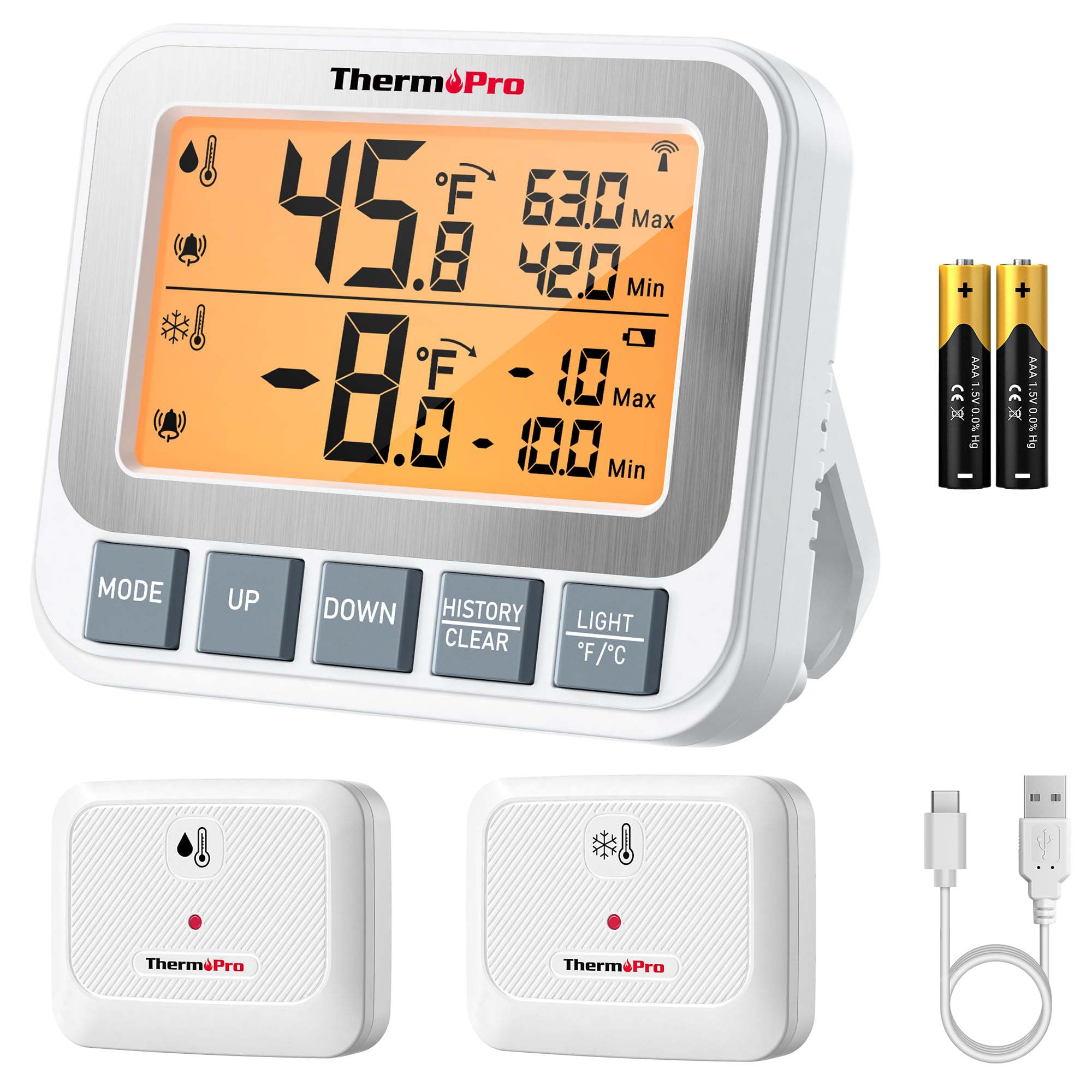
Image: ThermoPro TP210B Receiver and Transmitter. The receiver displays temperatures, while the transmitter sends data from inside the appliance.
Imtuvo vieta:
- Use the integrated stand to place it on a countertop.
- Utilize the magnetic back to attach it to a metallic surface.
- Hang it using the hook on the back.
- Place the receiver in a location where you can easily view the display and hear alarms, within the 500ft/150m range of the transmitter.
Siųstuvo išdėstymas:
- Place the transmitter inside your refrigerator or freezer.
- Use the integrated clip to attach it to a shelf or rack.
- Ensure the transmitter is not obstructed by large items that could block the wireless signal.
5. Naudojimo instrukcijos
5.1. Maitinimo įjungimas/išjungimas
- Paspauskite GALIA button on both the receiver and transmitter to turn them on or off.
5.2. Temperatūros matavimas
- The receiver's backlit LCD display will show the current temperature from the transmitter.
- The display typically shows both the current temperature and the all-time Max/Min records.
5.3. Setting Temperature Alarms
The TP210B allows you to set custom high and low temperature limits for alerts.
- Paspauskite PERSPĖJIMAS button on the receiver. The high limit will flash.
- Naudokite UP or ŽEMYN buttons to adjust the high temperature limit.
- Paspauskite PERSPĖJIMAS again to confirm the high limit and move to the low limit setting.
- Naudokite UP or ŽEMYN buttons to adjust the low temperature limit.
- Paspauskite PERSPĖJIMAS a third time to confirm the low limit and exit alarm setting mode.
When the temperature exceeds the set range, the receiver will emit an audio-visual alarm.
5.4. Max/Min Temperature Records
- The receiver automatically records the maximum and minimum temperatures detected since the last reset.
- Paspauskite MAX/MIN button to cycle through current, maximum, and minimum temperature readings.
- To reset the Max/Min records, press and hold the MAX/MIN mygtuką 3 sekundes viewing the Max/Min display.
5.5. Foninis apšvietimas
- The receiver features a bright backlit display for easy reading in low-light conditions.
- The backlight will activate automatically when a button is pressed and will turn off after a short period of inactivity to conserve battery.
6. Priežiūra
6.1. Valymas
- Nuvalykite įrenginius reklamaamp audinys. Nenardinkite į vandenį.
- Nenaudokite abrazyvinių valiklių ar tirpiklių.
6.2. Battery Replacement (Receiver)
- When the low battery indicator appears on the receiver display, replace the 2 AAA batteries.
- Įdėdami naujas baterijas, užtikrinkite teisingą poliškumą.
6.3. Transmitter Charging
- Recharge the transmitter's lithium battery when the low battery indicator appears.
- Naudokite pateiktą USB įkrovimo laidą.
6.4. Sandėliavimas
- If storing the device for an extended period, remove the AAA batteries from the receiver.
- Laikyti sausoje vietoje, atokiau nuo ekstremalių temperatūrų.
7. Problemų sprendimas
| Problema | Galima priežastis | Sprendimas |
|---|---|---|
| No temperature reading / "--" displayed | Transmitter not powered on, out of range, or low battery. |
|
| Netikslūs temperatūros rodmenys | Sensor obstruction, extreme environmental conditions, or sensor malfunction. |
|
| Signalizacijos neskamba | Alarm limits not set correctly or alarm function disabled. |
|
| Transmitter battery drains quickly | Operating in extremely low temperatures or frequent signal transmission. |
|
8. Specifikacijos
- Temperatūros diapazonas: -40°F iki 158°F (nuo -40°C iki 70°C)
- Temperatūros tikslumas: ± 0.9 ° F (± 0.5 ° C)
- Belaidis diapazonas: Iki 150 m (500 pėdų) atviroje erdvėje
- Perdavimo dažnis: 433 MHz
- Imtuvo galia: 2 x AAA baterijos (pridedamos)
- Siųstuvo galia: Rechargeable Lithium battery (included, with USB charging cable)
- Ekranas: LCD apšvietimas
- Matmenys (imtuvas): Maždaug 4.33 colio (ilgis)
- Svoris (prekė): Maždaug 11.2 uncijos
9. Garantija ir palaikymas
„ThermoPro“ suteikia šiam gaminiui garantiją dėl medžiagų ir gamybos defektų. Dėl išsamios informacijos apie garantiją, gaminio registracijos ar techninės pagalbos apsilankykite oficialioje „ThermoPro“ svetainėje. websvetainėje arba susisiekite tiesiogiai su jų klientų aptarnavimo tarnyba.
Oficialus Websvetainė: www.thermopro.com
Klientų aptarnavimas: Refer to the contact information provided on the ThermoPro websvetainėje arba produkto pakuotėje.


