1. Produktas baigtasview
The TCL FLIP 4 5G (T440W) is a compact flip phone designed for essential communication and ease of use. It features dual displays, a tactile keypad, and 5G connectivity for reliable performance.
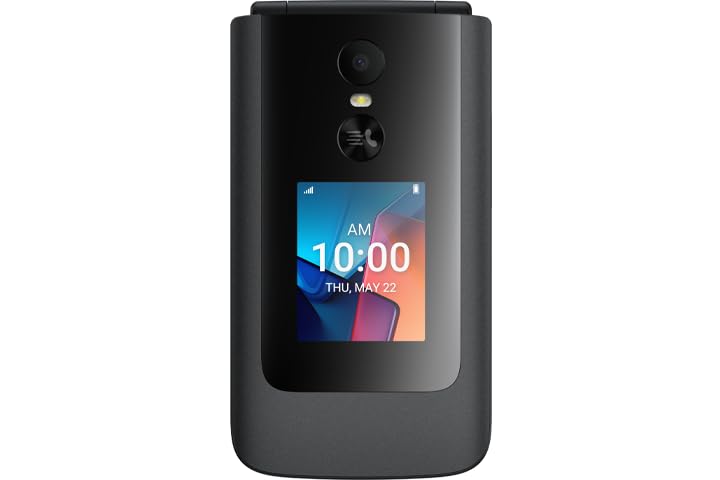
Image: TCL FLIP 4 5G phone in the open position, displaying the internal screen and the physical keypad.
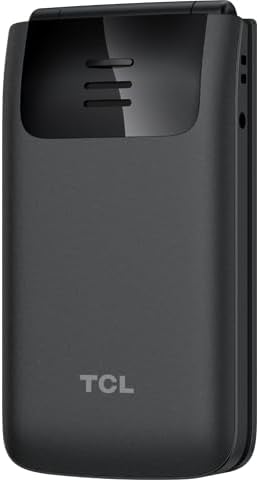
Image: TCL FLIP 4 5G phone in the closed position, showing the external display and the TCL branding on the back.
Pagrindinės funkcijos:
- Dvigubi ekranai: 1.77-inch external display for notifications and a 3.2-inch internal display.
- Tactile Keypad: Large buttons and dedicated shortcut keys for easy navigation.
- 5G ryšys: Reliable high-speed network access.
- KaiOS Operating System: User-friendly interface with essential applications.
- 5 MP kamera: Nuotraukų ir vaizdo įrašų fotografavimui.
- HD balsas: Enhanced call clarity.
2. Kas yra dėžutėje
Patikrinkite, ar prekės pakuotėje yra visi reikalingi daiktai:
- TCL FLIP 4 5G Phone (T440W)
- Baterija
- Įkroviklis
3. Sąranka
3.1. SIM kortelės ir akumuliatoriaus įdėjimas
- Atidarykite telefoną: Gently open the phone to access the battery compartment.
- Nuimkite galinį dangtelį: Locate the notch on the side or bottom of the phone and carefully pry off the back cover.
- Įdėkite SIM kortelę: Locate the SIM card slot. Insert your Nano-SIM card with the gold contacts facing down and the cut corner aligned as shown in the diagram (refer to phone's internal markings).
- Įdėkite bateriją: Sulygiuokite akumuliatoriaus kontaktus su telefono kontaktais ir švelniai paspauskite akumuliatorių į vietą.
- Pakeiskite galinį dangtelį: Sulygiuokite galinį dangtelį ir tvirtai spauskite kraštus, kol jis spragtelėdamas užsifiksuos vietoje.
3.2. Akumuliatoriaus įkrovimas
- Prijunkite įkroviklį: Įjunkite įkroviklį į maitinimo lizdą.
- Prisijunkite prie telefono: Connect the charger cable to the charging port on the side of the phone.
- Įkrovimo indikatorius: The phone will display a charging indicator on both the internal and external screens. Allow the phone to charge fully before first use.
3.3. Įjungimas/išjungimas
- Maitinimas: Paspauskite ir palaikykite Maitinimas / skambučio pabaiga button until the phone vibrates and the screen lights up.
- Išjungti: Paspauskite ir palaikykite Maitinimas / skambučio pabaiga mygtuką, tada iš ekrane rodomų parinkčių pasirinkite „Išjungti“.
3.4. Pradinė sąranka
Upon first power-on, follow the on-screen prompts to configure basic settings such as language, date and time, and network preferences.
4. Naudojimo instrukcijos
4.1. Pagrindinė navigacija
- Naršymo mygtukas: Norėdami peržiūrėti meniu ir parinktis, naudokite centrinį naršymo klavišą (aukštyn, žemyn, kairėn, dešinėn).
- Gerai mygtukas: Paspauskite centrinį OK mygtuką, kad patvirtintumėte pasirinkimus.
- Minkštieji klavišai: The keys directly below the screen (left and right) perform functions indicated by the text above them, which change depending on the context.
- Atgal/Išvalyti klavišas: Naudokite Atgal key (often indicated by an arrow) to return to the previous screen or delete characters.
4.2. Skambinimas ir skambučių priėmimas
- Skambinimas: Įveskite telefono numerį naudodami klaviatūrą ir paspauskite Skambinti mygtukas (žalias ragelio simbolis).
- Atsiliepimas į skambutį: Kai suskamba telefonas, paspauskite Skambinti mygtuką.
- Skambučio pabaiga: Paspauskite Maitinimas / skambučio pabaiga mygtukas (raudona ragelio piktograma).
4.3. Pranešimų siuntimas ir gavimas
- Access Messages: Pagrindiniame meniu eikite į programą „Žinutės“.
- Compose New Message: Select "New Message" or "Compose" and enter the recipient's number and your message using the keypad.
- Siųsti žinutę: Press the appropriate soft key to send the message.
4.4. Kameros naudojimas
- Atidaryti kamerą: Access the "Camera" application from the main menu or via a shortcut key.
- Fotografuoti: Frame your shot and press the OK mygtuką užfiksuoti.
- Įrašyti vaizdo įrašą: Switch to video mode within the camera app and press OK pradėti / sustabdyti įrašymą.
4.5. Ryšys
- 5G tinklas: The phone automatically connects to the available 5G network. Ensure your SIM card supports 5G and your plan includes 5G access.
- „Wi-Fi“: To connect to Wi-Fi, go to "Settings" > "Network & Connectivity" > "Wi-Fi". Select an available network and enter the password if required.
5. Priežiūra
5.1. Prietaiso valymas
- Telefono ekraną ir korpusą valykite minkštu, nepūkuotu audiniu.
- Venkite naudoti stiprias chemines medžiagas, abrazyvinius valiklius ar aerozolinius purškalus.
- Prieš valydami įsitikinkite, kad telefonas yra išjungtas ir atjungtas nuo elektros tinklo.
5.2. Akumuliatoriaus priežiūra
- Use only the original TCL charger and battery provided with the device.
- Venkite telefono laikymo ekstremaliose temperatūrose.
- Nepradurkite, neišardykite ir nemodifikuokite akumuliatoriaus.
5.3. Programinės įrangos atnaujinimai
Periodically check for software updates to ensure your phone has the latest features and security enhancements. Go to "Settings" > "Device" > "Software Update" to check for and install updates.
6. Problemų sprendimas
If you encounter issues with your TCL FLIP 4 5G, refer to the following common solutions:
6.1. Telefonas neįsijungia
- Įsitikinkite, kad baterija tinkamai įdėta ir įkrauta.
- Connect the phone to the charger and wait a few minutes before attempting to power on again.
- If the issue persists, perform a soft reset by removing and reinserting the battery, then try powering on.
6.2. Prasta skambučių kokybė
- Check your network signal strength. Move to an area with better reception.
- Įsitikinkite, kad mikrofonas ir garsiakalbis nėra uždengti.
- Iš naujo paleiskite telefoną.
6.3. Unable to Connect to Wi-Fi
- Įsitikinkite, kad jūsų telefone įjungtas „Wi-Fi“.
- Patikrinkite, ar teisingas „Wi-Fi“ slaptažodis.
- Iš naujo paleiskite „Wi-Fi“ maršrutizatorių ir telefoną.
7. Specifikacijos
| Funkcija | Detalė |
|---|---|
| Modelio numeris | T440W |
| Operacinė sistema | KaiOS |
| Vidinis ekrano dydis | 3.2 colių |
| Išorinio ekrano dydis | 1.77 colių |
| RAM | 2 GB |
| Sandėliavimo talpa | 32 GB |
| Fotoaparatas | 5 MP |
| Baterijos talpa | 3000 mAh |
| Ryšys | 5G |
| Matmenys (paketas) | 5 x 3 x 2 colio |
| Svoris | 6.4 uncijos |
8. Garantija ir palaikymas
8.1. Gaminio garantija
TCL products are covered by a limited manufacturer's warranty. Please refer to the warranty card included in your product packaging or visit the official TCL websvetainėje, kurioje rasite išsamias garantijos sąlygas, taikomas jūsų regionui.
8.2. Pagalba klientams
For further assistance, technical support, or service inquiries, please contact TCL customer support. You can find contact information on the official TCL websvetainėje arba per savo įrenginio nustatymų pagalbos skyrių.
Palaikymas internetu: www.tcl.com/us/en/support


