Įvadas
Thank you for choosing GOBOULT Tenet TWS Earbuds. This manual provides essential information for setting up, operating, and maintaining your earbuds. Please read it carefully before use to ensure optimal performance and longevity of your device.

Vaizdas: Viršview of GOBOULT Tenet TWS Earbuds features.
Kas yra dėžutėje
- GOBOULT Tenet TWS Earbuds (Left and Right)
- Įkrovimo dėklas
- C tipo USB įkrovimo laidas
- Ausų pagalvėlės (įvairių dydžių)
- Vartotojo vadovas
- Garantijos kortelė
Produktas baigtasview
The GOBOULT Tenet TWS Earbuds are designed for a seamless audio experience with advanced features.
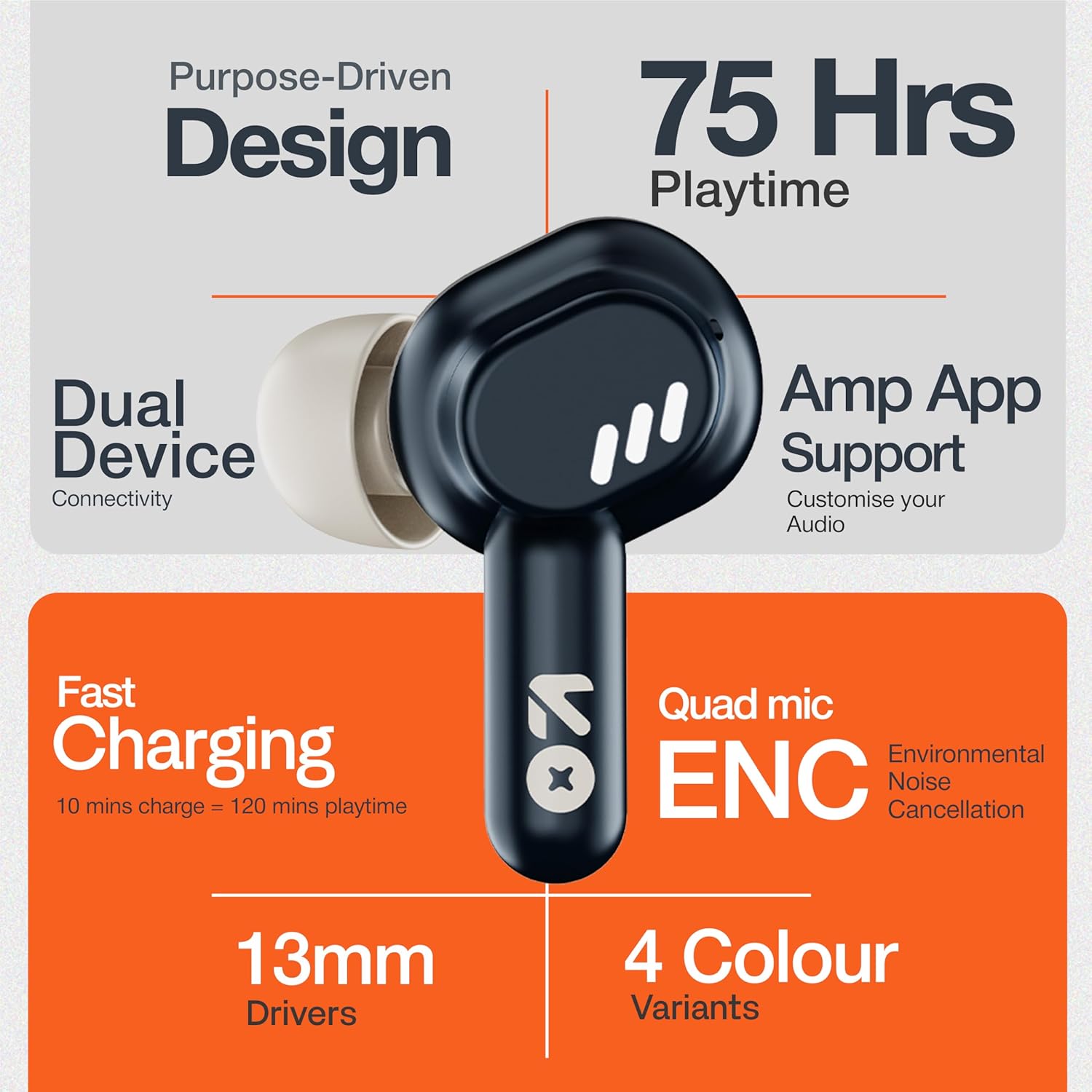
Image: GOBOULT Tenet TWS Earbuds and Charging Case.
Komponentai:
- Earbuds: Kairės ir dešinės ausinės su jutikliniais valdymo paviršiais ir integruotais mikrofonais.
- Įkrovimo dėklas: Stores and charges the earbuds, featuring a USB Type-C port for charging.
- LED indikatoriai: Abiejose ausinėse ir įkrovimo dėkle rodoma akumuliatoriaus būsena ir susiejimo režimas.

Image: Quad Mic Environmental Noise Cancellation (ENC) technology.
Sąranka
1. Ausinių ir dėklo įkrovimas
Prieš pirmą kartą naudodami, visiškai įkraukite ausines ir įkrovimo dėklą.
- Įdėkite ausines į įkrovimo dėklą. Įsitikinkite, kad jos tinkamai įstatytos.
- Prijunkite USB C tipo įkrovimo laidą prie dėklo įkrovimo prievado ir prie maitinimo šaltinio.
- The LED indicator on the case will show charging status. A full charge typically takes approximately 1.5 hours.
Greitas įkrovimas: A 10-minute charge provides up to 120 minutes of playtime.

Image: Charging the GOBOULT Tenet TWS Earbuds.
2. Susiejimas su įrenginiu
- Atidarykite įkrovimo dėklą. Ausinės automatiškai įsijungs susiejimo režimą, tai nurodys mirksinčios LED lemputės.
- Savo įrenginyje (išmaniajame telefone, planšetiniame kompiuteryje, nešiojamajame kompiuteryje) įjunkite „Bluetooth“.
- Ieškokite "GOBOULT Tenet" in the list of available Bluetooth devices and select it to connect.
- Once connected, the earbud LEDs will stop flashing.
Dviejų įrenginių ryšys: The earbuds support simultaneous connection to two devices. After pairing with the first device, connect to the second device. The earbuds will intelligently switch between them.

Image: Dual Device Connectivity.
3. Amp Programų palaikymas
Enhance your listening experience by downloading the GOBOULT Amp App. The app allows for custom EQ settings, control customization, and other audio preferences.
- Download the "GOBOULT Amp"programėlę iš savo įrenginio programėlių parduotuvės.
- Open the app and follow the on-screen instructions to connect your Tenet earbuds.

Image: GOBOULT Amp App for custom audio tuning.
Naudojimo instrukcijos
Nešioti ausines
Insert the earbuds gently into your ears and rotate them slightly to find a comfortable and secure fit. Choose the appropriate ear cushion size for optimal sound quality and comfort.
Maitinimo įjungimas/išjungimas
- Maitinimas: Atidarykite įkrovimo dėklą arba 3 sekundes palaikykite nuspaudę abiejų ausinių jutiklinį valdymo laukelį.
- Išjungti: Įdėkite ausines atgal į įkrovimo dėklą ir uždarykite dangtelį arba 5 sekundes palaikykite nuspaudę abiejų ausinių jutiklinį valdymo laukelį.
Palieskite valdiklius
The GOBOULT Tenet TWS Earbuds feature intuitive touch controls on each earbud.

Image: Touch Controls and AI Assistant.
| Veiksmas | Kairė ausinė | Dešinė ausinė |
|---|---|---|
| Leisti / pristabdyti muziką | Vienu paspaudimu | Vienu paspaudimu |
| Kitas takelis | Dukart bakstelėjimas | Dukart bakstelėjimas |
| Ankstesnis takelis | Trigubas bakstelėjimas | Trigubas bakstelėjimas |
| Atsiliepti / Baigti skambutį | Vienu paspaudimu | Vienu paspaudimu |
| Atmesti skambutį | Ilgas paspaudimas (2 s) | Ilgas paspaudimas (2 s) |
| Suaktyvinkite balso padėjėją | Ilgas paspaudimas (2 s) | Ilgas paspaudimas (2 s) |
Priežiūra
Valymas
- Reguliariai valykite ausines ir įkrovimo dėklą minkštu, sausu, nepūkuotu skudurėliu.
- Nenaudokite stiprių cheminių medžiagų, valymo tirpiklių ar stiprių ploviklių.
- Nuvalykite įkrovimo kontaktus ant ausinių ir dėklo, kad užtikrintumėte tinkamą įkrovimą.
Sandėliavimas
- Kai nenaudojate, laikykite ausines įkrovimo dėkle, kad jos būtų apsaugotos ir įkrautos.
- Laikyti vėsioje, sausoje vietoje, toliau nuo ekstremalių temperatūrų ir tiesioginių saulės spindulių.
Atsparumas vandeniui
The GOBOULT Tenet TWS Earbuds are rated IPX5 Atsparus vandeniui, meaning they are protected against low-pressure water jets from any direction. This makes them suitable for workouts and light rain. However, they are not designed for swimming or submersion in water.
Trikčių šalinimas
If you encounter any issues with your GOBOULT Tenet TWS Earbuds, please refer to the following common solutions:
- Ausinės nesusijungia:
- Įsitikinkite, kad abi ausinės yra įkrautos.
- Place earbuds back in the case, close the lid, wait 5 seconds, then open again to re-enter pairing mode.
- Išjunkite ir įjunkite „Bluetooth“ savo įrenginyje.
- Forget/delete "GOBOULT Tenet" from your device's Bluetooth list and try pairing again.
- Veikia tik viena ausinė:
- Įsitikinkite, kad abi ausinės yra įkrautos.
- Įdėkite abi ausines atgal į įkrovimo dėklą, uždarykite dangtelį ir vėl jį atidarykite.
- Try resetting the earbuds (refer to the Amp App or GOBOULT support for specific reset instructions).
- Nėra garso arba garsas per mažas:
- Patikrinkite garsumo lygį tiek savo įrenginyje, tiek ausinėse.
- Įsitikinkite, kad ausinės tinkamai prijungtos prie jūsų įrenginio.
- Nuvalykite visas šiukšles nuo ausinių garsiakalbio tinklelio.
- Įkrovimo problemos:
- Įsitikinkite, kad įkrovimo laidas yra tvirtai prijungtas tiek prie dėklo, tiek prie maitinimo šaltinio.
- Nuvalykite ausinių ir dėklo vidaus įkrovimo kontaktus.
- Išbandykite kitą USB C tipo laidą ir maitinimo adapterį.
If the issue persists, please contact GOBOULT customer support.
Specifikacijos

Image: 13mm Dynamic Drivers for enhanced audio.
| Funkcija | Detalė |
|---|---|
| Modelio pavadinimas | „Airbass“ ausinės |
| Ryšio technologija | Bluetooth 5.4 |
| Garso tvarkyklės dydis | 13 mm dinaminė tvarkyklė |
| Baterijos veikimo laikas (bendras) | Iki 75 valandų |
| Greitas įkrovimas | 10 min. įkrovimas = 120 min. grojimo laiko |
| Įkrovimo prievadas | C tipo USB |
| Mikrofonas | Keturis mikrofonas su aplinkos triukšmo slopinimu (ENC) |
| Atsparumas vandeniui | IPX5 |
| Kontrolės metodas | Palieskite |
| Balso asistentas | Built-In (Google Assistant, Siri) |
| Dviejų įrenginių susiejimas | Palaikoma |
| Dažnio atsakas | 20 KHz |
| Jautrumas | 105 dB |
| Prekės svoris | 54.5 gramų |
| Produkto matmenys (korpusas) | 6.7 x 2.2 x 5.6 cm |
Garantija ir palaikymas
Informacija apie garantiją
The GOBOULT Tenet TWS Earbuds come with a 1 metų gamintojo garantija nuo pirkimo datos. Ši garantija taikoma gamybos defektams. Prašome išsaugoti pirkimo įrodymą garantiniams reikalavimams.
Garantija netaikoma žalai, atsiradusiai dėl netinkamo naudojimo, nelaimingų atsitikimų, neleistinų modifikacijų ar įprasto nusidėvėjimo.
Pagalba klientams
For any questions, technical assistance, or warranty claims, please contact GOBOULT customer support through their official websvetainėje arba kontaktinę informaciją, pateiktą jūsų garantijos kortelėje.
Please have your product model number (Airbass Earbuds) and proof of purchase ready when contacting support.


