Įvadas
This manual provides essential information for the proper setup, operation, and maintenance of your GOBOULT Mustang Racer Smart Watch. Please read these instructions carefully before using your device to ensure optimal performance and longevity.
Kas yra dėžutėje
Upon unboxing your GOBOULT Mustang Racer Smart Watch, verify that all the following components are present:
- GOBOULT Mustang Racer Smart Watch (Black Blaze)
- Įkrovimo kabelis
- Vartotojo vadovas (šis dokumentas)
- Garantijos kortelė

Image: The GOBOULT Mustang Racer Smart Watch packaging, showing the watch, charging cable, user manual, and warranty card.
Produktas baigtasview
The GOBOULT Mustang Racer Smart Watch features a robust design with intuitive controls and a vibrant display.
Pagrindiniai komponentai:
- 1.43 colio AMOLED ekranas: Didelės raiškos ekranas aiškiam vaizdui.
- Besisukantis rėmelis: A functional bezel for navigating menus and features.
- Paddle Shifter: A unique side button for quick access to functions.
- Jutikliai: Located on the rear for health monitoring.
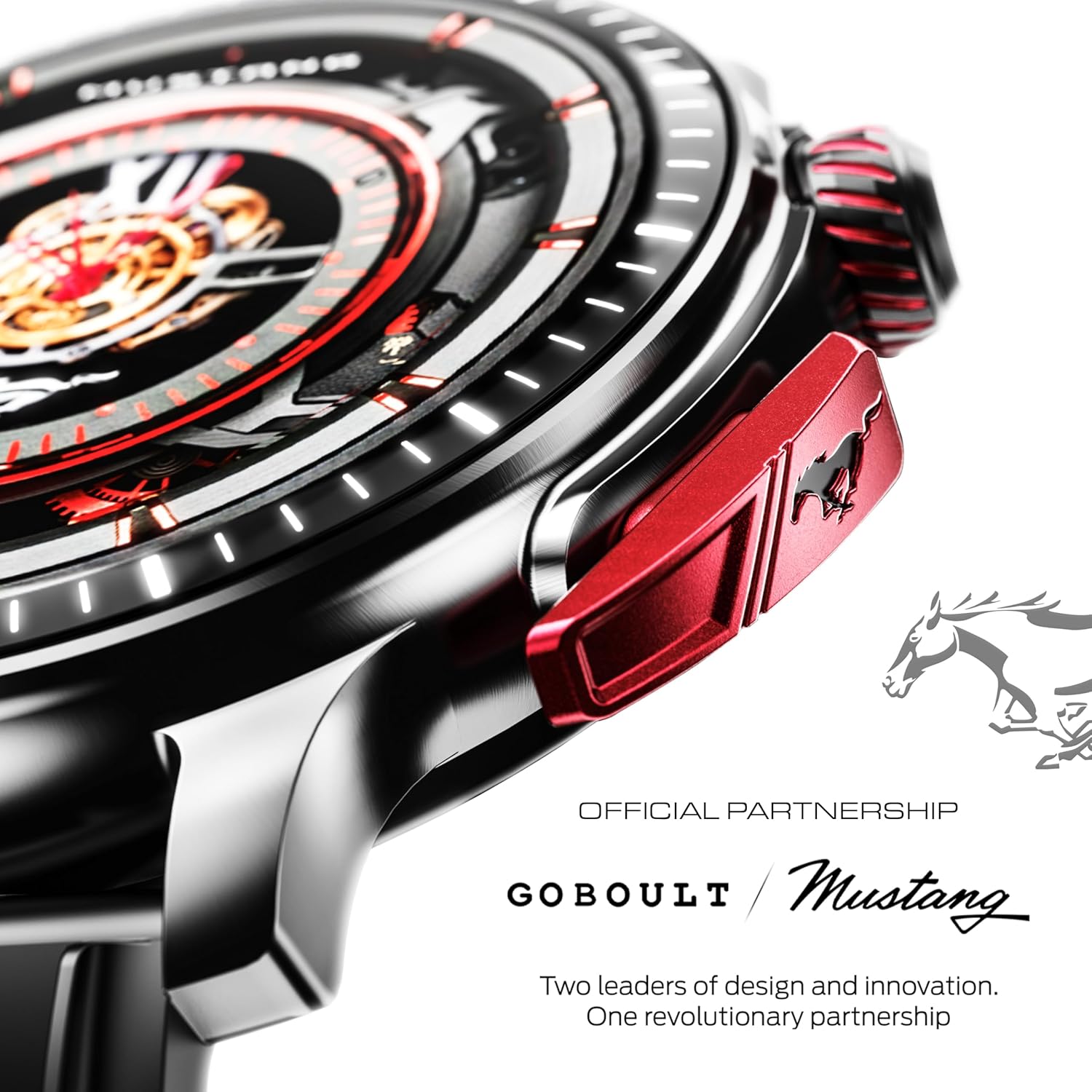
Paveikslėlis: detalus view of the watch's side, highlighting the red paddle shifter and the textured rotating crown.

Image: The watch face, showcasing the 1.43-inch AMOLED display and the functional paddle shifter.
Sąranka
1. Įrenginio įkrovimas
Before initial use, fully charge your smart watch. Connect the provided charging cable to the charging port on the back of the watch and to a standard USB power adapter (not included). A full charge typically takes approximately 120 minutes.
2. Susiejimas su išmaniuoju telefonu
- Download the official GOBOULT companion app from your smartphone's app store.
- Įsitikinkite, kad jūsų išmaniajame telefone įjungtas „Bluetooth“.
- Open the GOBOULT app and follow the on-screen instructions to search for and connect to your Mustang Racer Smart Watch. The watch uses Bluetooth V5.3 for stable connectivity.
- Patvirtinkite susiejimo užklausą ir laikrodyje, ir išmaniajame telefone.

Image: The watch on a wet surface, indicating its Bluetooth V5.3 and IP67 water resistance features.
Naudojimo instrukcijos
„Bluetooth“ skambinimas
The integrated speaker and microphone allow you to make and receive calls directly from your wrist. Once paired with your smartphone, access the call function through the watch interface.
Laikrodžių ciferblatų pritaikymas
Your Mustang Racer Smart Watch offers over 150 watch faces, including exclusive Mustang-themed designs. You can change watch faces through the watch settings or the companion app to match your style.

Image: Various watch faces displayed on the GOBOULT Mustang Racer Smart Watch, demonstrating customization options.
Sporto režimai
Track your physical activities with over 120 performance sports modes. Select your desired sport from the watch menu to monitor metrics such as steps, distance, calories burned, and heart rate during your workout.

Image: The watch on a wrist, displaying the sports mode interface.
AI balso padėjėjas
Utilize the integrated AI Voice Assistant for hands-free control. Activate the assistant through the watch interface and issue commands for various functions.
Always On Display (AOD)
The Always On Display feature allows the watch face to remain visible at a low power state, providing continuous time and information without needing to raise your wrist or press a button.

Image: The watch face with Always On Display enabled, showing continuous time display.
Sveikatos stebėjimo funkcijos
The GOBOULT Mustang Racer Smart Watch is equipped with advanced sensors to monitor various health metrics:
- 24x7 Heart Rate Monitor: Continuously tracks your heart rate throughout the day and during workouts.
- SpO2 Blood Oxygen Saturation Monitor: Matuoja deguonies lygį jūsų kraujyje.
- Miego stebėjimas: Analizuoja jūsų miego modelius, įskaitant gilų miegą, lengvą miegą ir pabudimo laiką.
- Kraujo spaudimo stebėjimas: Pateikia jūsų kraujospūdžio lygio įvertinimus.
- Streso monitorius: Padeda suprasti ir valdyti savo streso lygį.
Access detailed health data and trends through the companion app.

Image: The back of the watch, displaying the health monitoring sensors.
Specifikacijos
| Funkcija | Specifikacija |
|---|---|
| Prekės ženklas | GOBOULT |
| Modelio numeris | GOBOULT Mustang Racer |
| Ekrano dydis | 1.43 colio AMOLED |
| Belaidis tipas | Bluetooth V5.3 |
| Akumuliatoriaus įkrovimo laikas | 120 minučių |
| Baterijos energijos kiekis | 1.11 vatų valandos |
| Atsparumas vandeniui | IP67 |
| Prekės svoris | 55 g |
| Įtraukti komponentai | Charging Cable, Smart Watch, User Manual, Warranty Card |
Priežiūra
Valymas
Regularly clean your watch and strap with a soft, dry cloth. For stubborn dirt, lightly dampNuvalykite šluostę vandeniu. Venkite naudoti stiprias chemines medžiagas ar abrazyvines medžiagas.
Atsparumas vandeniui
The GOBOULT Mustang Racer Smart Watch is IP67 water resistant, meaning it can withstand immersion in up to 1 meter of water for 30 minutes. It is suitable for daily use and can resist splashes and sweat. However, it is not recommended for swimming, diving, or exposure to high-pressure water.
Akumuliatoriaus priežiūra
To prolong battery life, avoid fully discharging the watch frequently. Charge it when the battery level is low, and avoid leaving it uncharged for extended periods.
Trikčių šalinimas
Laikrodis neįsijungia
- Įsitikinkite, kad laikrodis yra visiškai įkrautas. Prijunkite jį prie įkrovimo laido ir leiskite jam krautis bent 30 minučių.
- Paspauskite ir keletą sekundžių palaikykite maitinimo mygtuką.
Nepavyksta susieti su išmaniuoju telefonu
- Verify that Bluetooth is enabled on your smartphone and the watch.
- Ensure the watch is within the Bluetooth range of your smartphone.
- Iš naujo paleiskite ir išmanųjį telefoną, ir išmanųjį laikrodį.
- Clear the Bluetooth cache on your smartphone and try pairing again.
Netikslūs sveikatos duomenys
- Įsitikinkite, kad laikrodis tvirtai prigludęs prie riešo, bet ne per stipriai.
- Nuvalykite jutiklius laikrodžio gale.
- Matavimo metu venkite per didelio judėjimo.
Ekrano problemos
- Iš naujo paleiskite laikrodį.
- Sureguliuokite ryškumo nustatymus.
Garantija ir palaikymas
Your GOBOULT Mustang Racer Smart Watch comes with a warranty. Please refer to the included Warranty Card for details regarding coverage, terms, and conditions.
For further assistance, technical support, or warranty claims, please contact GOBOULT customer service through their official websvetainėje arba kontaktinę informaciją, pateiktą jūsų garantijos kortelėje.


